
The content management system is no longer a back-office tool for storing blog posts. It has become the operational backbone of digital businesses — the layer where marketing velocity, developer productivity, and editorial autonomy intersect. WordPress and Webflow represent two distinct but equally serious answers to the question every B2B organization eventually asks: what platform do we actually build on?
Neither answer is wrong. But choosing without understanding the architectural implications, the long-term maintenance cost, and the real capability ceiling of each platform will cost you months and budget you cannot recover. This post breaks down where each platform is heading, what that means for your web infrastructure, and how to make a decision that holds up three years from now — not just at launch.
WordPress in 2025: Full Site Editing and the Platform That Refuses to Stand Still
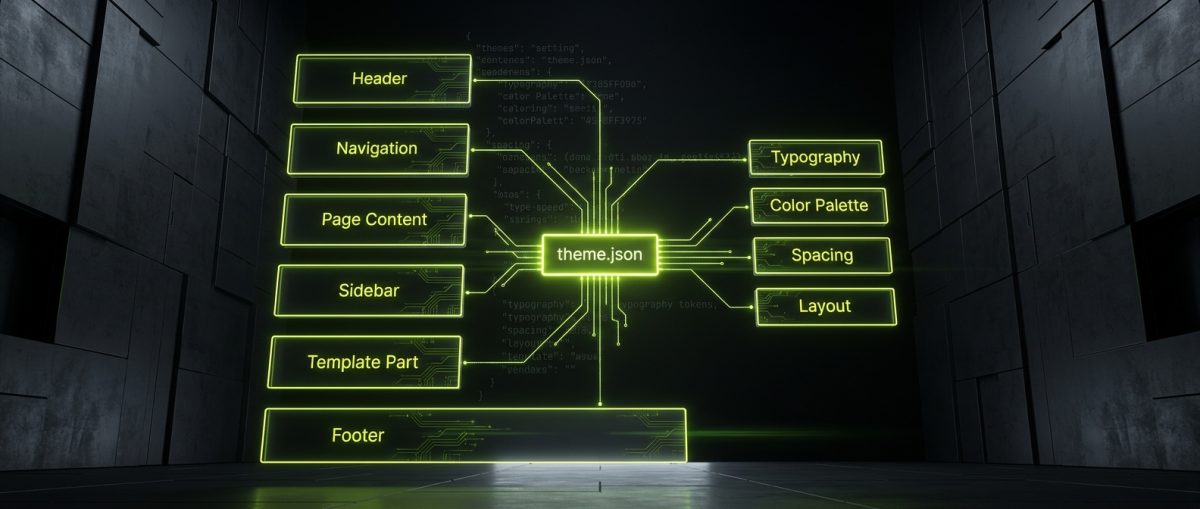
WordPress powers roughly 43% of all websites on the internet — a statistic that gets cited so often it has lost its weight. What matters more for B2B decision-makers is what WordPress has become architecturally, particularly since Gutenberg's block editor matured and Full Site Editing (FSE) became a production-ready reality.
FSE fundamentally changes the relationship between theme, template, and content. With block themes, every part of the page — header, footer, sidebar, archive template — is composed from blocks and editable through the Site Editor. For development teams, this means a cleaner separation of concerns and a more predictable rendering model. For content editors, it means genuine visual control without requiring a page builder plugin that adds 300KB of JavaScript to every page load.
What Full Site Editing Actually Delivers
The practical implications of FSE for B2B WordPress projects are significant:
- Template-level editing without developer involvement. Marketing teams can create new landing page templates, adjust global headers, and modify archive layouts without filing a ticket.
- Block patterns as a design system. Pre-built, reusable block combinations function like a component library — consistent, brand-safe, and maintainable.
- Theme.json as a design token layer. Typography scales, color palettes, spacing presets, and layout constraints are defined in a single JSON file, enforced across the entire site.
- Interactivity API for reactive blocks. Introduced in WordPress 6.2 and expanded since, the Interactivity API allows blocks to manage client-side state without shipping a full JavaScript framework.
At werun.dev, our WordPress builds lean into these capabilities deliberately. When we build a custom block theme, we architect theme.json to reflect the client's actual design system — not a generic set of defaults. Custom Gutenberg blocks are built using WordPress APIs with proper nonce verification, capability checks, and sanitization, then shipped with GitHub-powered auto-updates so the codebase stays current without manual intervention.
The REST API and Headless WordPress
WordPress's WP REST API has made headless architectures increasingly viable for organizations that need WordPress's editorial maturity but want to decouple the front-end. This is not the right architecture for every project — the added infrastructure complexity has a real cost — but for high-traffic publishing platforms, multi-channel content delivery, or applications that need React or Next.js on the front-end, it is a serious option.
Custom REST API endpoints, combined with WordPress's authentication system and custom post types, allow you to expose precisely the data your front-end needs — no more, no less. Combined with WordPress multisite, this architecture can support a network of regional or brand-specific sites sharing a single content infrastructure.
The key distinction is that WordPress's CMS capabilities — its taxonomy system, its media handling, its user roles, its plugin ecosystem — remain genuinely difficult to replicate. When the editorial workflow is complex, WordPress is not just a legacy choice. It is the correct one.
Webflow in 2025: Visual Development Meets Enterprise-Grade Architecture
Webflow has spent the last three years making a deliberate push upmarket. The platform that was once positioned primarily as a designer tool has added native localization, enterprise SSO, advanced CMS features, and a Webflow Apps marketplace that expands its integration surface considerably. For B2B organizations with sophisticated marketing operations, Webflow is now a credible platform — not a compromise.
The core value proposition remains the same: a visual development environment that produces clean, semantic HTML and CSS without the bloat of a traditional page builder. But the platform's maturity means that organizations can now build on Webflow with confidence that the architecture will hold as their content and team scale.
CMS Architecture That Supports Real Editorial Workflows
Webflow's CMS is collection-based, which means content is structured as typed fields within defined schemas. This is a different mental model from WordPress's post-and-meta approach, and it has real advantages for structured content:
- Reference and multi-reference fields allow you to build relational content structures — blog posts linked to authors, case studies linked to industries, products linked to feature sets.
- Conditional visibility lets you show or hide page elements based on CMS field values, reducing the need for custom code to handle content variations.
- CMS-driven interactions allow animations and transitions to respond to content data, not just static class states.
- Finsweet CMS Filter and Sort extends Webflow's native CMS with client-side filtering, pagination, and search — enabling resource libraries, partner directories, and product catalogs that feel dynamic without a custom back-end.
At werun.dev, we design CMS architectures before we open the Webflow Designer. Collection schemas, reference relationships, and field naming conventions are documented and agreed before a single page is built. This prevents the common failure mode where a Webflow site's CMS becomes unmaintainable six months after launch because it was designed around the first iteration of the content, not the actual editorial workflow.
Custom Code, GSAP, and the Webflow Ecosystem
Webflow's native interactions cover a significant range of animation and transition use cases. For projects that require more — scroll-driven storytelling, complex SVG animations, physics-based motion — GSAP integrates cleanly via Webflow's custom code embed system.
Our Webflow builds use a consistent class architecture based on BEM conventions, adapted for Webflow's combo class model. This means:
/* Base utility pattern */
.button         /* base component */
.button.is-primary    /* modifier via combo class */
.button.is-large      /* size modifier */
.button.is-ghost      /* style variant */
This naming system makes the project maintainable by any developer who joins the project later — not just the person who built it. It is the difference between a Webflow site that scales and one that becomes a liability.
For integrations, Webflow's API combined with middleware tools like Zapier, Make, or custom n8n workflows allows the platform to connect to CRMs, email platforms, payment systems, and internal tools. Memberstack and Outseta handle membership and client portal use cases that Webflow's native feature set does not cover. When Webflow's limitations are structural rather than cosmetic, we architect hybrid solutions using Next.js or Astro on the front-end, pulling content from Webflow's CMS via API.
Choosing the Right Platform: A Framework for B2B Decision-Making
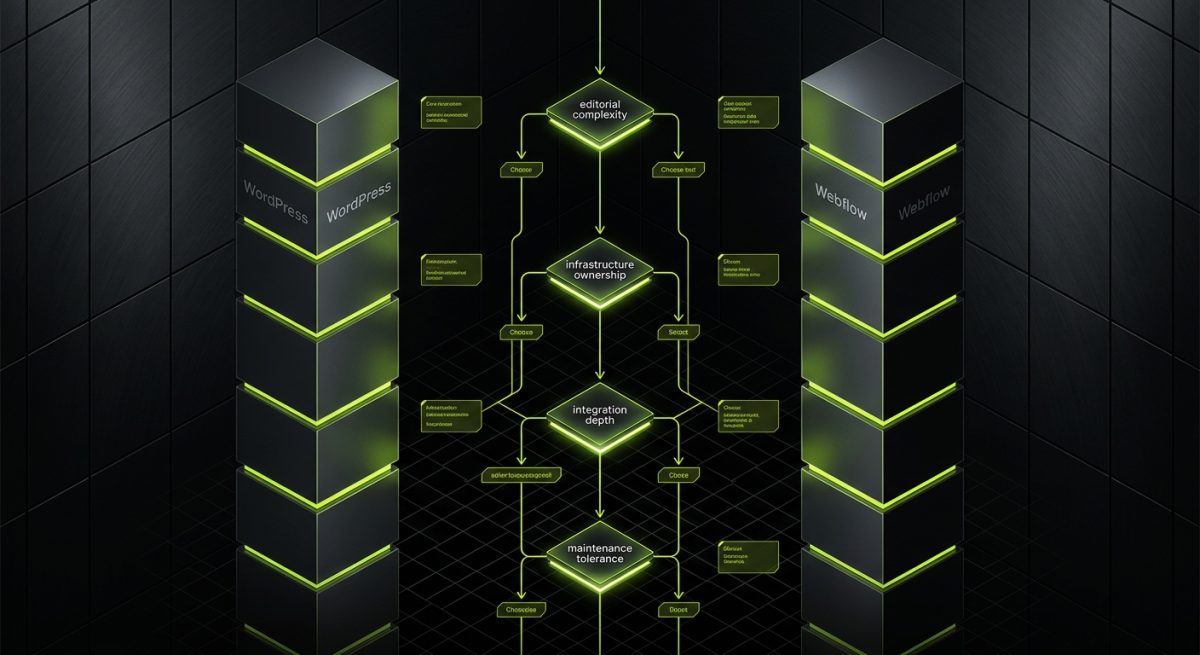
The WordPress versus Webflow question is not a technical debate. It is a business requirements question. The platform choice should follow from a clear understanding of who will manage the site, what the content model looks like, what integrations are required, and what the organization's tolerance for infrastructure ownership is.
Here is the framework we use when scoping new projects:
Editorial Team and Content Complexity
Choose WordPress when:
- The editorial team is large and has varied permission requirements
- Content types are numerous and have complex relationships (taxonomies, custom post types, meta fields)
- The organization needs a mature, well-documented CMS that non-technical staff can learn from existing resources
- Multilingual content is required at scale (WPML or Polylang are battle-tested solutions)
Choose Webflow when:
- The marketing team wants direct control over layout and design without developer dependency
- Content types are well-defined and relatively stable
- The organization values speed-to-publish over content model flexibility
- The site is primarily a marketing site or editorial publication with a manageable number of collection types
Integration and Infrastructure Requirements
WordPress gives you full server access, which means you can run background jobs, connect to internal databases, build custom authentication systems, and deploy complex plugin architectures. WooCommerce extends this into full e-commerce territory — custom product types, pricing rules, subscription billing, and ERP integrations that would be impossible in a purely hosted environment.
Webflow is a hosted platform, which means lower infrastructure overhead but less flexibility at the system level. For organizations that do not want to manage servers, SSL certificates, or WordPress updates, this is a genuine advantage. Webflow's hosting is fast, reliable, and requires no DevOps investment.
Long-Term Maintenance Cost
Both platforms have real maintenance costs that are often underestimated at the project scoping stage:
- WordPress maintenance includes plugin updates, security monitoring, performance optimization, and periodic PHP/MySQL upgrades. Managed WordPress hosts like WP Engine absorb much of this, but the plugin ecosystem still requires active oversight.
- Webflow maintenance is lower at the infrastructure level but requires attention to platform changes, CMS schema evolution, and custom code that may break when Webflow updates its rendering engine or JavaScript.
At werun.dev, we offer monthly maintenance retainers for both WordPress and Webflow projects. For WordPress, this includes GitHub-managed plugin updates, security audits, and Core Web Vitals monitoring. For Webflow, it covers CMS updates, custom code maintenance, and integration health checks. The goal is the same in both cases: a site that performs better six months after launch than it did on day one.
When Neither Platform Is the Full Answer
Some projects genuinely require a hybrid or headless architecture. A publishing platform that needs WordPress's editorial depth but React's interactivity. A Webflow marketing site that needs a custom membership system and a product catalog backed by a real database. An e-commerce operation that needs Shopify's checkout infrastructure but a fully custom front-end experience.
These are not edge cases. They are increasingly common as organizations mature digitally and their requirements outgrow what any single platform can deliver natively. The right architecture in these cases is not the one that fits neatly into a platform's marketing materials — it is the one that maps cleanly to the actual business requirements and can be maintained by a real team over a real timeline.
The new era of CMS is not about one platform winning. It is about understanding what each platform is genuinely good at, building to its strengths, and knowing when to extend, integrate, or move beyond it entirely.