All systems operational200+ sites monitoredResponse SLA <4h
WordPress plugin · v1.4.1

One plugin instead of a dozen,
on every WordPress site we run.

werun.Toolkit is the plugin we write and maintain for our clients' WordPress sites, and we charge nothing for it. 18 modules, each behind its own switch: security, email delivery, an activity log, a branded sign-in, Gutenberg blocks and Elementor widgets. A site turns on what it needs, and the rest stays off.

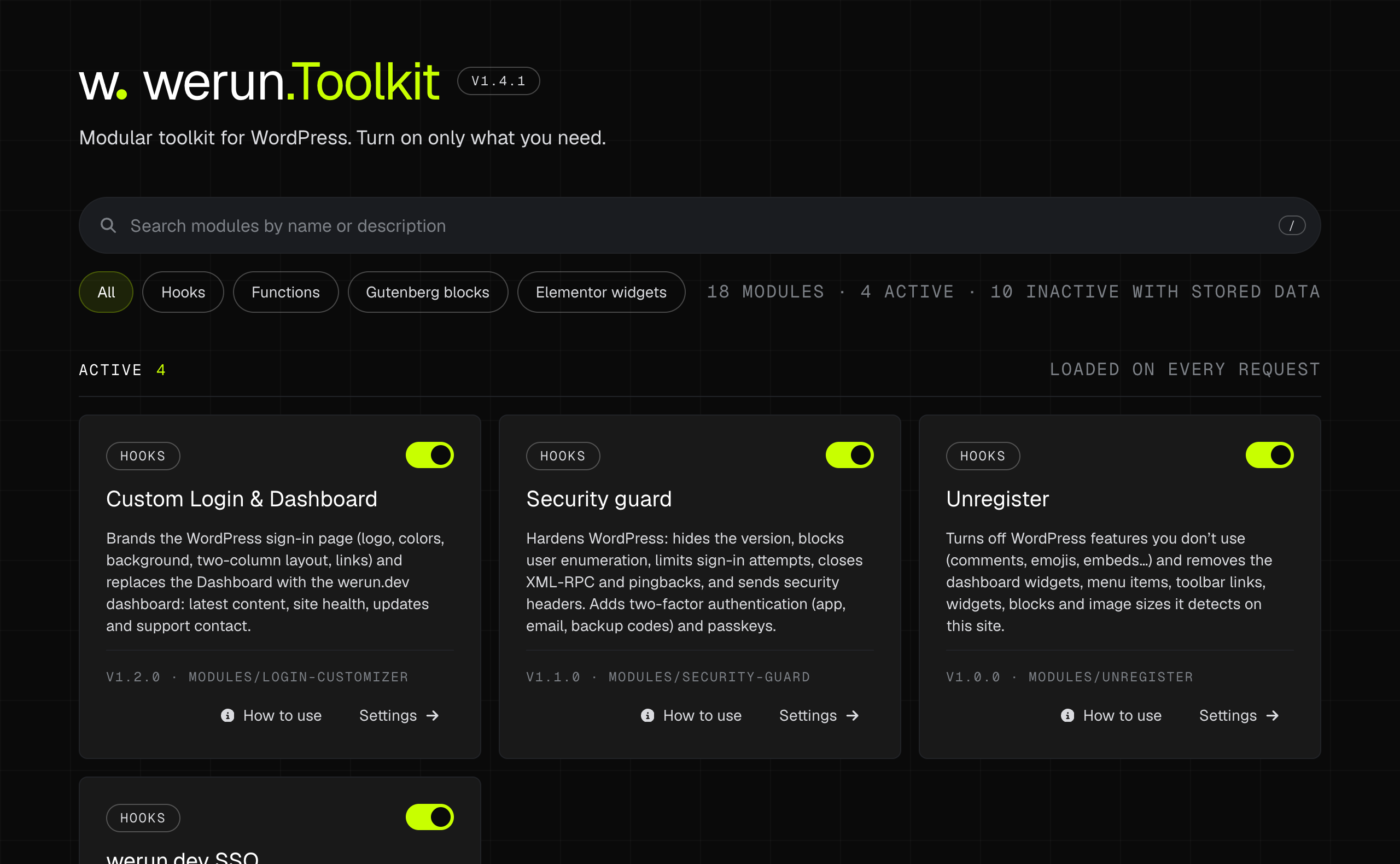
The Modules screen of werun.Toolkit: a search box, filters by type, and a card per module with its switch, its guide and its settings. Opens at full size in a new tab.
The Modules screen. One card per module: what it does, its switch, its guide and its settings.
18
Modules

Each with its own switch, guide and settings

$0
What we charge for it

Included on the sites we build and run

24
Plugins it replaces

One per job, each named in the table below

5
Licences you stop paying

Up to $235 + €79 a year per site, at their list prices

How it behaves

The rules every module follows.

A small core that knows how to switch a module on, switch it off and clean up after it, and modules that do one thing each. What follows is true of all of them.

Off until you switch it on

Every module starts off. Turning one on or off is a switch on one screen, with no page reload and an undo if you change your mind. A site runs what it uses and nothing else.

Switching off never deletes

A module that is turned off keeps its settings, its tables and its logs exactly as they were. Only its scheduled tasks stop. Turn it back on and it is where you left it.

Deleting data is a decision

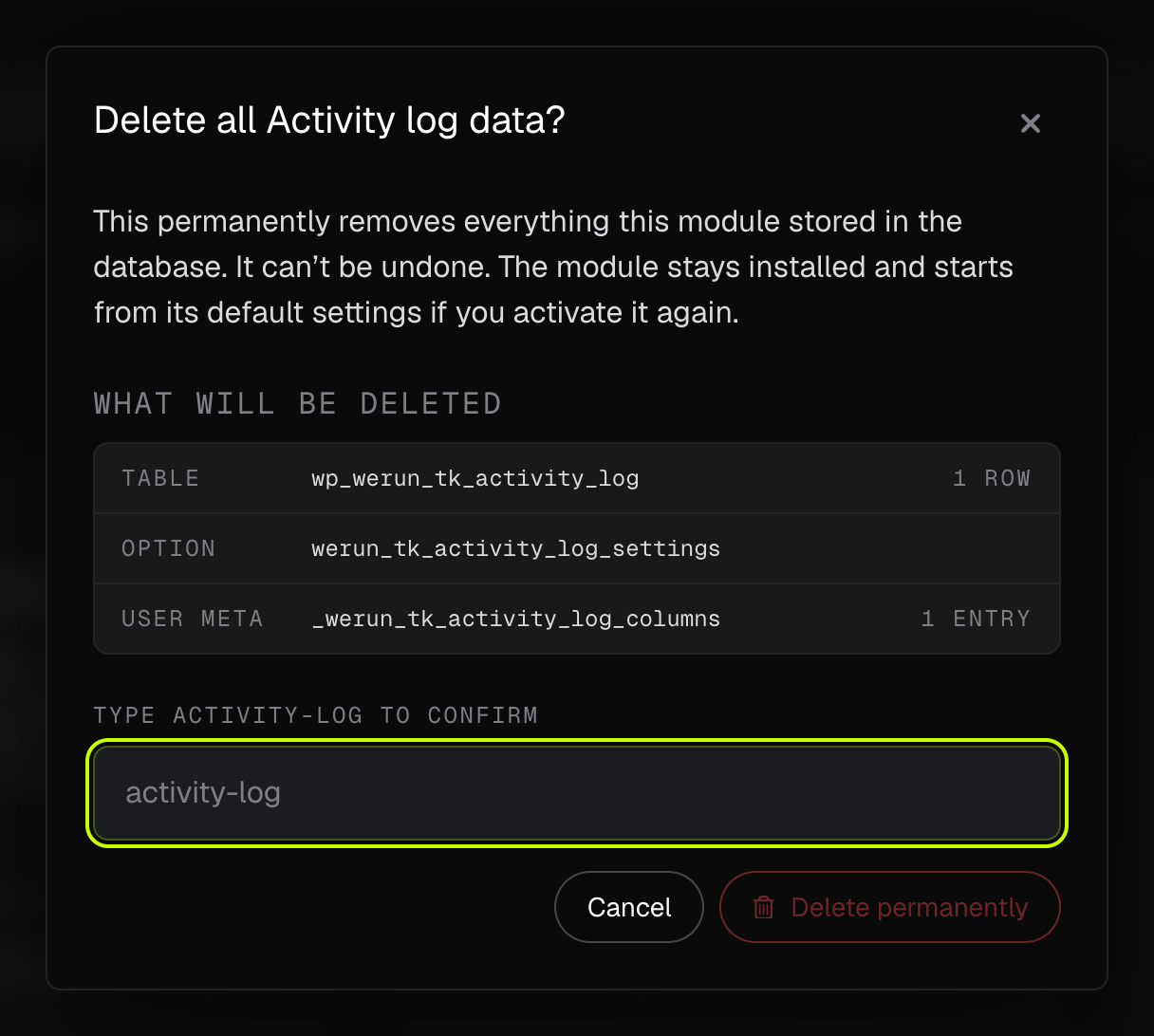
When you do want the data gone, a dialog lists every table, option and field the module stored, with live counts, and asks you to type the module's name before anything is removed.

A broken module cannot take the site down

If a module hits a fatal error, the toolkit turns that one module off, keeps the report on its card, emails the site owner once and lets the rest of the site load on the next request.

English and Spanish, complete

The plugin and every module ship in both languages, and a release fails its own check while a single string is untranslated. Each person sees the admin in the language of their own profile.

Every module comes with its guide

How to use opens from the module's card and from its settings screen: what it does, how to set it up and the commands to copy.

The Delete data dialog for the Activity log module: a table, an option and a user meta key with their counts, and a field asking to type activity-log to confirm. Opens at full size in a new tab.
Deleting a module's data lists what will go, with counts, and asks for the module's name.
What is inside

18 modules, three kinds of job.

Each one is a folder in the plugin and a card on its Modules screen, with a switch, a guide and, where it has options, a settings screen of its own.

Security and access

Closing what a default install leaves open, and keeping a record of who came through.

Security guard

Hardens the install: hides the WordPress version, blocks user enumeration, limits sign-in attempts and moves the sign-in address. Adds two-factor authentication, passkeys and security headers.

Endpoint guard

Finds every REST route, feed and sitemap that exposes users, posts or comments, shows what a visitor actually gets from each one, and lets you close it or put it behind a sign-in.

Activity log

Who changed what, where and when: sign-ins, content, plugins, themes, users and settings. Searchable, with a retention period you set and IP addresses anonymised by default.

werun.dev SSO

Our team signs in with its werun.dev account instead of a password stored on your site. Someone who leaves werun.dev is locked out of every site within the hour.

Custom Login & Dashboard

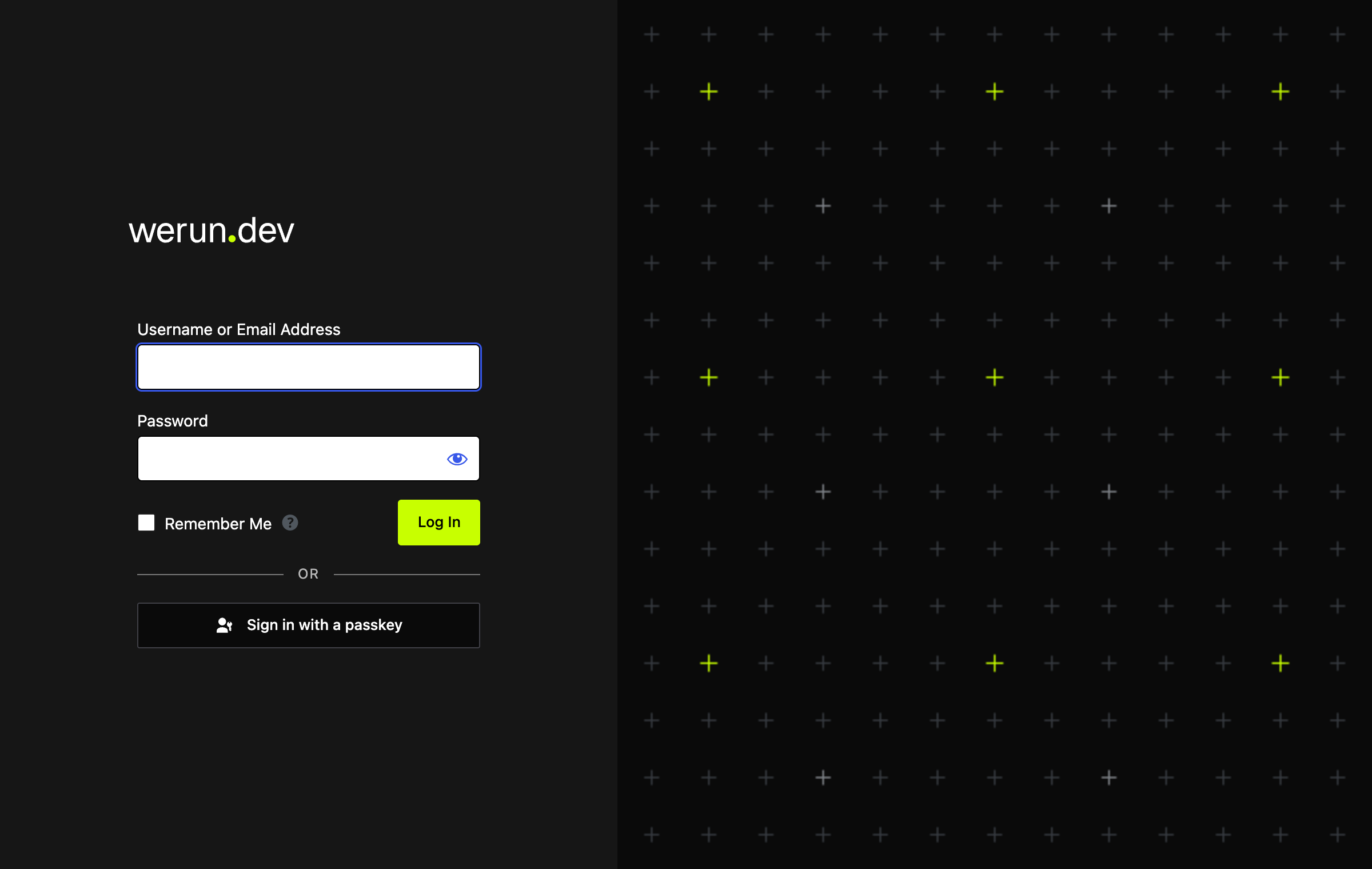
A sign-in page in your brand (logo, colours, background, a two-column layout) and a dashboard with quick actions, the latest content, site health, updates and the support contact.

Allow SVG

Lets the roles you choose upload SVG files. Every file is sanitised on upload, and previews work in the media library and in the editors.

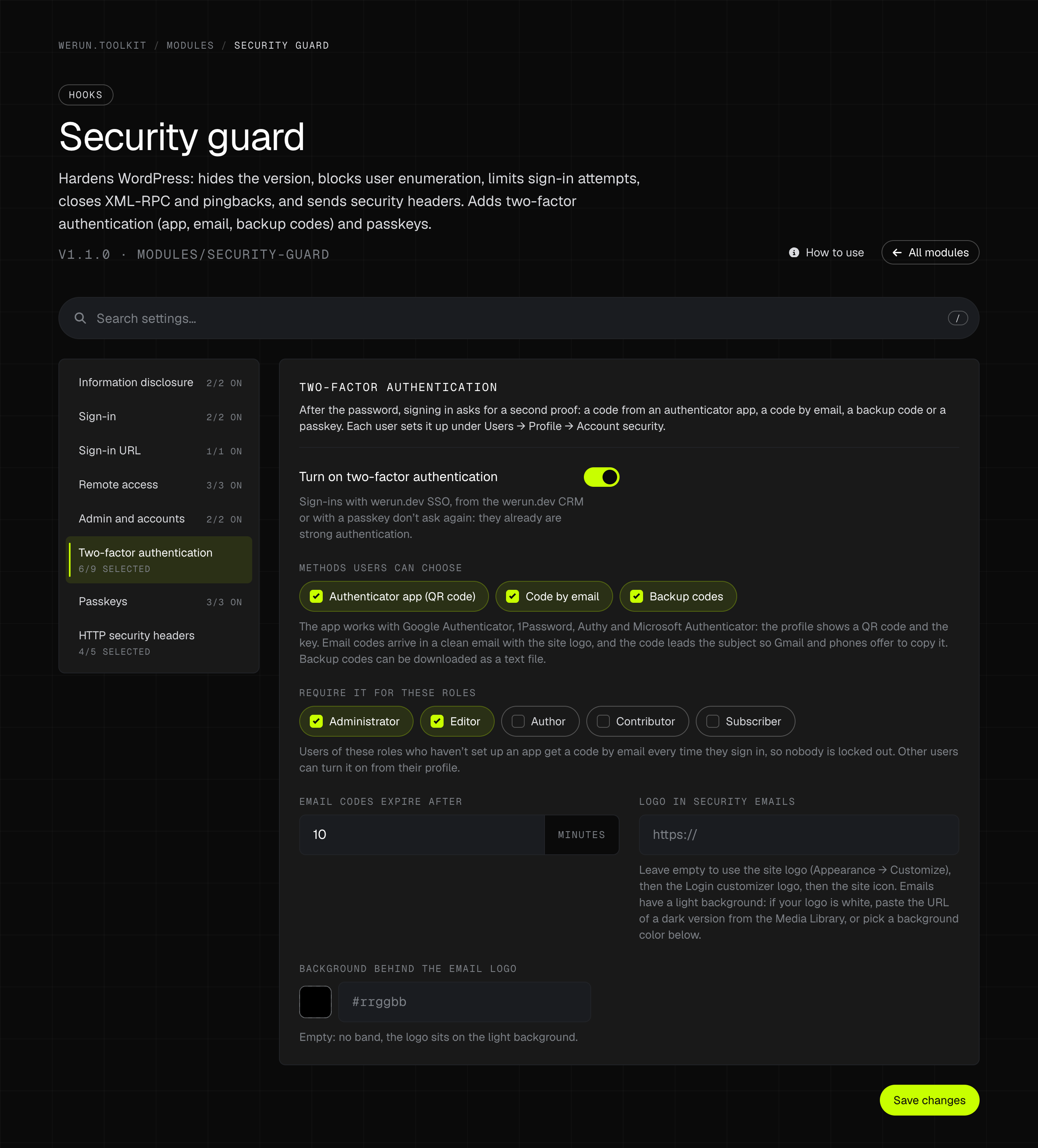
The settings of Security guard on its two-factor authentication tab: the methods users can choose, the roles it is required for and how long an email code lasts. Opens at full size in a new tab.
Security guard, on its two-factor tab. Every tab is part of one form, and the search box finds any switch by name.
Delivery and upkeep

What every site needs from its first day, and usually gets as one plugin per item.

Email delivery

Sends WordPress email through Brevo or any SMTP server, sets the sender, and keeps a searchable log of every message, with a tool to send a test.

Unregister

Switches off what the site does not use (comments, the emoji script, embeds, remote patterns) and removes the dashboard widgets, menu items, blocks and image sizes it detects on that site.

Heartbeat control

Slows down or turns off the Heartbeat API in the admin, in the editor and on the front end, to cut the requests it makes to admin-ajax.

Search engines alert

Warns in the admin bar when a live site still discourages search engines, the classic mistake after a launch, and marks staging and development copies with a badge.

Media AI metadata

Finds images with no alt text, title, caption or description and writes them with a Claude or OpenAI vision model, one at a time or in bulk, on your own API key.

Meta fields manager

Shows every meta field of a post, a term or a user on its edit screen, with search, a viewer for the full value, a JSON export and guarded deletion.

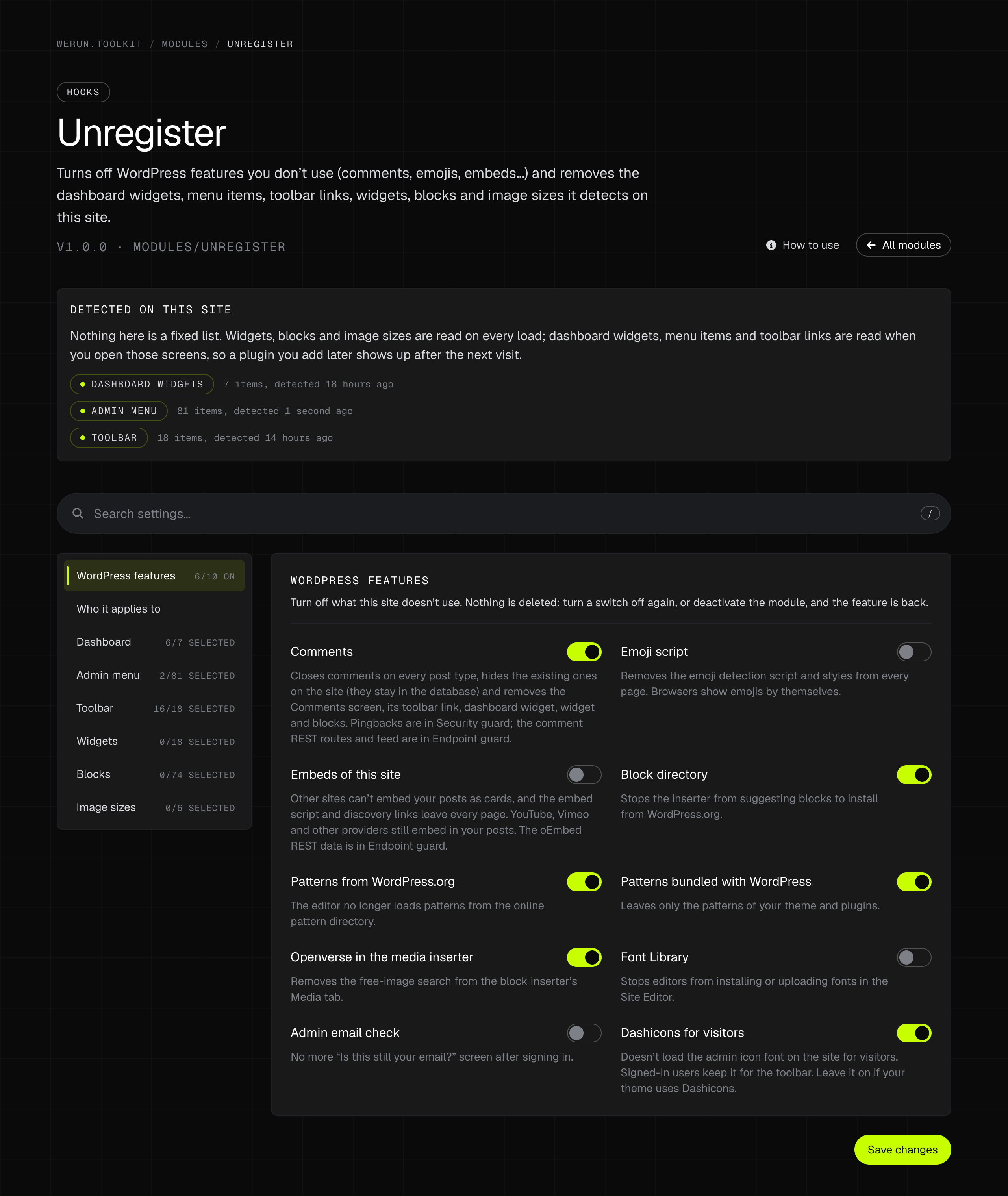
The settings of Unregister: what was detected on the site, and switches for WordPress features such as comments, the emoji script, embeds and remote patterns. Opens at full size in a new tab.
Unregister reads what the site actually registers, then lets you switch it off. Nothing is deleted.
Editors and content

The small things an editor asks for in the first month.

Duplicate posts

A Duplicate link on posts, pages and custom post types. Copies the content, the taxonomies and the custom fields into a draft.

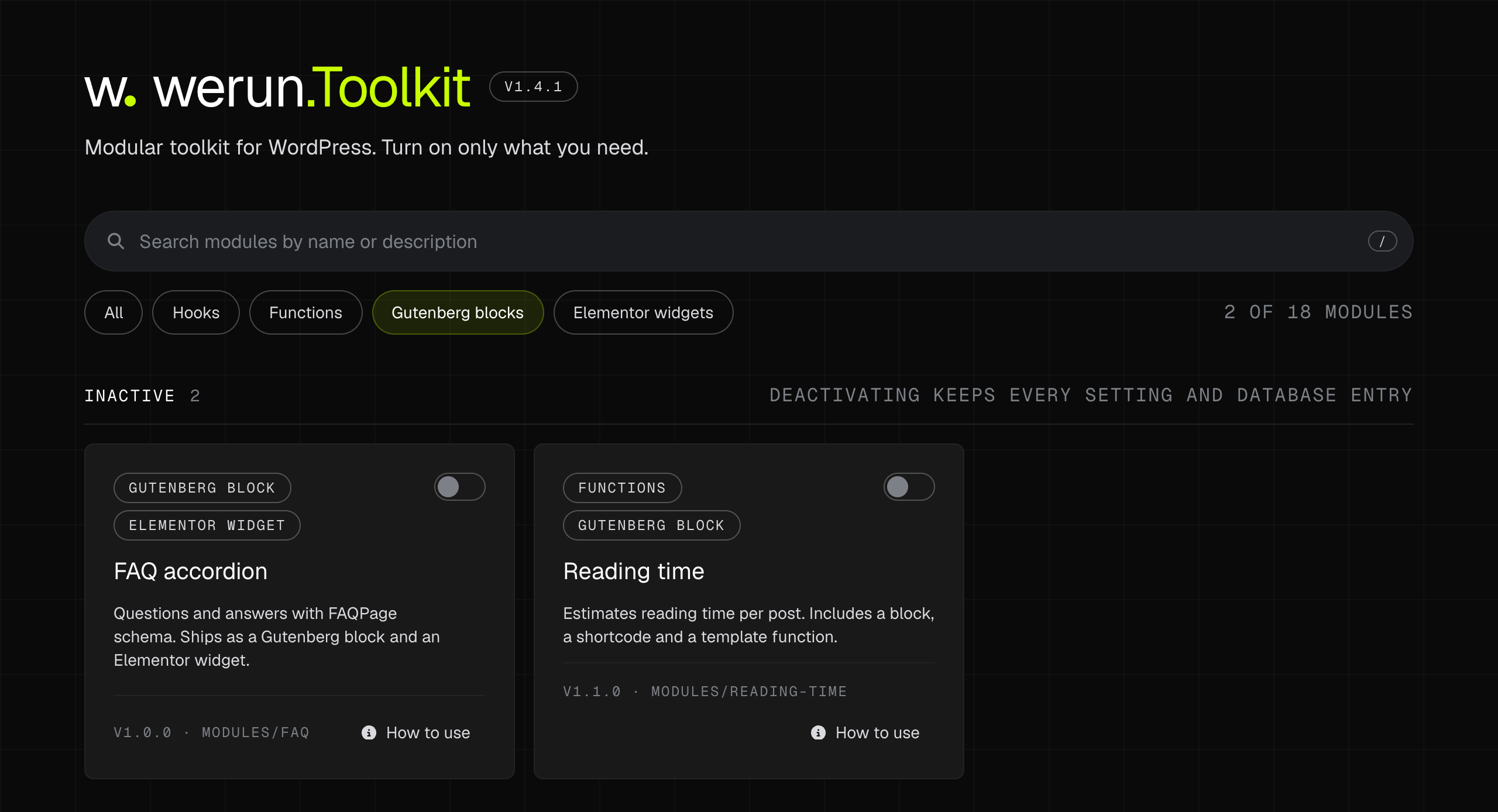
  • Gutenberg block

Reading time

Estimated reading time per post, as a block that works inside a Query Loop, a shortcode and a template function.

  • Gutenberg block
  • Elementor widget

FAQ accordion

Questions and answers in an accessible accordion with FAQPage structured data. One renderer behind a Gutenberg block and an Elementor widget.

Radio taxonomies

Turns the taxonomies you choose into a single choice: radio buttons in both editors, and one term per post enforced on the server.

Taxonomy search

A live search box in the editor's category and taxonomy panels, and paging for very large taxonomies so the screen still loads.

Custom columns

Adds columns to the admin lists of posts, custom post types and terms: custom fields, related terms and counts, sortable where sorting makes sense.

Blocks and widgets

Gutenberg blocks and Elementor widgets, shipped as modules.

The same switch delivers what editors actually touch. The ones below ship today, and a block or a widget your site needs and nobody has built is written the same way.

Built on the editor's own APIs

Blocks are registered from block.json and rendered on the server, so an update can change their markup without invalidating a single saved post. Widgets extend Elementor's base widget and nothing from Elementor Pro.

One renderer, two editors

When a feature exists as a block and as a widget, both call the same template and the same stylesheet. What a visitor gets is identical whichever editor the page was built in.

Easy to tell apart

Blocks sit in their own werun.Toolkit category in the inserter, and widgets in their own group in the Elementor panel with the werun.dev mark on each tile, so an editor knows which ones were made for the site.

When your site needs one that does not exist

We write it as a module: the same manifest, the same switch, the same guide and the same update channel as the ones that ship today. It arrives in an update, not as one more plugin.

01

FAQ accordion

Questions and answers in an accessible accordion, with FAQPage structured data. A Gutenberg block and an Elementor widget over one renderer.

  • —One renderer and one stylesheet behind both, so the two cannot drift apart
  • —Native details and summary: keyboard and screen reader, with no JavaScript
  • —FAQPage structured data, switched per block or per widget
  • —Inherits the theme's colours and type, with style controls on top in Elementor
  • —The widget needs Elementor 3.20 or later, and nothing from Elementor Pro
02

Reading time

Estimated reading time for a post, as a Gutenberg block, a shortcode and a template function.

  • —Reads the post from its context, so it works inside a Query Loop
  • —Words per minute and the wording are settings
  • —Counts accented words correctly, and ignores markup and shortcodes
  • —Colour, typography and spacing from the block editor's own controls
The Modules screen filtered to Gutenberg blocks, showing two modules: FAQ accordion and Reading time. Opens at full size in a new tab.
The same screen filtered by type: the modules that ship a Gutenberg block.
Support, built in

Help is inside the admin, not in an inbox somewhere.

Custom Login & Dashboard is the module where your team meets ours: a sign-in page in your brand, and a dashboard that knows who to ask.

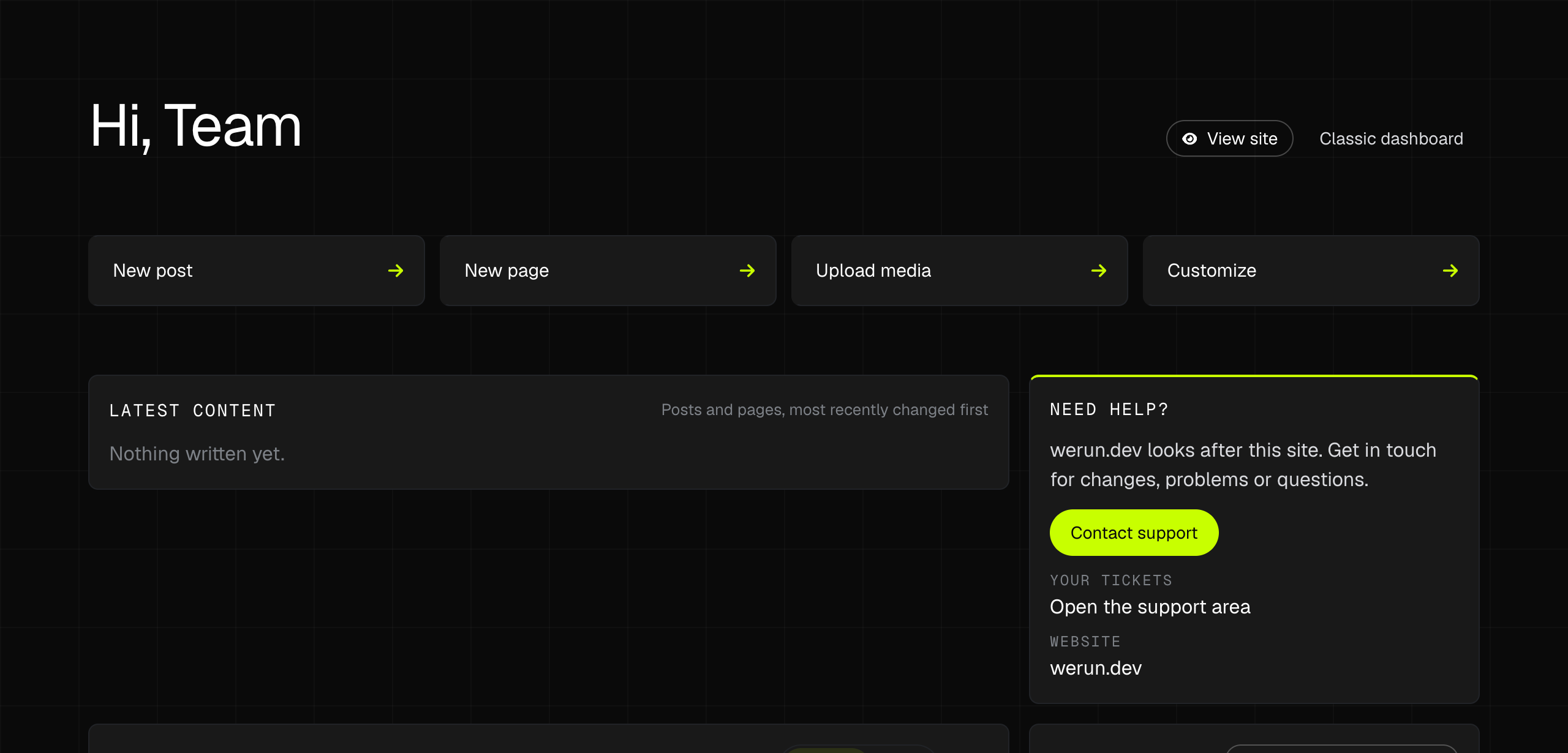
The dashboard that replaces the WordPress one: a greeting, four quick actions, the latest content and a support card with a Contact support button. Opens at full size in a new tab.
The dashboard your team opens after signing in, with support one click away.
A WordPress sign-in page in two columns: the logo and the form, with a passkey button, on the left, and a pattern on the right. Opens at full size in a new tab.
A sign-in page from the same module, in two columns and with a passkey button. The form's labels are WordPress's own, in the site's language.

A dashboard that knows who to call

The WordPress dashboard is replaced by one with quick actions, the latest content, site health, pending updates and the support contact. It skips the news feeds and the widgets the default dashboard loads.

A ticket with the context attached

Contact support opens a ticket with us from inside the admin. The site details travel with it: versions, theme, active plugins, modules and the latest activity log entries, so the first reply is an answer and not a list of questions.

Our access, without your passwords

Our team opens your site from our own CRM with a signed link that works once and expires in two minutes. No admin password is shared, so there is none to leak, and a person who leaves werun.dev loses access to every site within the hour.

Errors that report themselves

When a module is switched off after a critical error, one click sends the report to our support as a ticket, with the error and the site's versions.

Client savings

What you stop paying for, and what you stop maintaining.

werun.Toolkit costs you nothing: it is included on the WordPress sites we build and run. This is what a site would install instead for the same jobs, one row per plugin, with what that plugin charges for the part a module does here.

Plugin you would installWhat it chargesWith werun.ToolkitCovered here by
Limit Login Attempts ReloadedFreeLockouts per IP address are free. Its paid plans are a cloud service on top.IncludedSecurity guard
WPS Hide LoginFreeIt moves the sign-in address, and that is all it does.IncludedSecurity guard
WP 2FAFreeFree for codes from an app, codes by email and backup codes. Policies per role are in its Premium plan.IncludedSecurity guard
Headers Security Advanced & HSTS WPFreeIncludedSecurity guard
Disable XML-RPCFreeIncludedSecurity guard
Stop User EnumerationFreeIncludedSecurity guard
Disable REST APIFreeThe REST API only. Feeds and sitemaps are other plugins.IncludedEndpoint guard
Disable FeedsFreeIncludedEndpoint guard
WP Activity LogFreeFree for the log, a text search and the retention period. Its paid plans add search filters, reports and alerts.IncludedActivity log
Simple History$79 / yearThe log and its search are free, kept for 30 days. Choosing how long to keep it is in Premium.IncludedActivity log
LoginPressFreeFree for the sign-in page's logo, colours and background.IncludedCustom Login & Dashboard
White Label CMSFreeIt hides the dashboard's panels and adds a welcome panel of your own.IncludedCustom Login & Dashboard
Ultimate Dashboard$58 / yearRemoving WordPress's own dashboard widgets is free. Removing other plugins' widgets, and a contact form on the dashboard, are in PRO.IncludedCustom Login & Dashboard
Safe SVGFreeIncludedAllow SVG
WP Mail SMTP$49 / yearSending through SMTP or Brevo is free. The email log is in Pro, at an introductory price for the first year.IncludedEmail delivery
FluentSMTPFreeThe email log is included.IncludedEmail delivery
Disable CommentsFreeIncludedUnregister
Disable Emojis (GDPR friendly)FreeIncludedUnregister
Disable EmbedsFreeIncludedUnregister
Admin Menu EditorFreeFree for hiding menu items.IncludedUnregister
Heartbeat ControlFreeIncludedHeartbeat control
AltText.ai$49 / yearA hosted service billed in credits, one per image: 1,200 a year on this plan. It writes alt text.IncludedMedia AI metadata
AI (WordPress.org)FreeFree with your own API key. It writes alt text.IncludedMedia AI metadata
JSM Show Post MetadataFreePosts only. Terms and users are two more plugins.IncludedMeta fields manager
Yoast Duplicate PostFreeIncludedDuplicate posts
Reading Time WPFreeA shortcode. WordPress 6.9 also added a Time to Read block of its own.IncludedReading time
Radio Buttons for TaxonomiesFreeIncludedRadio taxonomies
Admin Columns€79 / yearColumns for custom fields are free. Sorting them, and columns on the lists of taxonomy terms, are in Pro.IncludedCustom columns

Read on Oct 13, 2026: each plugin's page on wordpress.org and, for the paid ones, the vendor's own pricing page. A price is the cheapest plan that includes what the module does, for one site and one year, in the vendor's currency; where the first year is sold at a discount, it is that first year. A plugin does more than its row says: the row is only the job it shares with a module.

What a client saves in licences, per site and year
Simple History$79 / year
Ultimate Dashboard$58 / year
WP Mail SMTP$49 / year
AltText.ai$49 / year
Admin Columns€79 / year
Up to$235 + €79

These are the other plugins’ prices, not ours: list prices, and the first year where a vendor discounts it. Some of these jobs also have a free plugin in the table, so this is what the paid route costs and not what every site was paying.

What a client saves in upkeep

The part with no price tag.

  • 24 plugins you do not install, update or audit one by one
  • One update channel and one changelog, in place of one per plugin
  • One team to call when something breaks: the one that wrote it
  • No upgrade prompts in the admin, because there is no paid plan to upgrade to
  • The toolkit itself: we charge nothing for it
Good to know

Some modules need an API key from OpenAI or Anthropic.

A module that works through an AI model needs a key from the company behind that model. Media AI metadata is the one that ships today: it runs on your own Anthropic or OpenAI key, and what the model costs to use is billed to you by that provider. We add nothing on top, and that usage is not in the sum above.

What it does not replace

The big jobs stay with tools built for them.

  • A firewall or a malware scanner
  • Backups
  • An SEO suite
  • Caching and image optimisation
  • A form builder

The toolkit covers the small single-purpose plugins that pile up around those. A site that needs one of the five still needs it.

Want this on your WordPress site?

Tell us what the site runs today and which plugins you would rather stop updating. We'll tell you what the toolkit covers, and what it does not.

No commitment. Just a conversation.
Toolkit questions