
The enterprise CMS landscape has shifted faster in the last three years than in the previous decade. Platforms that once required dedicated server infrastructure, proprietary licensing fees, and specialist consultants to operate are losing ground — not because they failed technically, but because the development and editorial experience they offer no longer matches what modern businesses expect.
Webflow and WordPress are not new entrants. But the way they are being used, extended, and positioned in 2024 is categorically different from their earlier incarnations. Together, they represent a pragmatic answer to a question that procurement teams, marketing directors, and CTOs are asking with increasing urgency: why are we still paying for a CMS that takes six months to deploy and requires a change request to update a headline?
This post examines why these two platforms are capturing market share from traditional enterprise CMS vendors, where each excels, and what a professional implementation actually looks like when the work is done properly.
Why Traditional CMS Platforms Are Losing Ground
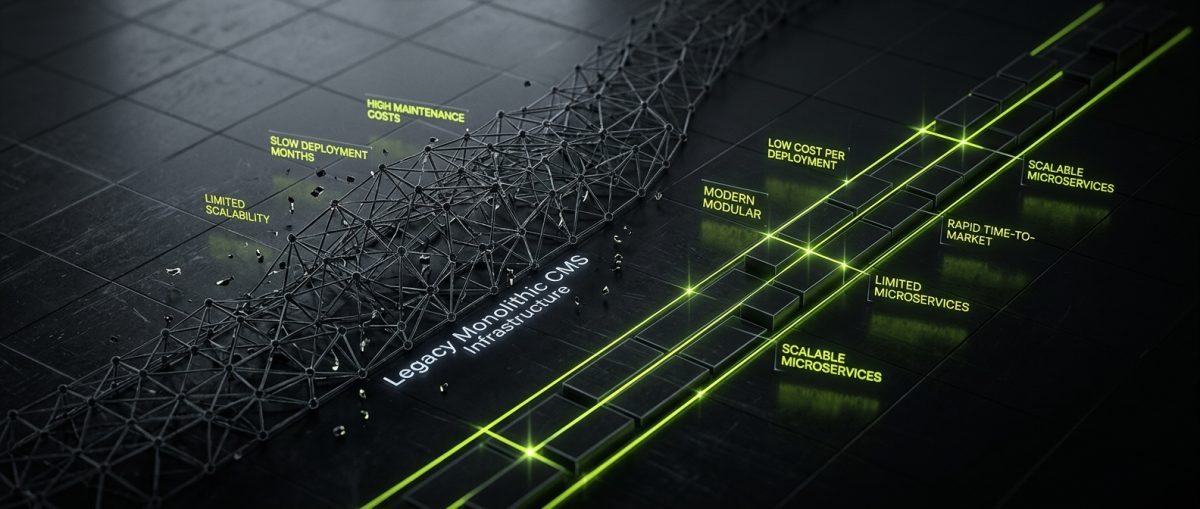
Traditional enterprise content management systems — Sitecore, Adobe Experience Manager, Episerver (now Optimizely), Drupal in its heavier enterprise configurations — were architected for a world where content was published through a single channel, infrastructure was on-premise, and development teams were large enough to absorb the complexity. That world no longer describes most organizations.
The problems are structural, not superficial.
Deployment Cycles That Kill Momentum
A typical AEM or Sitecore implementation runs six to eighteen months before a single page goes live. That timeline includes infrastructure provisioning, author training, template development, and integration work — all of which must be completed in sequence because the platform's architecture demands it. By the time the site launches, the business requirements that drove the project have often changed.
WordPress and Webflow invert this model. A well-scoped Webflow project can move from Figma to a live, CMS-connected site in four to eight weeks. A WordPress project with custom post types, Gutenberg blocks, and a REST API layer can be production-ready in a comparable timeframe. Neither platform requires infrastructure provisioning in the traditional sense — managed WordPress hosts like WP Engine and SiteGround absorb that complexity, and Webflow's hosting is bundled into the platform.
Licensing Costs That Don't Scale Rationally
Enterprise CMS licensing is typically seat-based, traffic-based, or both. A mid-market company running a marketing site on AEM can easily spend $150,000 to $400,000 annually in licensing alone before a single line of custom code is written. WordPress is open-source. Webflow's pricing scales with site plans and CMS item counts — costs that are predictable and directly tied to actual usage.
This cost structure matters enormously in B2B contexts where the website is a demand-generation asset, not a revenue-generating product. The argument for spending six figures annually on a CMS license becomes very difficult to sustain when the alternative delivers comparable editorial capability at a fraction of the cost.
Editorial Experience as a Competitive Disadvantage
Content teams working in traditional CMS environments frequently describe the authoring interface as a barrier rather than a tool. Rich text editors that don't reflect the final rendered output, component libraries that require developer intervention to extend, and publishing workflows that involve multiple approval steps for minor copy changes — these friction points accumulate into a genuine competitive disadvantage.
Webflow's Designer gives content editors a visual interface that maps directly to the published output. WordPress's Gutenberg editor, when blocks are built properly with full block controls and pattern support, gives authors meaningful layout flexibility without requiring them to touch code. Both platforms treat editorial experience as a first-class concern, not an afterthought.
WordPress in 2024: What Professional Implementation Actually Looks Like
WordPress powers approximately 43% of all websites on the internet. That statistic is frequently cited to argue that WordPress is ubiquitous to the point of being generic. The more accurate interpretation is that WordPress's extensibility makes it the right answer for an extraordinarily wide range of use cases — provided the implementation is done to professional standards.
The gap between a WordPress site built properly and one assembled from a theme marketplace with a page builder is not a matter of degree. It is a categorical difference in security posture, performance, maintainability, and long-term cost of ownership.
Plugin Development Done Right
Custom plugin development is where WordPress's architecture pays its most significant dividends. The WordPress hooks system — actions and filters — allows functionality to be extended without modifying core files, which means updates never break custom behavior. A plugin built using WordPress APIs, with proper nonce verification, capability checks, sanitization on input, and escaping on output, is genuinely secure. A plugin assembled from tutorials that skip those steps is not.
At werun.dev, every plugin we build ships with:
- Custom post types, taxonomies, and meta registered via the WordPress Settings API
- WP REST API custom endpoints with proper authentication
- Cron jobs and background processing for resource-intensive operations
- Shortcodes, widgets, and Gutenberg blocks as appropriate
- Auto-updates via GitHub releases, so client sites always run the current version without manual intervention
That last point deserves emphasis. Plugin maintenance is one of the most commonly neglected aspects of WordPress ownership. A GitHub-powered auto-update system eliminates the manual update cycle and ensures that security patches reach production automatically.
WooCommerce Beyond the Defaults
WooCommerce is frequently underestimated because its default configuration handles straightforward product catalogs competently but without distinction. The platform's real capability emerges in complex builds: custom product types with non-standard pricing logic, B2B wholesale stores with tiered pricing by customer group, subscription systems with flexible billing intervals, and checkout flows customized to specific regulatory or operational requirements.
Integrating WooCommerce with an ERP or CRM — connecting order data to a fulfillment platform, syncing customer records bidirectionally with a CRM, or pushing invoice data to an accounting system — is where a professional implementation creates genuine business value. These integrations require a thorough understanding of the WooCommerce data model and the REST API, not just familiarity with the admin interface.
Full Site Editing and Block Themes
WordPress's Full Site Editing (FSE) capability, delivered through block themes, represents a meaningful architectural shift. Template parts, global styles, and the site editor give content teams control over site-wide layout decisions that previously required developer involvement. Block patterns allow complex, reusable layout compositions to be offered to editors as single insertable units.
Building a block theme from scratch — rather than modifying a pre-built theme — produces clean semantic HTML, accessible markup, and performance characteristics that score 90+ on Core Web Vitals. That performance baseline matters for SEO and for user experience on lower-bandwidth connections.
Webflow: Visual Development Without the Visual Limitations
Webflow occupies a different position in the market. It is not a traditional CMS with a visual editor bolted on. It is a visual development environment that produces production-quality HTML, CSS, and JavaScript — with a CMS layer that supports genuine editorial workflows and a hosting infrastructure that handles performance and security at the platform level.
The common misconception is that Webflow is appropriate only for marketing sites with modest content requirements. That misconception typically comes from encountering Webflow projects built without architectural discipline — class naming that has collapsed into specificity chaos, CMS collections that weren't designed with editorial workflows in mind, and custom code embeds that work on launch day but break six months later.
Done properly, Webflow scales to complex content architectures, sophisticated interaction design, and meaningful third-party integrations.
CMS Architecture for Real Editorial Workflows
Webflow's CMS is collection-based. Each collection is a structured content type with defined fields — text, rich text, images, references to other collections, option fields, and more. The architecture decisions made at the collection design stage determine whether the CMS is usable by content editors or requires constant developer intervention.
A well-designed Webflow CMS architecture:
- Maps content types to editorial mental models, not to design components
- Uses reference fields to create relationships between content types that reflect real content relationships
- Defines option fields that constrain editor choices to values that work in the design system
- Structures collections so that content can be reused across multiple page templates without duplication
At werun.dev, we design CMS architectures for content editors, not just for developers. The handoff includes training and documentation, because a CMS that editors don't understand is a CMS that doesn't get used.
Custom Code, GSAP, and Integration Architecture
Webflow's native interaction system handles a wide range of animation and transition requirements. For more complex motion design — scroll-driven animations, timeline sequences, morphing SVGs — GSAP integrates cleanly with Webflow's class-based structure. The combination produces interaction-rich experiences that would require significant custom JavaScript to replicate in a traditional CMS.
Third-party integrations are handled through custom code embeds, Webflow's API, and middleware platforms. Connecting a Webflow site to a CRM like HubSpot, a payment system like Stripe, or a membership platform like Memberstack or Outseta requires a clear understanding of authentication flows, webhook handling, and data mapping. These are not configurations — they are integrations that require engineering judgment.
// Example: Webflow form submission forwarded to HubSpot via custom embed
document.querySelector('form').addEventListener('submit', async (e) => {
  e.preventDefault();
  const formData = new FormData(e.target);
  const payload = {
    fields: [
      { name: 'email', value: formData.get('email') },
      { name: 'firstname', value: formData.get('name') }
    ]
  };
  await fetch('https://api.hsforms.com/submissions/v3/integration/submit/PORTAL_ID/FORM_ID', {
    method: 'POST',
    headers: { 'Content-Type': 'application/json' },
    body: JSON.stringify(payload)
  });
});
When Webflow Needs a Headless Extension
Webflow's CMS has item limits and query constraints that become relevant at scale. When a project outgrows what Webflow's CMS can deliver natively, the right answer is not to abandon Webflow — it is to use Webflow as a design and hosting layer while moving content management to a headless CMS or building a custom front-end with Next.js or Astro that consumes Webflow's API.
This hybrid architecture preserves the design system and editorial experience of Webflow while removing the CMS constraints. It is a more complex build, but it is the correct technical answer for content-heavy sites that need Webflow's design capabilities without its CMS limitations.
Choosing Between Webflow and WordPress: A Practical Framework
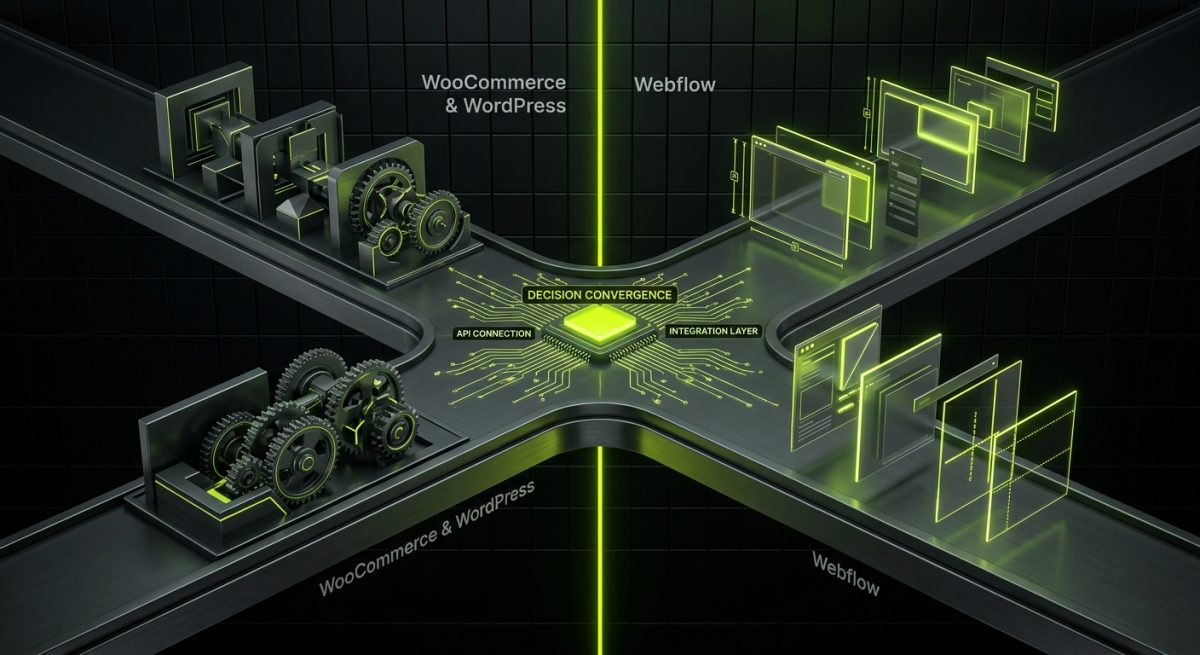
The question of which platform to use is not answered by comparing feature lists. It is answered by understanding the specific requirements of the project, the editorial team that will use the system, and the technical integrations the business needs.
When WordPress Is the Right Answer
WordPress is the stronger choice when:
- E-commerce is central to the project. WooCommerce's extensibility, combined with WordPress's plugin ecosystem, handles complex product catalogs, custom pricing logic, and ERP integrations more flexibly than any other open-source stack.
- Custom application logic is required. A WordPress site that needs to function as an application — with user roles, custom data structures, background processing, and REST API endpoints consumed by external systems — benefits from WordPress's mature plugin architecture.
- Content volume is high and taxonomy is complex. WordPress's custom post types and taxonomy system, combined with the REST API, handle large content archives with complex filtering requirements more naturally than Webflow's collection-based CMS.
- The client needs full infrastructure control. WordPress's open-source nature means the codebase can be hosted anywhere, migrated freely, and extended without platform dependency.
When Webflow Is the Right Answer
Webflow is the stronger choice when:
- Design fidelity is a primary requirement. Webflow produces pixel-accurate implementations of complex designs without the compromise that comes from mapping a design to a theme's component library.
- The editorial team is non-technical. Webflow's visual editor is genuinely usable by content editors who have no development background, provided the CMS architecture is designed well.
- Time to launch is constrained. Webflow's integrated hosting, SSL, CDN, and CMS mean there is no infrastructure layer to configure. A well-scoped project can move from design to live faster than any comparable WordPress build.
- Interaction design is a differentiator. Webflow's native interactions, combined with GSAP, produce motion design that is difficult to replicate in WordPress without significant custom JavaScript.
The Integration Layer
Both platforms increasingly operate as nodes in a broader technology stack rather than as standalone systems. A WordPress site might expose REST API endpoints consumed by a mobile application. A Webflow site might receive data from an Airtable base via Zapier and surface it through CMS collections. An n8n automation workflow might connect form submissions from either platform to a CRM, trigger email sequences, and update internal databases — all without manual intervention.
This integration layer is where the real competitive advantage lives. The platform choice matters less than the quality of the integrations built around it. At werun.dev, our AI and automation practice builds the n8n workflows, AI agents, and data pipelines that connect WordPress and Webflow sites to the rest of a client's business stack — turning a website from a publishing tool into an active component of a demand-generation and operations infrastructure.
The displacement of traditional CMS platforms is not a trend driven by marketing. It is a consequence of the fact that WordPress and Webflow, implemented properly, deliver better editorial experiences, faster deployment cycles, lower total cost of ownership, and more flexible integration architectures than the platforms they are replacing. The caveat — implemented properly — is doing significant work in that sentence. The platform is not the differentiator. The implementation is.