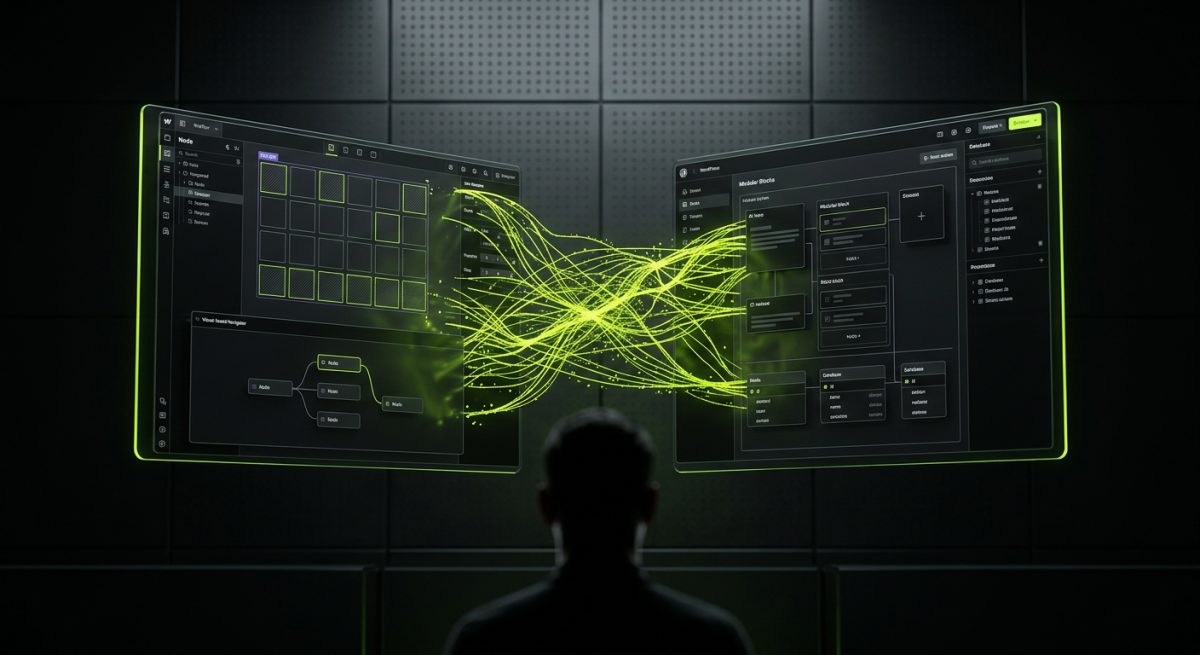
The question used to be simpler. Webflow or WordPress? Pick the one that fits your team's skill set and your client's content needs. But artificial intelligence has fundamentally changed the landscape of both platforms — and the decision matrix along with it.
AI is no longer a feature you bolt on. It's becoming infrastructure. Both Webflow and WordPress are racing to embed AI into their core workflows, and the way each platform approaches that integration reveals a great deal about where they're headed — and which one belongs in your next project stack.
This post is not a beginner's comparison. It's a technical and strategic breakdown for product managers, CTOs, and agency leads who need to make a defensible platform decision in 2024 and beyond.
How AI Is Reshaping the Webflow Ecosystem
Webflow's AI story is fundamentally about design velocity and editorial autonomy. The platform has always positioned itself as the tool that collapses the gap between designer and developer. AI accelerates that promise — but it also introduces new architectural considerations that teams need to plan for deliberately.
Webflow AI: What's Actually Shipping
Webflow's native AI features have expanded significantly. The AI-assisted layout generation allows designers to describe a section in natural language and receive a rendered starting point inside the Designer. This is not a gimmick — for rapid prototyping and client iteration cycles, it compresses what used to be a two-hour wireframe session into fifteen minutes.
More practically relevant for production builds is Webflow's AI-powered CMS content generation. Editors can now draft, expand, and localize CMS collection content directly inside the platform. For marketing teams managing large content libraries — product pages, blog posts, case studies — this reduces dependency on external tools and keeps the editorial workflow inside a single interface.
Custom Code + AI: Where It Gets Interesting
Webflow's real AI power for technical teams comes not from native features but from the custom code layer. Because Webflow allows arbitrary JavaScript embeds, you can wire any AI API directly into your Webflow site without leaving the platform ecosystem.
At werun.dev, this is where we spend most of our time on AI-enhanced Webflow builds:
- OpenAI / Claude chatbot embeds — pre-sales qualification bots, support agents, and onboarding assistants embedded as custom components with Webflow's native styling system
- AI-powered search — replacing Webflow's native search with semantic vector search via a middleware layer, dramatically improving content discoverability
- Dynamic personalization — using AI inference at the edge to serve different CMS content variants based on user behavior signals
- Form intelligence — AI-driven lead qualification logic that scores and routes form submissions before they hit your CRM
The architecture for a typical AI-enhanced Webflow site looks like this:
[Webflow Frontend]
    ↓ Custom JS embed
[Middleware API (n8n / custom Node.js)]
    ↓
[AI Model: OpenAI GPT-4 / Claude]
    ↓
[CRM / Database / Webflow CMS API]
This pattern keeps Webflow as the rendering and content layer while delegating AI logic to a proper backend. It's clean, maintainable, and scalable — which matters when you're handing a site off to a client who needs to iterate without breaking things.
The Webflow CMS Architecture Question
One limitation that AI amplifies rather than solves is Webflow's CMS capacity ceiling. If you're building an AI-driven content pipeline that generates or ingests large volumes of structured data, Webflow's CMS item limits and collection structure constraints will surface quickly. For those use cases, we typically architect a hybrid: Webflow handles the front-end and design system, while a headless CMS or database sits behind a custom API layer.
This is a legitimate architectural decision, not a workaround. Webflow's migration path to Next.js or Astro — which we build and maintain — becomes relevant here, allowing teams to preserve the Webflow design system while gaining full backend flexibility for AI workloads.
When Webflow + AI is the right call:
- Marketing-led sites with editorial teams who need AI content assistance without developer involvement
- Lead generation sites where AI chatbots and qualification logic live in the custom code layer
- Design-forward projects where visual fidelity and animation quality are non-negotiable
- Clients who need a fast, maintainable handoff without a WordPress hosting stack to manage
How AI Is Reshaping the WordPress Ecosystem
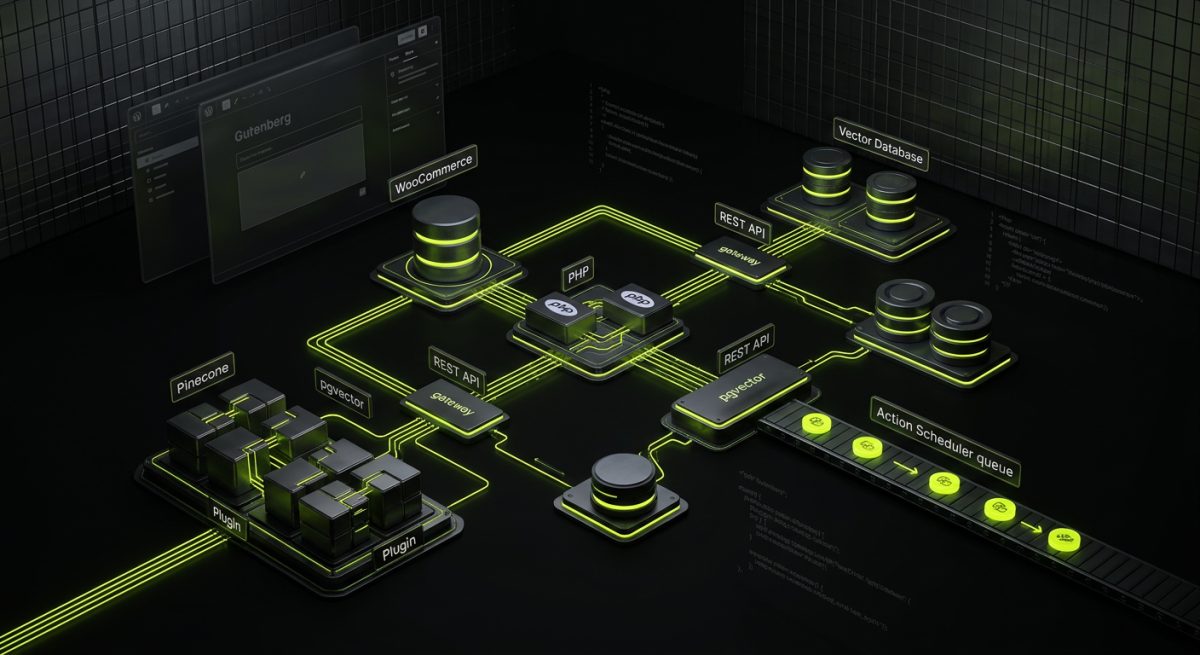
WordPress's AI story is more complex — and arguably more powerful — precisely because of its open architecture. WordPress doesn't have a single AI roadmap. It has thousands of them, running simultaneously across plugins, themes, hosting layers, and the REST API.
Gutenberg and the AI Content Layer
The Block Editor has become the primary surface where AI enters the WordPress editorial experience. Jetpack AI, the most widely deployed AI writing assistant in WordPress, integrates directly into the Gutenberg toolbar. Editors can generate post drafts, summarize content, adjust tone, and translate blocks without leaving the editor. For content-heavy WordPress installations — news sites, knowledge bases, e-commerce product catalogs — this is a meaningful productivity multiplier.
But Gutenberg's AI integration goes deeper than content generation. AI-assisted block pattern suggestions are beginning to appear in the Site Editor (FSE), where the system can recommend layout patterns based on the page context and existing design system. This is early-stage, but the trajectory is clear: the block editor is becoming an AI-native authoring environment.
Custom Plugin Development + AI APIs
This is where WordPress's open architecture creates a structural advantage over Webflow for complex AI use cases. Because every WordPress site is a PHP application with direct database access, a REST API, and a full hook system, you can build AI integrations that are deeply embedded in the application logic — not just appended as JavaScript embeds.
Examples of AI integrations we build at werun.dev inside WordPress:
- WooCommerce AI product recommendations — custom plugins that query OpenAI or a vector database at the product page level, serving personalized upsell logic based on purchase history and browsing behavior
- AI-powered search with WP REST API — replacing default WordPress search with semantic search endpoints backed by embeddings stored in a vector database (Pinecone, Weaviate, or pgvector)
- Content moderation pipelines — webhook-triggered workflows that run new user-generated content through a moderation model before it's published
- Automated SEO enrichment — background cron jobs that process new posts through an LLM pipeline to generate meta descriptions, schema markup, and internal linking suggestions
// Example: Triggering an AI enrichment job on post publish
add_action( 'publish_post', function( $post_id ) {
    if ( wp_is_post_revision( $post_id ) ) return;

    as_enqueue_async_action(
        'werun_ai_enrich_post',
        [ 'post_id' => $post_id ],
        'ai-enrichment'
    );
}, 10, 1 );
This pattern — using Action Scheduler to queue background AI processing — keeps the publish flow fast while the enrichment runs asynchronously. It's the kind of implementation detail that separates a production-grade AI integration from a demo.
WordPress + n8n: The Automation Layer
One of the most powerful AI architectures we deploy combines WordPress as the content and data layer with n8n as the automation and AI orchestration layer. WordPress fires webhooks on key events (new user, new order, new post), n8n receives them, routes them through AI nodes (OpenAI, Claude, custom code), and writes results back to WordPress via the REST API.
This architecture supports use cases like:
- Automated customer support ticket classification and routing from WooCommerce orders
- AI-generated post summaries pushed back to custom fields on publish
- Lead scoring from contact form submissions, synced to HubSpot or Salesforce
- RAG-powered knowledge base chatbots trained on your WordPress content library
When WordPress + AI is the right call:
- Complex applications where AI logic needs to interact with the database, user roles, or custom post types at the application layer
- WooCommerce stores requiring AI-driven personalization, recommendations, or fraud detection
- Large content sites where AI enrichment pipelines need to process thousands of existing posts
- Enterprise builds requiring custom authentication, multi-site architectures, and deep third-party integrations
Platform Decision Framework: Webflow vs WordPress in AI-Driven Projects
Choosing between Webflow and WordPress for an AI-enhanced project is not about which platform is "better at AI." Both platforms can support sophisticated AI integrations. The decision turns on where the AI logic needs to live, who owns it, and how it needs to scale.
The Architecture Map
Here's a practical framework for mapping project requirements to platform choice:
Project Requirement                  → Recommended Platform
─────────────────────────────────────────────────────────────
AI chatbot on marketing site         → Webflow (custom JS embed)
AI content generation for editors   → Either (Webflow native / Jetpack AI)
AI in WooCommerce checkout logic     → WordPress (plugin layer)
Semantic search on content library  → WordPress (REST API + vector DB)
AI personalization at edge           → Webflow (middleware API)
AI-powered data pipelines            → WordPress + n8n
Fast design-led MVP with AI chat     → Webflow
Enterprise AI application            → WordPress (or headless)
Ownership and Maintenance Considerations
AI integrations are not set-and-forget. Models deprecate. APIs change rate limits. Vector databases need re-indexing as content grows. The maintenance profile of your AI layer matters as much as the initial build.
Webflow AI maintenance considerations:
- Custom JS embeds require versioning and monitoring — if an AI API changes its response schema, the embed breaks silently
- Webflow's Designer updates can occasionally conflict with custom code embeds; regression testing is essential
- CMS-driven AI content requires editorial governance to prevent quality drift
- Our Webflow monthly maintenance retainers include monitoring for custom code integrations and AI embed health checks
WordPress AI maintenance considerations:
- Plugin-based AI integrations need WordPress core compatibility testing on major releases
- Background processing queues (Action Scheduler) need monitoring for failed jobs
- REST API endpoints serving AI responses need rate limiting and caching to prevent cost overruns
- Our WordPress maintenance retainers cover plugin updates, security patches, and integration health monitoring
The Hybrid Reality
For a growing number of projects, the answer is not Webflow or WordPress — it's both, plus an automation layer. A common architecture we build:
- Webflow handles the public-facing marketing site, blog, and lead capture
- WordPress (or a headless CMS) manages the product or application content that requires complex data relationships
- n8n orchestrates AI workflows between both platforms and the broader business stack
This isn't over-engineering. It's the natural result of platforms evolving at different speeds in different directions. Webflow is getting better at design and editorial AI. WordPress is getting better at application-layer AI. n8n is getting better at connecting everything.
Cost and Complexity Benchmarks
AI integrations add real cost and complexity to any build. Teams should plan for:
| Integration Type | Estimated Build Complexity | Ongoing AI API Cost (est.) |
|---|---|---|
| Embedded chatbot (Webflow) | Low–Medium | $50–$300/mo |
| Semantic search (WordPress) | Medium–High | $100–$500/mo |
| AI content pipeline (n8n) | Medium | $30–$200/mo |
| Full RAG knowledge base | High | $200–$1,000/mo |
These are rough benchmarks — actual costs depend on traffic volume, model selection, and caching strategy. A well-architected AI integration with proper caching can reduce API costs by 60–80% compared to a naive implementation that calls the model on every request.
Making the Call
If your project is primarily a marketing and content platform with AI as a UX enhancement layer — chatbots, content assistance, personalization — Webflow is often the faster, cleaner choice. The design system is more maintainable, the editorial experience is better, and the custom code layer is sufficient for most AI embedding patterns.
If your project is an application, e-commerce platform, or data-intensive system where AI needs to interact with business logic, user data, or complex content relationships — WordPress is the right foundation. Its open architecture, plugin system, and REST API give you the surface area to build AI integrations that are genuinely embedded in the application, not bolted on top.
If you're unsure which architecture fits your requirements, talk to the werun.dev team. We work across both platforms daily and can map your specific use case to the right stack before a line of code is written.
The AI & Automation Layer: What Sits Between Your Platform and Your AI Models
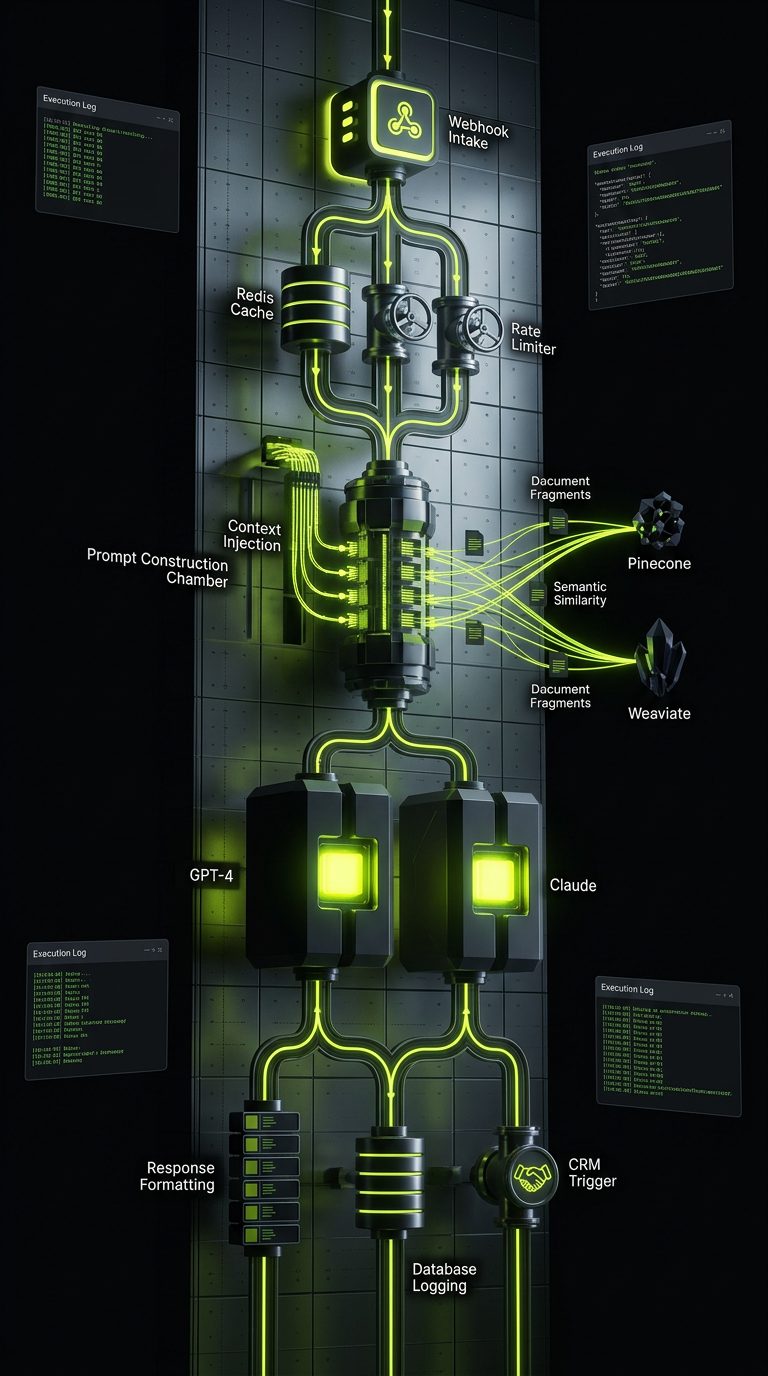
Regardless of whether you choose Webflow or WordPress, the most important architectural decision in an AI-enhanced web project is often what sits between your platform and your AI models. This is the layer that most teams underinvest in — and where the most production failures occur.
Why You Need a Middleware Layer
Calling an AI API directly from a browser embed or a WordPress plugin hook is fine for prototypes. For production systems, it creates several problems:
- No retry logic — if the API call fails, the user sees an error
- No caching — identical queries hit the model repeatedly, burning budget
- No rate limiting — a traffic spike can exhaust your API quota in minutes
- No observability — you have no visibility into what's being sent, what's coming back, or what's failing
- No prompt versioning — updating your prompts requires a code deployment
A proper middleware layer — whether that's a custom Node.js/Python API, a self-hosted n8n instance, or a managed service — solves all of these problems.
n8n as AI Orchestration Infrastructure
n8n has emerged as one of the most practical tools for building the middleware layer between web platforms and AI models. It's not just an automation tool — it's a full workflow orchestration platform with native AI nodes for OpenAI, Claude, and Anthropic, plus vector store integrations for building RAG pipelines.
A typical n8n-powered AI middleware architecture for a Webflow or WordPress site:
[User Action on Site]
    ↓ Webhook
[n8n Workflow]
    ├─ Check cache (Redis / Airtable)
    ├─ Rate limit check
    ├─ Prompt construction (with context injection)
    ↓
[AI Model: GPT-4 / Claude]
    ↓
[Response processing]
    ├─ Format for frontend
    ├─ Log to database
    └─ Trigger downstream actions (CRM update, email, etc.)
    ↓
[Response to Site]
This architecture works identically whether the site is Webflow or WordPress. The platform choice affects the front-end implementation — how the webhook is triggered, how the response is rendered — but the AI orchestration logic is platform-agnostic.
RAG Pipelines: Turning Your Content Into AI Context
Retrieval-Augmented Generation (RAG) is the pattern that makes AI chatbots actually useful for business applications. Instead of relying on a model's training data, a RAG system retrieves relevant content from your own knowledge base and injects it into the prompt as context.
For WordPress sites, this means indexing your posts, pages, and custom post type content into a vector database. For Webflow sites, it means indexing your CMS collections. The retrieval layer then queries this index at inference time, pulling the most semantically relevant content to answer the user's question.
We build RAG pipelines for both platforms as part of our AI & Automation services, using n8n for orchestration, OpenAI or Claude for inference, and vector databases (Pinecone, Weaviate, or pgvector on Postgres) for retrieval. The result is a chatbot that answers questions about your actual content — your products, your documentation, your policies — not a generic language model that hallucinates facts about your business.
Monitoring and Observability
AI integrations in production need monitoring. This means:
- Execution logs — every AI call logged with input, output, latency, and token cost
- Error alerting — Slack or email notifications when AI workflows fail
- Cost dashboards — real-time visibility into API spend by workflow and model
- Quality monitoring — periodic sampling of AI outputs to catch prompt drift or model degradation
n8n's execution log provides the first two out of the box. Cost dashboards and quality monitoring require additional instrumentation — typically a combination of the AI provider's usage API and a lightweight analytics layer.
This operational overhead is real, and it's one of the reasons AI integrations benefit from a maintenance retainer rather than a one-time build engagement. The code ships once. The system needs to be watched indefinitely.
Ready to build AI into your Webflow or WordPress project? The werun.dev team works across both platforms and specializes in the middleware and automation layer that makes AI integrations production-ready. Start a conversation →