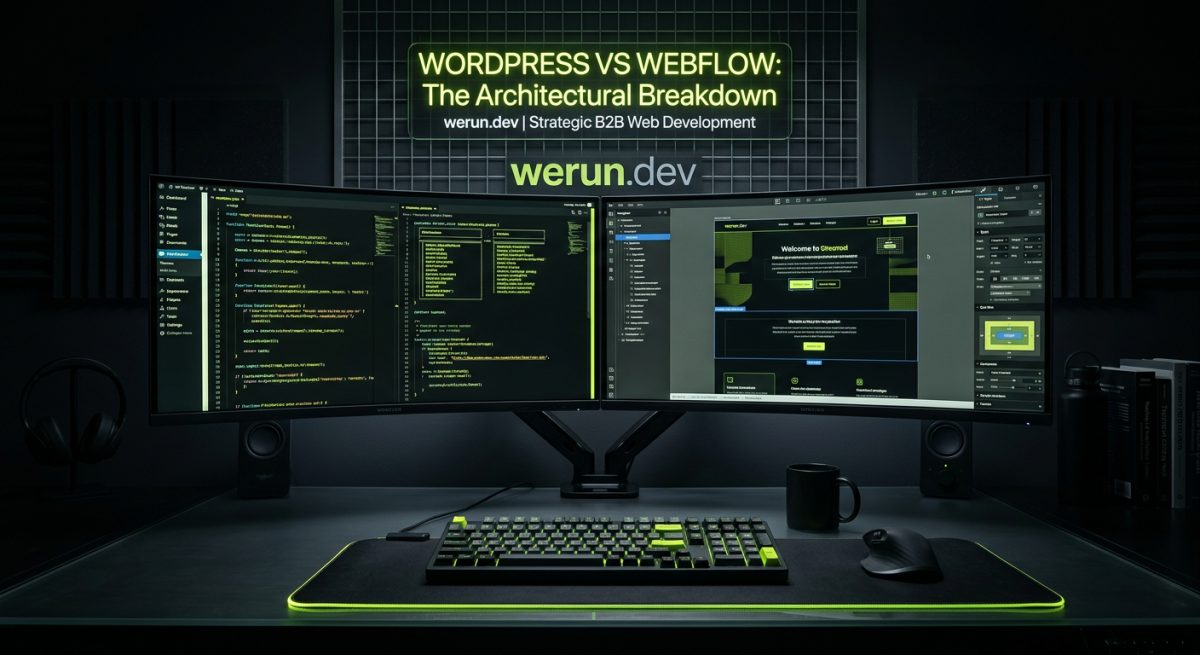
The WordPress vs Webflow debate surfaces in almost every discovery call we run at werun.dev. Clients arrive with a shortlist, a budget, and a set of requirements — and they want a straight answer. The honest one is that neither platform wins universally. What matters is whether the platform matches the project's technical complexity, editorial workflow, ownership model, and long-term maintenance reality.
This post cuts through the marketing noise on both sides and gives you the architectural truth: what each platform actually is under the hood, where each one genuinely excels, and the decision criteria that should drive the choice.
What Each Platform Actually Is — Architecture First
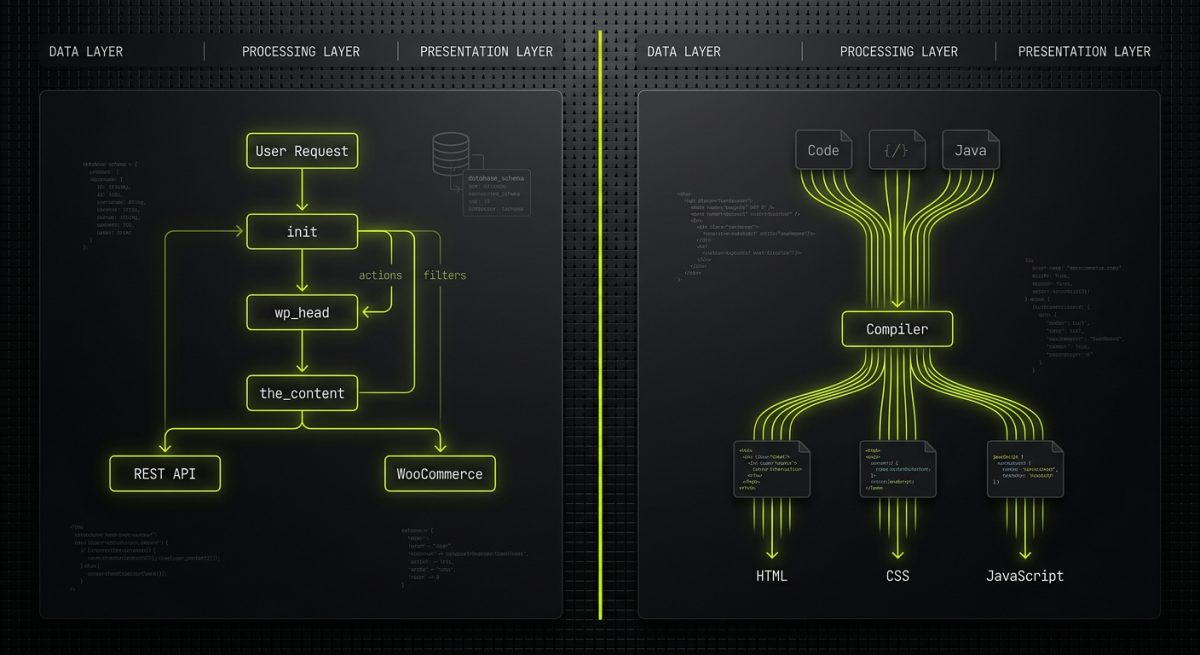
Most comparisons start with features. We start with architecture, because architecture determines everything downstream: hosting flexibility, developer experience, content modeling limits, and total cost of ownership.
WordPress: An Open-Source Application Framework
WordPress is not just a CMS. It is a PHP application framework with a CMS bolted on top — and that distinction matters enormously. The core is built around a hook system (actions and filters) that allows developers to intercept and modify almost any behavior without touching core files. This extensibility model is what makes WordPress genuinely powerful for complex projects.
When werun.dev builds a WordPress project, the deliverable is code that runs on any PHP/MySQL server in the world. The client owns the codebase outright. Every plugin we ship uses WordPress APIs properly — nonces for CSRF protection, capability checks for authorization, sanitization on input, escaping on output. The REST API exposes a programmable interface for headless architectures, mobile apps, and third-party integrations. WooCommerce extends the same hook model into a full e-commerce engine.
The technical surface area is vast:
- Custom post types and taxonomies — arbitrary content structures with no schema limitations
- Custom database tables — for high-volume or relational data that doesn't fit post meta
- Cron jobs and background processing — for async tasks like order processing or data sync
- Multisite networks — a single WordPress installation managing dozens of sites with shared users and plugins
- WP REST API custom endpoints — expose any data, accept any payload
- Block themes and Full Site Editing — Gutenberg's component model for theme-level design control
The tradeoff is real: that surface area requires competent developers to manage safely. A poorly built WordPress site — one with unescaped output, no update strategy, or plugins from unknown authors — is a security liability. The platform rewards good engineering and punishes careless implementation.
Webflow: A Visual Development Environment with a Managed Backend
Webflow is architecturally different at every layer. It is a SaaS platform where the Designer (the visual editor) compiles to clean HTML, CSS, and JavaScript hosted on Webflow's infrastructure. There is no server to configure, no PHP runtime to manage, no database schema to design. The CMS is a structured content layer built directly into the platform.
This is not a limitation — it is a deliberate design philosophy. Webflow trades raw extensibility for speed, visual fidelity, and a dramatically lower operational overhead. For marketing sites, campaign landing pages, and content-driven editorial sites, that tradeoff is often the right one.
At werun.dev, our Webflow builds follow a strict class architecture — BEM-style naming conventions, reusable component symbols, and CMS collection structures designed for real editorial workflows, not just developer convenience. The Webflow Designer produces production-quality output when used correctly. When used without discipline, it produces a stylesheet with 400 conflicting utility classes and a CMS that no editor can actually maintain.
The key architectural constraints to understand:
- CMS collection limits — Webflow's CMS has item caps per collection and per plan tier
- No server-side logic — dynamic behavior requires custom JavaScript, third-party services, or middleware
- Hosting is tied to Webflow — you cannot export a dynamic Webflow site and host it elsewhere (static export is possible but loses CMS functionality)
- Logic (beta feature) — Webflow is adding native logic/automation, but it is not a substitute for server-side processing
- Custom code embeds — JavaScript can extend Webflow significantly, but it runs client-side
Understanding these constraints is not a reason to avoid Webflow. It is a reason to make an informed choice before the project starts rather than discovering the limits six months into a build.
Where Each Platform Genuinely Wins
Platform selection should be driven by project requirements, not by developer familiarity or client assumptions. Here is a direct breakdown of where each platform has a real, structural advantage.
WordPress Wins When Complexity Is the Requirement
WordPress is the right choice when the project demands things that simply cannot be built on a managed visual platform.
E-commerce with real business logic. WooCommerce is not just a shopping cart. It is an extensible commerce engine. Custom product types, dynamic pricing rules based on user roles or purchase history, wholesale B2B functionality, subscription billing, integration with ERP and fulfillment systems — these are WooCommerce builds. The hook system means every part of the checkout flow can be intercepted and modified. Payment gateway integrations, custom order statuses, and warehouse sync all live in PHP code that runs server-side, with access to the full database.
Plugin products. If the deliverable is a WordPress plugin that will be installed on client sites and maintained over time, WordPress is the only answer. werun.dev ships plugins with GitHub-powered auto-update systems, meaning every installation receives updates automatically without requiring clients to log into wp-admin manually. This is only possible because WordPress is an open platform with a defined plugin API.
Multisite and multi-tenant architectures. A network of franchise sites, a SaaS product built on WordPress, or a university system managing 50 department sites — these are WordPress Multisite use cases. There is no equivalent in Webflow.
Deep third-party integrations with server-side requirements. When an integration requires webhook receivers, background processing, or authenticated server-to-server API calls, WordPress provides the runtime. Webflow requires middleware (Zapier, Make, a separate serverless function) to handle anything that cannot run in the browser.
Long-term content-heavy applications. News sites, knowledge bases, job boards, directories — anything with tens of thousands of content items, complex taxonomy relationships, or search requirements beyond basic filtering belongs on WordPress with proper database optimization.
Webflow Wins When Speed, Design Fidelity, and Editorial UX Are the Priority
Webflow is the right choice when the project is primarily a marketing or editorial site where visual quality, launch speed, and non-technical content management are the dominant requirements.
Design-led marketing sites. When a client brings a Figma file with complex layouts, custom animations, and a strong visual identity, Webflow is frequently the faster and cleaner path to production. The Designer maps directly to CSS — there is no translation layer between the design and the implementation. werun.dev's Figma-to-Webflow builds preserve pixel-perfect fidelity while maintaining a scalable class architecture that survives content updates and redesigns.
GSAP animations and scroll interactions. Webflow's native interaction system handles a wide range of scroll-triggered and element-based animations without custom JavaScript. For more complex sequences, GSAP integrates cleanly via custom code embeds. The result is animation quality that would require significant custom JavaScript work in a WordPress theme.
Editorial teams without technical resources. The Webflow Editor is genuinely usable by non-technical content editors. CMS collections with defined field schemas, rich text editors, and image management all work within a visual context that editors understand. WordPress's Gutenberg editor has improved substantially, but it still has a steeper learning curve for non-technical users managing structured content.
Fast time-to-launch for funded startups and campaign sites. When a startup needs a high-quality marketing site in four to six weeks, Webflow's managed infrastructure removes the hosting setup, SSL configuration, CDN provisioning, and server optimization work. The operational overhead is Webflow's problem, not the client's.
Membership portals with defined scope. Using Memberstack or Outseta, Webflow can support gated content, member dashboards, and client portals without a custom backend. These tools handle authentication, access control, and billing. For portals that fit within their feature set, this is a faster and lower-cost path than a custom WordPress members plugin.
The Ownership and Maintenance Reality

Platform decisions are not just technical — they are commercial. The long-term cost and risk profile of WordPress and Webflow are genuinely different, and clients deserve a clear picture of both before committing.
WordPress: You Own Everything, You Maintain Everything
WordPress is open-source software. The client owns the codebase, the database, and the hosting environment. There is no platform vendor who can change pricing, deprecate features, or shut down the service. This ownership is a genuine strategic asset for businesses where the website is core infrastructure.
The maintenance obligation that comes with ownership is real. WordPress core, themes, and plugins require regular updates. A site left unpatched for six months is a security risk. werun.dev's monthly maintenance retainers cover exactly this: core and plugin updates, security monitoring, uptime checks, performance audits, and developer availability for small changes. The retainer model exists because responsible WordPress ownership requires ongoing attention.
Hosting matters significantly on WordPress. The performance difference between a poorly configured shared host and a managed WordPress host like WP Engine or SiteGround (both werun.dev partners) is measurable in Core Web Vitals scores and conversion rates. Managed hosting handles server-level caching, PHP version management, and daily backups — but it is an additional cost line that clients need to plan for.
Total cost of ownership considerations for WordPress:
- Managed hosting: typically $30–$300/month depending on traffic and plan
- Plugin licenses: commercial plugins often carry annual renewal fees
- Developer time for updates and maintenance: addressed by a retainer
- Security incidents: the cost of a breach on an unpatched site can far exceed years of maintenance spend
- Scalability: server resources can be scaled independently; costs scale with actual usage
Webflow: Managed Infrastructure, Platform Dependency
Webflow's pricing model bundles hosting, CDN, SSL, and CMS into a single monthly or annual subscription. For many clients, this simplicity is worth the cost. There are no hosting decisions to make, no server patches to apply, and no infrastructure fires to fight.
The dependency risk is the structural tradeoff. Webflow controls the platform. Pricing changes, feature deprecations, and CMS limit adjustments are Webflow's decisions, not the client's. The 2022 pricing restructure caught many agencies and clients off-guard. This is not unique to Webflow — every SaaS platform carries this risk — but it should be factored into long-term planning.
For clients who outgrow Webflow's CMS limits or need capabilities the platform cannot support, migration is a real project. werun.dev has built Webflow-to-Next.js and Webflow-to-Astro migrations for exactly this scenario — using Webflow as a CMS and design layer while moving the front-end to a custom framework that removes the platform constraints.
Total cost of ownership considerations for Webflow:
- Webflow site plan: $23–$212/month depending on CMS items and features
- Workspace plan: separate billing for the design environment
- Third-party tools: Memberstack, Outseta, Weglot, and similar integrations carry their own subscription costs
- Custom code maintenance: JavaScript interactions and integrations require developer time when they break or need updates
- Migration cost: if the project outgrows Webflow, moving a mature CMS-driven site is a significant project
The Decision Framework werun.dev Uses in Practice
When a new project comes in, the platform recommendation follows a structured evaluation:
- What is the primary content model? Simple pages and a blog point toward Webflow. Complex relational content, custom post types, or high item volumes point toward WordPress.
- Is e-commerce required? Any serious e-commerce requirement defaults to WooCommerce unless the product catalog is simple and Shopify is on the table.
- What server-side processing is needed? Webhooks, background jobs, and authenticated server-to-server integrations require WordPress or a separate backend.
- Who manages the content day-to-day? Non-technical editors on a design-heavy marketing site often have a better experience in Webflow. Developers and technical teams managing complex content structures often prefer WordPress.
- What is the five-year ownership model? Clients who want full ownership and portability choose WordPress. Clients who want managed infrastructure and are comfortable with platform dependency choose Webflow.
- What is the animation and interaction requirement? Complex scroll-based animations and GSAP sequences are faster to build and maintain in Webflow.
There is no universal answer. The right platform is the one that fits the project's actual requirements — not the one the agency is most comfortable with, and not the one the client read about on a comparison blog that was written to drive affiliate clicks.