
The web development landscape has shifted faster in the past three years than in the previous decade. AI is no longer a feature you bolt on to impress stakeholders — it's becoming the underlying architecture that determines whether a web application feels alive or static. For B2B companies building on WordPress, Webflow, or Shopify, the question is no longer whether to integrate AI, but which implementations deliver measurable ROI and how to execute them without accumulating technical debt.
This post breaks down the three most impactful AI applications in modern web development: conversational interfaces (chatbots), dynamic content personalization, and in-app copilots. Each section covers the technical architecture, real-world use cases, and implementation patterns your development team can act on.
Conversational Interfaces: Beyond the FAQ Chatbot
The chatbot of 2019 was a decision-tree disguised as a conversation. Users clicked through pre-written options, hit dead ends, and abandoned the interaction frustrated. The chatbot of 2024 is a different animal entirely — powered by large language models (LLMs), connected to your product database, and capable of handling nuanced queries that would have required a human agent two years ago.
What Makes Modern Chatbots Different
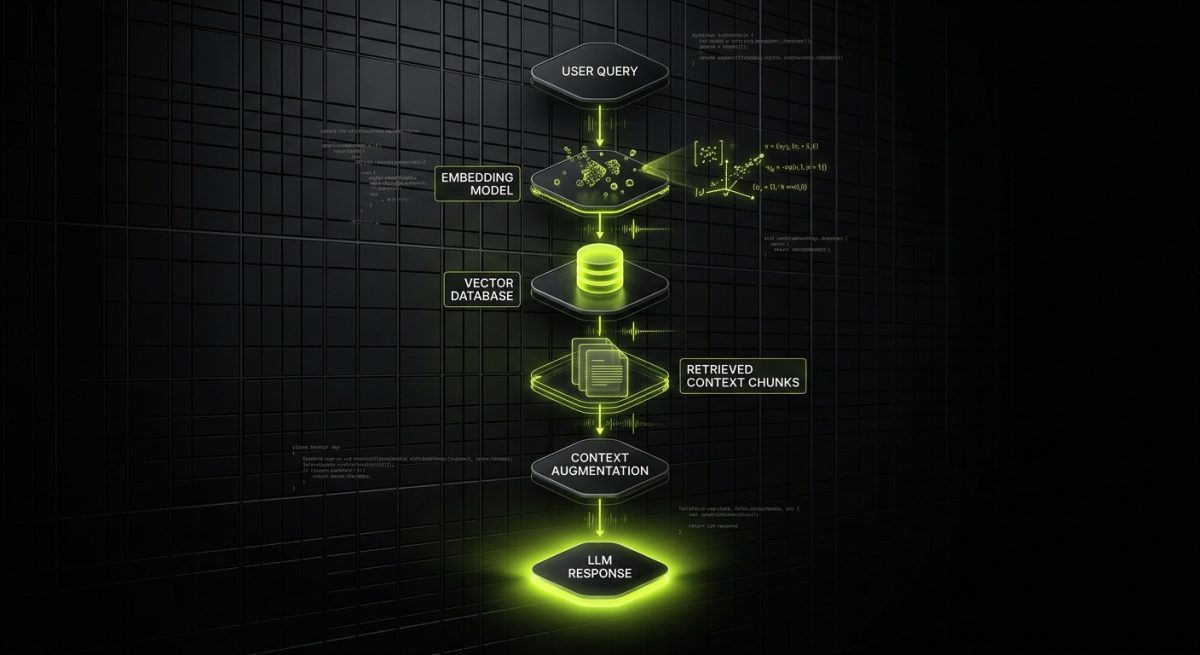
The architectural shift is significant. Legacy chatbots relied on intent classification with rigid pattern matching. Modern implementations use retrieval-augmented generation (RAG), where the LLM is grounded in your actual business data — product catalogs, documentation, CRM records, support tickets — before generating a response. This eliminates hallucination risk and keeps answers accurate to your specific context.
A typical RAG architecture for a B2B web application looks like this:
User Query
    ↓
Embedding Model (converts query to vector)
    ↓
Vector Database Search (Pinecone, Weaviate, pgvector)
    ↓
Retrieved Context Chunks
    ↓
LLM (GPT-4o, Claude 3.5, Llama 3) + System Prompt
    ↓
Grounded Response
Implementation on WordPress and Shopify
For WordPress, the most practical entry point is integrating an LLM-backed chatbot via a custom plugin that hooks into WooCommerce product data or a knowledge base stored as custom post types. The plugin queries a serverless function (Vercel, AWS Lambda) which handles the embedding lookup and LLM call, keeping API keys off the client side.
For Shopify, the Storefront API provides structured access to product, collection, and metafield data. A chatbot that can answer "Do you have a waterproof jacket under $200 in size medium?" and return a direct product link converts browsers into buyers more effectively than any static filter UI. Shopify's App Bridge allows you to embed the chat interface natively without disrupting the theme architecture.
Metrics That Justify the Investment
When evaluating chatbot ROI for B2B clients, track these KPIs:
- Deflection rate: Percentage of support queries resolved without human escalation. Well-implemented RAG chatbots consistently achieve 40–65% deflection on tier-1 queries.
- Conversation-to-conversion rate: For e-commerce, the ratio of chatbot interactions that result in an add-to-cart or purchase event.
- Average handle time (AHT): For hybrid human/AI setups, measure how much faster agents resolve tickets when the AI provides context summaries.
- CSAT on AI-handled tickets: User satisfaction scores for conversations handled entirely by the AI, benchmarked against human-handled equivalents.
The technical investment is real — expect 60–120 hours for a production-ready RAG chatbot with proper evaluation pipelines, not the 8-hour "plug in an API key" version that embarrasses brands publicly.
Dynamic Personalization: Serving the Right Content to the Right User
Personalization in web development has existed since the early days of cookies and A/B testing platforms. What AI changes is the scale and granularity. Instead of creating five audience segments and manually assigning content variants, machine learning models can generate effectively infinite micro-segments and update them in real time based on behavioral signals.
The Three Layers of AI-Driven Personalization
Layer 1 — Content Recommendation This is the most mature layer. Collaborative filtering and content-based filtering models analyze user behavior (pages visited, time on page, scroll depth, click patterns) and surface relevant content, products, or resources. For a B2B SaaS company's WordPress site, this might mean showing a visitor who read three security-focused blog posts a case study about compliance automation rather than a generic pricing page.
Layer 2 — Dynamic Copy and Layout This layer is less common but increasingly accessible. Tools like Mutiny, Intellimize, and custom implementations using feature flags allow the actual text, headlines, and CTAs on a page to change based on user attributes — industry, company size, traffic source, prior session behavior. A Webflow site can serve a headline that reads "Enterprise Security Teams Trust [Product]" to a visitor whose IP resolves to a Fortune 500 company, while a startup visitor sees "Ship Secure Features Without a Dedicated Security Team."
Implementing this on Webflow requires a combination of:
// Fetch user segment from your personalization API
const segment = await fetch('/api/user-segment', {
  method: 'POST',
  body: JSON.stringify({ sessionId, referrer, utmParams })
}).then(r => r.json());

// Apply dynamic content based on segment
document.querySelectorAll('[data-segment-key]').forEach(el => {
  const key = el.dataset.segmentKey;
  if (segment.copy[key]) {
    el.textContent = segment.copy[key];
  }
});
Layer 3 — Predictive Personalization This is where AI moves from reactive to proactive. Models trained on historical conversion data predict which users are likely to churn, upgrade, or convert, and trigger personalized interventions before the user takes action. For Shopify merchants, this might mean surfacing a loyalty discount to a customer whose purchase frequency has dropped, or promoting a complementary product category to a customer whose lifetime value model predicts high upsell potential.
Privacy and Compliance Considerations
AI personalization without a clear data governance strategy is a liability. Key requirements for B2B implementations:
- Consent management: Personalization based on behavioral tracking requires explicit consent under GDPR and CCPA. Use a consent management platform (CMP) that gates AI personalization features behind proper opt-in flows.
- Data minimization: Train personalization models on aggregated, anonymized behavioral data where possible. Avoid storing raw PII in your vector databases or feature stores.
- Explainability: For regulated industries, be prepared to explain why a user saw specific content. Maintain audit logs of personalization decisions.
- First-party data priority: As third-party cookies deprecate fully, personalization models that rely on first-party signals (login state, declared preferences, purchase history) will outperform those dependent on third-party data.
The technical architecture for a compliant personalization system adds meaningful complexity — plan for it from day one rather than retrofitting consent flows onto an existing implementation.
In-App AI Copilots: Augmenting Users Inside Your Web Application
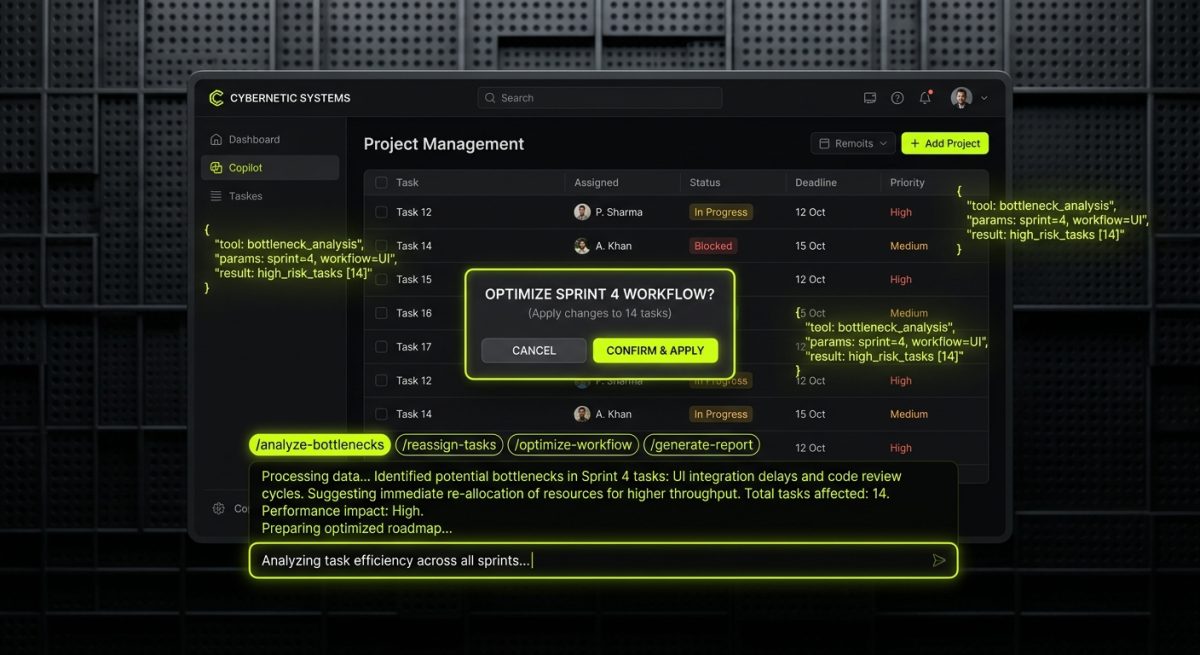
The copilot pattern — an AI assistant embedded directly inside a web application that helps users accomplish tasks faster — is arguably the highest-value AI integration available to B2B web development teams right now. It's not a chatbot on a marketing site. It's an AI layer woven into the application's core workflows.
What a Copilot Actually Does
A well-designed copilot reduces the cognitive load of complex tasks by:
- Generating drafts: A CRM built on WordPress with a custom application layer can offer a copilot that drafts follow-up emails based on deal notes and contact history.
- Explaining data: A Shopify analytics dashboard copilot can answer "Why did my conversion rate drop last Tuesday?" by querying order data, traffic sources, and inventory levels, then synthesizing a plain-language explanation.
- Automating repetitive actions: A project management tool can allow users to type "Move all tasks tagged 'design' to the next sprint" and execute that action via natural language rather than manual UI interaction.
- Surfacing contextual help: Instead of static documentation, a copilot understands what the user is currently doing and offers relevant guidance proactively.
Technical Architecture for a Web App Copilot
Building a production copilot requires more than calling the OpenAI API. The key components:
Tool Use / Function Calling Modern LLMs support structured tool calling, where the model can decide to invoke specific functions rather than just generating text. This is how a copilot takes actions in your application:
{
  "tools": [
    {
      "type": "function",
      "function": {
        "name": "update_task_status",
        "description": "Updates the status of a task in the project management system",
        "parameters": {
          "type": "object",
          "properties": {
            "task_id": { "type": "string" },
            "new_status": { "type": "string", "enum": ["todo", "in_progress", "done"] }
          },
          "required": ["task_id", "new_status"]
        }
      }
    }
  ]
}
Context Window Management Copilots need access to the user's current application context — what page they're on, what data is visible, what they've done recently. Injecting the right context into the system prompt without exceeding token limits requires a context selection strategy. Prioritize: current view state, recent user actions, relevant entity data (the customer record they're viewing, the order they're editing).
Streaming Responses For copilots, perceived latency matters enormously. Implement server-sent events (SSE) or WebSocket streaming so the response appears word-by-word rather than after a multi-second wait:
const response = await fetch('/api/copilot', {
  method: 'POST',
  body: JSON.stringify({ message, context }),
  headers: { 'Content-Type': 'application/json' }
});

const reader = response.body.getReader();
const decoder = new TextDecoder();

while (true) {
  const { done, value } = await reader.read();
  if (done) break;
  appendToUI(decoder.decode(value));
}
Copilot UX Patterns That Work in B2B Applications
- Slash commands: Allow users to trigger specific copilot actions with
/summarize,/draft,/explaincommands — familiar from tools like Notion and Linear. - Inline suggestions: Surface AI suggestions directly in form fields or text editors, similar to GitHub Copilot's ghost text pattern.
- Confirmation gates for destructive actions: When a copilot is about to take an irreversible action (deleting records, sending emails), always require explicit user confirmation. Trust is built through predictability.
- Feedback mechanisms: A simple thumbs up/thumbs down on each copilot response generates labeled training data you can use to fine-tune or evaluate model performance over time.
The copilot pattern is where AI stops being a novelty and becomes a genuine competitive moat. Applications that help users accomplish in 10 seconds what previously took 5 minutes don't just improve retention — they fundamentally change the product's value proposition.
Choosing the Right AI Stack for Your Web Platform
Not every AI implementation requires building from scratch. The right approach depends on your platform, team capabilities, and the complexity of the use case. Here's a practical framework for B2B web development projects:
Build vs. Buy Decision Matrix
Use a managed AI platform when:
- The use case is standard (FAQ chatbot, basic product recommendations)
- Time-to-market is the primary constraint
- Your team lacks ML engineering experience
- Budget is under $15K for the initial implementation
Managed options worth evaluating: Intercom Fin, Tidio AI, Yuma AI (Shopify-specific), and Algolia AI Search.
Build a custom implementation when:
- Your data is proprietary and sensitive (legal, healthcare, finance)
- The use case requires deep integration with custom application logic
- You need full control over model selection, prompting, and evaluation
- The AI feature is a core differentiator, not a commodity add-on
Model Selection by Use Case
| Use Case | Recommended Models | Key Consideration |
|---|---|---|
| RAG Chatbot | GPT-4o, Claude 3.5 Sonnet | Context window size, cost per token |
| Content Personalization | Smaller fine-tuned models, embedding models | Latency at scale |
| In-App Copilot | GPT-4o, Claude 3.5, Gemini 1.5 Pro | Tool calling reliability |
| Search Enhancement | text-embedding-3-large, Cohere Embed | Embedding quality, multilingual support |
Evaluation and Monitoring
Deploying an AI feature without an evaluation framework is how you ship something that works in staging and fails in production. Implement:
- Automated evals: Use frameworks like LangSmith, Braintrust, or custom pytest suites to run your chatbot or copilot against a curated set of test cases before every deployment.
- Production monitoring: Log all LLM inputs and outputs (with appropriate data handling policies). Monitor for latency spikes, error rates, and user feedback signals.
- Regression testing: When you update your model, prompts, or retrieval logic, run the full eval suite to catch regressions before they reach users.
- Cost tracking: LLM API costs scale with usage in ways that can surprise teams accustomed to fixed infrastructure costs. Set up per-feature cost tracking from day one.
The teams that get the most value from AI in web development are not necessarily the ones with the largest budgets or the most sophisticated models. They're the ones that treat AI features with the same engineering rigor they apply to any other production system — proper testing, monitoring, iteration, and a clear understanding of what success looks like before they write the first line of code.


