
Why the Old Web Stack Is No Longer Enough
For most of the last decade, a typical B2B web stack looked predictable: a CMS sitting on top of a database, a theme handling the frontend, and maybe a plugin or two managing forms and email. It worked well enough when the web was primarily a publishing medium. But the expectations placed on business websites have fundamentally changed. Today, a website is not a brochure — it is an operational layer of the business itself.
Clients expect their site to pull live inventory from an ERP, respond to customer queries with contextual intelligence, trigger internal workflows when a lead converts, and sync data across a half-dozen platforms in real time. None of that is achievable with a monolithic CMS acting alone. The architecture required to support these expectations is built on three interconnected pillars: APIs, artificial intelligence, and automation.
Understanding how these three pillars interact — and how to implement them responsibly — is the defining technical challenge for web development agencies in 2024 and beyond.
The Shift From Pages to Systems
The language of web development used to be dominated by terms like "pages," "themes," and "plugins." That vocabulary still applies at the surface level, but underneath, the most capable modern websites are better described as distributed systems with a web interface.
Consider what this means in practice:
- A WordPress site might serve as the editorial layer, while product data lives in a Shopify storefront, customer records in a CRM like HubSpot, and financial data in QuickBooks.
- A Webflow site might handle marketing pages, while a headless backend manages authentication, user dashboards, and personalized content delivery.
- A Shopify store might process orders through its native checkout, but route fulfillment instructions to a third-party 3PL via webhook, update a customer success team in Slack, and log the transaction in a BI tool — all within seconds.
None of these architectures are exotic. They are becoming the baseline expectation for mid-market B2B clients. The agencies that understand how to design, connect, and maintain these systems are the ones winning the most valuable contracts.
Why This Matters for Agency Positioning
Agencies that position themselves purely as "WordPress shops" or "Webflow designers" are increasingly competing on price in a commoditized market. Agencies that position themselves as digital infrastructure partners — capable of architecting API-connected, AI-enhanced, automated systems — are competing on value.
This is not a minor distinction. The budget allocation for a project that involves custom API integrations, AI-driven personalization, and automated workflows is typically three to five times larger than a standard CMS build. More importantly, the ongoing relationship with the client is stickier, because the system requires maintenance, iteration, and expertise that the client cannot easily replicate in-house.
The technical foundation for this positioning is exactly what this post addresses: how APIs, AI, and automation work together to form a new kind of digital infrastructure.
APIs as the Connective Tissue of Modern Web Architecture
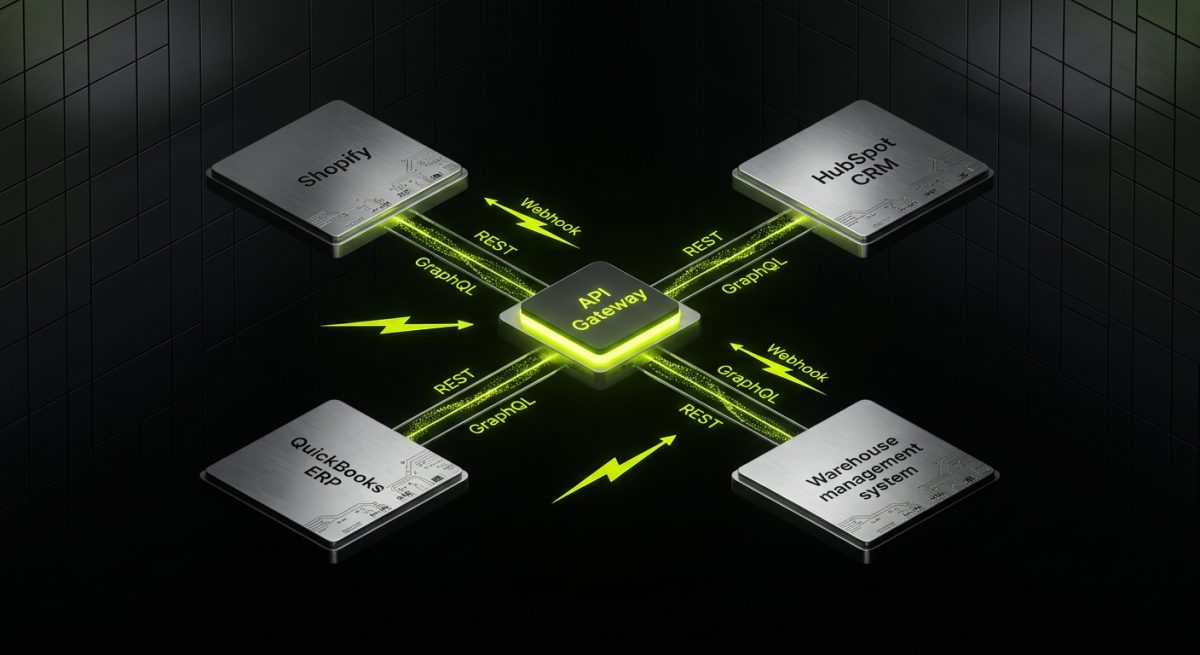
An API — Application Programming Interface — is the mechanism by which two software systems exchange data and trigger actions. In the context of web development, APIs are what allow a WordPress site to display live product availability from a warehouse management system, or a Webflow site to submit a form and instantly create a deal in a CRM.
APIs are not new. REST APIs have been a standard tool for over fifteen years. But what has changed dramatically is the density and sophistication of API ecosystems available to web developers. Nearly every business tool a B2B client uses — their CRM, ERP, marketing platform, payment processor, analytics suite, communication tools — exposes an API. The question is no longer whether integration is possible. The question is how to architect it cleanly.
REST vs. GraphQL: Choosing the Right Protocol
For most WordPress and Shopify integrations, REST APIs remain the dominant protocol. They are well-documented, widely supported, and straightforward to implement with standard HTTP methods.
GraphQL, originally developed by Facebook and now widely adopted, offers a more flexible alternative. Instead of hitting multiple endpoints to assemble a complete data object, a GraphQL query lets the client specify exactly the data it needs in a single request.
When to use REST:
- Integrating with third-party platforms that only expose REST endpoints (most CRMs, ERPs, and marketing tools)
- Simple CRUD operations where over-fetching is not a concern
- Projects where the development team has stronger REST experience
When to use GraphQL:
- Building headless architectures where the frontend needs to compose complex data from multiple sources
- Shopify Storefront API integrations, which natively support GraphQL
- Applications where bandwidth efficiency matters (mobile-first or high-traffic scenarios)
Here is a basic example of a GraphQL query against the Shopify Storefront API to retrieve product data:
query GetProduct($handle: String!) {
  product(handle: $handle) {
    title
    description
    priceRange {
      minVariantPrice {
        amount
        currencyCode
      }
    }
    images(first: 3) {
      edges {
        node {
          url
          altText
        }
      }
    }
  }
}
This single query returns the product title, description, price, and first three images — data that would require multiple REST calls to assemble from some APIs.
Webhooks: From Pull to Push
Traditional API integrations are pull-based: your application requests data from an external system on a schedule or in response to a user action. Webhooks reverse this model. Instead of your system asking "did anything change?", the external system notifies your system the moment something happens.
For B2B web applications, webhooks are often more appropriate than polling:
- A Shopify store fires a webhook when an order is placed, triggering a fulfillment workflow without any delay
- A payment processor fires a webhook when a subscription renews, updating the user's access level in the CMS immediately
- A CRM fires a webhook when a deal closes, triggering an onboarding email sequence and creating a client record in the project management tool
Handling webhooks reliably requires attention to a few critical details: idempotency (ensuring the same event processed twice does not create duplicate records), signature verification (confirming the payload came from the legitimate source), and error handling with retry logic (ensuring failed webhook deliveries are retried and logged).
API Gateway Architecture for Complex Integrations
When a project involves more than two or three API integrations, managing them individually at the application level becomes unwieldy. An API gateway acts as a centralized layer that handles authentication, rate limiting, logging, and routing for all external API calls.
For agency projects, tools like AWS API Gateway, Kong, or even a lightweight custom middleware built in Node.js can serve this function. The benefit is not just technical cleanliness — it also makes the system significantly easier to debug, monitor, and hand off to a client's internal team.
Integrating AI Into the Web Infrastructure Layer
Artificial intelligence has moved from a buzzword to a practical infrastructure component faster than most agencies anticipated. The availability of capable, affordable AI APIs — most notably from OpenAI, Anthropic, and Google — means that AI functionality can now be embedded directly into web systems without requiring a dedicated data science team.
For B2B web development agencies, the most immediately valuable AI integrations fall into three categories: content intelligence, conversational interfaces, and predictive personalization.
Content Intelligence: AI as a Data Processing Layer
One of the most underutilized AI applications in web infrastructure is using language models as a data transformation and classification layer. Rather than generating content from scratch, AI can process incoming data and make it more useful.
Practical examples:
- Lead qualification: When a contact form submission arrives, an AI model analyzes the message, classifies the lead by industry and intent, assigns a priority score, and routes it to the appropriate sales team member — all before a human reads it.
- Product description normalization: For e-commerce clients with large catalogs, AI can take raw supplier data (often inconsistent and poorly formatted) and generate standardized, SEO-optimized product descriptions at scale.
- Support ticket triage: Incoming support requests are classified by topic and urgency, with suggested responses drafted for the support agent to review and send.
Here is a simplified example of a Node.js function that uses the OpenAI API to classify an incoming lead:
const OpenAI = require('openai');
const client = new OpenAI({ apiKey: process.env.OPENAI_API_KEY });

async function classifyLead(formSubmission) {
  const prompt = `
    Analyze this contact form submission and return a JSON object with:
    - industry: the likely industry of the sender
    - intent: one of ["sales", "support", "partnership", "other"]
    - priority: one of ["high", "medium", "low"]
    - summary: a one-sentence summary

    Submission: ${JSON.stringify(formSubmission)}
  `;

  const response = await client.chat.completions.create({
    model: 'gpt-4o',
    messages: [{ role: 'user', content: prompt }],
    response_format: { type: 'json_object' }
  });

  return JSON.parse(response.choices[0].message.content);
}
This function can be triggered by a webhook from a form submission tool, with the result written to a CRM and used to route the lead automatically.
Conversational Interfaces: Beyond Basic Chatbots
The chatbots of five years ago were rule-based decision trees that frustrated users more often than they helped. Modern AI-powered conversational interfaces are categorically different. Built on large language models with access to a company's own knowledge base via Retrieval-Augmented Generation (RAG), they can answer nuanced questions accurately and escalate to a human when appropriate.
For B2B clients, the most valuable use cases include:
- Technical documentation assistants: A software company embeds an AI assistant trained on its documentation, allowing developers to ask natural language questions instead of searching manually.
- Sales qualification chatbots: A website visitor describes their use case, and the AI determines whether they meet the criteria for the company's services, collects qualifying information, and schedules a call.
- Internal knowledge bases: An agency builds an AI assistant for a client's internal team, trained on SOPs, product specs, and policy documents, reducing the load on managers answering repetitive questions.
The RAG architecture is critical here. Rather than relying solely on a model's training data, RAG retrieves relevant documents from a vector database (such as Pinecone or Weaviate) and injects them into the model's context window before generating a response. This allows the AI to answer questions about proprietary, up-to-date information that was never in its training data.
Predictive Personalization at the Infrastructure Level
Personalization has long been a goal of web marketing, but most implementations have been shallow: showing a returning visitor their last-viewed product, or displaying a different hero image based on the traffic source. AI enables genuine behavioral personalization that adapts the entire content experience based on a visitor's demonstrated interests, industry, and stage in the buying journey.
Implementing this at the infrastructure level means:
- Collecting behavioral signals (page views, scroll depth, click patterns, form interactions) and storing them in a user profile
- Running those signals through a classification model to determine the visitor's likely persona and intent
- Using that classification to dynamically serve different content blocks, CTAs, and recommendations
For Webflow and WordPress sites, this can be implemented with a combination of a lightweight JavaScript tracking layer, a serverless function handling the classification logic, and conditional content rendering based on the returned persona.
Automation: Closing the Loop Between Systems
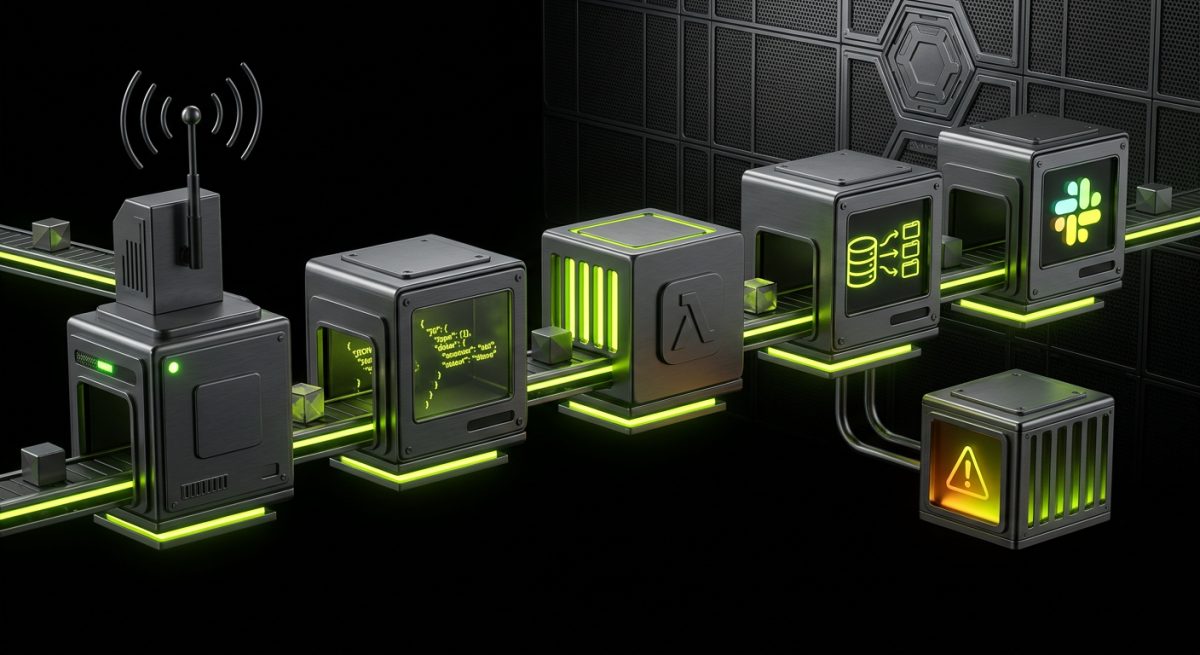
APIs connect systems. AI adds intelligence to data. Automation is what makes these capabilities operational without constant human intervention. In the context of web infrastructure, automation refers to the orchestration of multi-step workflows that execute in response to events, on schedules, or based on conditions.
The tools most relevant to agency work fall into two categories: no-code/low-code automation platforms (Make, Zapier, n8n) and code-level workflow orchestration (custom serverless functions, queue-based systems). The right choice depends on the complexity of the workflow, the client's internal technical capacity, and the maintenance model.
No-Code Automation Platforms: Power and Limitations
Make (formerly Integromat) and n8n have become genuinely powerful tools for connecting web systems without custom code. For many agency use cases, they are the right choice:
- Speed of implementation: A workflow that would take a developer two days to build in code can often be configured in Make in a few hours.
- Client maintainability: Non-technical clients can understand and modify visual workflows, reducing their dependency on the agency for minor changes.
- Built-in connectors: Both platforms have hundreds of pre-built integrations with common business tools, eliminating the need to write API authentication logic from scratch.
However, no-code platforms have real limitations that agencies need to communicate clearly to clients:
- Execution limits: Most platforms impose limits on the number of operations per month at each pricing tier, which can become expensive for high-volume workflows.
- Error handling complexity: Sophisticated error handling, retry logic, and conditional branching can become difficult to manage visually as workflows grow.
- Data transformation constraints: Complex data manipulation is awkward in visual interfaces and often requires workarounds that make the workflow brittle.
For workflows that exceed these constraints, custom code is the appropriate solution.
Serverless Functions as Automation Infrastructure
For more complex or high-volume automation requirements, serverless functions (AWS Lambda, Vercel Edge Functions, Cloudflare Workers) provide a flexible and cost-effective infrastructure layer.
A serverless function can:
- Receive a webhook from any source
- Validate and transform the payload
- Make multiple API calls in sequence or parallel
- Write results to a database
- Trigger downstream webhooks or queue messages
- Return a response — all within a single execution
Here is an example of a Vercel serverless function that handles a Shopify order webhook, enriches the order data with customer information from a CRM, and sends a Slack notification:
export default async function handler(req, res) {
  if (req.method !== 'POST') {
    return res.status(405).json({ error: 'Method not allowed' });
  }

  const order = req.body;

  // Verify Shopify webhook signature
  const isValid = verifyShopifyWebhook(req);
  if (!isValid) return res.status(401).json({ error: 'Unauthorized' });

  // Fetch customer data from CRM
  const crmData = await fetchCRMContact(order.customer.email);

  // Build Slack message
  const slackMessage = {
    text: `New order from ${order.customer.first_name} ${order.customer.last_name}`,
    blocks: [
      {
        type: 'section',
        text: {
          type: 'mrkdwn',
          text: `*Order #${order.order_number}* — $${order.total_price}\n` +
                `Customer since: ${crmData?.created_at || 'New customer'}\n` +
                `Lifetime value: $${crmData?.lifetime_value || '0'}`
        }
      }
    ]
  };

  await fetch(process.env.SLACK_WEBHOOK_URL, {
    method: 'POST',
    headers: { 'Content-Type': 'application/json' },
    body: JSON.stringify(slackMessage)
  });

  return res.status(200).json({ success: true });
}
This pattern — receive event, enrich data, take action — is the core loop of most business automation workflows.
Designing Automation for Reliability and Observability
The most common failure mode in automation projects is building workflows that work perfectly in testing but fail silently in production. Reliability and observability need to be designed in from the start, not added as an afterthought.
Key practices for production-grade automation:
- Idempotent operations: Every workflow step should be safe to execute multiple times without creating duplicate records or triggering duplicate actions. Use unique identifiers to check whether an action has already been performed before executing it.
- Dead letter queues: When a workflow step fails after all retries are exhausted, the failed payload should be written to a dead letter queue for manual review, not silently discarded.
- Structured logging: Every workflow execution should log its inputs, outputs, and any errors in a structured format (JSON) that can be queried and analyzed. Tools like Datadog, Logtail, or even a simple database table can serve this purpose.
- Alerting on failure rates: Set up alerts that notify the relevant team when a workflow's failure rate exceeds a threshold. A workflow that fails 5% of the time might not be noticed until it has caused significant data inconsistency.
- Documentation as infrastructure: Every automated workflow should have written documentation that describes its trigger, its steps, its dependencies, and its failure modes. This is not optional — it is what makes the system maintainable by someone other than its original author.
Agencies that build automation with these practices in place deliver systems that clients can trust and that generate fewer emergency support calls. That reliability is a significant part of the value proposition for infrastructure-level web development work.


