
Why Web Application Security Is a Business-Critical Concern
The attack surface for modern web applications has never been larger. As B2B organizations move core workflows — customer portals, procurement systems, partner dashboards — onto web platforms built with WordPress, Webflow, or Shopify, the consequences of a security breach extend far beyond a single compromised page. Regulatory fines, client trust erosion, and operational downtime are all on the table.
According to IBM's Cost of a Data Breach Report 2023, the average cost of a data breach reached $4.45 million globally, with web application vulnerabilities accounting for a significant share of initial attack vectors. Meanwhile, Verizon's 2023 Data Breach Investigations Report found that 74% of breaches involved a human element — including exploitation of misconfigured web applications and stolen credentials.
For B2B teams managing client-facing web infrastructure, these numbers translate directly into liability. A vulnerability in a client portal isn't just a technical problem — it's a contractual and reputational one.
The challenge for development teams is that security is rarely built into project timelines from the start. It gets treated as a final checklist item rather than an architectural principle. This reactive posture is precisely what attackers rely on. Shifting to a security-by-design mindset — where threat modeling, dependency audits, and access control reviews happen at the planning phase — is the operational change that separates resilient web applications from vulnerable ones.
The B2B-Specific Risk Profile
B2B web applications carry distinct risk characteristics compared to consumer-facing platforms:
- Higher data sensitivity: B2B platforms often handle financial records, contracts, PII of enterprise clients, and proprietary business data
- Complex integrations: ERP, CRM, and payment gateway integrations multiply the number of attack vectors
- Privileged user roles: Multi-tenant dashboards with admin, manager, and client roles create authorization complexity
- Longer session lifespans: Business users often stay logged in for extended periods, increasing session hijacking exposure
Understanding this profile is the first step toward applying the right security controls at the right layers of the stack.
OWASP Top 10: The Framework Every Web Development Team Should Internalize
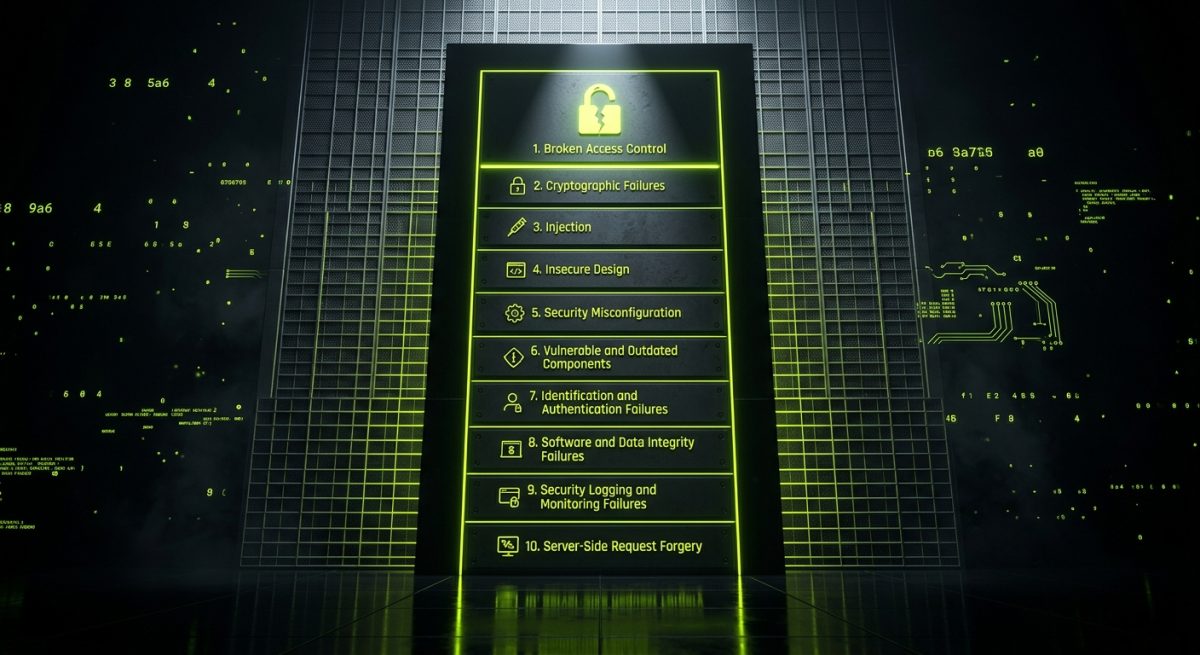
The Open Web Application Security Project (OWASP) publishes its Top 10 list of the most critical web application security risks, updated periodically to reflect evolving threat landscapes. The 2021 edition remains the current authoritative reference and is widely used as a baseline for security audits, penetration testing scopes, and compliance frameworks.
For development agencies and in-house teams building on WordPress, Webflow, or Shopify, the OWASP Top 10 isn't abstract theory — each category maps directly to implementation decisions made during development.
A01: Broken Access Control
The top-ranked risk since 2021. Access control failures occur when users can act outside their intended permissions — accessing other users' data, elevating privileges, or viewing admin-only content.
Practical example in WordPress: A custom REST API endpoint that returns user profile data without verifying the requesting user's identity. Any authenticated user could enumerate other accounts by iterating over user IDs.
Mitigation:
// Verify current user has permission before returning data
add_action( 'rest_api_init', function () {
  register_rest_route( 'myapp/v1', '/profile/(?P<id>\d+)', array(
    'methods'  => 'GET',
    'callback' => 'get_user_profile',
    'permission_callback' => function( $request ) {
      return get_current_user_id() === (int) $request['id']
             || current_user_can( 'administrator' );
    },
  ));
});
A02: Cryptographic Failures
Previously labeled "Sensitive Data Exposure," this category covers inadequate encryption of data in transit and at rest. Common failures include transmitting sensitive data over HTTP, storing passwords with weak hashing algorithms (MD5, SHA-1), or exposing API keys in client-side JavaScript.
Key controls:
- Enforce HTTPS with HSTS headers
- Use
bcryptorArgon2for password storage - Store API credentials in environment variables, never in version-controlled files
A03: Injection
SQL injection, NoSQL injection, LDAP injection, and OS command injection remain pervasive. In CMS environments, custom plugins and theme functions that construct database queries with unvalidated user input are frequent culprits.
// VULNERABLE — never do this
$results = $wpdb->get_results(
  "SELECT * FROM wp_users WHERE user_email = '" . $_GET['email'] . "'"
);

// SAFE — use prepared statements
$results = $wpdb->get_results(
  $wpdb->prepare(
    "SELECT * FROM wp_users WHERE user_email = %s",
    sanitize_email( $_GET['email'] )
  )
);
A04–A10: The Remaining Risk Categories
The rest of the OWASP Top 10 covers equally important ground:
- A04 Insecure Design: Missing threat modeling and security requirements in the design phase
- A05 Security Misconfiguration: Default credentials, verbose error messages, open cloud storage buckets
- A06 Vulnerable and Outdated Components: Unpatched plugins, outdated npm packages, deprecated libraries
- A07 Identification and Authentication Failures: Weak password policies, missing MFA, insecure session tokens
- A08 Software and Data Integrity Failures: Unverified software updates, insecure CI/CD pipelines
- A09 Security Logging and Monitoring Failures: No audit trails, alerts not configured for suspicious activity
- A10 Server-Side Request Forgery (SSRF): Tricking the server into making requests to internal services
Each of these maps to specific configuration decisions in WordPress (plugin management, role configuration, .htaccess rules), Webflow (custom code injection policies, form handling), and Shopify (app permissions, webhook validation, checkout customization security).
Data Protection Frameworks and Compliance Requirements for Web Applications
Beyond OWASP, B2B web applications operating in regulated industries or serving clients in the EU, UK, or California must align their security posture with formal data protection legislation. Non-compliance isn't just a technical failure — it carries direct financial penalties and can void client contracts.
GDPR and Its Technical Implications
The General Data Protection Regulation (GDPR) applies to any organization processing personal data of EU residents, regardless of where the organization is based. For web applications, this translates into concrete technical requirements:
Data minimization: Only collect what is strictly necessary. Forms should not include optional fields that harvest unnecessary personal data by default.
Right to erasure: Systems must support the ability to permanently delete a user's data on request. In WordPress, this means ensuring custom tables and third-party plugin data are included in erasure workflows — not just the native wp_users table.
Data breach notification: Article 33 requires notification to supervisory authorities within 72 hours of becoming aware of a breach. This is only achievable if logging and monitoring infrastructure is in place before an incident occurs.
Consent management: Cookie banners are the visible layer, but the underlying requirement is that consent must be granular, revocable, and documented. Consent Management Platforms (CMPs) like Cookiebot or Complianz integrate with WordPress to handle this technically.
CCPA and Sector-Specific Regulations
The California Consumer Privacy Act (CCPA) introduces similar rights for California residents, including the right to know, the right to delete, and the right to opt out of data sales. For B2B platforms with US-based clients, CCPA compliance is increasingly a contractual requirement rather than an optional standard.
Sector-specific frameworks add further layers:
- HIPAA for any platform handling protected health information (PHI)
- PCI DSS for Shopify stores or custom checkout flows handling cardholder data
- SOC 2 Type II increasingly requested by enterprise B2B clients as a vendor qualification requirement
Implementing Data Protection at the Application Layer
Compliance isn't achieved through policy documents alone — it requires technical controls embedded in the application:
Encryption at rest: Sensitive database fields (SSNs, financial identifiers, health data) should be encrypted at the application layer using AES-256, not just relying on disk-level encryption.
Access logging: Every access to sensitive records should be logged with user ID, timestamp, and action. This supports both breach investigation and compliance audits.
Data retention policies: Automated deletion of records that exceed their retention period reduces both liability and storage costs. Cron jobs or scheduled tasks should enforce these policies programmatically.
// Example: Shopify webhook signature validation (Node.js)
const crypto = require('crypto');

function verifyShopifyWebhook(rawBody, hmacHeader, secret) {
  const hash = crypto
    .createHmac('sha256', secret)
    .update(rawBody, 'utf8')
    .digest('base64');
  return crypto.timingSafeEqual(
    Buffer.from(hash),
    Buffer.from(hmacHeader)
  );
}
Validating webhook signatures — as shown above for Shopify — is a foundational control that prevents attackers from injecting fraudulent event payloads into your application's processing pipeline.
Security Hardening in Practice: WordPress, Webflow, and Shopify

General security principles must be translated into platform-specific implementation. Each platform has its own attack surface, configuration options, and third-party ecosystem risks.
WordPress Security Hardening
WordPress powers approximately 43% of the web, making it the most targeted CMS by volume. The majority of WordPress compromises involve vulnerable plugins or themes, not the core platform itself.
Essential hardening measures:
- Disable XML-RPC unless explicitly required:
add_filter('xmlrpc_enabled', '__return_false'); - Limit login attempts using plugins like Limit Login Attempts Reloaded or server-level fail2ban rules
- Restrict file editing in the admin dashboard:
define('DISALLOW_FILE_EDIT', true);inwp-config.php - Implement a Web Application Firewall (WAF): Cloudflare, Sucuri, or Wordfence provide rule-based filtering at the edge or application layer
- Audit user roles regularly: Remove dormant admin accounts and apply the principle of least privilege
- Move
wp-config.phpabove the web root to prevent direct access - Enforce strong Content Security Policy (CSP) headers to mitigate XSS attack surface
# Nginx: Block access to sensitive WordPress files
location ~* /(wp-config\.php|xmlrpc\.php|\.htaccess) {
  deny all;
  return 404;
}
Dependency management: Every installed plugin and theme is a potential attack vector. Maintain an inventory, subscribe to the WPScan vulnerability database, and automate security update notifications. Remove plugins that are no longer maintained or have open CVEs.
Webflow Security Considerations
Webflow's hosted infrastructure handles many server-level security concerns, but custom code, form handling, and third-party integrations remain the developer's responsibility.
- Custom code injection: Scripts added via the
<head>or<body>custom code sections bypass Webflow's content pipeline. Audit all third-party scripts for supply chain risks - Form submissions: Webflow's native forms are processed by Webflow's infrastructure, but integrations with Zapier, Make, or direct webhooks to custom backends introduce data handling responsibilities
- API keys in client-side code: Any Webflow site using JavaScript to call external APIs must proxy those calls through a serverless function to avoid exposing credentials in browser-readable code
- CMS content sanitization: If CMS content is dynamically rendered in custom JavaScript contexts, validate and sanitize all output to prevent stored XSS
Shopify Security Considerations
Shopify's platform handles PCI DSS compliance for checkout flows, but custom apps, theme code, and third-party integrations extend the merchant's responsibility.
- App permissions (OAuth scopes): Request only the minimum required API scopes. An app that requests
read_all_orderswhen it only needsread_ordersfor a specific date range violates least-privilege principles - Webhook validation: Always verify HMAC signatures on incoming webhooks (as shown in the code example above)
- Liquid template injection: Avoid rendering user-supplied content directly in Liquid templates without sanitization
- Storefront API tokens: Public Storefront API tokens have limited scope by design, but should still be rotated periodically and monitored for abuse patterns in API logs
- Checkout extensibility: With Shopify's move to checkout extensibility (replacing checkout.liquid), custom UI extensions run in a sandboxed environment — but any external API calls from those extensions must be secured appropriately
Cross-Platform Security Practices
Regardless of platform, the following controls apply universally to B2B web applications:
| Control | Implementation |
|---|---|
| Multi-Factor Authentication | Enforce for all admin and privileged accounts |
| Dependency scanning | Integrate tools like Snyk or Dependabot into CI/CD |
| Security headers | X-Frame-Options, X-Content-Type-Options, Referrer-Policy, CSP |
| Regular penetration testing | Annual minimum; quarterly for high-risk applications |
| Incident response plan | Documented, tested, and accessible before an incident occurs |
Security is not a product feature — it's an operational discipline. For B2B agencies and development teams, embedding security reviews into sprint cycles, conducting pre-launch security checklists, and maintaining post-deployment monitoring are the practices that separate professional web development from technically functional but operationally risky delivery.


