
The Numbers Don't Lie: WordPress Market Dominance in 2024
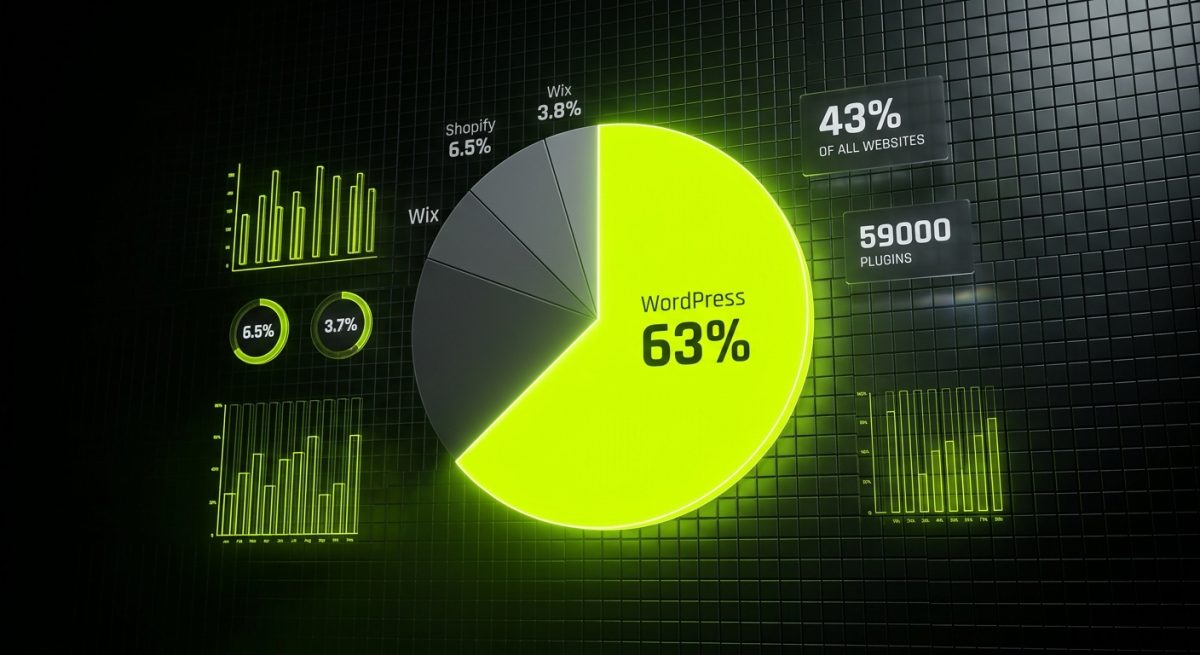
When a platform powers over 43% of all websites on the internet, it stops being a trend and becomes infrastructure. WordPress has held the top position in the CMS market for over a decade, but what's more remarkable is that its market share continues to grow — not stagnate — even as competitors like Webflow, Squarespace, Wix, and headless CMS solutions pour millions into marketing and product development.
As of 2024, WordPress commands approximately 63% of the CMS market share among websites that use a known content management system. The next closest competitor, Shopify, sits at around 6.5%, followed by Wix at 3.8%. These aren't numbers that suggest a platform coasting on legacy adoption — they reflect active, ongoing preference by developers, agencies, and enterprise teams worldwide.
What the Data Actually Tells Us
Breaking down WordPress's reach reveals a few important truths:
- Volume at every tier: From personal blogs to Fortune 500 companies, WordPress serves clients across every revenue bracket and industry vertical.
- Plugin ecosystem depth: Over 59,000 plugins in the official repository, with thousands more distributed commercially through platforms like Envato and individual developer marketplaces.
- Theme marketplace maturity: ThemeForest alone hosts tens of thousands of WordPress themes, many of which are actively maintained and updated.
- Developer talent pool: WordPress-specific developers represent one of the largest pools of web professionals globally, making hiring, outsourcing, and team scaling significantly easier than with niche platforms.
For B2B decision-makers evaluating CMS platforms, these statistics carry real operational weight. A platform with 43% internet penetration is one with deep documentation, extensive community support, proven hosting infrastructure, and a long runway of continued development. The risk profile of choosing WordPress is fundamentally different — and lower — than choosing a platform with 2% market share, regardless of how compelling that platform's feature set might appear.
The Open-Source Advantage in Enterprise Contexts
WordPress's open-source foundation isn't just a philosophical position — it's a structural advantage with direct business implications. Unlike SaaS CMS platforms where pricing, features, and even platform availability are controlled by a third party, WordPress gives organizations full ownership of their codebase, data, and infrastructure decisions.
This matters enormously in enterprise and mid-market B2B contexts where vendor lock-in is a legitimate concern. When a SaaS CMS raises prices, deprecates features, or — as has happened with multiple platforms — shuts down entirely, clients built on those platforms face forced migrations on someone else's timeline. WordPress eliminates that category of risk entirely.
The WordPress project is governed by Automattic and the WordPress Foundation, with core development driven by a global contributor community. No single corporate acquisition or pivot can fundamentally alter the platform's direction without community consensus. That governance model provides a level of long-term stability that proprietary platforms structurally cannot match.
Why Developers and Agencies Keep Choosing WordPress
The agency perspective on WordPress is often more nuanced than the end-client perspective, and for good reason. Developers who have worked across multiple CMS platforms understand both the strengths and the genuine friction points of WordPress — and they keep choosing it anyway. That's not inertia; it's informed preference.
The Development Ecosystem Is Genuinely Mature
WordPress development has evolved significantly from the days of manually editing functions.php and hoping nothing broke. The modern WordPress development stack includes:
- Block Editor (Gutenberg): The block-based editing experience has matured substantially since its controversial 2018 launch. Full Site Editing (FSE) now allows theme-level customization through the editor interface, reducing the gap between developer-built templates and client-manageable layouts.
- REST API: WordPress exposes a robust REST API that enables headless and decoupled architectures, allowing teams to use WordPress purely as a content backend while serving content through React, Next.js, or other frontend frameworks.
- WP-CLI: Command-line interface tooling that enables scripted deployments, database operations, plugin management, and environment configuration — essential for professional development workflows.
- Composer and modern PHP practices: WordPress increasingly integrates with modern PHP tooling, enabling dependency management, autoloading, and coding standards enforcement through tools like PHP_CodeSniffer and PHPStan.
# Example: Installing WordPress with WP-CLI and configuring a new site
wp core download --locale=en_US
wp config create --dbname=my_db --dbuser=root --dbpass=secret
wp core install --url=https://example.com --title="My Site" --admin_user=admin --admin_email=admin@example.com
wp plugin install advanced-custom-fields --activate
This level of tooling maturity means WordPress development can be integrated into CI/CD pipelines, version-controlled properly, and deployed with the same rigor as custom application development.
Advanced Custom Fields and the Data Modeling Revolution
One of the most underappreciated reasons WordPress retains agency loyalty is Advanced Custom Fields (ACF) and its commercial counterpart, ACF Pro. These tools transformed WordPress from a blogging platform into a genuine content modeling system.
With ACF, developers can:
- Define complex, structured data schemas for any post type
- Create repeater fields and flexible content layouts that give editors structured freedom without risking design integrity
- Expose custom field data through the REST API for headless consumption
- Build options pages that function as site-wide configuration panels
Combined with Custom Post Types, taxonomies, and query customization, this capability set allows WordPress to serve as the content backbone for complex B2B applications — product catalogs, knowledge bases, event management systems, member portals — without requiring a custom-built CMS from scratch.
Page Builder Ecosystem for Non-Technical Clients
While the developer community often debates the merits of page builders, their business value for agencies is undeniable. Elementor, Divi, Beaver Builder, and Bricks Builder give non-technical clients the ability to manage and update their own content without introducing layout-breaking changes or requiring developer intervention for every edit.
This reduces ongoing maintenance overhead, lowers the barrier to client self-sufficiency, and positions agencies to focus on higher-value work rather than content update tickets. For B2B agencies managing multiple client sites, that operational leverage compounds significantly over time.
WordPress in the Headless and Composable Architecture Era
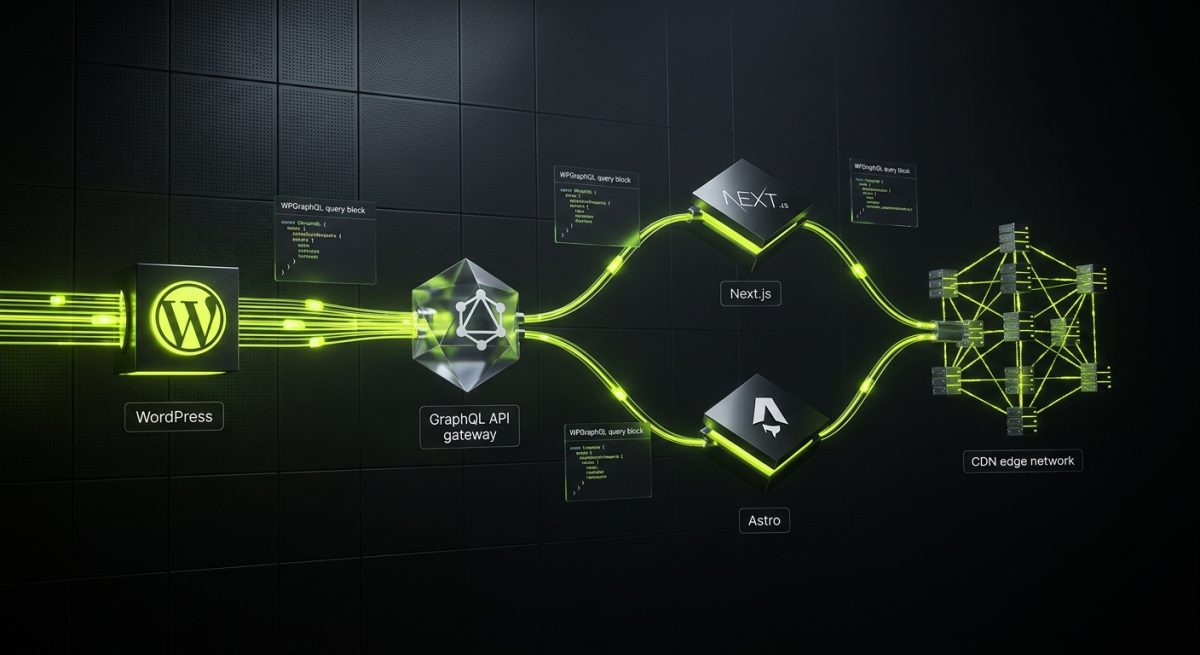
The rise of headless CMS architecture — where the content management backend is decoupled from the presentation layer — initially seemed like a threat to traditional WordPress adoption. If developers could choose purpose-built headless platforms like Contentful, Sanity, or Strapi, why would they route that architecture through WordPress?
The answer, increasingly, is that WordPress as a headless backend offers a combination of content management maturity, editorial UX familiarity, and ecosystem depth that newer headless platforms are still working to match.
WPGraphQL and the Headless WordPress Stack
WPGraphQL is the plugin that made headless WordPress architecturally competitive. By exposing WordPress content through a GraphQL API, it enables frontend frameworks to query exactly the data they need — nothing more, nothing less — with a single request.
query GetLatestPosts {
  posts(first: 5, where: { status: PUBLISH }) {
    nodes {
      id
      title
      slug
      date
      excerpt
      featuredImage {
        node {
          sourceUrl
          altText
        }
      }
    }
  }
}
This query pattern, paired with a Next.js or Astro frontend, delivers the performance and developer experience of modern frontend frameworks while retaining WordPress's mature editorial interface — an interface that content teams already know how to use.
The Faust.js Framework and Official Headless Support
WP Engine's Faust.js framework represents a significant maturation of the headless WordPress ecosystem. It provides:
- Seed nodes and routing: Automatic route generation based on WordPress permalink structures, eliminating the need to manually map WordPress URLs to Next.js routes
- Authentication handling: Built-in support for previewing draft content, authenticated requests, and user session management
- Apollo Client integration: Pre-configured GraphQL client setup with caching and state management
The existence of a dedicated, well-maintained framework for headless WordPress signals that this architectural pattern has moved from experimental to production-ready. Agencies building headless sites for clients no longer need to architect the integration layer from scratch.
Performance Characteristics of Headless WordPress
The performance argument for headless WordPress is compelling in high-traffic B2B contexts:
- Static generation: Pages pre-rendered at build time serve from CDN edge nodes with sub-100ms response times
- Incremental Static Regeneration (ISR): Next.js ISR allows individual pages to be regenerated on-demand without full site rebuilds, solving the stale content problem that historically plagued static site generators
- Separation of concerns: WordPress server load is limited to API requests from the build process and authenticated preview requests, rather than serving every public page view
For B2B sites with significant organic search traffic, media-heavy content, or global audiences, the performance delta between a well-configured headless WordPress deployment and a traditional server-rendered WordPress site can be substantial — often measured in Core Web Vitals improvements that directly affect search ranking and conversion rate.
The Gutenberg Evolution: Full Site Editing Changes the Equation
Full Site Editing (FSE) represents the most significant architectural shift in WordPress since the introduction of the block editor, and its implications for both developers and clients are still being fully realized. FSE moves template-level design — headers, footers, archive layouts, single post templates — into the block editor interface, making them editable through the same visual tools used for page content.
What FSE Means for Agency Workflows
For agencies, FSE introduces a meaningful shift in how WordPress themes are structured and delivered:
- Block themes replace classic themes: Block themes use HTML template files with block markup rather than PHP template files, changing the authoring model for theme development
- theme.json as design system configuration: The
theme.jsonfile centralizes design tokens — colors, typography, spacing, layout constraints — in a structured format that both the editor and frontend rendering respect - Reduced custom CSS dependency: Design constraints defined in
theme.jsoncan prevent editors from making off-brand choices without requiring custom JavaScript or PHP to enforce them
{
  "$schema": "https://schemas.wp.org/trunk/theme.json",
  "version": 2,
  "settings": {
    "color": {
      "palette": [
        { "slug": "primary", "color": "#1A73E8", "name": "Primary Blue" },
        { "slug": "secondary", "color": "#F8F9FA", "name": "Light Gray" }
      ]
    },
    "typography": {
      "fontSizes": [
        { "slug": "small", "size": "14px", "name": "Small" },
        { "slug": "medium", "size": "18px", "name": "Medium" },
        { "slug": "large", "size": "28px", "name": "Large" }
      ]
    }
  }
}
This configuration-driven approach to design systems aligns well with how design-conscious agencies already think about component libraries and design tokens — it just moves that discipline into the WordPress layer.
Custom Blocks as Product Differentiators
Agencies that invest in custom block development are building genuine product IP. A library of well-crafted, reusable blocks — pricing tables, testimonial carousels, feature comparison grids, CTA modules — becomes a deployment accelerator across client projects and a tangible differentiator in sales conversations.
Building custom blocks with @wordpress/create-block and React gives agencies access to the same toolchain WordPress core uses, ensuring compatibility and longevity:
npx @wordpress/create-block my-custom-block --template @wordpress/create-block-tutorial-template
cd my-custom-block
npm start
The resulting block integrates natively with the editor, supports block patterns, and can be distributed as a standalone plugin — making it portable across client sites and potentially marketable as a commercial product.
Editor Experience as a Client Retention Factor
Client satisfaction with their CMS is a meaningful factor in agency retention. Clients who find their CMS frustrating, confusing, or limiting are more likely to seek platform migrations — which represent both an opportunity and a threat depending on which side of the conversation an agency is on.
The Gutenberg editor, despite its early controversy, has matured into an editorial experience that most non-technical users find genuinely intuitive. The block-based mental model — content as a collection of structured, reorderable components — maps well to how modern web content is actually produced. Clients who can confidently update their own sites without constant agency support are clients who trust their agency's technical choices and are more likely to return for new projects rather than viewing their website as a source of ongoing frustration.


