
Webflow has earned a legitimate place in the professional web development stack. But the conversations happening in agency war rooms and client discovery calls are rarely as clean as the platform's marketing suggests. The real question is never "Is Webflow good?" — it's "Is Webflow right for this project, this team, and this business?"
After building production Webflow projects ranging from marketing sites to gated membership portals to multi-language editorial platforms, the patterns become clear. There are categories of work where Webflow is the sharpest tool available. There are others where choosing it creates compounding technical debt from week one. This post maps both territories with precision.
Where Webflow Genuinely Wins: The Right Use Cases
Webflow's competitive advantage is not that it's a visual builder — it's that it closes the gap between design fidelity and production output without sacrificing developer control. That distinction matters enormously in specific project contexts.
Marketing Sites and Campaign Landing Pages
For B2B SaaS companies, agencies, and professional services firms, the primary website is a sales asset, not a software product. The requirements are predictable: pixel-perfect design implementation, fast load times, CMS-driven content for blog and case studies, and the ability for a non-technical marketing team to make copy and image updates without filing a dev ticket.
Webflow handles this combination better than any other platform at its price point. A Figma file becomes a production build with clean, semantic HTML — not a theme hack layered on top of a framework that was never designed for that design. When class architecture follows BEM-style conventions and components are built to be reused rather than duplicated, the resulting codebase is genuinely maintainable.
The CMS layer is particularly strong here. Collection schemas can be structured to match real editorial workflows — not just title, body, and image, but multi-reference fields, conditional visibility rules, and template layouts that give content editors meaningful control without exposing them to the Designer interface.
Design-Driven Projects with Animation Requirements
When a project brief includes scroll-triggered animations, parallax sequences, or interaction-heavy UI states, the build options narrow quickly. WordPress with a page builder produces animation implementations that are either plugin-dependent or require significant custom JavaScript that fights the DOM structure the builder created. React-based frameworks give full control but require a front-end developer for every iteration.
Webflow's native interactions engine, combined with GSAP integration via custom code embeds, creates a middle path that is genuinely powerful. Designers can own interaction logic in the Webflow Designer while developers layer in GSAP timelines for sequences that exceed what the native engine handles. The result is production-ready animation without the overhead of a fully custom front-end build.
This is particularly relevant for agency and studio websites, product launch microsites, and portfolio-type builds where visual differentiation is a core business requirement — not a cosmetic preference.
Multi-Language Editorial Platforms
Webflow's native localization feature (available on higher-tier plans) and its Weglot integration give it a credible story for multi-language content sites that don't require complex backend logic. For a company publishing thought leadership content in English, French, and German — with a team of editors managing each locale — the Webflow CMS plus Weglot combination handles translation workflows, hreflang tags, and locale-specific content variations without a custom CMS build.
The ceiling here is real: if the localization requirements involve machine translation pipelines, complex approval workflows, or content that varies structurally (not just linguistically) between locales, a headless CMS with a custom front-end becomes the more defensible architecture. But for the majority of professional service and B2B content sites, Webflow's localization capabilities are sufficient and significantly faster to implement.
Membership Sites and Client Portals (With the Right Stack)
Webflow does not have native authentication. But that limitation is addressable with the right integration layer. Memberstack and Outseta both have mature Webflow integrations that handle user authentication, gated content, and member dashboards. For more complex requirements — custom JWT authentication, role-based access control, or integrations with internal business systems — custom code embeds and middleware can extend Webflow's capabilities considerably.
The architecture pattern that works: Webflow handles the front-end presentation layer, including all design, layout, and CMS-driven content. Memberstack or Outseta handles identity and access. Airtable, a custom database, or an existing CRM handles member data. Zapier or Make handles workflow automation between systems. This stack is not as elegant as a purpose-built application, but for membership sites with under a few thousand members and straightforward access logic, it ships faster and costs less to maintain.
Where Webflow Creates Problems: The Cases to Avoid
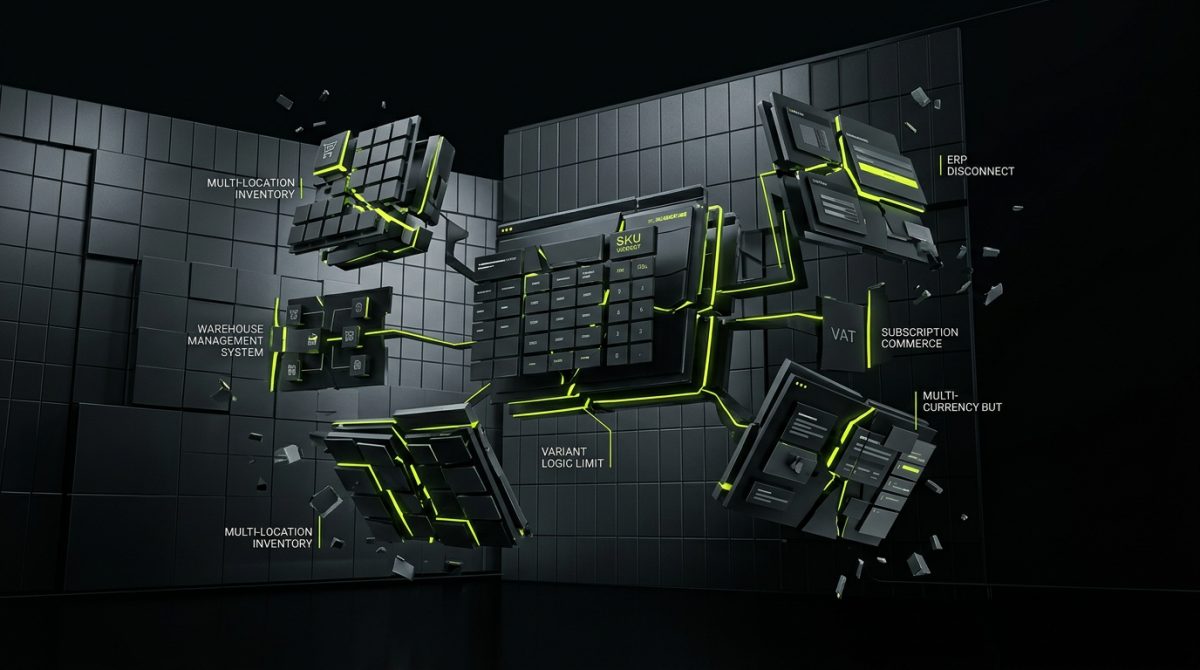
The Webflow sales narrative is compelling enough that projects sometimes land on the platform that should never have been there. The failure modes are predictable, and they tend to compound — what starts as a minor limitation becomes a structural constraint that blocks growth.
Complex E-commerce Beyond Basic Catalogs
Webflow's native e-commerce is a product catalog with a checkout flow. For a brand selling a small number of SKUs with simple variant logic, it works. For anything approaching real e-commerce complexity, it breaks down quickly.
The specific failure points:
- Inventory management: No native integration with warehouse management systems. Multi-location inventory is not supported.
- Variant logic: Complex product variants (size × color × material with SKU-level pricing) hit hard limits in the CMS.
- Order management: The native order management interface is minimal. Any operational workflow beyond basic order review requires third-party tooling.
- Tax and compliance: Webflow's tax calculation is basic. For businesses with nexus in multiple US states or VAT obligations across EU countries, this is a compliance risk.
- Subscription commerce: Native subscriptions do not exist. Stripe integration via custom code is possible but requires significant development effort and ongoing maintenance.
Shopify exists precisely to solve these problems. When a client's e-commerce requirements include any meaningful operational complexity — high SKU count, subscription products, B2B pricing tiers, ERP integration, or multi-currency checkout — Shopify is the correct platform choice, and recommending Webflow e-commerce is a disservice to the client.
Applications With Complex Business Logic
Webflow is a front-end publishing platform. It is not an application framework. This distinction is obvious in theory and frequently ignored in practice.
The signal that a project has crossed from "website with interactive features" to "application" is usually the presence of user-generated data, stateful UI that depends on server-side logic, or business rules that need to be enforced at the data layer rather than the presentation layer.
Examples of projects that should not be built in Webflow:
- A platform where users create, edit, and share structured content with other users
- A booking or scheduling system with real-time availability and conflict resolution
- A dashboard that aggregates data from multiple sources and applies business rules to surface insights
- Any system where data integrity and access control are regulatory requirements
For these projects, a Next.js or Astro front-end with a proper backend — or a purpose-built SaaS tool — is the right architecture. Webflow can sometimes serve as a marketing site that sits in front of the application, but it should not be the application itself.
Large-Scale Content Sites With Complex Taxonomies
Webflow's CMS has a 10,000-item limit per collection on the Business plan and a 20-item limit on multi-reference fields. For a marketing blog with 200 posts, these limits are irrelevant. For a publisher with 15,000 articles, a complex tagging taxonomy, and editorial workflows that involve draft states, contributor permissions, and scheduled publishing, these limits are blocking constraints.
The multi-reference field limit is particularly painful for content-rich sites. A recipe site where each recipe references ingredients, techniques, dietary categories, and related recipes will hit the 20-item reference limit on active content — not edge cases.
WordPress with a headless architecture, or a dedicated headless CMS like Contentful or Sanity paired with a custom front-end, handles these requirements without architectural compromise. Webflow is not the right tool, and the limitations will surface at the worst possible time — when the content library has grown and migration costs are high.
When the Client Team Needs Developer-Level Control
Webflow's editor interface is genuinely good for content updates — text, images, CMS items. It is not a tool for non-technical users to make structural layout changes, modify component logic, or manage complex conditional visibility rules. The Designer interface requires meaningful training to use without breaking things.
If the client's internal team needs to own the site development — not just content updates — and that team does not include someone with front-end development experience, Webflow creates a dependency problem. Every structural change requires either a trained Webflow developer or a retainer relationship with the agency that built the site.
This is not inherently a problem — maintenance retainers are a legitimate service model, and most professional sites benefit from ongoing development support. But it should be a transparent part of the project conversation, not a surprise that surfaces six months after launch.
The Architecture Decision Framework: How to Evaluate Webflow for a Specific Project
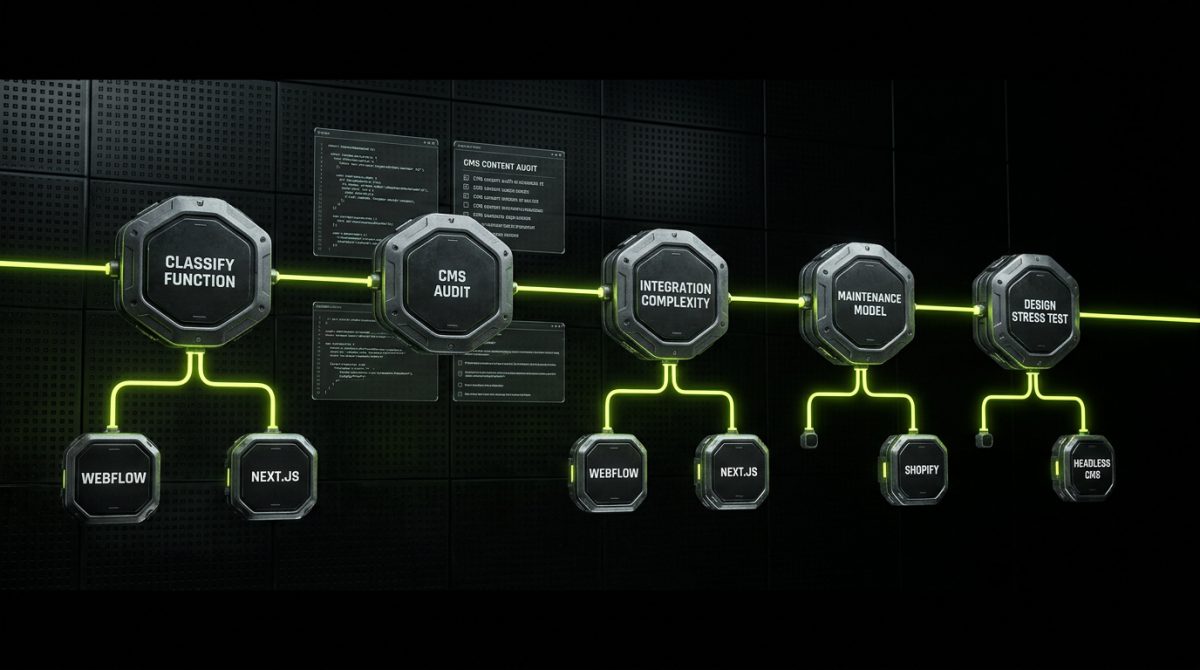
The decision to use Webflow should follow a structured evaluation, not a platform preference. The following framework reflects the questions that should drive the conversation in a project discovery session.
Step 1: Classify the Primary Function
Before evaluating any platform, classify what the project primarily is:
- Publishing platform: Content is created by the team and consumed by visitors. No user accounts, no user-generated data, no stateful UI.
- Marketing tool: The site exists to generate leads, support sales, and communicate brand positioning. Conversion optimization and design quality are primary concerns.
- Application: Users have accounts, create or modify data, and interact with business logic that runs server-side.
- E-commerce: Products are sold, inventory is managed, orders are fulfilled.
Webflow is a strong candidate for the first two categories. It is a weak candidate for the third and fourth — with the narrow exceptions described above.
Step 2: Evaluate CMS Requirements Against Platform Limits
Map the content model against Webflow's CMS constraints before committing to the platform:
Content audit checklist:
- Total items per collection (limit: 10,000 on Business plan)
- Multi-reference fields per item (limit: 20 references)
- Number of CMS collections needed (limit: 40 on Business plan)
- Required field types (check against Webflow's field type list)
- Draft/staging workflow requirements
- Contributor permission requirements
If any of these constraints are binding, evaluate headless CMS alternatives before proceeding.
Step 3: Assess Integration Complexity
Webflow integrates well with tools that have mature REST APIs and webhook support. The integration story is strong for:
- HubSpot: Native form integration plus custom API calls for contact and deal creation
- Stripe: Custom code embeds for payment flows, with Memberstack or Outseta handling subscription logic
- Airtable: Webflow CMS sync via Whalesync or custom API integration for data that needs to live in both systems
- Zapier / Make: Workflow automation triggered by Webflow form submissions or CMS events
The integration story weakens for:
- ERP systems: SAP, Oracle, NetSuite — these require middleware and significant custom development, at which point a more flexible front-end may be more appropriate
- Real-time data: Webflow's CMS is not designed for real-time data updates. Displaying live inventory, pricing, or availability requires custom JavaScript and external API calls
- Complex authentication: Multi-tenant applications, SSO, or SAML-based authentication require significant custom code and ongoing maintenance
Step 4: Evaluate the Long-Term Maintenance Model
Webflow projects have a specific maintenance profile. The platform handles hosting, security patches, and infrastructure — which reduces the operational overhead compared to a self-hosted WordPress installation. But Webflow Designer updates, API changes, and CMS schema modifications require someone with Webflow-specific expertise.
For clients who want a fully managed, low-touch website, a Webflow site on a maintenance retainer is an excellent model. The agency handles platform updates, content architecture changes, and new feature development. The client team handles content.
For clients who want to own their technology stack entirely — including the ability to move hosts, modify server configuration, or hire any developer to work on the codebase — WordPress or a custom front-end is the more appropriate choice. Webflow's hosting is tied to the platform. The export function produces static HTML that loses all CMS functionality. This is a real constraint that should be part of every platform conversation.
Step 5: Stress-Test the Design Requirements
Not all design requirements are equal in Webflow. The platform handles most layout patterns well, but there are specific interaction and animation patterns where the native tooling has gaps:
- Canvas-based interactions: Anything requiring a
<canvas>element for drawing or WebGL rendering needs custom code - Complex scroll-jacking: Webflow's native scroll interactions have performance limitations on complex sequences; GSAP ScrollTrigger via custom embed is more reliable
- Dynamic layout changes based on data: Conditional class application based on CMS field values has limits; complex conditional UI logic often requires custom JavaScript
- SVG animations: Native SVG animation support is limited; GSAP or CSS animations via custom code are required for anything beyond basic transforms
For projects where these patterns are central to the design — not edge cases — the design and development teams should prototype the critical interactions in Webflow before committing to the platform for the full build.
Webflow With Custom Code: Where the Real Power Lives
The Webflow projects that perform best in production are almost never pure Webflow-Designer builds. They are Webflow as a foundation, extended with custom code that fills the gaps the platform's native tooling leaves.
This is not a workaround or a sign that the platform is insufficient — it is the intended architecture for professional-grade builds. Webflow provides the design layer, the CMS, the hosting infrastructure, and the visual editing interface. Custom code provides the business logic, the advanced interactions, and the integrations that connect the site to the client's broader technology stack.
Custom JavaScript for UI Logic
Webflow's native interactions cover the majority of animation and state change requirements. But there are UI patterns that require JavaScript:
// Example: Filtering CMS items client-side without a third-party tool
// Attach data attributes to CMS collection items via custom embed
// Then filter based on user selection

const filterButtons = document.querySelectorAll('[data-filter]');
const collectionItems = document.querySelectorAll('[data-category]');

filterButtons.forEach(button => {
  button.addEventListener('click', () => {
    const filter = button.getAttribute('data-filter');

    collectionItems.forEach(item => {
      const category = item.getAttribute('data-category');
      item.style.display =
        (filter === 'all' || category === filter) ? 'block' : 'none';
    });
  });
});
This pattern — using Webflow CMS fields to populate data- attributes and custom JavaScript to handle interaction logic — is one of the most powerful patterns in professional Webflow development. It keeps the content model in Webflow's CMS where editors can manage it, while giving developers full control over the UI behavior.
Webflow API for Headless and Hybrid Architectures
Webflow's REST API exposes CMS content, form submissions, and site data. This opens up architectures that go beyond the standard Webflow hosting model:
- Hybrid builds: Webflow hosts the marketing pages; a Next.js or Astro application pulls CMS content via the API and renders it in a custom front-end for sections that require application-level functionality
- Content syndication: CMS content published in Webflow is consumed by other systems — a mobile app, a partner portal, or an internal dashboard
- Automated content workflows: External systems push content to Webflow CMS via the API, enabling programmatic content creation from data sources
This hybrid model — Webflow as a CMS and design layer, with a custom front-end handling the application logic — is increasingly the architecture of choice for projects that have outgrown Webflow's native hosting environment but want to preserve the editorial workflow that the Webflow CMS provides.
GSAP Integration for Production-Grade Animation
GSAP (GreenSock Animation Platform) is the industry standard for complex web animation. Integrating it into a Webflow project requires nothing more than a script embed in the project settings and custom code embeds on the pages or components where animations are needed:
<!-- Add to project-level custom code (head) -->
<script src="https://cdn.jsdelivr.net/npm/gsap@3.12.5/dist/gsap.min.js"></script>
<script src="https://cdn.jsdelivr.net/npm/gsap@3.12.5/dist/ScrollTrigger.min.js"></script>
// Before-footer animation example using GSAP ScrollTrigger
gsap.registerPlugin(ScrollTrigger);
gsap.from('.hero-heading', {
scrollTrigger: {
trigger: '.hero-section',
start: 'top 80%',
toggleActions: 'play none none reverse'
},
y: 60,
opacity: 0,
duration: 0.9,
ease: 'power3.out'
});The combination of Webflow's layout and CMS tooling with GSAP's animation capabilities produces results that are indistinguishable from fully custom front-end builds — at a fraction of the development time.
The Honest Assessment: Webflow's Position in a Professional Stack
Webflow is not a universal solution, and it is not a platform that should be dismissed as a no-code toy. It occupies a specific, well-defined niche in the professional web development stack — and within that niche, it is genuinely excellent.
The projects where Webflow delivers the best outcomes share a common profile: design quality is a primary business concern, the content model is manageable within the CMS constraints, the integration requirements are addressable with the available tooling, and the client team needs a content editing interface that doesn't require developer involvement for routine updates.
The projects where Webflow creates problems also share a common profile: complex e-commerce operations, application-level business logic, content libraries that exceed CMS limits, or client teams that need full platform ownership without vendor dependency.
Making the right platform call at the start of a project is one of the highest-leverage decisions in web development. Getting it wrong means either rebuilding on a new platform when the current one hits its ceiling, or over-engineering a solution for requirements that a simpler platform would have handled cleanly.
At werun.dev, platform selection is part of every discovery conversation — not an assumption made before the brief is understood. If a project belongs on Webflow, we build it properly: scalable class architecture, maintainable CMS collections, custom code where the platform's native tooling has gaps, and integrations that connect the site to the client's actual business stack. If it belongs somewhere else, we say so.