
What You're Actually Choosing Between
When clients come to us comparing WordPress and Webflow, they're rarely asking the wrong question — they're just asking it at the wrong level. The surface-level comparison goes something like: WordPress is older, more complex, and requires hosting; Webflow is newer, visual, and all-in-one. That framing is technically accurate and almost entirely useless for making a real decision.
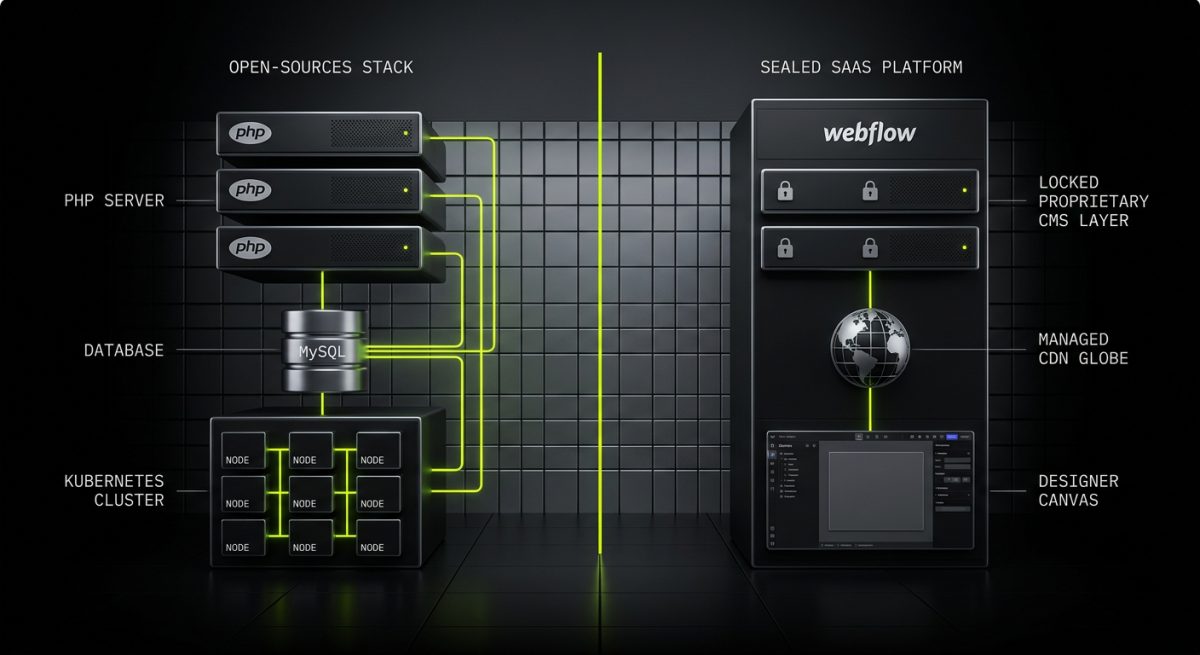
The deeper question is architectural. WordPress is an open-source CMS that runs PHP on infrastructure you control. Webflow is a SaaS visual development platform with a proprietary CMS, a managed hosting layer, and a designer-first interface. These aren't two versions of the same thing — they're fundamentally different approaches to building and owning a web presence.
Ownership and Infrastructure
With WordPress, you own the software, the database, the files, and the deployment pipeline. You can host it on WP Engine, SiteGround, a bare VPS, or a Kubernetes cluster. You can export everything, migrate anywhere, and modify the core behaviour using hooks and filters without touching core files. The GPL licence means the code is yours to extend, redistribute, and commercialise.
With Webflow, you're licensing access to a platform. Your site lives on Webflow's infrastructure. If Webflow changes its pricing, deprecates a feature, or shuts down a plan tier, your options are limited. You can export clean HTML/CSS/JS — but not a running application. The CMS data export is a CSV. There is no plugin ecosystem in the WordPress sense, no server-side scripting, and no database you can query directly.
This isn't a criticism of Webflow — it's a structural reality that has direct implications for what you can build and how long you can sustain it.
The Developer Surface Area
WordPress exposes an enormous developer surface. Custom post types, taxonomies, meta fields, the WP REST API, custom Gutenberg blocks, WooCommerce extensions, multisite networks, cron jobs, background processing — all of it is scriptable, testable, and deployable via standard PHP tooling. At werun.dev, our WordPress engagements regularly involve building plugins from scratch using WordPress APIs, proper capability checks, nonce verification, sanitisation and escaping — the full stack of professional WordPress development.
Webflow's developer surface is intentionally constrained. You get custom attributes, interactions triggered by scroll and click, some CMS collection logic, and the ability to embed custom code via script tags. For a large proportion of marketing sites, this is sufficient. For anything requiring server-side logic — complex pricing rules, authenticated API calls, dynamic user data, subscription billing — you're immediately reaching for third-party services and custom JavaScript that Webflow was never designed to host.
// Example: WordPress REST API custom endpoint registered in a plugin
add_action( 'rest_api_init', function () {
    register_rest_route( 'werun/v1', '/quote', array(
        'methods'             => 'POST',
        'callback'            => 'werun_handle_quote_request',
        'permission_callback' => function () {
            return current_user_can( 'edit_posts' );
        },
    ) );
} );
This kind of server-side extensibility simply doesn't exist in Webflow. You can call external APIs from the browser, but you cannot run authenticated server-side logic, process webhooks securely, or build admin tooling that integrates with WordPress's capability system.
Where Webflow Genuinely Wins
Webflow's value proposition is real, and it's worth being precise about where it delivers. The platform was built for designers who think in visual systems, and it shows. The canvas-based editor maps directly to CSS concepts — flexbox, grid, spacing, typography — without abstracting them into a simplified UI that loses fidelity. A skilled Webflow designer can build a pixel-accurate, animation-rich marketing site faster than a WordPress developer building a custom theme from scratch.
The Speed-to-Launch Advantage
For marketing teams that need a high-quality brochure site, a campaign landing page, or a portfolio with a manageable content volume, Webflow's integrated hosting, SSL, CDN, and CMS mean there is genuinely less operational overhead. There's no plugin update queue, no server to patch, no PHP version to manage. The editorial experience for non-technical content managers is clean and predictable.
Webflow's CMS also handles structured content reasonably well for bounded use cases — blog posts, team members, case studies, product listings without complex variants. Collections, reference fields, and multi-image fields cover a lot of ground. The constraint is that you can't extend the CMS schema in ways that require backend logic, computed fields, or relational queries beyond what the Webflow UI exposes.
Performance Characteristics
Because Webflow sites are statically generated and served from a global CDN, baseline performance is strong without configuration. A competently built Webflow site will score well on Core Web Vitals out of the box. WordPress can match or exceed this — our custom themes are built to score 90+ on Core Web Vitals — but it requires deliberate effort: image optimisation, caching strategy, server response time tuning, and careful management of third-party scripts.
The honest comparison here is not "Webflow is faster than WordPress" — it's "Webflow's performance floor is higher for sites that don't require server-side rendering of dynamic content." For WordPress sites with WooCommerce, logged-in user states, or complex query logic, performance requires active engineering rather than passive defaults.
When Webflow Is the Right Recommendation
We recommend Webflow when:
- The primary deliverable is a visually sophisticated marketing or brand site with a bounded, manageable CMS
- The client team includes designers who will own ongoing updates and prefer a visual tool over a block editor
- There is no requirement for custom server-side logic, complex e-commerce, or deep third-party system integration
- Speed of initial delivery is a higher priority than long-term extensibility
We recommend WordPress when any of the following are true: the site requires custom plugin functionality, WooCommerce with non-standard behaviour, multisite architecture, REST API endpoints consumed by external systems, or a content model that will grow in complexity over time.
The Enterprise and B2B Reality
For B2B organisations evaluating these platforms at a strategic level, the calculus shifts significantly. The question is rarely "which tool is easier to use" — it's "which platform can support our digital infrastructure for the next five years without creating technical debt or vendor dependency that constrains our roadmap."
Integration Depth
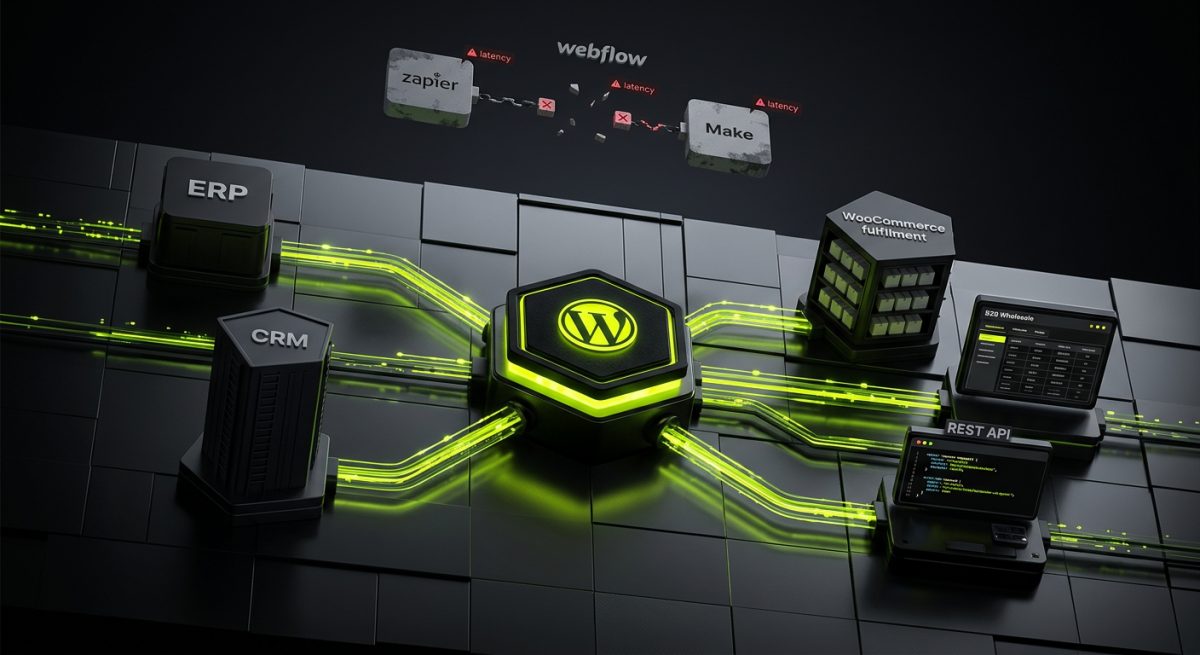
WordPress's REST API and plugin architecture make it a viable integration hub. We build WordPress installations that talk to ERPs, CRMs, fulfilment platforms, and custom internal tools via authenticated API endpoints. WooCommerce stores we've built handle B2B wholesale pricing, subscription billing, and custom checkout logic that would require a completely different technical approach on Webflow — typically a headless architecture with a separate backend, which introduces its own complexity and cost.
Webflow's integration story relies heavily on Zapier, Make, and embedded third-party scripts. These are legitimate tools, but they introduce latency, rate limits, and failure points that sit outside your control. For mission-critical workflows — order processing, user authentication, data synchronisation — this is a meaningful operational risk.
Content at Scale
Webflow's CMS has item limits by plan tier. As of current pricing, the Business plan caps at 10,000 CMS items. For a marketing site with a blog and a team page, this is irrelevant. For a SaaS company with a large resource library, a multi-region site, or a product catalogue that maps to a real database, this becomes a hard architectural constraint.
WordPress has no equivalent limit. The database is yours, the query layer is yours, and custom post types can model arbitrarily complex content relationships. With proper database indexing and query optimisation — which is part of how we build — WordPress handles hundreds of thousands of content items without performance degradation.
Security and Compliance
WordPress's open-source nature means vulnerabilities are publicly disclosed and patched transparently. This is sometimes framed as a weakness — and it can be, for sites running outdated plugins or unmanaged installs. For professionally maintained WordPress installations, it's actually a strength: you have full visibility into the security posture of your stack, you can implement your own hardening measures, and you're not dependent on a vendor's internal security team to protect your data.
At werun.dev, every plugin we ship includes proper nonce verification, capability checks, and input sanitisation. We maintain clients on monthly retainers specifically to manage updates, monitor for vulnerabilities, and respond to security advisories before they become incidents. That level of control is simply not available on a managed SaaS platform.
Webflow's security model is Webflow's responsibility — which is fine until it isn't. For organisations with compliance requirements around data residency, audit logging, or custom authentication flows, the inability to control the infrastructure layer is a genuine blocker.
Choosing the Right Tool for the Right Scope
The most expensive mistake in platform selection is choosing based on what's easiest to launch rather than what's sustainable to own. Both WordPress and Webflow have legitimate use cases, and the right answer depends on a precise reading of your content model, integration requirements, team capabilities, and growth trajectory.
The Hybrid Architecture Question
Some organisations run both: Webflow for the marketing site, WordPress (or a custom backend) for the application layer. This is a valid pattern when the marketing site genuinely has no overlap with the application's data model. It introduces operational complexity — two CMS environments, two deployment pipelines, two sets of credentials — but for teams with clear ownership of each layer, it can be the cleanest solution.
Headless WordPress is another option worth naming here. Using WordPress purely as a content API, consumed by a Next.js or Astro frontend, preserves the full WordPress content model and plugin ecosystem while giving frontend teams complete control over the rendering layer. This is increasingly how we approach projects where clients want WordPress's content flexibility with a modern frontend architecture.
Questions That Determine the Answer
Before selecting either platform, get precise answers to these:
- Does the site require any server-side logic beyond what a CDN can serve? If yes, Webflow is not the right primary platform.
- Will the content model grow in complexity over the next 18 months? If yes, WordPress's extensibility is a material advantage.
- Does the team include a designer who will own the site's visual evolution? If yes, Webflow's canvas may reduce dependency on developers for routine updates.
- Are there compliance, data residency, or security audit requirements? If yes, infrastructure ownership matters and WordPress on managed hosting is the safer choice.
- Is e-commerce part of the scope? If yes, WooCommerce's extensibility — custom product types, pricing rules, checkout logic, payment gateway integration — far exceeds what Webflow Commerce can support for anything beyond a straightforward catalogue.
At werun.dev, we don't have a platform preference — we have a scope-matching process. When a client needs a visually polished brand site with a small editorial team and no backend requirements, we'll say so. When a client needs a WordPress plugin that integrates their WooCommerce store with their ERP and handles B2B wholesale pricing, that's exactly what we build. The platform should serve the project, not the other way around.