All systems operational200+ sites monitoredResponse SLA <4h+54 9 11 7820-8554
Gutenberg blocks · v2.1.1

The blocks a company site is built from,
written and kept running by us.

werun.Blocks is the block library we write and maintain for our clients' WordPress sites, and we charge nothing for it. 20 blocks for the block editor with 87 ready-made layouts between them: heroes and sections, pricing and comparison tables, FAQs and timelines, jobs from your applicant tracking system, forms from the provider you already use and a visual query builder for any post type.

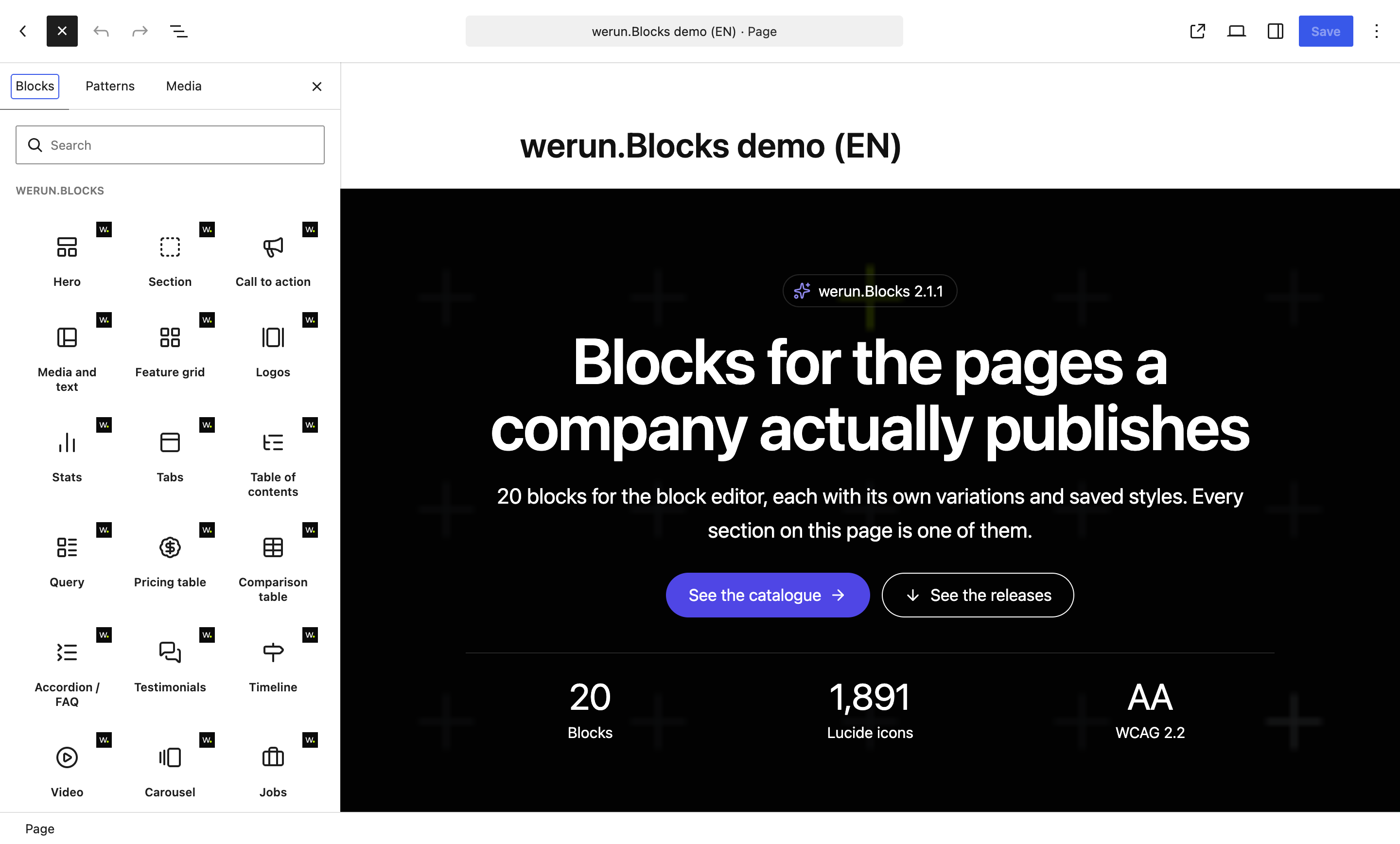
The block editor with the inserter open on the werun.Blocks category: Hero, Section, Call to action, Media and text, Feature grid, Logos, Stats, Tabs, Table of contents, Query, Pricing table, Comparison table, Accordion / FAQ, Testimonials, Timeline, Video, Carousel and Jobs, each with its icon. Beside it, a Hero block on the page. Opens at full size.
The inserter. Each block appears once, with its own icon and the werun.dev mark in the corner.
20
Blocks

Each with its layouts, Saved styles and its own settings

$0
What we charge for them

Included on the sites we build and run

19
Plugins they replace

One per job, each named in the table below

12
Licences you stop paying

Up to $619.50 + €420 a year per site, at their list prices

Coming soon
Community edition

werun.Blocks.Community: the same blocks, free for any WordPress site.

A public edition of werun.Blocks is on its way to the WordPress.org plugin directory. Anyone will be able to install it on any WordPress site, at no cost: the same 20 blocks and 87 layouts, with no licence, no key and no account.

The same as werun.Blocks

The whole catalogue.

  • All 20 blocks and their 87 layouts
  • Saved styles on every block
  • Contrast that fixes itself, to WCAG 2.2 AA
  • Maps, videos and third-party forms that wait for consent
  • The 1,891 Lucide icons, bundled
  • The Integrations screen: maps, privacy, forms, jobs and gated downloads
What changes

Open to anyone.

  • Installed from WordPress.org, and updated from there
  • No licence and no key: it never contacts werun.dev
  • Help from its documentation, in English and Spanish, and from GitHub issues
  • It can run next to werun.Blocks: every block, class and option has its own prefix
  • On the sites we build and run, werun.Blocks stays, with its update channel and our team behind it

It is not in the directory yet. Until it is, its code is public on GitHub and its documentation is online.

How they behave

The rules every block follows.

Every block is written to the same rules, so an editor learns them once and a page built today still renders after the next update.

One entry per block, the layouts inside it

The inserter shows each block once. Its ready-made layouts (a hero with the image on the right, centred, over a video) are variations you switch between from the block itself, without starting again.

A look saved once, used anywhere

Saved styles keeps a block's colours, layout and options under a name, to apply to the same block on any other page. Each page keeps its own text, images and links, and everyone who edits the site shares the styles.

An update never breaks a saved page

Every block is drawn on the server when the page is served. An update can change what a block prints without invalidating a single page that uses it.

They answer to their own width

Columns and layouts follow the block's width, not the window's, so one block fits a full page, a column or a sidebar without a setting for each.

Two of the same block never collide

Each block on a page carries its own id, its own settings and its own script, so two pricing tables or two carousels on one page leave each other alone. Every class is prefixed, so nothing clashes with the theme.

Icons without an icon font

Lucide's whole set, printed as inline SVG: no icon font, no CDN and no script. Any icon can animate on hover, once in view or in a loop, and nothing moves for a visitor who asked for less motion.

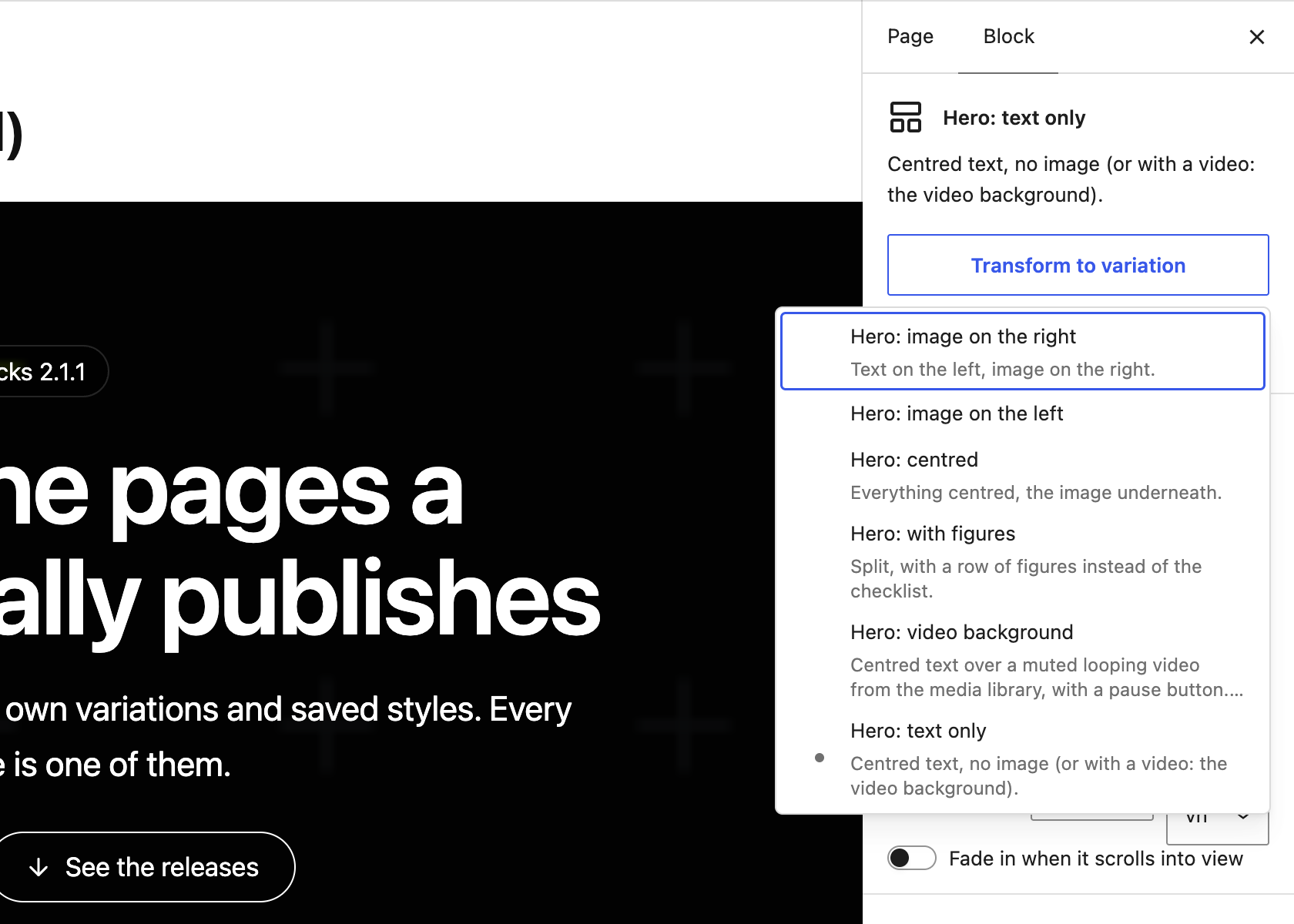
A Hero block selected in the editor, with its sidebar's Transform to variation menu open: image on the right, image on the left, centred, with figures, video background and text only. Opens at full size.
A block's ready-made layouts, chosen from the block itself. Switching keeps what is written in it.
What is inside

20 blocks, 87 ready-made layouts.

Each one is a single block in the inserter, with at least three layouts to start from and Saved styles. A section, a carousel slide, a tab and an accordion answer hold any other blocks inside them.

Structure

The pieces a page is laid out with.

6 layouts

Hero

The opening section: eyebrow, heading, text, checklist, two buttons, figures and an image, each one optional. Split or centred, over a background image or a muted looping video.

4 layouts

Section

A section that holds any blocks, with its width, padding, a background colour, gradient or image under an overlay, a minimum height and an optional header.

4 layouts

Media and text

An image or a video beside a title, text, checklist and button, at a fixed shape, with the media on either side.

4 layouts

Carousel

Slides that hold any blocks, with background images, slides per screen size, arrows, dots, thumbnails and autoplay. Keyboard, swipe and screen readers.

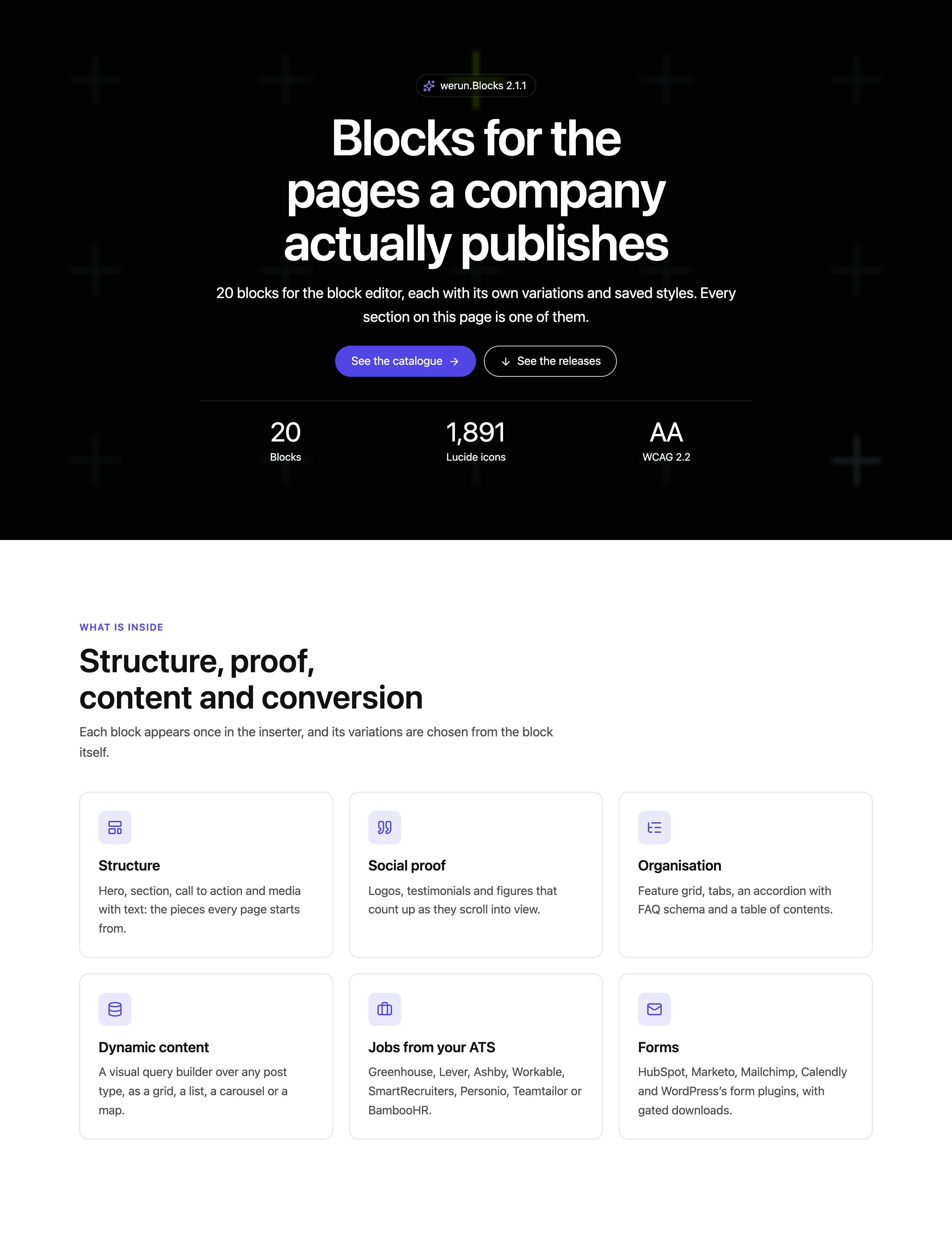
A page made of werun.Blocks: a dark hero with a heading, two buttons and three figures, then a feature grid of six cards with icons. Opens at full size.
A Hero and a Feature grid on the published page, on werun.BlocksTheme as it ships, with no CSS written for them.
Asking for the sale

What turns a visit into an enquiry, and says what things cost.

4 layouts

Call to action

A banner that asks for one action: title, text, one or two buttons and an optional image. Centred, split, a compact strip or a floating card.

3 layouts

Pricing table

Plans with a monthly and yearly switch that works, a highlighted plan and lists of what is and is not included.

4 layouts

Comparison table

Plans side by side against a list of features: checks, crosses, group headings, a featured plan and a sticky header, and one card per plan on a phone.

4 layouts

Notice

A message in the content or a bar at the top or bottom of the window, with a link, a close button that remembers and dates to show it between.

Proof

Who you work with, what they say and what you have done.

4 layouts

Logos

Client and partner logos as a grid, an endless marquee or a carousel, in grey with full colour on hover or all in one flat colour.

4 layouts

Testimonials

Quotes with name, role, photo and rating, written by hand or taken from a post type, as a carousel or a grid.

4 layouts

Stats

Key figures that count up as they scroll into view: a row, cards or large figures with a description.

4 layouts

Timeline

A company history or a process, step by step: vertical, on alternating sides or along a horizontal track.

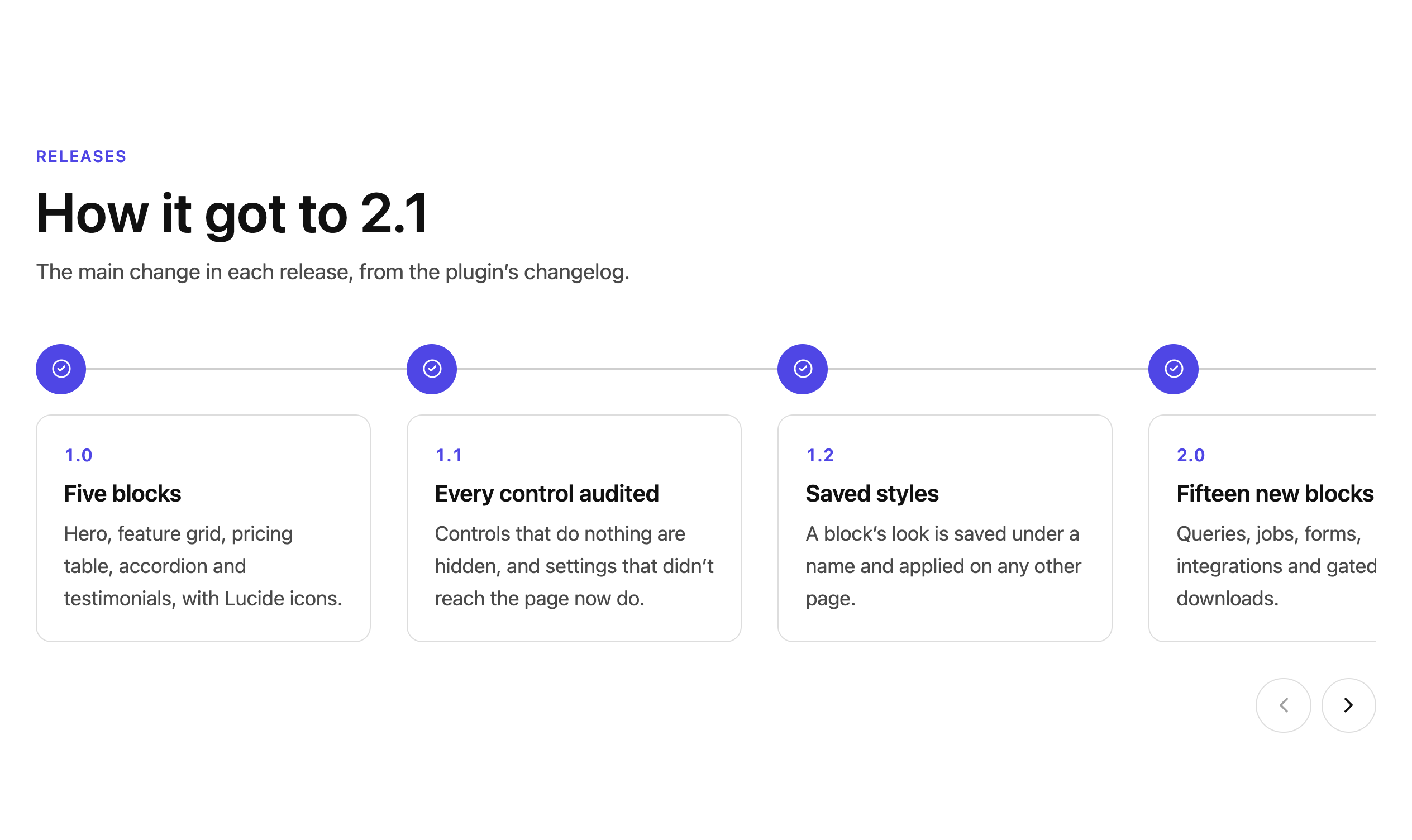
A horizontal timeline of werun.Blocks' own releases, 1.0, 1.1, 1.2 and 2.0 in view, with arrows to scroll to the rest. Opens at full size.
The Timeline block, telling the plugin's own history: its releases, from the changelog.
Organising content

Long pages a reader can find their way through.

4 layouts

Feature grid

Cards with an icon, title, text and link, in one to six columns per screen size. Any part of a card switches off for the whole grid or for one card.

5 layouts

Tabs

Content in tabs, horizontal or vertical, in four styles, with links to a tab and tabs that become an accordion on a phone.

3 layouts

Accordion / FAQ

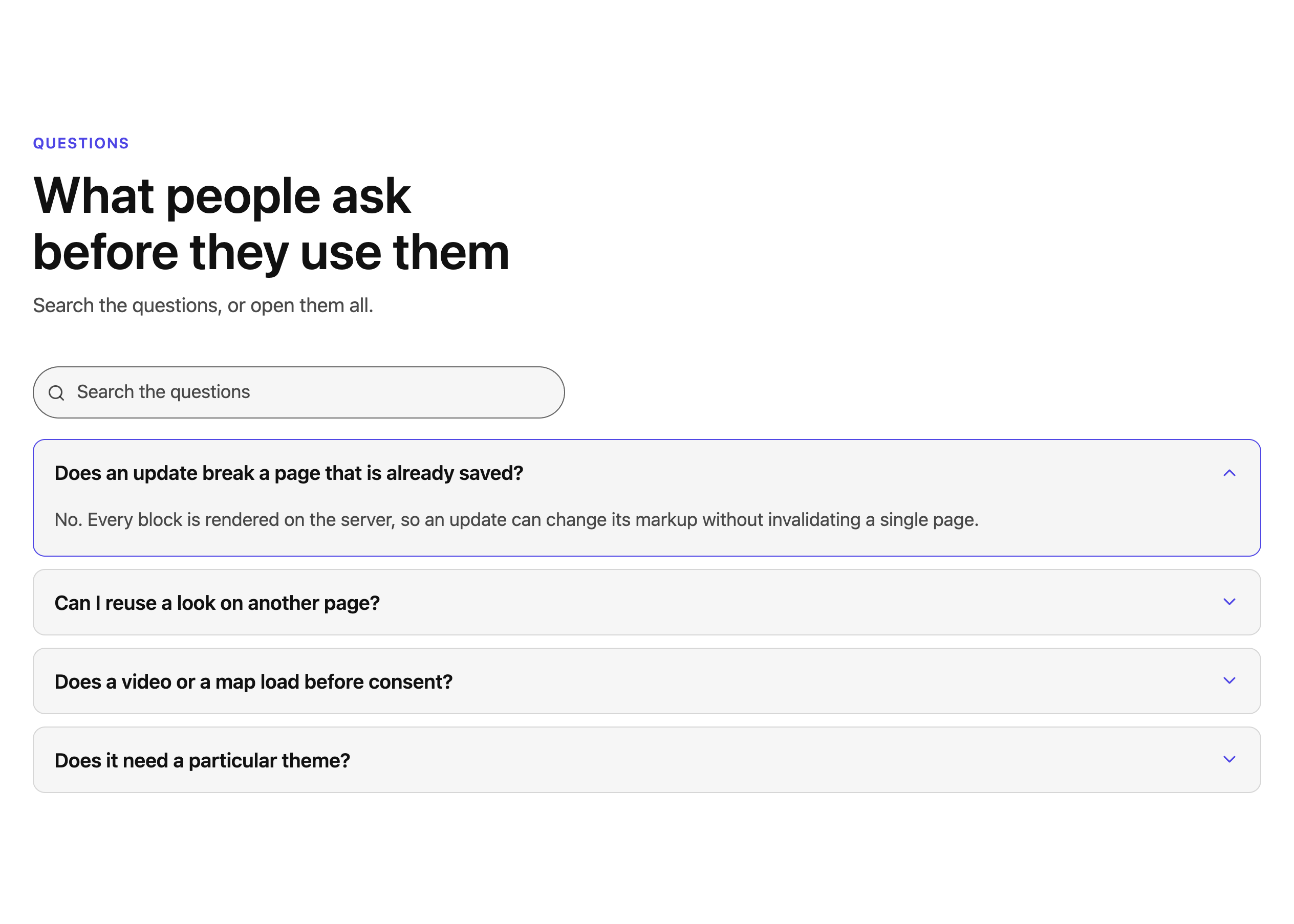
Questions that open and close without JavaScript, with search, expand all, links to a question and FAQ structured data.

5 layouts

Table of contents

Links to the page's headings, built from its content: sticky beside a long page, a dropdown on a phone, the section being read highlighted.

An accordion of questions with a search box above it, the first question open. Opens at full size.
The Accordion / FAQ block, with search and FAQ structured data switched on.
Content from elsewhere

Your posts, your applicant tracking system, your form provider and your videos, on the page and kept current.

8 layouts

Query

Cards from any post type: latest or related posts, a team, upcoming events, offices on a map, a resource library or case studies, with filters a visitor can use.

4 layouts

Jobs

Open positions read from your applicant tracking system, kept in a cache, grouped by department, as cards or a table, with search and filters.

5 layouts

Form

A form from HubSpot, Marketo, Mailchimp, Calendly and the other usual providers, or from a form plugin on the site, with consent before it loads and optional gated downloads.

4 layouts

Video

YouTube, Vimeo or a file from the media library, loaded only when played: a poster and a play button, in the page or in a window, with captions and a transcript.

Integrations

The three blocks that read from other systems.

Most of a page is written once. These three show what lives somewhere else (the site's own posts, the applicant tracking system, the form provider) and keep it current without anyone copying it over.

Keys stay on the server

API keys and tokens are stored encrypted, used only by the server and never sent to a browser.

Nothing loads before consent

Maps, YouTube and Vimeo, and forms hosted elsewhere wait for the visitor's click or for the site's cookie banner: WP Consent API, Complianz, CookieYes or Cookiebot.

A list for your security policy

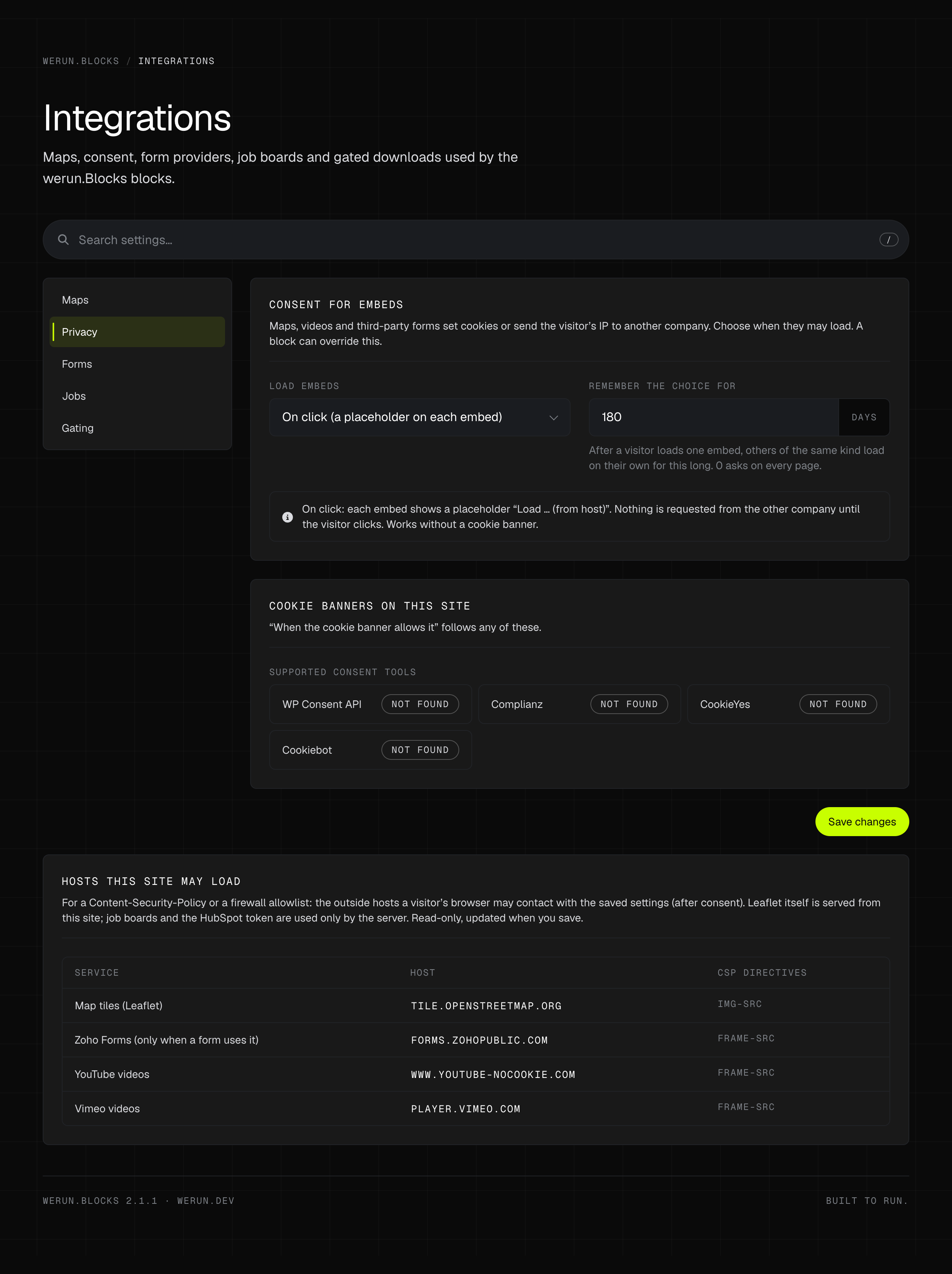
The Integrations screen lists every outside host the saved settings let a browser contact, with the directive each one needs, ready for a Content-Security-Policy or a firewall allowlist.

Maps without a key

Maps run on OpenStreetMap through Leaflet, which ships inside the plugin, or on Google Maps with your own key.

01

Query

A visual query builder over any public post type, with each card showing the fields you choose.

  • —Filters by taxonomy and by custom field, ordered by date, title, a field or the next event
  • —Related posts and hand-picked items, and layouts ready for a team, events, offices on a map and a resource library
  • —Grid, list, carousel or map, with filters, search and pages a visitor can use, also without JavaScript
  • —Only published content of public types, never a protected field: the query is signed into the page and checked again on every request
02

Jobs

Open positions from Greenhouse, Lever, Ashby, Workable, SmartRecruiters, Personio, Teamtailor or BambooHR.

  • —Read from your ATS and kept in a cache, so a slow ATS never slows the page
  • —Grouped by department, as cards, a list with filters or a compact table
  • —Search and filters for the visitor
  • —Each position links to its own application
03

Form

The form you already run, from HubSpot, Marketo, Salesforce Account Engagement, Dynamics 365, Typeform, Jotform, Mailchimp, ActiveCampaign, Zoho or Calendly, or from a form plugin on the site.

  • —Nothing loads from the provider until the visitor agrees
  • —Gated downloads: the file unlocks once the form is sent, through a link that expires in minutes
  • —With a form plugin on the site the send is checked on the server; with a hosted service, the provider's own event unlocks it
  • —Mailchimp sign-ups show Mailchimp's own answer, so an address already on the list is told so
The werun.Blocks Integrations screen on its Privacy tab: when embeds may load, how long the choice is remembered, the cookie banners it works with, and a table of the outside hosts the site may load with their CSP directives. Opens at full size.
Integrations, on its Privacy tab. Below it, every outside host the settings allow, for a security policy.
Accessibility

WCAG 2.2 AA, in every block and every option.

Since version 2.1, every block, variation and option meets WCAG 2.2 AA on light and dark backgrounds, including with the theme's own CSS loaded after the blocks.

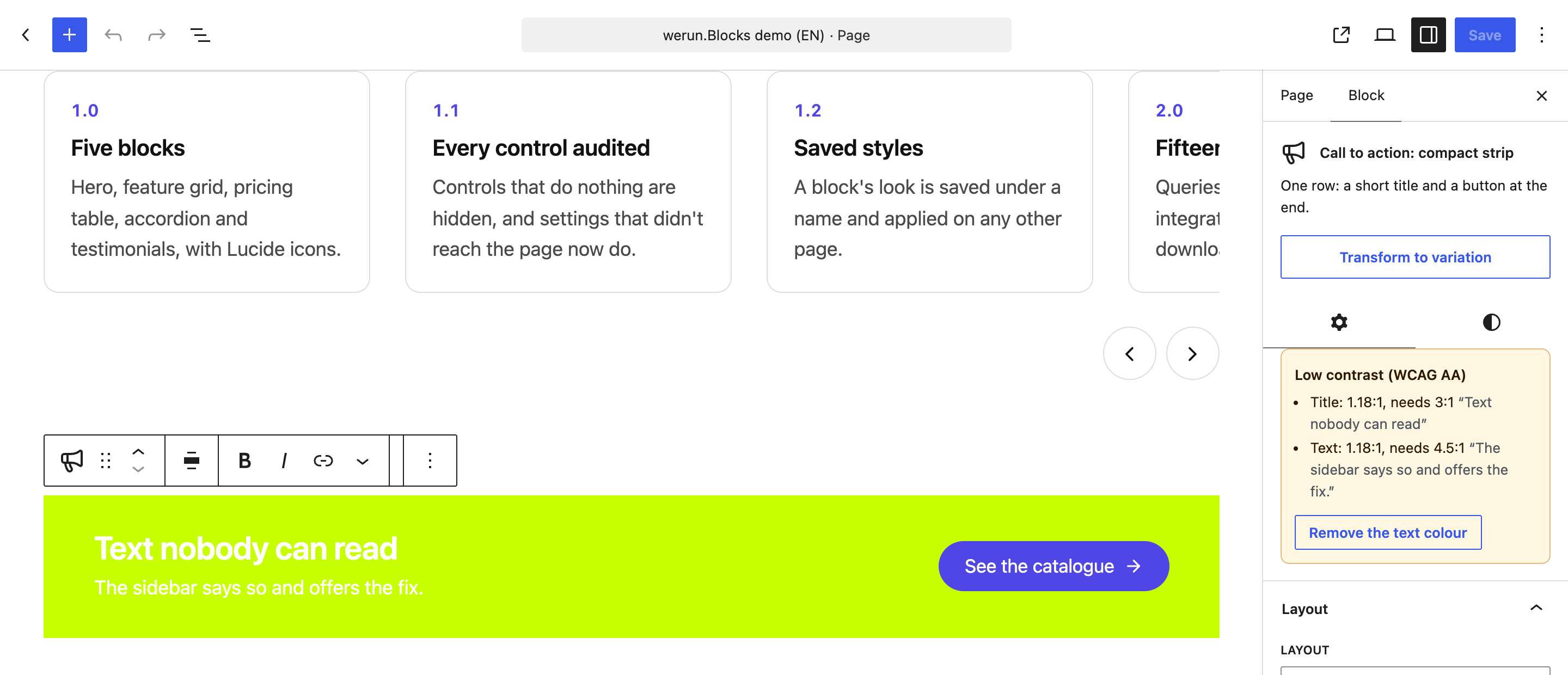
A call to action with white text on a chartreuse background, and the sidebar warning "Low contrast (WCAG AA)" with the ratios and a Remove the text colour button. Opens at full size.
Unreadable on purpose: the sidebar lists the problem, with the ratios, and offers the fix.

Colours that adapt

Each block knows what it sits on: its own colour, an image under an overlay, or a dark section around it. Its text, accent and focus ring follow, and a colour picked in the block shows as the closest readable one while the saved value stays as chosen.

The editor says when something cannot be read

A text or a control under the minimum contrast is listed at the top of the sidebar, with the fix one click away.

Keyboard and screen readers

A visible focus everywhere, the ARIA patterns for tabs, accordions, carousels and dialogs, status messages that are read out and targets of at least 24 pixels.

Motion that stops

Anything that moves for more than five seconds has a pause button, and nothing moves for a visitor who asked for less motion.

Client savings

What you stop paying for, and what you stop maintaining.

werun.Blocks costs you nothing: it is included on the WordPress sites we build and run. This is what a site would install instead for the same jobs, one row per plugin, with what that plugin charges for the part a block does here.

Plugin you would installWhat it chargesWith werun.BlocksDone here by
Spectra$69 / yearSliders, tabs, accordions and post grids are free. Its Loop Builder and dynamic content are in Pro, sold for up to three sites.IncludedQuery · Carousel
Stackable$49 / yearNamed styles to reuse across blocks, dynamic content, and custom post types and pages in its Posts block are in Premium.IncludedQuery
GenerateBlocks$99 / yearContainers, grids and a query loop are free. Accordions, tabs, global styles and queries on custom fields are in Pro.IncludedTabs · Accordion / FAQ · Query
MetaSlider$39.50 / yearImage sliders are free. Thumbnails under the slides are in Pro, shown at half its $79 list price.IncludedCarousel
Smart Slider 3FreeSliders with thumbnails, arrows and autoplay are free.IncludedCarousel
Easy Pricing Tables$79 / yearPricing tables are free. The monthly and yearly switch is in its Business plan, sold for up to five sites.IncludedPricing table
WP Table Builder$39 / yearComparison tables are free. A sticky header and a highlighted column are in Pro, at an introductory price.IncludedComparison table
WPFront Notification BarFreeA sticky bar with a close button and dates to show it between is free.IncludedNotice
Logo Carousel$29 / yearA logo carousel is free. The grid, the grey effect and the endless marquee are in Pro.IncludedLogos
Strong TestimonialsFreeTestimonials as a grid, a list or a slider are free.IncludedTestimonials
Counters BlockFreeAnimated counters are free.IncludedStats
Cool Timeline$29 / yearA vertical timeline is free. The horizontal layout is in Pro, shown at a quarter off its $39 list price.IncludedTimeline
Tabby Responsive TabsFreeTabs that become an accordion on a narrow screen are free.IncludedTabs
Easy Accordion$29 / yearAccordions with FAQ structured data are free. Search in the questions and expand all are in Pro.IncludedAccordion / FAQ
Ultimate FAQFreeQuestions with FAQ structured data and a search that reloads the page are free.IncludedAccordion / FAQ
Easy Table of Contents$49 / yearA table of contents from the headings is free. The sticky one is in Pro.IncludedTable of contents
Search & Filter$49 / yearFilters by category, tag and date are free. Filters on custom fields are in Pro.IncludedQuery
Content Views$39 / yearGrids and lists of posts are free. Filters a visitor can use, and filters on custom fields, are in Pro.IncludedQuery
MapPress$39 / yearA map per post is free. One map built from all your posts, with filters, is in Pro, sold for up to three sites.IncludedQuery
Personio Integration€420 / yearPersonio only. Up to ten open positions are free; more than ten, and every Personio language, are in Pro.IncludedJobs
Download Monitor$199 / yearManaging downloads is free. Unlocking one with a form is only in its Complete plan, sold for five sites, at half price for the first year.IncludedForm
WP YouTube LyteFreeYouTube only: a poster and a play button, with the player loaded on click.IncludedVideo
Embed PrivacyFreePlaceholders that load an embed only after the visitor agrees are free.IncludedVideo · Form
The Icon BlockFreeWordPress's own icon set or any SVG you paste. No Lucide set and no animation.IncludedEvery block

Read on Oct 20, 2026: each plugin's page on wordpress.org and, for the paid ones, the vendor's own pricing page. A price is the cheapest plan that includes what the block does, for one year, in the vendor's currency: for one site where the vendor sells a plan for one, otherwise its smallest. Where the first year is sold at a discount, it is that first year. A plugin does more than its row says: the row is only the job it shares with a block.

What a client saves in licences, per site and year
Stackable$49 / year
MetaSlider$39.50 / year
Easy Pricing Tables$79 / year
WP Table Builder$39 / year
Logo Carousel$29 / year
Cool Timeline$29 / year
Easy Accordion$29 / year
Easy Table of Contents$49 / year
Content Views$39 / year
MapPress$39 / year
Personio Integration€420 / year
Download Monitor$199 / year
Up to$619.50 + €420

These are the other plugins’ prices, not ours: list prices, and the first year where a vendor discounts it. Where two paid plugins do one job, only the cheaper is counted, and several jobs also have a free plugin in the table, so this is what the paid route costs and not what every site was paying.

What a client saves in upkeep

The part with no price tag.

  • 19 plugins you do not install, update or audit one by one
  • One update channel and one changelog for every block on the site
  • One look across every section, instead of one per plugin's stylesheet
  • No upgrade prompts in the editor, because there is no paid plan to upgrade to
  • The blocks themselves: we charge nothing for them
Good to know

Some integrations run on the client's own account.

Google Maps needs your own API key, and Teamtailor and BambooHR need a key from your own account; whatever those services bill for their use, they bill to you. OpenStreetMap's map tiles need no key and allow light use, and a busy site uses a commercial tile provider. We add nothing on top, and none of it is in the sum above.

What it does not replace

The systems behind the blocks stay where they are.

  • Your applicant tracking system
  • Your form provider or form plugin
  • Your CRM and email marketing
  • A video host for a large library
  • A page builder, on a site built in one

The Jobs block reads the positions your ATS publishes, and the Form block shows the form your provider hosts. Neither replaces the system it reads from.

Our tooling

The rest of what we write for the sites we run.

The plugin, the blocks, the theme, the A/B tests and the feedback extension go on the sites we build and run, and we charge nothing for any of them.

werun.Toolkit

The plugin on every WordPress site we run: security, email delivery, an activity log and a branded sign-in, one switch per module.

werun.BlocksTheme

The base theme we build sites on: structure only, and one settings screen that writes the brand into theme.json.

werun.Experiments

A/B and Split URL tests on the sites we run: a 7 KB script, a visual editor on the real page and Bayesian results in our CRM.

werun.dev - Client Feedback

Clients click any element of their site and leave a comment. It becomes a task in the CRM project, with a screenshot and the page details.

Want these blocks on your WordPress site?

Tell us what your pages need to say and where the content lives today. We'll tell you which blocks cover it, and which do not.

No commitment. Just a conversation.
Blocks questions