All systems operational200+ sites monitoredResponse SLA <4h+54 9 11 7820-8554
A/B testing · v1.0.6

Test a change on your site
before it goes to everyone.

werun.Experiments is the A/B testing tool we built for the sites we build and run, and we charge nothing for it. One line in your site's head, a visual editor that changes the real page, goals that count real conversions, and results that say when a variation has actually won.

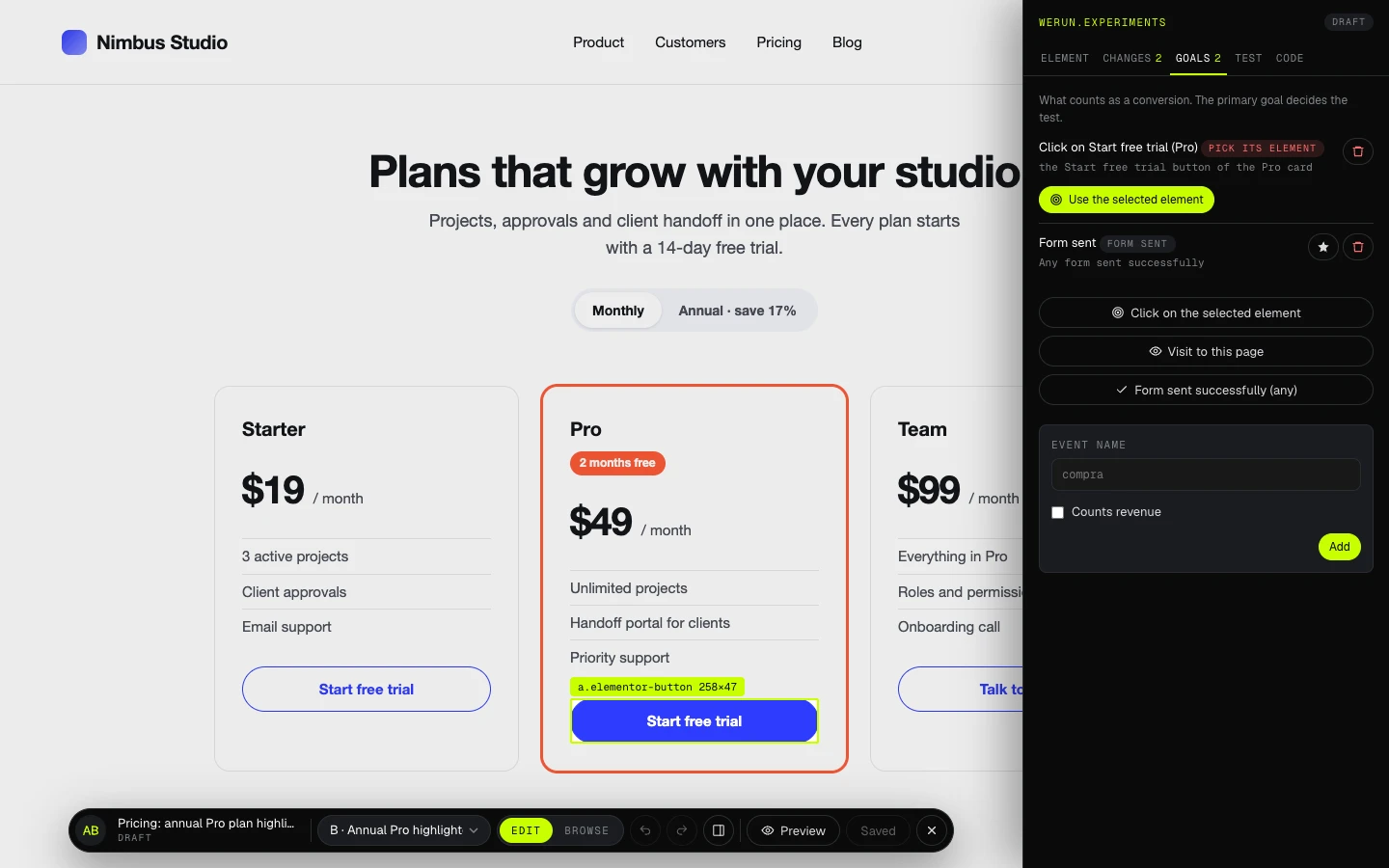
The visual editor on a made-up pricing page: the Pro plan’s button selected, and the Goals panel on the right with a goal waiting for its element. Opens at full size.
The editor on the client’s real page. The goal the assistant left is completed with the element picked here.
7 KB
Script on your page

Compressed, from Cloudflare’s edge, applied before the page shows

$0
What we charge for it

Included on the sites we build and run

11
Builders and platforms

Each with its own installation guide

95%
Before a winner is called

Chance to beat the control, with four guards met

How it runs

Fast on the page, and never a flicker.

The script is the only part of werun.Experiments your visitors download. It was written around one requirement: a test must never make the site slower to look at, or show the original page first.

One line, once

The snippet goes first in the head and never changes. New tests reach the site without anybody touching it again: publishing a test rebuilds the script and clears the cache.

About 7 KB, from the edge

The script and the tests running on your site arrive compressed in one file from Cloudflare's cache at edge.werun.dev, not from your server.

Applied before the page shows

It loads synchronously on purpose. Style changes are in place before the element exists, and an element about to change waits for it, 2 seconds at most. No frame shows the original page swapping to the variation.

Left alone by optimizers

The snippet carries the attributes that Cloudflare Rocket Loader, LiteSpeed, SG Optimizer, Autoptimize, WP Rocket, Jetpack Boost and Cookiebot's auto-blocking respect, so they leave it where it is.

Each visitor keeps their variation

A visitor gets a variation and keeps it on every visit. The visit counts the moment they qualify for the test, in the control too, so both sides are measured the same way.

Never inside the builder

The editors of Elementor, Divi, Bricks and the other builders, the WordPress customizer, the Webflow Editor and Shopify's theme editor never show or count a test, so editing the site and testing it stay out of each other's way.

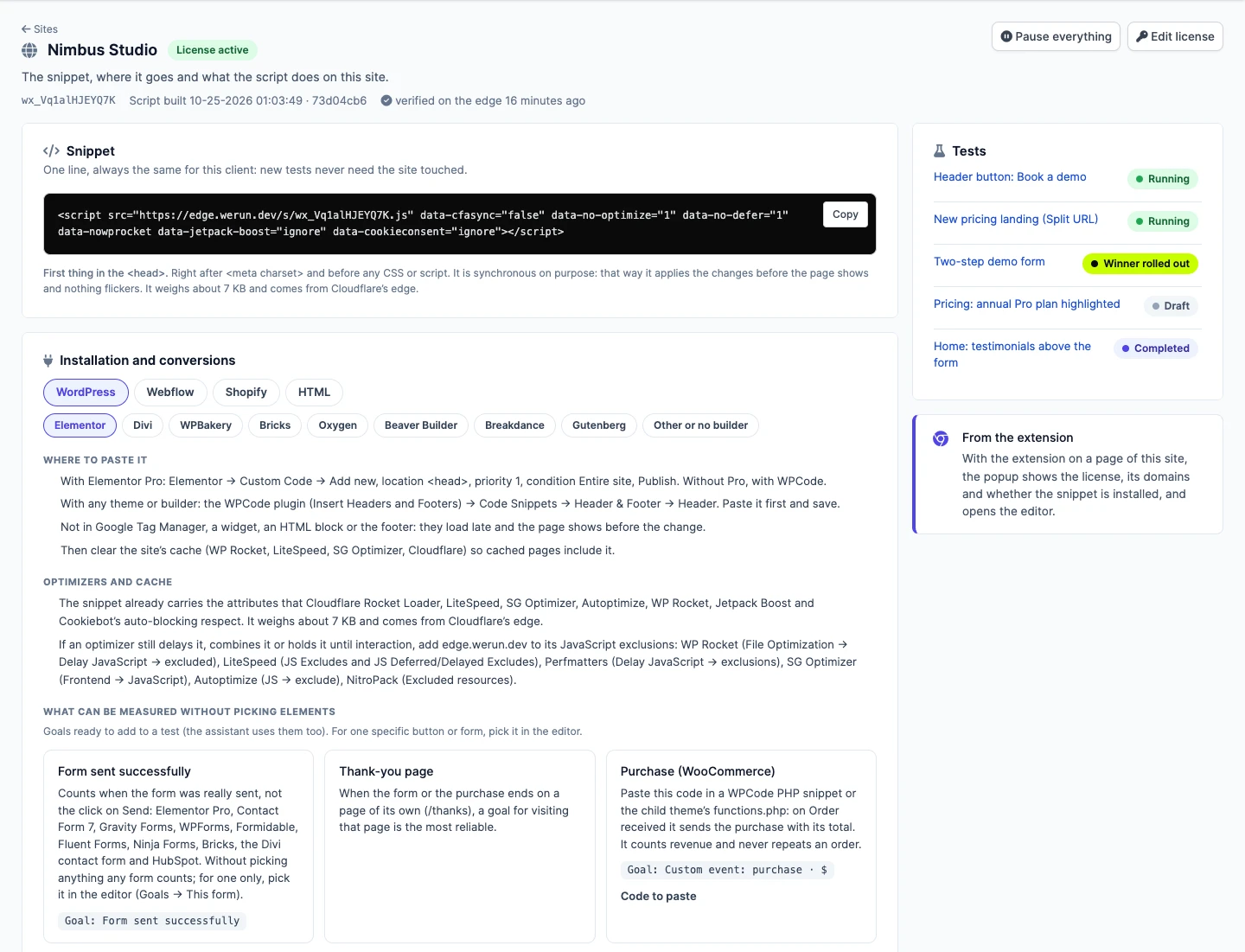
A site’s page in the CRM: the one-line snippet with a Copy button, where to paste it with Elementor, the optimizers it works with, and the goals ready for that site. Opens at full size.
The snippet and the installation guide for what the site is built with.
The visual editor

Changes made on the real page, not described in a ticket.

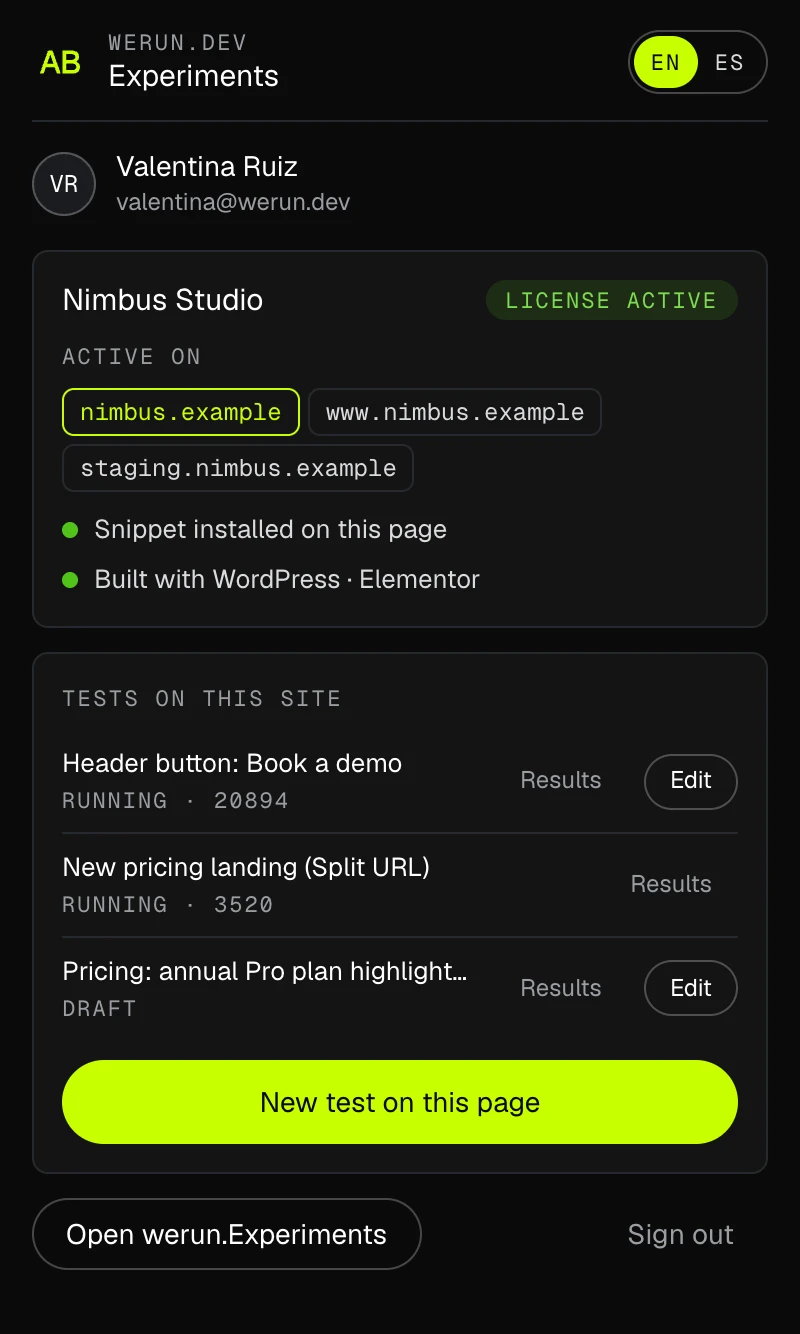
Our team builds each variation with werun.dev - Experiments, our Chrome extension, on your site as it is. Open it on a page and it shows the site's licence, whether the snippet is there, what the site is built with and its tests.

Pick an element and change it

Text typed on the page, HTML, links, images (uploaded or by address), style, classes and attributes; hide it, remove it or insert HTML next to it. Browse mode keeps the page working, to open a menu or a tab before picking something inside it.

Selectors that survive an edit

Each change is anchored on the id the builder gives the element (Elementor's, Bricks', Oxygen's, Breakdance's, Shopify's sections), animation classes are ignored, and the editor warns when a selector finds more than one element.

The preview is the real thing

The editor applies changes with the same engine as the script your visitors get, so what the team sees while editing is what a visitor in that variation will see.

Split URL when it is a whole page

When the variation is a different page rather than a change, the visitor is sent there before the first page shows, and the visit is counted on arrival.

Every save is a version

Each save keeps a version of the test: variations, changes, goals, targeting and traffic. The newest 50 stay, and any of them can be restored.

The extension’s popup on a client page: the licence active, the domains it covers, the snippet installed, what the site is built with, and the site’s tests. Opens at full size.
The extension’s popup on a client page: licence, snippet, platform and tests.
Goals

Conversions that happened, not clicks that might have.

The primary goal decides the test; the others are there to look at. A conversion only counts for a visitor who saw the test.

Click on an element

Someone clicks the button or the link picked in the editor.

Form sent successfully

Counted when the form tool confirms the send, not on the click: Elementor Pro, Contact Form 7, Gravity Forms, WPForms, Formidable, Fluent Forms, Ninja Forms, Bricks, Divi, HubSpot, Webflow and Shopify.

Visit to a page

The thank-you page, for example: the most reliable goal when a form or a purchase ends on a page of its own.

Custom event

Anything the site reports with one line of JavaScript, with revenue when there is any.

Purchase

The order and its total: a snippet for WooCommerce, a Customer events pixel for Shopify, one line on any other site.

Google Analytics 4 and Clarity

Each visitor's variation goes to Google Analytics 4 and Microsoft Clarity as well, so reports and recordings can be split by it.

Where and for whom

The pages it runs on, and the visitors it counts.

A change targets an element, and the test decides the pages: the same change can run on one page, a folder or the whole site.

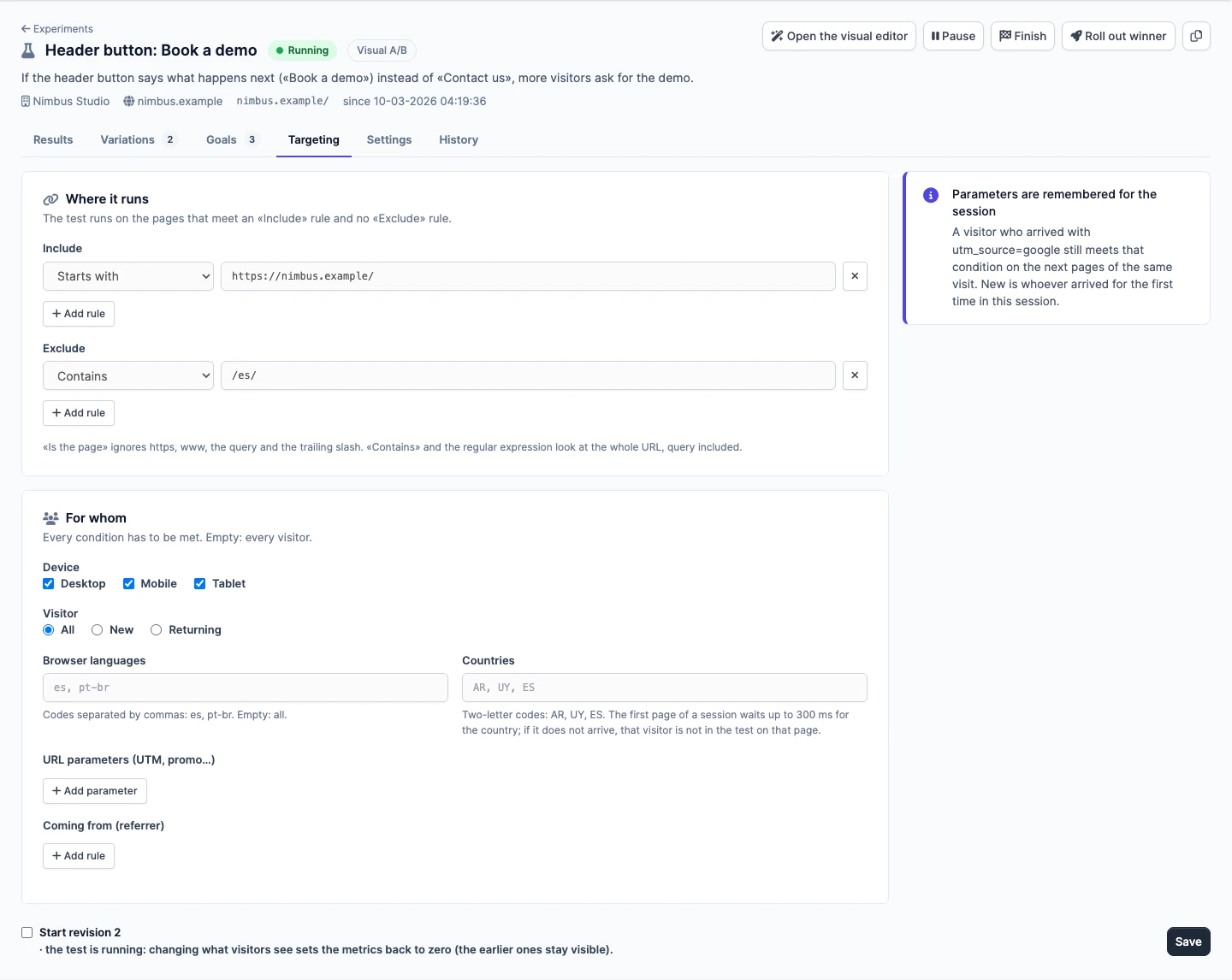
A test’s Targeting tab: it runs on every page of the site except the Spanish ones, for every device and visitor, with fields for languages, countries, campaign parameters and referrer. Opens at full size.
Where a test runs and for whom, by rules on the address and the visitor.

Pages by rule

Include and exclude rules on the address: one page, every page under a folder, the whole site, one language version, or a regular expression.

An audience, when it matters

Device, new or returning visitor, browser language, country, campaign parameters such as utm_source, and where the visitor came from. Every condition has to be met.

Traffic and schedule

The share of matching visitors that takes part, the weight of each variation (up to 7 besides the control) and the dates it runs.

Tests that do not collide

A test warns when another running one changes the same page or the same elements, and a site can make its tests mutually exclusive.

Results

A winner is called when the numbers can carry it.

Bayesian statistics, read in our CRM: for every goal, how likely each variation is to beat the page as it is, by how much, and what choosing it could cost.

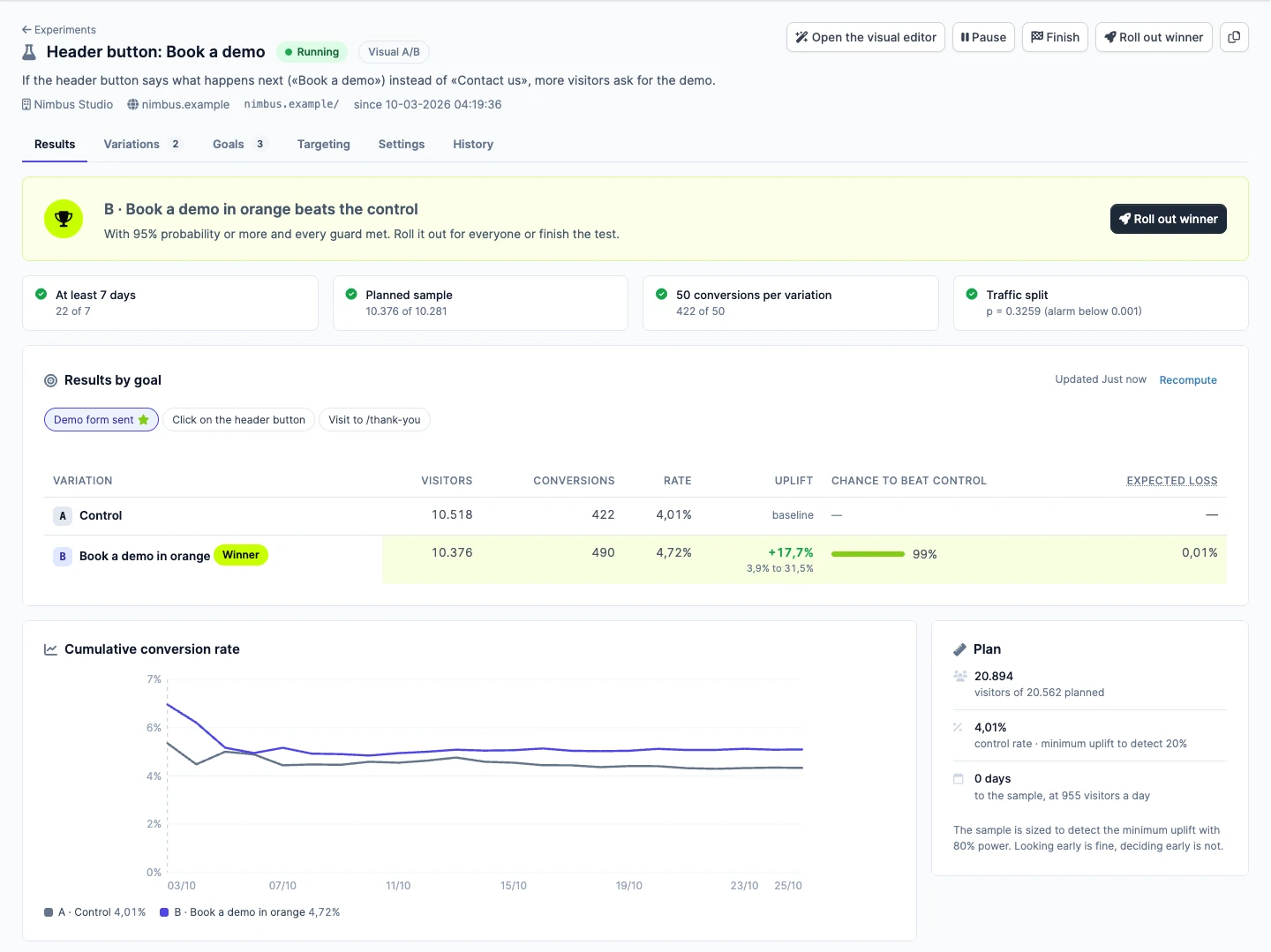
The results of a running test: variation B beats the control with the four guards met, a table per goal with the chance to beat the control, the cumulative rate and the sample plan. Opens at full size.
Results in the CRM. A winner is called only with 95% and the four guards met.

95% and four guards

A winner needs a 95% chance of beating the control and four guards met: at least 7 days, the planned sample, 50 conversions per variation and the traffic split the test was set to.

A sample planned up front

The plan says how many visitors the test needs to detect the uplift you care about, and how many days are left at the current pace.

An alarm for a broken split

When the traffic split drifts from what was configured, the results say so first. It is usually a redirect, a cache or a bot, and worth knowing before reading anything else.

Revisions keep the history honest

Changing what visitors see in a running test starts a new revision, with its metrics from zero and the earlier ones still there to read.

Roll out the winner

Every visitor gets the winning variation while the change is made on the site for good.

Where it works

WordPress and its builders, Webflow, Shopify and plain HTML.

Every site gets an installation guide for what it is built with, and goals ready to add for its platform.

01

WordPress

With Elementor, Divi, WPBakery, Bricks, Oxygen, Beaver Builder, Breakdance or Gutenberg.

  • —Elementor Pro's Custom Code, or WPCode with any theme
  • —Selectors anchored on each builder's own ids
  • —Successful sends of the usual form plugins
  • —WooCommerce purchases, with their total
02

Webflow

In the site's custom head code, on a paid site plan.

  • —Changes hold inside Webflow interactions
  • —Webflow forms counted on a successful send
03

Shopify

In the theme's layout, right after the head opens.

  • —The editor recognises the theme's sections
  • —Add to cart, and purchases through a Customer events pixel
  • —A price Shopify redraws keeps its change
04

HTML and Next.js

In the layout every page shares.

  • —A site setting for pages built with React, Next or Vue
  • —Custom events and purchases with one line
Your side of it

You see every test, we do the setting up.

werun.Experiments lives in our CRM, where your projects, invoices and support already are.

Your tests in the client area

Each test on your site with its status, hypothesis, visitors, verdict and the primary goal’s table. Read-only, for the contacts you choose.

Ask for a test in plain words

Tell us what you want to try. Our assistant in the CRM turns it into a draft (variations, goals, targeting, traffic and sample size) and our team picks the elements on the page.

Staging never skews a result

The script runs on every domain of the site, but only the ones that count add up, so a staging copy can be tested without touching the numbers.

Everything paused in one click

A site setting stops every test on the site at once, for the day something has to go back to how it was.

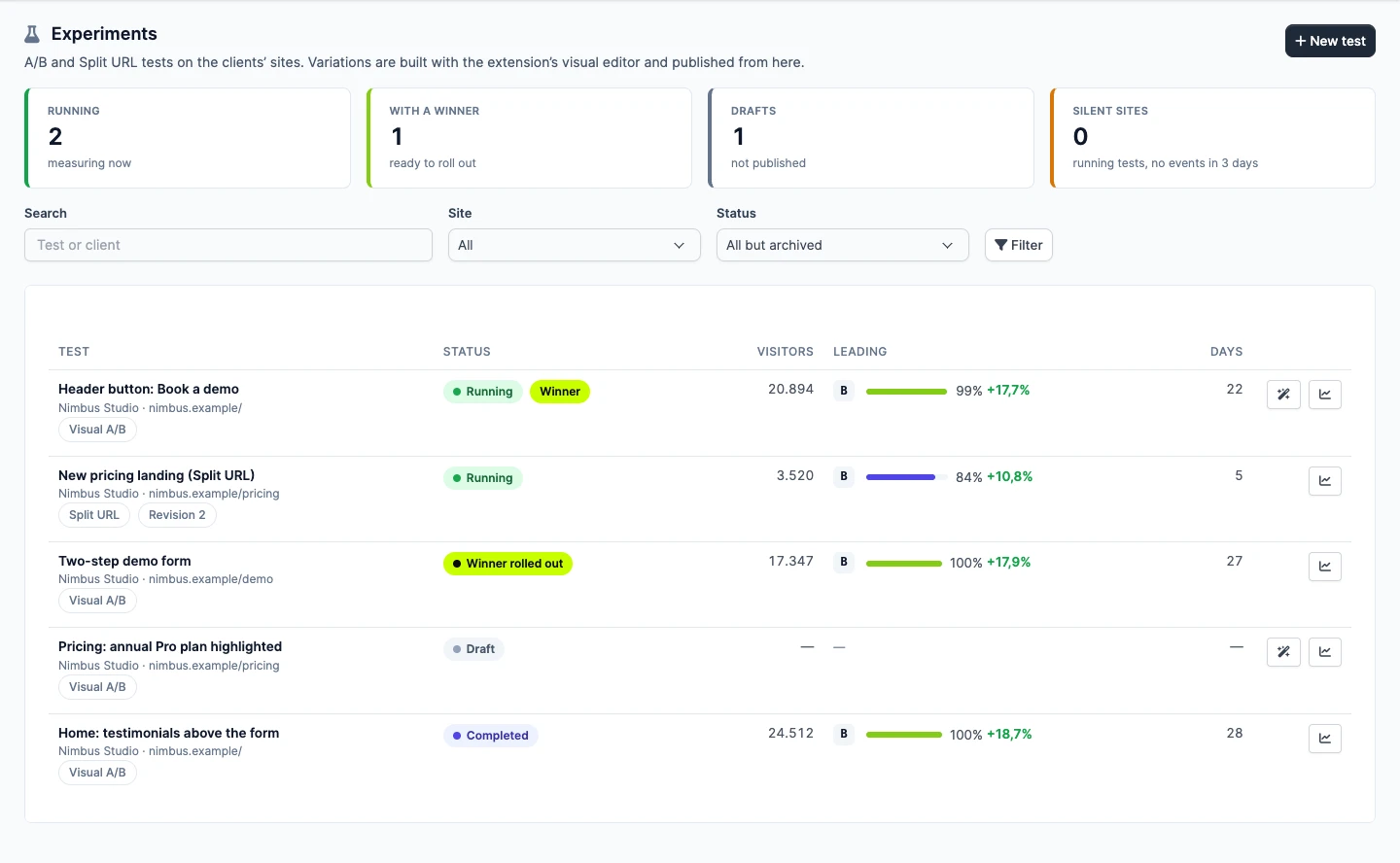
The list of tests of a made-up client: running, with a winner, drafts and silent sites at the top, and each test with its status, visitors and the variation leading. Opens at full size.
Every test of every site in one list, with the variation leading and by how much.
Client savings

What a testing tool would cost, and what you skip with ours.

werun.Experiments costs you nothing: it is included on the sites we build and run. These are the tools a site would use instead, with what each one charges for visual A/B testing on one site.

Tool you would useWhat it chargesWith werun.ExperimentsDone here by
VWOQuote onlyPriced on monthly active users, on a quote. Its free Starter plan has been discontinued; a 30-day trial is what is left.IncludedVisual editor, Split URL, targeting and results
Optimizely Web ExperimentationQuote onlyEvery plan is packaged individually, on a quote, and billed on monthly active users.IncludedVisual editor, Split URL, targeting and results
AB TastyQuote onlyJoined VWO in January 2026 and is sold from the same quote-only pricing page.IncludedVisual editor, Split URL, targeting and results
KameleoonQuote onlyIts visual editor is in the Enterprise plan, priced on a quote by traffic.IncludedVisual editor, Split URL, targeting and results
Convert Experiences$3,588 / yearGrowth plan, paid yearly ($299 a month), for up to 100,000 tested users a month.IncludedVisual editor, Split URL, targeting and results
Crazy Egg$1,188 / yearPlus plan, billed yearly ($99 a month): A/B tests with a visual editor beside heatmaps and recordings, for up to 150,000 tracked pageviews a month.IncludedVisual editor, Split URL, targeting and results

Read on Oct 25, 2026 on each vendor's own pricing page. A price is the cheapest plan that includes visual A/B testing, for one site and one year, billed yearly, in the vendor's currency, at its smallest traffic tier. "Quote only" is a vendor that publishes no price. A tool does more than its row says: the row is only the job it shares with werun.Experiments.

What the paid route starts at, per site and year
Convert Experiences$3,588 / year
Crazy Egg$1,188 / year
From$1,188

These are the other tools’ prices, not ours: list prices for the smallest plan with a visual editor. They are alternatives, so the figure is the cheapest of them, not a sum. Google Optimize, the free option many sites used, closed on September 30, 2023.

What else you skip

Beyond the licence.

  • No plan priced by your monthly visitors to outgrow when the site grows
  • No second dashboard: tests and results sit in the CRM with the rest of your project
  • No snippet to update: the one line stays the same for every test
  • The team that runs your site sets the tests up, reads them and rolls the winner out
  • The tool itself: we charge nothing for it
What it does not replace

Some testing is a different job.

  • Tests inside your application’s code (server-side tests or feature flags)
  • Multivariate tests
  • Heatmaps and session recordings: Microsoft Clarity does that, and gets each visitor’s variation
  • Your analytics: Google Analytics 4 gets each visitor’s variation too

werun.Experiments tests what a page shows. When a test belongs in your product’s code, we plan it there.

Our tooling

The rest of what we write for the sites we run.

The plugin, the blocks, the theme, the A/B tests and the feedback extension go on the sites we build and run, and we charge nothing for any of them.

werun.Toolkit

The plugin on every WordPress site we run: security, email delivery, an activity log and a branded sign-in, one switch per module.

werun.Blocks

The Gutenberg block library we write for the sites we build: heroes, pricing tables, FAQs, jobs from your ATS and a query builder for any post type.

werun.BlocksTheme

The base theme we build sites on: structure only, and one settings screen that writes the brand into theme.json.

werun.dev - Client Feedback

Clients click any element of their site and leave a comment. It becomes a task in the CRM project, with a screenshot and the page details.

Want to test something on your site?

Tell us the page and what you would change. We'll tell you how long a test needs with your traffic, and what we would measure.

No commitment. Just a conversation.
Experiments questions