
Understanding what sits beneath a Shopify storefront matters more than most merchants — and even many developers — realize. When you commit to a platform for your commerce infrastructure, you are making a long-term architectural decision. Shopify's SaaS model, its hosting stack, and the way it structures themes, APIs, and data all have direct implications for what you can build, how fast it will run, and how far it can scale. This post breaks down how Shopify actually works under the hood, so you can make informed decisions about custom development, platform migrations, and long-term growth.
The SaaS Model: What It Means to Build on Shopify
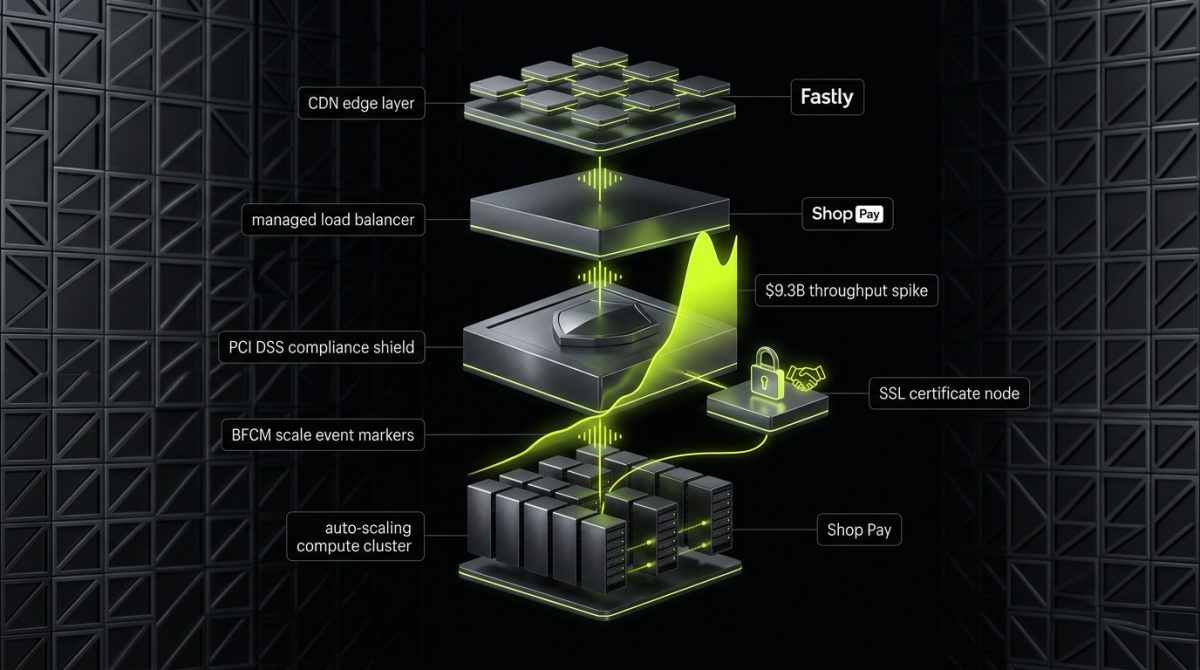
Shopify is a Software-as-a-Service platform. That distinction shapes everything about how you interact with it as a developer or merchant. Unlike self-hosted platforms like WooCommerce or Magento, you do not manage servers, PHP versions, database connections, or security patches. Shopify owns and operates the infrastructure. You rent access to it through a monthly subscription and build on top of what Shopify exposes.
This model has concrete trade-offs that any serious development team needs to understand before committing to a build.
What the SaaS Model Gives You
- Managed infrastructure at scale. Shopify handles load balancing, CDN delivery, SSL certificates, PCI DSS compliance, and uptime SLAs. During peak events like Black Friday, Shopify's infrastructure scales automatically — merchants processed over $9.3 billion in sales during BFCM 2023 without individual stores managing a single server.
- Continuous platform updates. New features like Checkout Extensibility, Markets, and B2B functionality ship to all merchants on the platform. You inherit improvements without migration overhead.
- Built-in payment infrastructure. Shopify Payments, Shop Pay, and multi-currency checkout are part of the platform, not integrations you build and maintain yourself.
- Storefront performance baseline. Shopify's CDN — powered by Fastly — serves assets globally with edge caching. A well-built theme starts with strong infrastructure before a single line of Liquid is written.
What the SaaS Model Constrains
The trade-off is control. You cannot access the underlying database directly. You cannot install arbitrary server-side software. You cannot modify Shopify's core checkout flow without Checkout Extensibility (available on Shopify Plus). Your customization surface is defined by what Shopify exposes through its APIs, theme architecture, and app ecosystem.
This is not a limitation for most commerce use cases — it is a deliberate design. Shopify's constraints push complexity into the right layer: apps handle business logic, themes handle presentation, and the platform handles infrastructure. When teams try to fight these constraints instead of working within them, they create brittle, hard-to-maintain stores. When they embrace the architecture, they build stores that scale cleanly.
For enterprise brands, Shopify Plus removes several of these constraints. Custom checkout pages, B2B wholesale portals, Shopify Flow automations, multi-store architectures, and negotiated platform terms are all available at the Plus tier. This is where the SaaS model becomes genuinely powerful for complex operations.
Subscription Tiers and Their Development Implications
Shopify's pricing tiers — Basic, Shopify, Advanced, Plus — are not just billing differences. They affect which APIs and features your development team can access:
- Checkout Extensibility (checkout UI extensions, checkout branding API) is Plus-only
- B2B and wholesale APIs require Plus
- Shopify Flow for complex automation is Plus-only in its full form
- Multi-currency and Markets are available across tiers but with different configuration depth
- Script Editor (legacy) and its successor, Checkout Extensibility, are Plus features
When scoping a Shopify project, the tier is an architectural input, not just a budget line.
Shopify's Hosting Architecture: CDN, Data Centers, and Performance
Shopify does not publish a detailed infrastructure map the way AWS does, but its hosting architecture is well-documented through its engineering blog and platform documentation. Understanding it helps you optimize themes correctly and set realistic performance expectations with clients.
The CDN Layer
Shopify uses Fastly as its CDN provider. All static assets — theme files, images, fonts, JavaScript bundles — are served from edge nodes distributed globally. When a customer in Berlin loads a Shopify storefront, they are not hitting a single origin server. They are hitting a Fastly edge node that has cached the response.
This has a direct implication for theme development: asset delivery is not your bottleneck. The bottleneck is almost always render-blocking JavaScript, unoptimized images, or poorly structured Liquid that generates excessive server-side rendering time. When we build custom Liquid themes at werun.dev, Core Web Vitals optimization is built into the architecture from day one — not retrofitted after launch.
Storefront Rendering: Liquid and the Storefront API
Shopify supports two rendering models:
Server-side rendering via Liquid — the traditional model. Liquid templates are processed on Shopify's servers, and HTML is returned to the browser. This is how all standard Online Store 2.0 themes work.
Headless via the Storefront API — the decoupled model. Your frontend (Next.js, Hydrogen, or any custom framework) queries Shopify's GraphQL Storefront API and renders the UI independently. Shopify's own Hydrogen framework is built on this model.
For most B2B and DTC brands, server-side Liquid remains the right architecture. It is simpler to maintain, inherits Shopify's CDN optimization automatically, and does not require a separate hosting layer for the frontend. Headless makes sense when you need a genuinely custom frontend experience, tight integration with a non-Shopify data layer, or multi-channel content delivery from a single backend.
Online Store 2.0 and JSON Templates
Online Store 2.0 — introduced in 2021 — fundamentally changed Shopify's theme architecture. The key shift: templates moved from static Liquid files to JSON template files that reference sections. This means:
// templates/product.json
{
  "sections": {
    "main": {
      "type": "main-product",
      "blocks": {
        "title": { "type": "title" },
        "price": { "type": "price" },
        "buy_buttons": { "type": "buy-buttons" }
      },
      "block_order": ["title", "price", "buy_buttons"]
    }
  },
  "order": ["main"]
}
Merchants can now add sections to any page — not just the homepage — through the theme editor. Developers can expose granular controls through section and block settings. Metafields and metaobjects extend the data model without requiring app overhead for simple structured content.
This architecture is why building from scratch using Online Store 2.0 patterns produces fundamentally better results than modifying legacy themes. The flexibility is structural, not cosmetic.
Data Residency and Compliance
Shopify's primary data centers are located in the United States, with infrastructure distributed globally through its CDN. For merchants operating in the EU, Shopify maintains GDPR compliance at the platform level. However, data residency requirements for specific industries or jurisdictions may require additional configuration — particularly around customer data handling, third-party app data storage, and analytics pipelines. This is an important scoping conversation for enterprise builds, especially in regulated industries.
The API Layer: How Shopify Exposes Extensibility
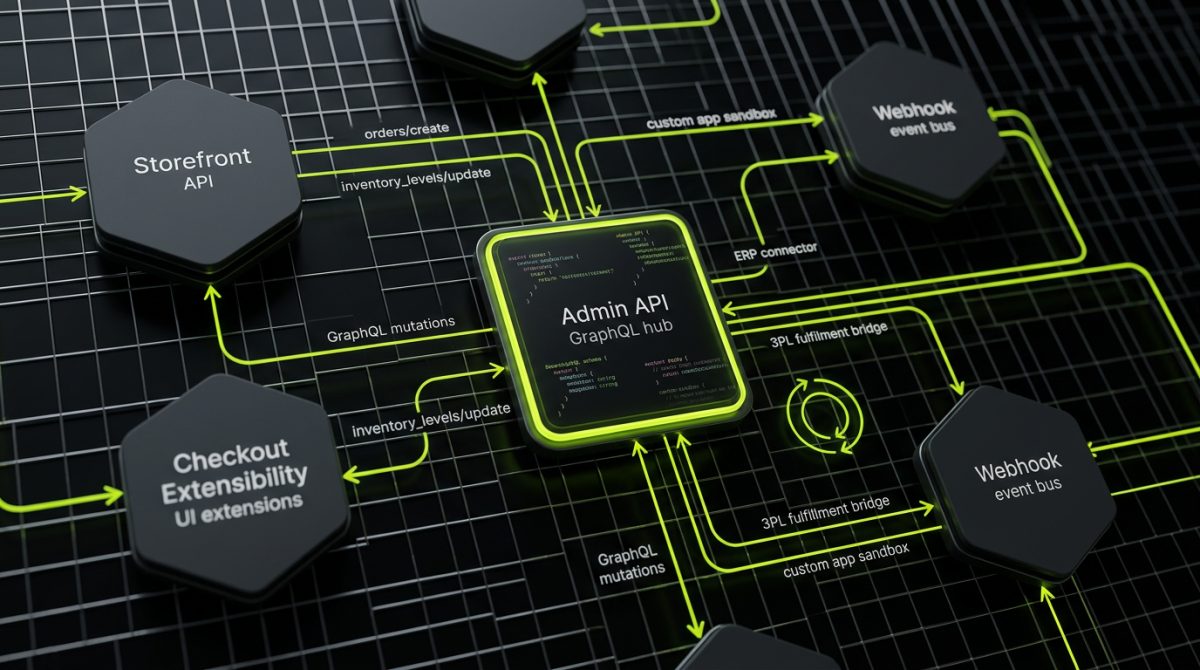
Shopify's extensibility model is API-first. Everything a merchant or developer can do outside of the core admin is mediated through one of Shopify's APIs. Understanding which API does what is foundational to scoping integrations, custom apps, and automation workflows correctly.
Admin API
The Admin API (available in both REST and GraphQL variants, with GraphQL being the current recommended approach) is the primary interface for reading and writing store data:
- Products, variants, inventory, and collections
- Orders, fulfillments, and returns
- Customers and customer segments
- Metafields and metaobjects
- Discounts, price rules, and gift cards
- Webhooks for event-driven integrations
When we build private Shopify apps at werun.dev — connecting stores to ERP systems, 3PL providers, CRMs, or custom fulfillment platforms — the Admin API is the primary integration surface. GraphQL mutations and queries replace the older REST endpoints for new builds, with better performance and more precise data fetching.
# Example: Fetch product with metafields via GraphQL Admin API
query GetProduct($id: ID!) {
  product(id: $id) {
    id
    title
    metafields(first: 10, namespace: "custom") {
      edges {
        node {
          key
          value
          type
        }
      }
    }
  }
}
Storefront API
The Storefront API is a public-facing GraphQL API designed for building custom storefronts. It exposes:
- Product catalog and availability
- Cart creation and management
- Customer authentication
- Checkout creation (linking to Shopify's hosted checkout)
This is the API powering headless Shopify implementations, custom mobile apps, and any frontend that is not using Liquid templates directly.
Checkout Extensibility
Prior to Checkout Extensibility, the only way to customize Shopify's checkout was through checkout.liquid — a Plus-only file that gave developers direct HTML access to the checkout pages. Shopify deprecated checkout.liquid for most use cases in August 2024, replacing it with Checkout Extensibility: a set of UI extension APIs, the Checkout Branding API, and checkout-specific app blocks.
This is a significant architectural shift. Checkout customizations now live in sandboxed UI extensions rather than arbitrary HTML. The trade-off: you lose the ability to inject arbitrary code, but you gain guaranteed compatibility with future Shopify checkout updates, Shop Pay, and accelerated checkout flows. For Plus merchants, scoping checkout customizations now means scoping UI extensions — a different skill set than editing checkout.liquid.
App Architecture: Public vs. Private vs. Custom
Shopify apps come in three forms:
- Public apps — listed in the Shopify App Store, installable by any merchant, subject to Shopify's review process
- Custom apps — built for a single store, installed directly without App Store review, ideal for proprietary integrations
- Private apps — the legacy equivalent of custom apps (deprecated in favor of the custom app model)
For enterprise builds where you need deep ERP integration, custom fulfillment logic, or proprietary business rules, custom apps are the right architecture. They use the same Admin API access as public apps but are scoped to a single store and do not require App Store approval cycles.
Webhooks and Event-Driven Architecture
Shopify's webhook system allows apps and integrations to react to store events in near real-time. Key webhook topics include:
orders/create,orders/updated,orders/fulfilledproducts/create,products/updateinventory_levels/updatecustomers/create,customers/updatecheckouts/create,checkouts/update
For integration-heavy builds — particularly ERP and 3PL connections — a well-designed webhook architecture with proper retry handling, idempotency keys, and event queuing is the difference between a reliable integration and a fragile one. This is infrastructure work that belongs in the architecture phase, not as an afterthought during QA.
What This Architecture Means for Your Shopify Project
Shopify's SaaS model, CDN-backed hosting, and API-first extensibility model are not limitations to work around — they are a foundation to build on intelligently. The merchants and brands that get the most out of Shopify are the ones whose development partners understand these layers deeply enough to use them correctly.
Custom Liquid themes built on Online Store 2.0 patterns perform better and cost less to maintain than modified third-party themes because they align with Shopify's actual architecture. Custom apps built against the GraphQL Admin API with proper webhook handling integrate more reliably than hacked-together REST calls. Shopify Plus builds that use Checkout Extensibility correctly will survive platform updates that would break checkout.liquid customizations.
At werun.dev, every Shopify engagement — whether it is a custom Liquid theme from scratch, a Shopify Plus enterprise build, a migration from WooCommerce or Magento, or a custom app connecting your store to your ERP — starts from this architectural foundation. The platform is sophisticated. The work should be too.
If you are evaluating Shopify for a new build, planning a migration, or trying to understand why your current store is not performing the way it should, start a conversation with our team. We respond within four hours.