
Scaling a Shopify store is not simply a matter of increasing ad spend or expanding your product catalog. At a certain inflection point — typically when order volumes climb past a few hundred per day, SKU counts multiply, and operational complexity compounds — the underlying architecture of your store becomes either a competitive advantage or a bottleneck. The businesses that scale efficiently are the ones that treat Shopify as an operational platform, not just a storefront.
This post covers what that actually looks like in practice: how automation reduces manual overhead, how integrations connect Shopify to the rest of your business stack, and how the right technical foundation keeps operations clean as you grow.
Shopify Flow and the Case for Native Automation
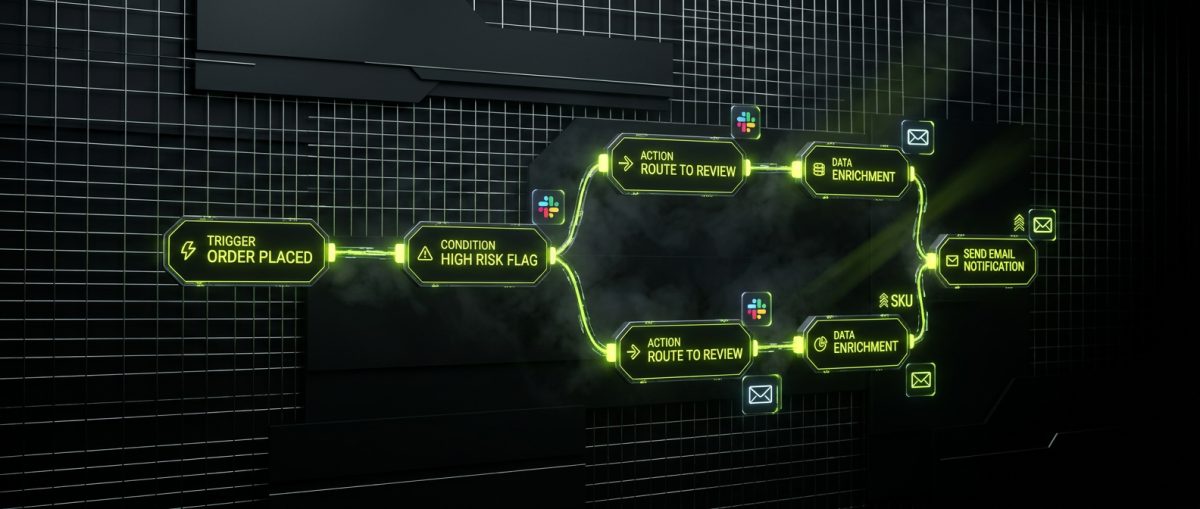
Shopify Flow is the platform's native automation engine, available exclusively on Shopify Plus. It operates on a trigger-condition-action model: something happens in the store, a condition is evaluated, and an action is executed. That sounds simple, but the scope of what it can automate is substantial — and for growing operations, it changes how teams work.
What Flow Actually Handles
The most common use cases fall into a few categories:
Order management automation:
- Auto-tag orders based on product type, customer segment, or payment method
- Flag high-risk orders for manual review before fulfillment begins
- Route orders to specific fulfillment locations based on inventory availability or shipping destination
- Auto-cancel unpaid orders after a defined window and restore inventory
Customer segmentation:
- Tag customers as VIP, wholesale, or at-risk based on purchase history and lifetime value
- Trigger loyalty reward emails when spend thresholds are crossed
- Suppress marketing communications for customers with open support tickets
Inventory operations:
- Notify the purchasing team when a SKU drops below reorder threshold
- Auto-publish or unpublish products based on inventory levels
- Send Slack or email alerts when a product sells out during a campaign
B2B and wholesale workflows:
- Approve or reject B2B account applications based on custom form data
- Assign net payment terms to wholesale customers automatically upon approval
- Trigger onboarding sequences when a company account is created
Building Flows That Don't Break
The technical discipline here matters. Flows that rely on string-matching tags, unvalidated metafield data, or chained triggers without error handling will cause silent failures at scale. When werun.dev builds Flow automations for Shopify Plus clients, the approach always includes:
- Documented trigger maps — every Flow is documented with its trigger source, condition logic, and downstream effects before it goes live
- Idempotency checks — ensuring a Flow that fires multiple times for the same order doesn't produce duplicate actions
- Metafield-driven conditions — using structured metafield data rather than tag-based logic wherever possible, since metafields are typed and validated
- Staging environment testing — running Flows against a development store with realistic order data before deploying to production
For operations teams managing 1,000+ orders per week, a poorly designed Flow doesn't just create noise — it creates fulfillment errors, customer service load, and revenue leakage. The investment in clean architecture upfront pays for itself within weeks.
When Flow Isn't Enough
Flow is powerful within Shopify's ecosystem, but it has limits. It cannot make external HTTP requests natively (without a connector app), it has no native loop logic for bulk operations, and its condition logic is relatively flat. For more complex automation — multi-step workflows involving external APIs, conditional branching across multiple systems, or scheduled batch operations — the right approach is a custom app or an n8n workflow connected to Shopify via webhook and the Admin API. That's a different conversation, but it's one worth having early before teams start building workarounds inside Flow that were never designed for it.
Integrations: Connecting Shopify to Your Operational Stack

No growing business runs on Shopify alone. The store is one node in a larger operational graph that includes ERPs, 3PLs, CRMs, marketing platforms, accounting systems, and customer support tools. The quality of the connections between those systems determines whether your team scales with the business or gets buried under manual data reconciliation.
The Integration Architecture Decision
Before writing a single line of integration code, the architecture decision matters more than the implementation. There are three common patterns:
1. Point-to-point integrations Direct connections between Shopify and one other system. Fast to build, easy to understand, but brittle at scale. When you have five systems, you potentially have ten point-to-point connections to maintain.
2. App-based integrations via the Shopify App Store Pre-built connectors for common platforms (Klaviyo, Gorgias, ShipBob, NetSuite, etc.). Appropriate for standard use cases, but they often lack the flexibility to handle custom data models, non-standard workflows, or business logic specific to your operation.
3. Custom private apps with a middleware layer A private Shopify app built on the Admin API and Storefront API, with a middleware service (often a lightweight Node.js or Python service) that handles transformation, queuing, error handling, and retry logic. This is the right architecture for businesses with complex data requirements or where off-the-shelf connectors have failed them.
ERP and 3PL Integrations in Practice
The two integration categories that cause the most operational pain for growing Shopify businesses are ERP and 3PL connections.
ERP integration (NetSuite, SAP, Dynamics, Brightpearl):
The core data flows are order sync, inventory sync, and customer/account sync. The technical challenges are almost always in the mapping layer — Shopify's data model and your ERP's data model will not align cleanly. Orders in Shopify have line items with variant IDs; your ERP expects SKUs mapped to internal product codes. Discounts are represented differently. Tax handling varies by jurisdiction. Shipping line items need to map to service codes.
A well-built ERP integration handles these translations in a documented mapping layer, not hardcoded in the sync logic. When your ERP data model changes — and it will — you update the map, not the integration.
3PL integration (ShipBob, Whiplash, Flexport, custom 3PLs):
The critical flows are order push (Shopify → 3PL), fulfillment confirmation (3PL → Shopify), and inventory sync (3PL → Shopify). The failure modes are well-known: duplicate orders pushed to the 3PL, fulfillment confirmations that don't update tracking in Shopify, inventory counts that drift because sync jobs fail silently.
Reliable 3PL integrations require:
- Webhook-based order push with idempotency keys to prevent duplicates
- Polling fallback for fulfillment confirmations when 3PL webhooks are unreliable
- Reconciliation jobs that compare Shopify inventory to 3PL inventory on a schedule and alert on drift above a defined threshold
- Dead letter queues for failed sync events, with alerting and manual retry capability
CRM and Marketing Platform Integrations
For B2C brands, the Shopify–Klaviyo connection is often the highest-ROI integration in the stack. The standard app handles the basics, but custom event schemas — passing metafield data, subscription status, loyalty tier, or product category affinity as event properties — unlock significantly more sophisticated segmentation and automation.
For B2B operations, the CRM integration (Salesforce, HubSpot, Pipedrive) needs to handle company accounts, contact hierarchies, and deal stage data — none of which maps cleanly to Shopify's default customer model without Shopify Plus's B2B features and a custom integration layer.
Shopify Plus B2B: Building Wholesale Operations That Scale
Shopify's native B2B functionality, introduced with Shopify Plus in 2022 and significantly expanded since, represents a genuine architectural shift for wholesale operations. Before it existed, B2B on Shopify meant third-party apps, password-protected stores, and fragile workarounds. The current native B2B feature set is production-ready for most wholesale use cases — with the right implementation.
The Native B2B Feature Set
Shopify Plus B2B provides:
- Company accounts with multiple locations, each with their own contacts, payment terms, and shipping addresses
- Price lists that assign customer-specific or segment-specific pricing at the variant level, with optional percentage or fixed discounts off retail
- Net payment terms (Net 15, 30, 60, 90) with invoice generation and payment collection workflows
- Custom checkout for B2B customers, including purchase order number fields, tax exemption handling, and approval workflows
- B2B-specific Storefront API access for headless or custom portal implementations
Designing the B2B Checkout Experience
The default B2B checkout in Shopify Plus is functional, but growing wholesale businesses typically need customization. Checkout extensibility — Shopify's replacement for checkout.liquid — allows developers to add UI extensions at specific points in the checkout flow without forking the checkout codebase.
Common B2B checkout extensions werun.dev builds for clients include:
// Example: PO number validation extension
// Built as a Checkout UI Extension in React
// Validates PO number format against company-specific rules
// before allowing checkout to proceed- PO number capture and validation — required for many procurement departments, with format validation against company-specific rules
- Tax exemption certificate display — showing the customer's tax exemption status and certificate number before order submission
- Minimum order value enforcement — blocking checkout if the order total falls below the company's minimum, with a clear message and upsell prompt
- Approval workflow triggers — for companies that require internal approval before an order is submitted, triggering an async approval flow via Shopify Flow or a custom app
Multi-Store Architecture for Global Wholesale
For brands operating across multiple regions or selling through both DTC and wholesale channels, a single Shopify Plus store is often not the right architecture. The expansion store model — multiple stores under a single Shopify Plus organization — allows:
- Separate storefronts for different regions with localized pricing, currency, and tax handling
- Dedicated B2B stores with wholesale-specific catalogs, pricing, and checkout flows, completely separate from the DTC experience
- Centralized inventory management across stores via a shared ERP or inventory platform
- Unified reporting at the organization level through Shopify's organization admin
The operational complexity of multi-store architectures is real — product catalog management, content updates, and integration maintenance multiply with each store. The decision to go multi-store should be driven by genuine business requirements (regulatory compliance, channel separation, regional pricing complexity) rather than perceived simplicity. When it is the right call, the architecture needs to be designed upfront, not retrofitted.
Metafields and Metaobjects as the B2B Data Layer
B2B operations generate data that Shopify's standard data model doesn't accommodate: contract terms, account manager assignments, approved product lists, credit limits, compliance certifications. Metafields and metaobjects are the right place to store this data — they're native to Shopify, accessible via the Admin API and Storefront API, and can drive both frontend display logic and backend automation.
A well-designed metafield schema for a B2B store might include:
company.credit_limit— integer, used in checkout validationcompany.account_manager— metaobject reference linking to an internal staff recordcompany.approved_collections— list of collection references defining the customer's approved catalogcustomer.tax_exemption_certificate— file reference storing the uploaded certificate
This data layer, when built deliberately, becomes the foundation for automation (Flow conditions referencing metafield values), integrations (syncing credit limit data from the ERP), and personalization (showing account-specific content in the storefront based on company metafields).
Performance, Maintainability, and the Long-Term Store
Growing businesses accumulate technical debt in their Shopify stores faster than almost any other digital asset. Theme customizations stack up. Apps are installed and forgotten. Integration code gets written under deadline pressure without documentation. The result is a store that works until it doesn't — and when it breaks, no one knows why.
Core Web Vitals and Conversion Performance
Shopify's storefront performance directly affects both SEO rankings and conversion rates. The relationship between page load speed and conversion is well-documented: a one-second delay in mobile load time can reduce conversions by up to 20%. For a store doing $5M per year, that's a $1M problem hiding in your Lighthouse scores.
The performance killers on Shopify stores are predictable:
- Third-party scripts loaded synchronously — analytics, chat widgets, review apps, and loyalty programs that block rendering
- Unoptimized images — product images served at full resolution without responsive srcset attributes
- Render-blocking app blocks — theme app extensions that inject JavaScript in the
<head>without defer or async attributes - Liquid template inefficiency — nested loops, redundant API calls within templates, and missing pagination on collection pages
A performance audit on a mature Shopify store almost always surfaces 10–15 specific, fixable issues. Addressing them is not glamorous work, but it compounds: faster stores rank better, convert better, and cost less to operate at scale.
Theme Architecture for Long-Term Maintainability
The most expensive Shopify stores to maintain are the ones built on heavily modified third-party themes. Every customization applied to a purchased theme creates a divergence from the upstream codebase. When the theme author releases an update — or when Shopify deprecates a feature the theme relies on — the update cannot be applied cleanly. The store is frozen in time.
Custom Liquid themes built from scratch, using Online Store 2.0's JSON template architecture, don't have this problem. There is no upstream to diverge from. The codebase is owned, documented, and maintained by the team that built it. Sections Everywhere and app blocks mean that content editors can customize pages without touching code, while developers maintain clean separation between presentation and logic.
At werun.dev, every Shopify theme we build starts from scratch in Liquid — not a modified Dawn clone, not a purchased theme with overrides. The architecture decisions made at the theme level (how metafields are exposed to templates, how sections are structured, how the cart interacts with the Storefront API) determine how maintainable and extensible the store is three years from now.
App Audit and Dependency Management
A mature Shopify store with 20+ apps installed is a performance and security liability. Each app adds JavaScript to the storefront, potentially adds database queries to every page load via ScriptTags, and represents a vendor dependency that can change its pricing, deprecate features, or shut down.
A disciplined app audit for a growing store should evaluate each installed app against three criteria:
- Is this functionality available natively in Shopify or Shopify Plus? Many stores pay for apps that replicate features already included in their plan.
- What is the storefront performance impact? Apps that inject JavaScript on every page load should be evaluated against their actual conversion contribution.
- Can this be replaced with a custom solution that we own? For core operational functionality — reviews, loyalty, subscriptions — a private app built on the Admin API eliminates vendor dependency and gives full control over the data model.
The answer is not always to replace apps with custom code. Off-the-shelf apps are appropriate for many use cases and represent significant development cost savings. But the decision should be deliberate, not the result of installing whatever appeared in search results during a growth sprint.
If your Shopify store has outgrown its current architecture — whether that means Flow automations that don't exist yet, integrations held together with workarounds, or a theme that's become impossible to maintain — werun.dev works with Shopify Plus merchants to build the operational infrastructure that scales. Start a conversation with the team and get a response within four hours.