
Most merchants interact with Shopify through its admin dashboard — uploading products, configuring shipping, running discounts. But underneath every high-performing store is a rendering engine that determines how fast pages load, how flexibly merchants can customize their storefront, and whether the architecture can scale when the business demands it. That engine is Liquid, Shopify's open-source templating language, and understanding how it works is the difference between a store that gets patched together and one that gets engineered.
This post goes deep into how Liquid powers the Shopify theme system, why Online Store 2.0 changed the architecture fundamentally, and what scalable theme development actually looks like in practice — not theory.
How Liquid Works: The Rendering Engine Behind Every Shopify Storefront

Liquid is a Ruby-based templating language created by Shopify in 2006. It has since been open-sourced and is used across multiple platforms, but its deepest integration remains in Shopify's theme rendering pipeline. Every page a customer sees — product pages, collection pages, cart, checkout — is generated by Liquid templates that combine static markup with dynamic data pulled from Shopify's backend.
The language operates on three core constructs:
- Objects: These expose store data to templates.
{{ product.title }},{{ cart.total_price }},{{ shop.name }}— objects give templates access to the live data layer without requiring API calls from the browser. - Tags: Control flow and logic.
{% if %},{% for %},{% unless %},{% paginate %}— tags let templates respond to conditions, iterate over collections, and manage output structure. - Filters: Transform output inline.
{{ product.price | money }},{{ 'image.jpg' | img_url: '800x' }},{{ article.published_at | date: '%B %d, %Y' }}— filters format, convert, and manipulate values before they're rendered.
The Request-Response Cycle in Shopify
When a customer hits a product URL, Shopify's servers identify the requested resource, resolve the active theme, and render the appropriate Liquid template server-side. The fully-rendered HTML is then delivered to the browser. This is fundamentally different from client-side JavaScript frameworks — there's no skeleton HTML waiting for API responses. The page arrives complete.
This architecture has direct performance implications. Because Liquid renders server-side:
- Time to First Byte (TTFB) is fast — the server does the heavy lifting
- Search engines receive fully-rendered HTML — no JavaScript execution required for indexing
- Core Web Vitals metrics like Largest Contentful Paint (LCP) benefit from reduced client-side rendering overhead
Template Hierarchy and File Structure
A Shopify theme is a structured directory of files. The key directories are:
theme/
├── layout/
│   └── theme.liquid          # Master layout wrapper
├── templates/
│   ├── product.json          # OS2.0 JSON template
│   ├── collection.json
│   └── index.json
├── sections/
│   ├── product-main.liquid
│   ├── featured-collection.liquid
│   └── header.liquid
├── snippets/
│   ├── product-card.liquid
│   └── icon-cart.liquid
├── assets/
│   ├── theme.css
│   └── theme.js
└── config/
    ├── settings_schema.json
    └── settings_data.json
The layout/theme.liquid file is the outermost wrapper — it contains the <html>, <head>, and <body> tags, and uses {{ content_for_layout }} to inject the rendered template output. Every page request passes through this layout unless an alternative layout is specified.
Snippets are reusable partials — think of them as components that sections and templates can include via {% render 'product-card' %}. Unlike {% include %} (now deprecated), {% render %} creates an isolated scope, preventing variable leakage between contexts — a critical distinction for maintainable, predictable templates.
Working with the Liquid Object Model
Shopify exposes a rich set of global and context-specific objects. On a product page, the product object gives access to nested data:
{% for variant in product.variants %}
  <option
    value="{{ variant.id }}"
    {% unless variant.available %}disabled{% endunless %}
  >
    {{ variant.title }} — {{ variant.price | money }}
  </option>
{% endfor %}
The cart object is globally accessible, allowing header templates to display live cart counts without additional API calls. The shop object exposes store-level settings. The request object provides URL, path, and locale data useful for conditional rendering across multi-region stores.
Understanding the object model deeply — knowing what data is available in which contexts, what requires additional API calls, and what can be cached — is what separates developers who build fast Liquid themes from those who inadvertently create performance bottlenecks.
Online Store 2.0: The Architecture Shift That Changed Everything
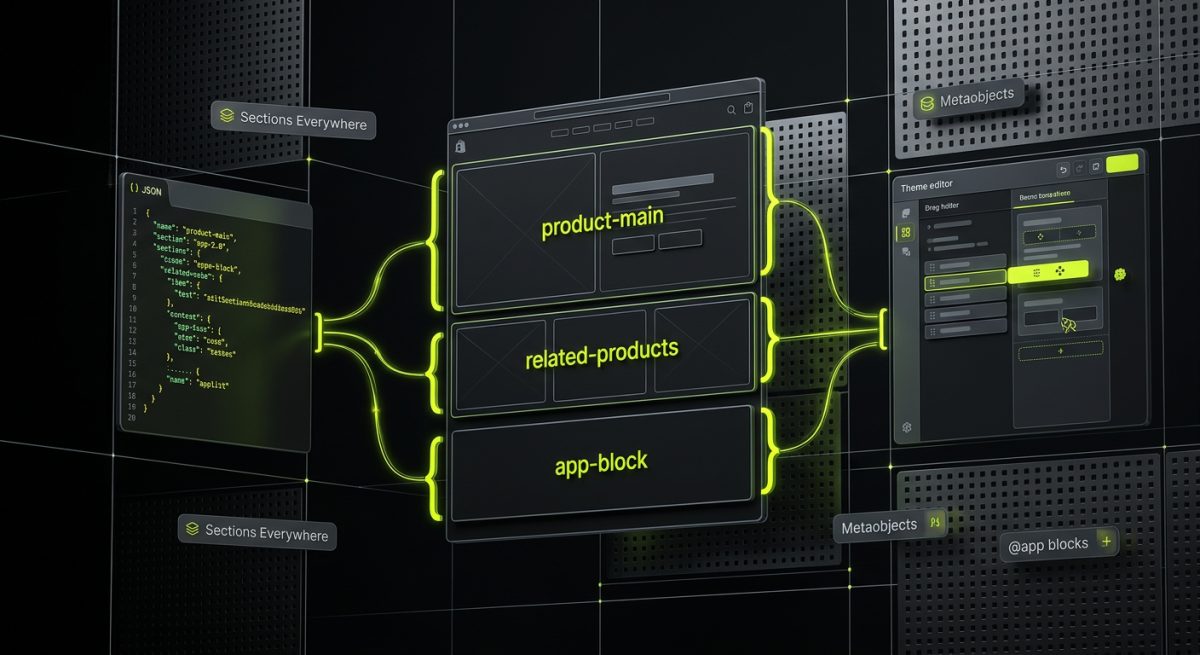
Prior to Online Store 2.0, Shopify themes had a rigid structure. Sections — the modular, drag-and-drop content blocks merchants could configure in the theme editor — were limited to the homepage. Every other template type (product, collection, blog, page) used static Liquid files with no native drag-and-drop editing capability. Customizing a product page layout required code changes. Merchants were locked into whatever structure the theme developer had hardcoded.
Online Store 2.0, launched in 2021, dismantled that constraint entirely.
JSON Templates: Decoupling Structure from Content
The most significant architectural change in OS2.0 is the introduction of JSON templates. Instead of a product page being defined by a single product.liquid file, it's now defined by a product.json file that declares which sections appear on the page and in what order:
{
  "sections": {
    "main": {
      "type": "product-main",
      "settings": {
        "show_vendor": true,
        "enable_sticky_info": true
      }
    },
    "related-products": {
      "type": "related-products",
      "settings": {
        "products_to_show": 4
      }
    }
  },
  "order": ["main", "related-products"]
}
This JSON file is what the theme editor reads. Merchants can add, remove, and reorder sections on any page type — not just the homepage. Developers define the available sections and their configurable settings; merchants control the composition. The separation is clean and deliberate.
Sections Everywhere and App Blocks
With OS2.0, the "Sections Everywhere" capability means any template can be built from a stack of configurable sections. Each section is a .liquid file that declares its own schema — the settings, blocks, and presets that control its behavior in the theme editor:
{% schema %}
{
  "name": "Product Main",
  "blocks": [
    {
      "type": "title",
      "name": "Product Title",
      "limit": 1
    },
    {
      "type": "price",
      "name": "Price",
      "limit": 1
    },
    {
      "type": "variant-picker",
      "name": "Variant Picker",
      "limit": 1
    },
    {
      "type": "@app"
    }
  ]
}
{% endschema %}
The "type": "@app" block type is particularly powerful. It creates a slot where Shopify app developers can inject their own blocks — review widgets, loyalty badges, size guides — directly into the section, without theme code changes. This is the integration layer that makes Shopify's app ecosystem work cleanly with custom themes.
Metafields and Metaobjects: Structured Data Without Custom Apps
OS2.0 also elevated metafields from a developer-only API concern to a first-class theme feature. Metafields allow stores to attach structured data to any resource — products, variants, collections, customers, orders. In Liquid templates, they're accessible via the resource object:
{{ product.metafields.custom.care_instructions.value }}
{{ product.metafields.specifications.weight_grams.value | append: 'g' }}
Metaobjects take this further — they're custom data structures that can be defined in the Shopify admin and referenced across multiple resources. A "Material" metaobject might contain fields for name, description, sustainability rating, and an image. Products reference that metaobject rather than duplicating the data. In Liquid:
{% assign material = product.metafields.custom.material.value %}
<p>{{ material.name }}</p>
<p>{{ material.description }}</p>
For complex product catalogs — particularly in B2B and wholesale contexts — metaobjects eliminate the need for custom apps to manage structured content. This directly reduces app dependency, improves page load times, and simplifies long-term maintenance.
Building Scalable Themes: Architecture Decisions That Compound Over Time
Scalability in Shopify theme development isn't a single decision — it's a set of architectural choices made early that either compound into maintainability or accumulate into technical debt. The themes that hold up under traffic spikes, product catalog growth, and feature additions are the ones where these decisions were made deliberately.
Component-Based Section Architecture
The most scalable Liquid themes treat sections and snippets as a component system. Each section is responsible for a single, well-defined piece of UI. Snippets handle reusable sub-components. The goal is to minimize duplication and maximize composability.
A practical pattern is the "render with parameters" approach, where snippets accept explicit variables:
{% render 'product-card',
  product: featured_product,
  show_vendor: true,
  image_ratio: 'square',
  lazy_load: true
%}
Because {% render %} creates an isolated scope, the snippet only has access to the variables explicitly passed to it. This prevents the "action at a distance" bugs that plague themes built with {% include %}, where any variable set anywhere in the template chain is accessible inside the partial.
Performance Engineering at the Template Level
Core Web Vitals are a direct ranking factor, and Liquid theme architecture has a significant impact on them. Key performance patterns include:
Lazy loading images with native attributes and Shopify's image filters:
<img
  src="{{ product.featured_image | img_url: '800x' }}"
  srcset="
    {{ product.featured_image | img_url: '400x' }} 400w,
    {{ product.featured_image | img_url: '800x' }} 800w,
    {{ product.featured_image | img_url: '1200x' }} 1200w
  "
  sizes="(max-width: 768px) 100vw, 50vw"
  loading="lazy"
  width="800"
  height="800"
  alt="{{ product.featured_image.alt | escape }}"
>
Deferring non-critical JavaScript using defer and type="module" attributes, keeping the main thread clear during initial render.
Section-level CSS loading — scoping styles to the sections that need them rather than loading a monolithic stylesheet, reducing render-blocking CSS.
Avoiding Liquid loops in critical render paths — complex {% for %} loops with nested object access on high-traffic templates (product pages, collection pages) should be profiled carefully. Where data can be pre-structured in metafields or passed via section settings, that's preferable to computing it at render time.
Multi-Region and Multi-Currency Architecture
For Shopify Plus stores operating across multiple markets, the theme architecture must account for Shopify Markets from day one. This means:
- Using
{{ localization.available_countries }}and{{ localization.available_languages }}to build currency and language selectors that work with Shopify's native market routing - Structuring URLs with locale prefixes in mind — Shopify Markets routes traffic to
/en-us/,/de-de/, etc., and templates need to handle these paths correctly - Avoiding hardcoded strings in Liquid templates — all user-facing text should go through the
tfilter, pulling from locale files in thelocales/directory:
{{ 'products.product.add_to_cart' | t }}
{{ 'cart.general.subtotal' | t }}
This isn't just good practice for internationalization — it's a prerequisite for any Shopify Plus build targeting multiple regions.
Theme Settings Architecture for Long-Term Maintainability
The settings_schema.json file defines the global settings available in the theme editor — typography, colors, spacing, feature toggles. How this file is structured determines how much flexibility merchants have without developer intervention.
A well-architected settings schema uses design tokens as the foundation:
{
  "name": "Colors",
  "settings": [
    {
      "type": "color",
      "id": "color_primary",
      "label": "Primary",
      "default": "#1a1a1a"
    },
    {
      "type": "color",
      "id": "color_accent",
      "label": "Accent",
      "default": "#e63946"
    }
  ]
}
These settings are then referenced in CSS via Liquid-generated custom properties:
<style>
  :root {
    --color-primary: {{ settings.color_primary }};
    --color-accent: {{ settings.color_accent }};
  }
</style>
This pattern means a merchant can rebrand the entire store — changing primary colors, typography scales, spacing — without touching a line of CSS. It also means that when a developer needs to update styles, they're working with a coherent token system rather than hunting through hardcoded hex values across dozens of files.
When Custom Themes Outperform Theme Store Purchases
The economics of Shopify theme development are often misunderstood. A premium theme from the Shopify Theme Store costs $300–$500. A custom Liquid theme from a specialist agency costs significantly more. The question isn't which is cheaper upfront — it's which is cheaper over the lifetime of the store.
Theme store purchases come with constraints: opinionated section structures that may not match the brand's design system, performance overhead from features the store doesn't use, update cycles that may conflict with custom modifications, and limited ability to implement genuinely differentiated UX patterns. As stores grow — more SKUs, more markets, more complex B2B requirements — these constraints compound.
Custom Liquid themes built on OS2.0 architecture, with clean component systems, proper metafield integration, and performance-first engineering, scale with the business. They don't require rebuilding when the catalog grows to 10,000 products or when the business expands into three new markets. That's the compounding return on architectural investment.
At werun.dev, every Shopify theme we build starts from scratch — no modified Debut clones, no theme store bases stripped of their branding. We architect from OS2.0 foundations with JSON templates, Sections Everywhere, and metafield integration built in from day one, optimized for Core Web Vitals and designed for long-term maintainability. If your store has outgrown its current theme or you're planning a build that needs to scale, start a project with us.