
Running an online store is not just about picking products and setting prices. The platform underneath your store determines how fast you can move, how much engineering overhead you carry, and ultimately how much of your team's energy goes toward selling versus maintaining infrastructure. That distinction — selling versus maintaining — is where Shopify separates itself from self-managed platforms like WooCommerce, Magento, or a custom-built stack.
This post breaks down the architectural, operational, and commercial reasons why Shopify reduces friction for serious ecommerce businesses, and where the tradeoffs actually live.
The Hidden Cost of Self-Managed Ecommerce Infrastructure

When a business chooses WooCommerce or Magento, they are not just choosing a shopping cart. They are choosing to become, in part, a hosting and software operations company. That responsibility is rarely framed clearly at the outset, but it compounds quickly.
What "Self-Managed" Actually Means
A self-managed ecommerce platform requires you to own and operate every layer of the stack:
- Hosting environment — server provisioning, scaling policies, CDN configuration
- Security patching — WordPress core, WooCommerce, plugins, PHP version compatibility
- SSL certificates and renewal — often manual or semi-automated, with real downtime risk
- Backup and disaster recovery — your responsibility to architect and test
- PCI DSS compliance — you must validate your own scope and controls
- Performance tuning — caching layers, database optimization, image delivery
None of these are trivial. A mid-sized WooCommerce store running 15 plugins can require 8–12 hours of maintenance per month just to stay current and secure — before any feature development happens. When a plugin update breaks the checkout flow at 11pm on a Friday, that cost becomes very concrete.
The Compounding Dependency Problem
Self-managed platforms grow complex through dependency accumulation. A typical WooCommerce store might depend on:
- WooCommerce core and its own extension ecosystem
- A page builder (Elementor, Divi, or Gutenberg blocks)
- A caching plugin (WP Rocket, W3 Total Cache)
- A payment gateway plugin
- A shipping rate plugin
- An SEO plugin
- A forms plugin
- Multiple third-party API integrations
Each of these has its own release cycle, its own breaking changes, and its own support queue. Compatibility between them is not guaranteed. The more plugins you add, the more combinatorial your testing matrix becomes.
This is not a theoretical problem. It is the single most common reason businesses contact werun.dev for WooCommerce-to-Shopify migrations. The platform that felt flexible at launch becomes a fragile, slow, and expensive system to maintain at scale.
The Real TCO Calculation
Total cost of ownership for self-managed platforms must include:
- Hosting costs — typically $200–$2,000/month for a production-grade WooCommerce environment with proper redundancy
- Developer retainer — ongoing maintenance, security patches, plugin updates
- Downtime cost — even one hour of checkout downtime during peak traffic can cost thousands in lost revenue
- Performance investment — dedicated engineering time to achieve Core Web Vitals scores that Shopify delivers by default
When you add these up honestly, the "free" in open-source is rarely free at the scale where it matters.
How Shopify's Managed Architecture Changes the Equation
Shopify is not a hosted version of WooCommerce. It is a fundamentally different architectural model. Shopify owns and operates the infrastructure layer entirely, which means the responsibility boundary for your team shifts dramatically.
Infrastructure You No Longer Own
On Shopify, the following are Shopify's problem, not yours:
- Global CDN — Shopify runs on Fastly with edge nodes worldwide, delivering sub-100ms TTFB for most storefronts
- Automatic scaling — Black Friday traffic spikes are absorbed without any action on your part; Shopify has handled billions of dollars in GMV in single days
- PCI DSS Level 1 compliance — the highest level of payment security certification, maintained by Shopify
- SSL — automatic, always current, zero maintenance
- Platform security — Shopify patches its own platform; you are not responsible for securing the application layer
- 99.99% uptime SLA — backed by Shopify's infrastructure investment
This is not a minor convenience. It is a structural shift in where engineering effort goes. Instead of maintaining infrastructure, your development budget goes toward building customer-facing features, conversion improvements, and integrations that generate revenue.
Online Store 2.0 and the Developer Experience
For developers, Shopify's Online Store 2.0 architecture represents a significant maturation of the platform. JSON templates, Sections Everywhere, app blocks, and metafield integration give developers a structured, predictable system to work within.
At werun.dev, our Shopify development work is built entirely on this architecture — custom Liquid themes from scratch, not modified free themes. The difference matters:
{% comment %}
  Example: Metafield-driven product feature block
  Uses Online Store 2.0 JSON template + metaobject integration
{% endcomment %}

{% assign features = product.metafields.custom.features.value %}
{% if features %}
  <ul class="product-features">
    {% for feature in features %}
      <li class="product-features__item">{{ feature.label }}: {{ feature.value }}</li>
    {% endfor %}
  </ul>
{% endif %}
This kind of structured, metafield-driven content architecture means store editors can manage complex product data without touching code — while developers maintain clean, maintainable theme logic.
The App Ecosystem as Infrastructure
Shopify's app ecosystem is often misunderstood as a weakness ("you need apps for everything") rather than a strength. The reality is that Shopify's App Store provides vetted, maintained integrations for nearly every ecommerce function — reviews, loyalty, subscriptions, search, upsells, returns management — each built and supported by dedicated teams.
For functions that the app store does not cover, or where a business needs proprietary logic, Shopify's Admin API and Storefront API provide a clean, documented, versioned interface for custom app development. Shopify commits to API versioning, which means custom integrations do not break silently with platform updates — a problem that plagues WooCommerce hook-based customizations.
When Shopify Plus Makes the Architecture Argument Stronger
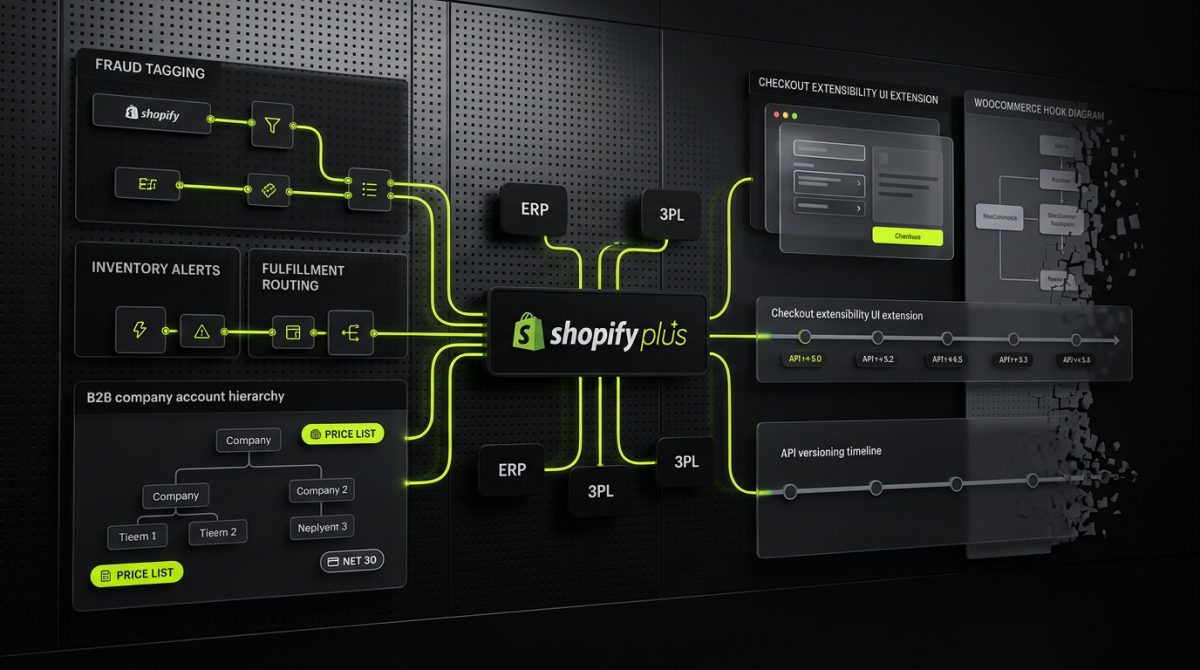
For businesses operating at significant scale — typically above $1M annual GMV, or with complex B2B, multi-region, or enterprise requirements — Shopify Plus extends the managed architecture model with capabilities that would require substantial custom engineering on any self-managed platform.
Checkout Extensibility
Shopify Plus merchants have access to checkout extensibility, which allows deep customization of the checkout flow without forking Shopify's checkout codebase. This is a critical distinction. On WooCommerce or Magento, checkout customization typically means modifying core files or applying patches that break on updates. On Shopify Plus, checkout UI extensions are built against a stable API:
- Custom upsell blocks within the checkout
- Dynamic shipping method logic
- Custom validation rules (minimum order values, product restrictions)
- Branded thank-you and order status pages
- Post-purchase offer flows
All of this runs within Shopify's infrastructure, passes through Shopify's PCI compliance scope, and does not require you to maintain a custom checkout server.
B2B and Wholesale Without a Separate Platform
One of the most expensive patterns in self-managed ecommerce is running a separate B2B store — often a second WooCommerce or Magento installation with its own hosting, maintenance, and integration overhead. Shopify Plus natively supports B2B functionality:
- Company accounts with multiple buyers and permission levels
- Customer-specific pricing and price lists
- Net payment terms (Net 30, Net 60) at the checkout level
- Draft order workflows for sales-assisted purchasing
- Quantity rules and minimum order values per product and per customer
Building equivalent functionality on WooCommerce requires a stack of plugins — WooCommerce B2B, Role-based pricing extensions, custom order workflow plugins — each adding maintenance surface and compatibility risk.
Shopify Flow for Operational Automation
Shopify Flow is a native automation engine available on Shopify Plus that allows merchants to build event-driven workflows without code. Common use cases include:
- Fraud risk tagging — automatically flag orders above a threshold or from high-risk regions
- Inventory alerts — notify buying teams when SKUs drop below reorder points
- Customer segmentation — tag customers based on LTV, order frequency, or product category
- Fulfillment routing — route orders to specific 3PL locations based on product type or destination
On a self-managed platform, each of these requires custom development — a plugin, a cron job, a webhook handler, a queue worker. On Shopify Plus with Flow, a non-technical operations manager can build and maintain these workflows through a visual interface.
For businesses with complex operational requirements, werun.dev builds Shopify Plus architectures that combine Flow automations with custom apps and API integrations — connecting the store to ERP systems, 3PL providers, CRM platforms, and fulfillment networks. The managed infrastructure layer means that integration work focuses entirely on business logic, not on keeping servers running.
Migrations: What Moving to Shopify Actually Involves
The decision to move from WooCommerce, Magento, or BigCommerce to Shopify is not trivial, but it is well-understood. The migration process has clear phases, and when executed properly, it results in zero data loss and a measurably improved operational baseline.
What Gets Migrated
A complete store migration covers:
- Products and variants — including metafields, images, SKUs, and inventory levels
- Customer records — email addresses, order history, addresses (with appropriate data handling for GDPR)
- Historical orders — for reporting continuity and customer service context
- SEO equity — URL structure mapping, 301 redirects, meta data preservation
- Content — blog posts, pages, navigation structures
- Integrations — mapping existing third-party connections to Shopify equivalents or custom apps
The SEO Consideration
The most common concern in platform migrations is SEO impact. A poorly executed migration — broken redirects, missing meta data, changed URL structures without proper mapping — can cause significant organic traffic loss. A properly executed migration preserves and often improves SEO performance, because Shopify's default technical SEO baseline (clean URLs, fast load times, structured data support, canonical tag handling) is stronger than most WooCommerce configurations.
werun.dev's migration process includes a full URL audit and redirect mapping before any data is moved, with post-launch monitoring to catch any gaps in coverage.
The Timeline Reality
A realistic migration timeline for a mid-sized store (1,000–10,000 SKUs, established customer base, multiple integrations) is typically 8–16 weeks from kickoff to launch. That timeline covers:
- Weeks 1–2: Discovery, data audit, integration mapping, redirect planning
- Weeks 3–6: Theme development (custom Liquid, Online Store 2.0 architecture)
- Weeks 7–10: Data migration, integration build, QA
- Weeks 11–14: UAT, redirect implementation, performance testing
- Weeks 15–16: Staged cutover, DNS transition, post-launch monitoring
The investment in a structured migration process pays back quickly. Teams that were spending 10+ hours per month on WooCommerce maintenance immediately recapture that time. Performance improvements — faster page loads, better Core Web Vitals scores — typically produce measurable conversion rate improvements within the first 90 days post-launch.
If your team is evaluating a platform migration or starting a new Shopify build, werun.dev's Shopify team builds custom Liquid themes, Shopify Plus enterprise architectures, and complete store migrations with zero data loss. Start a conversation — the team responds within four hours.