
Pick the wrong automation platform and you find out in month six, when the bill triples or a workflow needs a loop the tool cannot draw. The n8n vs Zapier vs Make decision is not about feature lists. It comes down to who builds the workflows, who hosts them and what unit you pay for.
We build on n8n, so read this with that bias in mind. We also tell clients to use Zapier or Make when they fit better, and often they do. Below are the five decisions that change the outcome: billing unit, data control, complexity ceiling, integrations and reliability.
We describe how the platforms work, not what a plan costs today, because plans and names change. Check each claim against the n8n documentation, the Zapier Help Center and the Make Help Center before you commit.
Key takeaways
- The three platforms differ most on billing unit, hosting model and logic depth, not on the length of their feature lists.
- Zapier has the shortest time to a first working automation and suits simple, linear flows owned by non-technical teams.
- Make gives you more visual branching and data mapping per unit of spend, with a steeper learning curve than Zapier.
- n8n gives you data control, code nodes and AI agent building blocks, in exchange for more technical ownership.
- Custom code wins when the workflow is the product, or when volume, latency or testing needs outgrow a workflow canvas.
n8n vs Zapier vs Make at a glance
On a slide, all three look alike: triggers, actions, a canvas or a list. The difference is the operating model. Zapier is a hosted product built so a marketer can ship an automation in an afternoon. Make is a hosted visual canvas that exposes more of the logic. n8n is a workflow engine you can run on your own server or in its cloud, with code available at every step.
The short verdict: choose Zapier when speed and simplicity matter more than cost per run. Choose Make when logic branches and the team is comfortable in a visual builder. Choose n8n when developers are involved, when data must stay under your control or when AI agents are on the roadmap.

Each platform asks something different of you, and that matters more than any feature row. Here is the philosophy of each in two sentences.
Hosted
Zapier
Built for people who want a working automation today. It asks you to accept a linear model and a bill that grows with every step.
Visual
Make
Built for people who think in diagrams. It asks you to learn routers, iterators and data mapping.
Self-hostable
n8n
Built for teams with technical ownership. It asks you to run, update and monitor the system, or to pay for the cloud edition.
Those are the models. The next three parts show what each one is like to live with.
Zapier: the fastest path for non-technical teams
Zapier is built on a trigger-and-action model. You pick an app, pick an event, then add steps. Its app directory is typically the broadest of the three, and an ops manager can ship a working Zap without engineering help.
It does branch and transform. Paths split a Zap by condition, Filter stops a run early, Formatter reshapes text and dates, and Code by Zapier runs short JavaScript or Python snippets. The model strains past a dozen steps, because the editor is a vertical list and every added step also adds to the bill.
Make: visual scenarios with more logic
Make draws scenarios on a canvas. Routers split a scenario into branches with a filter on each route, and iterators and aggregators turn arrays into single bundles and back again. The mapping panel shows the output of each module and lets you apply functions inline.
That visibility is why operations teams like it. The cost is a learning curve around bundles, arrays and error handlers, which a non-technical user hits within the first weeks. For multi-step flows Make is often the better value of the two hosted tools, though that depends on your plan and module count.
n8n: workflows you can host and extend
n8n is a node-based workflow engine. The canvas feels like Make, but every node exposes its input and output as JSON, the Code node runs JavaScript or Python, and the HTTP Request node reaches any API. You can run it on n8n Cloud or on your own infrastructure.
The self-hosted Community Edition runs under n8n's Sustainable Use License. That is fair-code, not OSI open source, so read the terms, especially if you plan to resell workflows as a service. n8n asks for someone who is comfortable with APIs and JSON.
A summary of the differences before we go deeper:
| Criterion | Zapier | Make | n8n |
|---|---|---|---|
| Billing unit | Tasks (action steps) | Credits (module operations) | Executions on Cloud, none on self-hosted |
| Hosting | Cloud only | Cloud only | Cloud or self-hosted |
| Logic depth | Linear, with Paths | Routers, iterators, aggregators | Branches, loops, sub-workflows, code |
| Code | Short code steps | Built-in functions, HTTP | Code node, HTTP, custom nodes |
| Best fit | Non-technical teams, simple flows | Visual builders, moderate logic | Developer-led teams, data rules, AI |
n8n vs Zapier vs Make pricing: tasks, credits, executions
Price pages are hard to compare because each vendor counts a different thing. A workflow that is cheap on one platform can be expensive on another with identical logic. Not a price problem. A unit problem.
How each platform counts usage
- Zapier counts tasks. A task is generally a successful action step. The trigger does not count, and built-in helpers such as filters and formatting generally do not either.
- Make counts credits. In the simple case each module that runs in a scenario consumes a credit, trigger included, and some features such as AI modules can consume more.
- n8n Cloud counts workflow executions. One run is one execution however many nodes it passes through, and the self-hosted edition has no execution quota from n8n.
The exact rules live in each vendor's help center and they change, so read them before estimating. The diagram follows a single run, one trigger and five actions, and shows each counter ticking as steps fire.
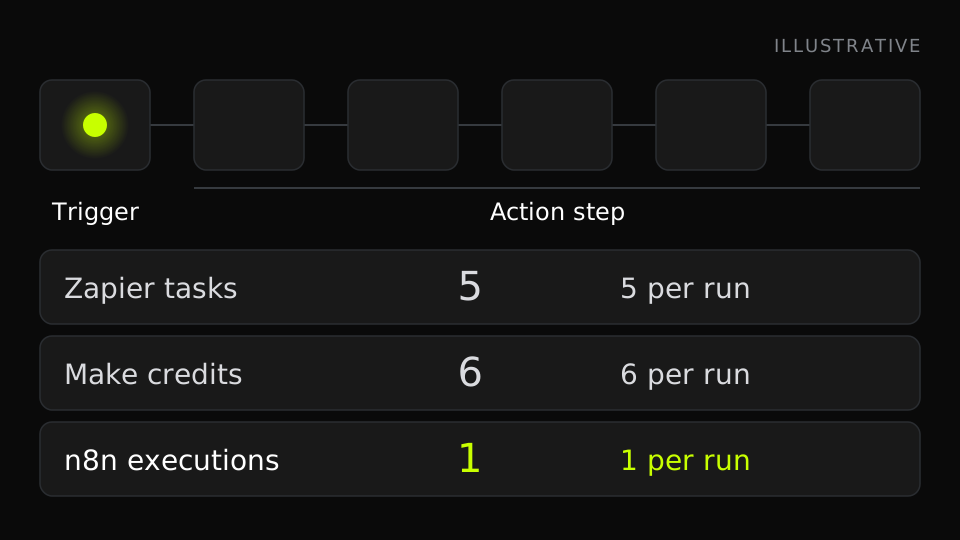
Worked example: one workflow, 10,000 runs
Take an illustrative lead-routing workflow. A form submission triggers it, then five actions run: enrich the company, look it up in the CRM, create or update the contact, create a deal and post to Slack. It runs 10,000 times a month.
On a per-step model that is five billed tasks per run, so 50,000 tasks. On a per-module credit model the trigger counts too, so six credits per run, or 60,000. On a per-execution model it is one per run, so 10,000. Same workflow, same outcome, up to a sixfold spread in billed units.
These are billed units, not dollars. Each vendor sells bundles at different prices, so convert the units using the current plan tables. What the example shows is the shape: per-step models multiply by step count, and per-execution models do not.
Where the pricing curve flips
At low volume and short flows, the unit differences are small, and the cheapest tool is the one your team actually finishes building. The curve flips when flows get longer, when volume grows tenfold or when loops appear. Each added step multiplies on a per-step model.
For example, an order sync that loops over 200 line items with two actions per item bills 400 steps per order on a per-step model, before counting anything outside the loop. On n8n Cloud it is still one execution. Self-hosting removes the execution meter altogether, but adds a server bill and an on-call burden.
Costs the price page does not show
- Build time: a tool your team knows is cheaper than a cheaper tool they must learn.
- Maintenance: someone fixes the workflow when an API changes its fields.
- Failure cost: a lost lead or a duplicated invoice outweighs a month of subscription.
- Infrastructure and DevOps time, if you self-host.
- Seats, environments and access controls, which vary by plan.
A cheaper unit price is not a cheaper project. Count people-hours next to the bill.
Self-hosting, data control and compliance
Data location is where the decision stops being about price. If workflows touch customer records, contracts, health information or personal data of EU residents, you need to know where data is processed, how long execution logs live and who can read them.
What self-hosted automation with n8n gives you
Self-hosted automation with n8n means the engine runs in your own cloud account or data center. Payloads stay in your network, execution history lives in your database and credentials are encrypted with a key you hold. Workflows can also reach internal systems behind a firewall without exposing them to a third party. You decide the region, the retention window and the network rules.
Control is a trade
Self-hosting n8n gives you data control, but you inherit upgrades, backups, queue mode, secrets and uptime. A workflow tool you run is a system you operate.
In practice that means a production database instead of the default SQLite, queue mode with Redis and worker processes once volume grows, backups, upgrades, TLS and monitoring. The n8n documentation covers each. If nobody on your side wants that job, n8n Cloud or a managed arrangement is the honest answer.
Cloud-only: Zapier and Make
Zapier and Make are cloud services. Neither offers a self-hosted version of the platform, so data passes through vendor infrastructure and execution history stores payloads for a retention period. For marketing and sales operations, where the data already lives in SaaS tools, that is usually acceptable.
Reduce exposure by passing only the fields a step needs, and review each vendor's retention settings and data processing terms. It is a constraint, not a flaw.
What a compliance review will ask
Bring these questions to the vendors early:
- Where is data processed and stored, and can you choose the region?
- How long are execution logs kept, and can you delete them on demand?
- Who can see credentials, and how are they stored?
- Does the plan you need include audit logs and role-based access?
- Is there a data processing agreement and a list of subprocessors?
If you work under HIPAA or similar rules, get a written answer from the vendor and sign-off from legal, not a marketing page.
Complexity ceiling: branching, loops, code and AI agents
Every tool handles "if this, then that". The ceiling shows when logic needs loops, shared routines and state. Test your hardest workflow on each tool, not your easiest.
Branching and loops
Zapier handles conditions with Paths and arrays with Looping by Zapier, and both count toward tasks. Deep nesting gets hard to read in a vertical list. Make uses routers with filters per route, plus iterators and aggregators, which handle arrays well once you learn the bundle model.
n8n uses IF and Switch nodes, Merge for rejoining branches and Loop Over Items for batching. Nodes process arrays of items by default, so many loops are implicit and you draw fewer of them.
Code steps and sub-workflows
Zapier's code steps suit short transformations, within the runtime limits in its Help Center. Make offers built-in functions for text, dates and arrays, and one scenario can call another. n8n pairs the Code node with an Execute Sub-workflow node, so you can build a reusable routine once and call it from many workflows. Workflows export as JSON, so you can keep them in Git.
That last point matters for review and rollback. For examples of this in practice, see our guide to advanced automation with n8n.
AI agents and LLM chains
All three now offer AI steps and agent features. For a single summarize-or-classify step, any of them works. The gap opens when an agent needs several tools, memory and retrieval from a vector store.
n8n exposes the most building blocks: an AI Agent node, chat models, memory, tool nodes and vector stores, each inspectable in the editor. Whatever you choose, add guardrails: validate outputs, require human approval for risky actions and cap spend per run.
Integration libraries and webhooks
App count is a vanity number. What matters is whether your core tools, plus the odd one, are supported at the depth you need.
Prebuilt apps versus the HTTP node
Zapier is known for the broadest directory of prebuilt apps, and Make's library is large too. n8n ships fewer built-in nodes but adds community nodes and a capable HTTP Request node. A prebuilt action usually covers common operations, not every endpoint.
The long tail is where the choice shows: a niche ERP, vertical software, an internal API. All three can call a generic endpoint, so ask how comfortable that is. Our REST API, ERP and CRM integration work starts exactly where prebuilt actions stop.
Webhooks, auth and rate limits
All three accept webhook triggers. Check four things before you build:
- Can the workflow reply to the caller with a custom response? n8n and Make support this, while Zapier's webhook trigger is built for one-way delivery, so check its Help Center.
- Which auth methods are covered: OAuth2, API keys, header auth, signature verification?
- What are the payload size limits?
- How do you throttle? Zapier has Delay, Make has a sleep tool, and n8n has batching options and a Wait node.
When an API allows only a few requests per second, delays and batching decide whether a nightly sync finishes.
Reliability, error handling and monitoring
At 2 a.m. an API returns a 500 and a lead disappears. Reliability is not whether the platform is up. It is whether you know, and whether you can recover. This is where cheap automations become expensive.
Retries and error routing
Make attaches error handlers to modules, with routes such as resume, ignore, rollback, commit and break, and keeps incomplete executions for retry. n8n has per-node Retry On Fail, a continue-on-error output and an Error Trigger node that starts a dedicated error workflow. Zapier can notify you of errors and replay failed runs, and which of those your plan includes is worth checking.
Logs, replay and alerting
All three keep execution history. The differences are how much payload you can see, how long it is kept and how easily you can replay a run with the same data. Route alerts to a channel your team reads, with the workflow name, the failing step and a link to the run.
Replay needs idempotency. If a run created a deal before it failed, replaying it creates a second deal unless the workflow checks for an existing record first.
Who owns uptime
With Zapier and Make, the vendor owns the platform and you own the correctness of your workflows. With self-hosted n8n you own both. Name one person for each workflow, and write down what happens when it fails. For running n8n at volume, see our post on scaling B2B operations with advanced n8n workflows.
Which platform fits which team
Four criteria sort most cases: who builds, what data rules apply, how deep the logic goes and how many runs you expect. Map your situation to one of three profiles.
Marketing and sales ops without developers
Start with Zapier. Lead routing, notifications and form-to-CRM handoffs ship in hours, and the people who own the process can edit them. Move to Make when a flow needs branches and arrays.
Operations teams with growing logic
Make fits teams that think in processes and want to see data move. Approvals, enrichment and multi-system syncs map well to routers and iterators. If someone technical joins, n8n becomes a real option.
Teams with developers, data rules or AI workloads
n8n fits when developers review workflows, when data must stay in your environment or when you are building agents with tools and memory. It asks for ownership in return. If you do not have that ownership, buy the cloud edition or a managed service.
Fastest start
Zapier
- Non-technical teams and simple, linear flows
- Broad app directory, short time to first automation
- Cost grows with every added step
Visual logic
Make
- Ops teams with branching and array handling
- Strong data mapping on a visual canvas
- Cloud only, learning curve on bundles
Our pick with developer access
n8n
- Developers, data rules or AI agent workloads
- Self-hostable, code at every step
- You own upgrades, backups and uptime
When custom code beats all three
A workflow tool is plumbing. When the workflow becomes the thing you sell or the thing that must never fail, plumbing is the wrong layer. The broader decision is covered in our post on low-code and no-code versus custom development.
Signals you have outgrown a workflow tool
- The workflow is the product: customers pay for it and expect an SLA.
- Volume is high or latency strict, for example a user-facing response in a fraction of a second.
- You need real tests, code review, staging and CI.
- Logic needs transactions, ordering or long-running state.
- The canvas has become a codebase: dozens of nodes nobody can review.
A hybrid pattern that works
Keep orchestration in n8n or Make and move the core rules into a small service behind a REST endpoint. The workflow receives events through a webhook, calls the service over HTTP and handles notifications and retries. You get tests, versioning and reuse for the logic, and fast iteration for the glue.
Where to start
Do not choose by demo and do not migrate everything. Pick one real workflow that hurts, build it on the likely winner and run it for two weeks.
- List your top three workflows by pain
- Count the steps and monthly runs of each
- Mark the sensitivity of the data each one touches
- Name one owner for failures
- Break a step on purpose and test the error handling
- Compare the real bill and the hours spent after two weeks
If you want a second opinion, our AI and automation service covers n8n workflows, AI agents and integrations. We can scope the pilot, build it on n8n or tell you plainly that Zapier or Make fits better. Tell us which workflow is hurting and we will reply with a recommendation.
Frequently asked questions
Is n8n better than Zapier?
Neither is better in general. n8n gives more control, code and self-hosting and suits developer-led teams, while Zapier is faster to start and easier for non-technical teams. The better one is the one that matches who builds and hosts your workflows.
Is Make cheaper than Zapier?
It can be for workflows with many steps, but not always. Zapier bills tasks per action step and Make bills credits per module operation, so compare using your real step count and volume against the current price pages.
Can you self-host Zapier or Make?
No. Both are cloud services. Among the three, only n8n can run on your own infrastructure, through its self-hosted edition under the Sustainable Use License.
Which automation platform is best for a B2B company?
It depends on the team. Zapier suits non-technical teams with simple flows, Make suits operations teams with branching logic, and n8n suits teams with developers, data control needs or AI agent workloads.
Is n8n free to use?
You can self-host the Community Edition at no license cost under n8n's Sustainable Use License, which is fair-code and not OSI open source. You still pay for servers and maintenance time, and n8n Cloud is a paid service.
Can n8n, Zapier or Make build AI agents?
Yes, all three offer AI steps and agent features. n8n exposes the most granular building blocks, such as an agent node, memory, tools and vector stores. In any tool, add validation, human approval and spend limits.
When should you stop using no-code automation and write custom code?
Switch when the workflow is the product, when volume or latency outgrow the tool, or when you need tests, code review and staging. A common middle path keeps orchestration in a workflow tool and moves core rules into a small service.