
Most guides on how to build a WordPress plugin stop at Hello World. The plugin runs on your laptop, then breaks when a second developer touches it, when a site runs a different PHP version, or when an editor submits a form without the right role.
This tutorial builds one small plugin, Acme Notes, and adds what a production plugin needs: a clean file structure, hooks, a custom post type, a settings page, a REST endpoint, security controls, safe updates, uninstall cleanup, tests and a class-based architecture. It is the engineering view. For the buyer view (when a custom plugin makes sense, what it costs and how a project runs), read our guide to custom WordPress plugin development.
Every snippet builds on the one before and uses the acme_notes prefix. We do not quote minimum PHP or WordPress versions here because they move. Check the WordPress Plugin Handbook for the current ones before you set yours.
Key takeaways
- A plugin needs one main file with a header and an ABSPATH guard, and a unique prefix on every function, option and post type.
- Hooks are the only integration surface, so register on the right lifecycle hook and never edit core or other plugins.
- Security is four controls in order: capability, nonce, sanitize and validate, escape on output, plus
$wpdb->prepare()for custom SQL. - Store a db version beside the code version and run idempotent migrations on
plugins_loaded, because activation hooks do not run on update. - Move to classes with constructor injection once the plugin passes a few hundred lines or a second developer joins.
How to build a WordPress plugin: file structure
A plugin is a folder in wp-content/plugins with one PHP file that carries a header comment. WordPress reads that header, lists the plugin and, once it is active, loads the file on every request. Everything else is your decision, and the decisions from the first hour set the cost of the three hundredth.
Folder layout that scales
Keep the root thin. The main file bootstraps, classes live in srcand anything that is not runtime code (tests, tooling, the readme) sits next to it. The same layout works for a 200-line plugin and a 20,000-line one.
acme-notes/
├── acme-notes.php
├── uninstall.php
├── readme.txt
├── composer.json
├── src/
│   ├── Plugin.php
│   ├── Settings.php
│   └── Rest_Controller.php
├── tests/
└── vendor/
Three rules keep it honest. One main file, named after the folder. No logic at the top level of any other file except class and function definitions. And no queries, output or asset loading at include time: a file registers hooks and returns.

A WordPress plugin boilerplate saves typing, not thinking. The popular ones ship admin and public class pairs, a loader class that wraps add_action and i18n stubs, and you will delete half of it. We start from the layout above and add structure when a file earns it. Use a boilerplate when your team already knows it and agrees on its conventions. Skip it when you cannot explain every file it generated.
The plugin header and the direct access guard
Only Plugin Name is mandatory in the header, but Version, Requires PHP, Text Domain and License are the fields you will regret skipping. The ABSPATH guard stops anyone from requesting the PHP file directly and running code outside WordPress.
<?php
/**
 * Plugin Name:       Acme Notes
 * Description:       Internal notes with a settings page and a REST endpoint.
 * Version:           1.0.0
 * Requires PHP:      7.4
 * Author:            Acme
 * License:           GPL-2.0-or-later
 * Text Domain:       acme-notes
 */

if ( ! defined( 'ABSPATH' ) ) {
	exit;
}

define( 'ACME_NOTES_VERSION', '1.0.0' );
define( 'ACME_NOTES_DB_VERSION', 2 );
define( 'ACME_NOTES_FILE', __FILE__ );
define( 'ACME_NOTES_DIR', plugin_dir_path( __FILE__ ) );
Constants hold three things: the plugin version, a separate db version (more on that in the updates section) and paths. Prefix everything: functions, constants, options, post types. Unprefixed names are how two plugins fatal each other on activation.
Autoloading with Composer PSR-4
Past a handful of classes, stop writing require_once lines. The Composer PSR-4 autoloader maps a namespace to a folder, so Acme\Notes\Settings loads from src/Settings.php. We use it from the refactor section onward, but wiring it now costs nothing.
{
  "name": "acme/acme-notes",
  "type": "wordpress-plugin",
  "require": { "php": ">=7.4" },
  "autoload": {
    "psr-4": { "Acme\\Notes\\": "src/" }
  }
}
Then load the generated autoloader from the main file.
$acme_notes_autoload = ACME_NOTES_DIR . 'vendor/autoload.php';

if ( is_readable( $acme_notes_autoload ) ) {
	require_once $acme_notes_autoload;
}
Ship the vendor folder inside the release zip, built with composer install --no-dev. Check that the file exists before requiring it, so a missing folder does not take down a live site.
Hooks: actions and filters in practice
Hooks are the only integration surface WordPress gives you. You never edit core, a theme or another plugin: you attach a callback to a named point and WordPress calls it. Learn the lifecycle and half of plugin debugging disappears.
Actions vs filters
An action announces that something happened. Your callback does work and returns nothing. A filter passes a value through. Your callback receives it and must return it, changed or not. Forgetting the return in a filter is the classic way to blank a site's content.
| Aspect | Action | Filter |
|---|---|---|
| Registered with | add_action | add_filter |
| Fired with | do_action | apply_filters |
| Callback returns | Nothing | The value, modified or not |
| Typical use | Register, save, enqueue, send | Change content, titles, query args |
add_action( 'init', 'acme_notes_register_post_type' );
add_filter( 'the_content', 'acme_notes_append_footer' );

function acme_notes_append_footer( $content ) {
	if ( is_singular( 'acme_note' ) && in_the_loop() && is_main_query() ) {
		$label    = get_option( 'acme_notes_label', 'Internal note' );
		$content .= '<p class="acme-notes-footer">' . esc_html( $label ) . '</p>';
	}

	return $content;
}
The filter guards three conditions: the right post type, the loop and the main query. Without them it appends your markup to widgets, excerpts and feeds. Both registration functions accept a priority (default 10, lower runs first) and the number of arguments your callback takes.
Choosing the right hook and priority
Pick the earliest hook where everything you need exists, and no earlier.
plugins_loaded: every active plugin is loaded. Build your objects and run upgrade checks here.init: WordPress is loaded and the user is authenticated. Register post types, taxonomies and shortcodes here.admin_menuandadmin_init: add admin pages and register settings.rest_api_init: register REST routes.wp_enqueue_scriptsandadmin_enqueue_scripts: load CSS and JavaScript, only on the screens that need them.
Capability checks and translated strings are not reliable before initwhich is why registering a post type earlier is a bug even when it appears to work. Change a priority only with a reason, for example to run after another plugin's filter, and write the reason in a comment.
Activation and deactivation hooks
register_activation_hook( ACME_NOTES_FILE, 'acme_notes_activate' );
register_deactivation_hook( ACME_NOTES_FILE, 'flush_rewrite_rules' );

function acme_notes_activate() {
	// The init hook has not fired yet, so register the type directly.
	acme_notes_register_post_type();
	flush_rewrite_rules();
	add_option( 'acme_notes_db_version', ACME_NOTES_DB_VERSION );
}
Activation runs once, at a moment when your init hooks have not fired, which is why we call the registration function directly before flushing rewrite rules. Never call flush_rewrite_rules on every request: it rewrites a database option each time. Use deactivation for temporary cleanup such as flushing rules or unscheduling cron events. Deleting data belongs to uninstall.
Activation also does not run when a plugin is updated. That single fact drives the upgrade design later in this article.
Add a custom post type, settings page and REST endpoint
These three features appear in most plugins. Each has a WordPress API that handles the hard parts if you use it as designed.
Register a custom post type
function acme_notes_register_post_type() {
	register_post_type(
		'acme_note',
		array(
			'labels'       => array(
				'name'          => __( 'Notes', 'acme-notes' ),
				'singular_name' => __( 'Note', 'acme-notes' ),
			),
			'public'       => true,
			'show_in_rest' => true,
			'supports'     => array( 'title', 'editor', 'author' ),
			'menu_icon'    => 'dashicons-edit-page',
			'rewrite'      => array( 'slug' => 'notes' ),
		)
	);
}
Setting show_in_rest to true exposes the type in the REST API and makes it editable in the block editor. The post type key is limited to 20 characters, so keep it short and prefixed. Choose public and rewrite on purpose: a public type with a slug creates front-end URLs, and an internal type should not.
Settings page with the Settings API
add_action( 'admin_init', 'acme_notes_register_settings' );
add_action( 'admin_menu', 'acme_notes_add_settings_page' );

function acme_notes_register_settings() {
	register_setting(
		'acme_notes',
		'acme_notes_label',
		array(
			'type'              => 'string',
			'sanitize_callback' => 'sanitize_text_field',
			'default'           => 'Internal note',
		)
	);
	add_settings_section( 'acme_notes_main', '', '__return_false', 'acme-notes' );
	add_settings_field(
		'acme_notes_label',
		__( 'Footer label', 'acme-notes' ),
		'acme_notes_render_label_field',
		'acme-notes',
		'acme_notes_main'
	);
}

function acme_notes_render_label_field() {
	printf(
		'<input type="text" class="regular-text" name="acme_notes_label" value="%s">',
		esc_attr( get_option( 'acme_notes_label', 'Internal note' ) )
	);
}

function acme_notes_add_settings_page() {
	add_options_page(
		__( 'Acme Notes', 'acme-notes' ),
		__( 'Acme Notes', 'acme-notes' ),
		'manage_options',
		'acme-notes',
		'acme_notes_render_settings_page'
	);
}

function acme_notes_render_settings_page() {
	if ( ! current_user_can( 'manage_options' ) ) {
		return;
	}
	?>
	<div class="wrap">
		<h1><?php echo esc_html( get_admin_page_title() ); ?></h1>
		<form action="options.php" method="post">
			<?php
			settings_fields( 'acme_notes' );
			do_settings_sections( 'acme-notes' );
			submit_button();
			?>
		</form>
	</div>
	<?php
}
register_setting attaches the sanitize callback to the option, so every save goes through it, including saves from other code. The form posts to options.phpwhich verifies the nonce printed by settings_fields and checks the capability for you. Do not build your own save handler for plain options. Use the Settings API and you inherit both checks.
A REST endpoint with permission checks
add_action( 'rest_api_init', 'acme_notes_register_routes' );

function acme_notes_register_routes() {
	register_rest_route(
		'acme-notes/v1',
		'/notes',
		array(
			'methods'             => WP_REST_Server::READABLE,
			'callback'            => 'acme_notes_rest_list',
			'permission_callback' => function () {
				return current_user_can( 'edit_posts' );
			},
			'args'                => array(
				'per_page' => array(
					'type'              => 'integer',
					'default'           => 10,
					'sanitize_callback' => 'absint',
					'validate_callback' => function ( $value ) {
						return is_numeric( $value ) && (int) $value >= 1 && (int) $value <= 50;
					},
				),
			),
		)
	);
}

function acme_notes_rest_list( WP_REST_Request $request ) {
	$notes = get_posts(
		array(
			'post_type'   => 'acme_note',
			'numberposts' => $request['per_page'],
		)
	);

	$items = array();
	foreach ( $notes as $note ) {
		$items[] = array(
			'id'    => $note->ID,
			'title' => get_the_title( $note ),
		);
	}

	return rest_ensure_response( $items );
}
Three details matter. The permission_callback decides who may call the route. Omit it and WordPress raises a notice, and return __return_true only when the route is meant to be public. The args array validates and sanitizes input before your callback runs, with validation first. And the namespace carries a version, so a v2 can live beside v1. The REST API Handbook documents schemas and controller classes for larger APIs.
WordPress plugin best practices for security
WordPress plugin security is four controls applied in the right order, not clever cryptography. The recurring failure is a missing check, not an exotic exploit. The plugin security guidance in the handbook frames it the same way, and the wider picture is in our piece on web application security and OWASP priorities.
Each control answers a different question and applies at a different moment of the request.
Who
Capability
Who may do this. Check the narrowest fit with current_user_can() before any change.
From where
Nonce
Did the request come from our form, for this user. Use wp_nonce_field() and check_admin_referer().
On input
Sanitize
Clean data before storing it with sanitize_text_field() or absint(), and reject what is invalid.
On output
Escape
Make output safe for its context with esc_html(), esc_attr() or esc_url().
Capabilities and nonces: who and from where
A capability answers who is allowed. A nonce answers whether this request came from a form or link we generated for this user. You need both on every state-changing request. Here is a custom admin-post handler, the pattern for anything the Settings API does not cover.
add_action( 'admin_post_acme_notes_save', 'acme_notes_handle_save' );

function acme_notes_handle_save() {
	if ( ! current_user_can( 'manage_options' ) ) {
		wp_die( esc_html__( 'You are not allowed to do this.', 'acme-notes' ), '', array( 'response' => 403 ) );
	}

	check_admin_referer( 'acme_notes_save', 'acme_notes_nonce' );

	$label = isset( $_POST['label'] ) ? sanitize_text_field( wp_unslash( $_POST['label'] ) ) : '';
	$page  = admin_url( 'options-general.php?page=acme-notes' );

	if ( '' === $label || strlen( $label ) > 60 ) {
		wp_safe_redirect( add_query_arg( 'acme_error', 'label', $page ) );
		exit;
	}

	update_option( 'acme_notes_label', $label );
	wp_safe_redirect( add_query_arg( 'acme_saved', '1', $page ) );
	exit;
}
The matching form prints the action name and the nonce.
<form action="<?php echo esc_url( admin_url( 'admin-post.php' ) ); ?>" method="post">
	<input type="hidden" name="action" value="acme_notes_save">
	<?php wp_nonce_field( 'acme_notes_save', 'acme_notes_nonce' ); ?>
	<input type="text" name="label" value="<?php echo esc_attr( get_option( 'acme_notes_label', '' ) ); ?>">
	<?php submit_button(); ?>
</form>
Check the capability first and fail with a 403. Then verify the nonce with check_admin_refererwhich stops the request on failure. Nonces expire and are tied to the user and the action, so they limit cross-site request forgery, but they are not authentication.
Nonce is not permission
A nonce proves intent: the request came from a form or link generated for this user. It does not prove the user may perform the action. Always check a capability as well, and never rely on a nonce alone.
Pick the narrowest capability that fits. manage_options suits a settings page, edit_posts suits note-taking, and a custom capability suits anything you want to hand to one role. Never gate admin actions with is_admin(): it only says the request targets an admin screen, not that the user is an administrator.
The diagram traces one settings form submit through the checks. Each check can reject the request, and rejection happens before any data is touched.
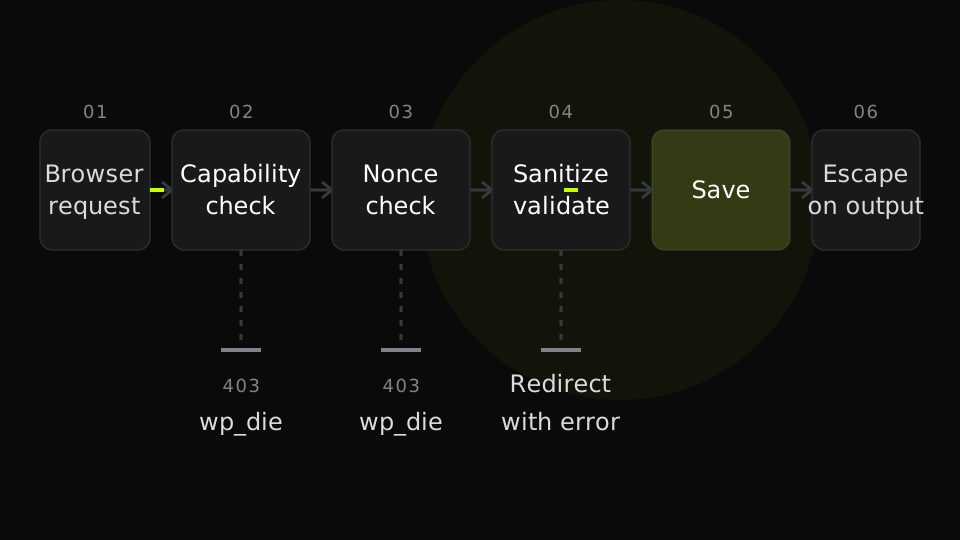
Sanitize on input, validate, escape on output
Sanitizing cleans input before you store it. Validation rejects input that is not acceptable at all. Escaping makes output safe for the context where it prints. Do the first two when data arrives, and do the third at the last moment before output, every time, even for values you stored yourself.
Remember that $_POST values arrive slashed, so call wp_unslash before sanitizing. Then escape for the context, not the source. Text, attributes, URLs and trusted rich text each have their own function.
| Output context | Function | Use it for |
|---|---|---|
| HTML text | esc_html | Plain text between tags |
| HTML attribute | esc_attr | value, class and data attributes |
| URL | esc_url | href and src values |
| Rich text | wp_kses_post | Trusted markup, allowed tags only |
| JavaScript data | wp_json_encode | Passing PHP values to scripts |
<?php if ( isset( $_GET['acme_saved'] ) ) : ?>
	<div class="notice notice-success">
		<p><?php echo esc_html( get_option( 'acme_notes_label', '' ) ); ?></p>
	</div>
<?php endif; ?>
Database queries with $wpdb->prepare
Prefer WordPress APIs (WP_Query``get_poststhe options functions) over raw SQL. When you need a custom query, pass every variable through prepare with a placeholder: %d for integers, %s for strings. Table names come from $wpdb->prefixnever from user input.
global $wpdb;

$table = $wpdb->prefix . 'acme_notes_log';
$rows  = $wpdb->get_results(
	$wpdb->prepare(
		'SELECT id, note_id FROM ' . $table . ' WHERE user_id = %d AND action = %s LIMIT %d',
		$user_id,
		$action,
		20
	)
);
prepare does not sanitize anything. It separates data from the statement. Validate the values first, then let prepare do its single job.
Versioning, updates and uninstall cleanup
A plugin that cannot be updated safely is a liability on every site that runs it. Three pieces make updates boring: a version scheme, a stored db version with upgrade routines, and an uninstall that cleans up only what it should.
Semantic versioning and a db version option
Use semantic versioning: MAJOR for breaking changes, MINOR for backward compatible features, PATCH for fixes. The version lives in two places, the header and the constant, and a release script should fail when they differ. Add a readme.txt with a Stable tag and a changelog even if you never publish to WordPress.org, because the format is a useful release record.
Keep a second number: the db version. The plugin version describes your code. The db version describes the shape of what you stored, such as option names, custom tables and meta keys. Most releases change the first only. When a release changes stored data, you bump the db version and ship a migration. It is the pattern we follow when we maintain plugins such as werun.Toolkit.
Running upgrade routines safely
Activation hooks do not run when a plugin is updated, and automatic updates replace files without touching the database. So the upgrade check must run on a normal request, early. We hang it on plugins_loaded.
Read the stored version
Load
acme_notes_db_versionwith a default of 0 for installs that predate it.Compare with the code constant
If the stored value is equal or higher, return without doing any work.
Run each migration in order
Skip the ones at or below the stored version and run the rest, oldest first.
Update the stored version
Write it after each migration succeeds, not once at the end.
Log failures
Stop at the first failure, write it to the log and retry on the next load.
add_action( 'plugins_loaded', 'acme_notes_maybe_upgrade' );

function acme_notes_maybe_upgrade() {
	$stored = (int) get_option( 'acme_notes_db_version', 0 );

	if ( $stored >= ACME_NOTES_DB_VERSION ) {
		return;
	}

	$migrations = array(
		2 => 'acme_notes_migrate_to_2',
	);

	foreach ( $migrations as $target => $callback ) {
		if ( $stored >= $target ) {
			continue;
		}

		if ( true !== call_user_func( $callback ) ) {
			error_log( sprintf( 'acme-notes: migration to %d failed', $target ) );
			return;
		}

		update_option( 'acme_notes_db_version', $target );
		$stored = $target;
	}
}

function acme_notes_migrate_to_2() {
	// Version 2 renamed the footer option to the label option.
	$old = get_option( 'acme_notes_footer' );

	if ( false !== $old ) {
		update_option( 'acme_notes_label', $old );
		delete_option( 'acme_notes_footer' );
	}

	return true;
}
Three habits keep migrations safe. Make each one idempotent, so running it twice does no harm. Never run a heavy migration inside a web request: schedule batches with WP-Cron or Action Scheduler instead. And record the new version only after a migration succeeds, so a failure retries on the next load instead of being skipped.
Uninstall cleanup with uninstall.php
When an admin deletes the plugin, WordPress runs uninstall.php if it exists. This is the place to remove options, custom tables and scheduled events. The guard constant confirms WordPress called the file and nobody requested it directly.
<?php
// uninstall.php
if ( ! defined( 'WP_UNINSTALL_PLUGIN' ) ) {
	exit;
}

if ( get_option( 'acme_notes_delete_data' ) ) {
	$ids = get_posts(
		array(
			'post_type'   => 'acme_note',
			'post_status' => 'any',
			'numberposts' => -1,
			'fields'      => 'ids',
		)
	);

	foreach ( $ids as $id ) {
		wp_delete_post( $id, true );
	}
}

delete_option( 'acme_notes_delete_data' );
delete_option( 'acme_notes_label' );
delete_option( 'acme_notes_db_version' );
Deleting content is irreversible, so make it opt-in. Add a Delete data on uninstall setting, default off, and remove notes only when it is on. Options are cheap and safe to remove. User-generated content is not. On multisite, loop over the sites and repeat the cleanup for each one.
Testing and coding standards before release
A plugin nobody can safely change is a plugin nobody will update. Tests are the cheapest way to keep changing it. The minimum gate has three layers: static checks, automated tests and a release checklist.
PHPCS and WordPress Coding Standards
PHP_CodeSniffer with the WordPress Coding Standards catches security mistakes (unescaped output, unprepared queries, missing nonce verification) as well as style problems. Run it locally and in CI.
composer require --dev wp-coding-standards/wpcs dealerdirect/phpcodesniffer-composer-installer
vendor/bin/phpcs --standard=WordPress --extensions=php --ignore=vendor .
The standard is published in the WordPress Coding Standards handbook on developer.wordpress.org. Fix errors before you debate warnings, and annotate each deliberate exception with an ignore comment that states why.
Unit and integration tests
Pure PHP logic, such as a validator or a formatter, can be unit tested with plain PHPUnit. Anything that touches hooks, options, users or REST needs the WordPress test suite, which boots a real WordPress against a test database. WP-CLI generates the scaffold with wp scaffold plugin-tests acme-notes.
class Test_Notes_Rest extends WP_UnitTestCase {
	public function test_anonymous_request_is_rejected() {
		$response = rest_do_request( new WP_REST_Request( 'GET', '/acme-notes/v1/notes' ) );

		$this->assertSame( 401, $response->get_status() );
	}

	public function test_editor_can_list_notes() {
		wp_set_current_user( self::factory()->user->create( array( 'role' => 'editor' ) ) );

		$response = rest_do_request( new WP_REST_Request( 'GET', '/acme-notes/v1/notes' ) );

		$this->assertSame( 200, $response->get_status() );
	}
}
Permission tests give the best return. They prove that the check you added stays added after the next refactor, and they take a few lines each.
Release checklist
Before every release, run the same list. The official Plugin Check plugin from WordPress.org automates part of it and flags common problems with headers, readme files and escaping.
- PHPCS passes with the WordPress standard and no unexplained ignores
- PHPUnit tests pass, including permission and upgrade tests
- Plugin Check reports no errors
- Version bumped in the header, the constant and the readme Stable tag
- Changelog updated in readme.txt
- Upgrade tested from the oldest supported version on a staging site
- Uninstall tested on staging, with and without the delete data option
- Release zip built with composer install --no-dev
How to build a WordPress plugin architecture that scales
The procedural version works, and for a small plugin it is enough. The question is what happens when the plugin has three features, two developers and a test suite. This is where a deliberate WordPress plugin architecture pays for itself.
From functions to classes
Pressure appears as the plugin grows: prefixed functions pile up in one namespace, load order lives in your head and nothing can be tested without booting WordPress. Our post on the plugin problem covers how ad hoc growth produces this debt across a whole site. Classes fix it inside one plugin.
The refactor moves each concern into one class under the Acme\Notes namespace and leaves the main file as a small bootstrap. A class registers its own hooks in one method, usually register(). The post type and the upgrade routine move into classes the same way.
Dependency injection without a framework
Dependency injection means a class receives what it needs instead of creating it. Constructor injection is the simplest form, and you do not need a container to use it. One place, the composition root, builds the objects and wires them together.
// src/Settings.php
namespace Acme\Notes;

class Settings {
	public const OPTION = 'acme_notes_label';

	public function register(): void {
		add_action( 'admin_init', array( $this, 'register_setting' ) );
	}

	public function register_setting(): void {
		register_setting(
			'acme_notes',
			self::OPTION,
			array(
				'type'              => 'string',
				'sanitize_callback' => 'sanitize_text_field',
				'default'           => 'Internal note',
			)
		);
	}

	public function get_label(): string {
		return (string) get_option( self::OPTION, 'Internal note' );
	}
}
// src/Rest_Controller.php
namespace Acme\Notes;
class Rest_Controller {
private Settings $settings;
public function __construct( Settings $settings ) {
$this->settings = $settings;
}
public function register(): void {
add_action( 'rest_api_init', array( $this, 'register_routes' ) );
}
public function register_routes(): void {
register_rest_route(
'acme-notes/v1',
'/notes',
array(
'methods' => 'GET',
'callback' => array( $this, 'list_notes' ),
'permission_callback' => array( $this, 'can_list' ),
)
);
}
public function can_list(): bool {
return current_user_can( 'edit_posts' );
}
public function list_notes() {
$ids = get_posts(
array(
'post_type' => 'acme_note',
'numberposts' => 10,
'fields' => 'ids',
)
);
return rest_ensure_response(
array(
'label' => $this->settings->get_label(),
'ids' => $ids,
)
);
}
}// src/Plugin.php
namespace Acme\Notes;
final class Plugin {
private Settings $settings;
private Rest_Controller $rest;
public function __construct( Settings $settings, Rest_Controller $rest ) {
$this->settings = $settings;
$this->rest = $rest;
}
public function boot(): void {
$this->settings->register();
$this->rest->register();
}
}The composition root is the only place that uses new. It sits in the main file, on plugins_loadedand the old add_action lines for these features disappear from it.
add_action(
	'plugins_loaded',
	static function () {
		$settings = new \Acme\Notes\Settings();
		$rest     = new \Acme\Notes\Rest_Controller( $settings );

		( new \Acme\Notes\Plugin( $settings, $rest ) )->boot();
	}
);
Rest_Controller does not call get_option. It asks a Settings object, so a test can pass a fake. Dependencies are visible in constructors, and load order is visible in one function. That is the whole benefit, and it needs no framework.
Starting point
Prefixed functions
- Fewest files, fastest first release
- Load order implied by file order
- Collisions avoided by prefix discipline
- Hard to test without booting WordPress
- Refactor cost grows with every feature
Our pick past a few hundred lines
Classes with constructor injection
- Dependencies declared in constructors
- Load order explicit in one composition root
- Namespaces remove naming collisions
- Fakes replace dependencies in tests
- Refactor cost is paid once
When not to over-engineer
Not every plugin needs this. A single-purpose plugin of a few hundred lines, one developer and no tests can stay procedural with a strict prefix. Move to classes when a second developer joins, when you add a second feature area, or when you want tests.
Add a container only when the wiring in the composition root becomes long enough to hurt, and not before. The refactor is cheapest while the plugin is small, so let team size and test needs trigger it, not line count.
Where to start
Apply this in order. First the skeleton: header, guard, prefix and Composer. Then the security controls, because they are the hardest to retrofit. Then versioning and uninstall, then tests, and last the class refactor, when the code shows you where the seams are.
If you would rather have a plugin built and maintained by a team that does this every week, see our WordPress plugin work or talk to us. We build to this standard and keep running the plugin after launch.
Frequently asked questions
How do I create a WordPress plugin from scratch?
Create a folder in wp-content/plugins with a PHP file named after it, add a header comment with at least Plugin Name, add an ABSPATH guard and register your code on hooks. Activate it in the admin. Add a unique prefix, escaping and capability checks before it handles real data.
What is the minimum file a WordPress plugin needs?
One PHP file with a header comment that contains Plugin Name. That is enough for WordPress to list and activate it. A real plugin also needs a readme.txt, an uninstall.php and a unique prefix on everything it defines.
How do I make a WordPress plugin secure?
Check a capability and a nonce on every state-changing request, sanitize and validate input, escape output for its context and use $wpdb->prepare for custom queries. Give every REST route a permission_callback. Run PHPCS with the WordPress Coding Standards to catch the checks you missed.
What is the difference between actions and filters in WordPress?
An action runs your code when something happens and returns nothing. A filter receives a value, lets you change it and must return it. Register them with add_action and add_filter.
Should I use a WordPress plugin boilerplate?
Use one if your team already knows it, because it saves setup time. It does not replace understanding. A small structure with a main file, a src folder and Composer autoloading is often easier to maintain than a boilerplate full of files you never use.
How do I update a WordPress plugin without breaking sites?
Version your code with semantic versioning, store a separate db version and run idempotent migrations on plugins_loaded. Test the upgrade from your oldest supported version on staging. Never put migrations in the activation hook, because it does not run when a plugin is updated.