Safe plugin updates
Every plugin updated, every page in place.
Your updates run on a copy of your site before your customers see them. A backup taken just before keeps a way back. Then someone checks the pages that matter to you.
Short answer
How do I update WordPress plugins safely?
werun.dev updates your plugins safely: on a staging copy first, with a backup just before and checks after. Staging is a private copy of your site, so a broken page shows up where no customer sees it. If anything looks wrong on the live site, the backup puts it back. An update that must wait, like a premium licence to renew, is listed in your report with its reason. Care does this every month, from $1,200 a month per site.
- First
- A staging copy of your site
- Before going live
- A backup, taken just before
- Price
- From $1,200 a month per site
- Reply
- Under 2 hours on business days


























































In your words
What a risky update looks like, and how a routine changes it.
What happens: You clicked Update all and the home page went blank.
What changes: Updates run on a copy first, so a blank page shows up where no customer sees it.
What happens: The last update broke the checkout, so nobody has touched the store since.
What changes: Checkout and payments are checked after every update, on the copy first.
What happens: One plugin needs a paid renewal, and you are not sure the rest can wait.
What changes: An update held back is listed in the report with its reason, and you decide.
What happens: An automatic update ran overnight and you heard about it from a customer.
What changes: Every update, including the ones WordPress applies itself, is listed with its versions.
How it works
Every update takes the same path, and each step can be reversed.
Every update goes through these steps, in this order, every month. Under each one, what you get at that point.
Your updates are tried on a copy of your site
Staging is a private copy with your theme, plugins and content. WordPress, the theme and each plugin update there first.
You getUpdates tried where no customer can see them
The copy gets checked page by page
Pages, forms and, on a store, checkout and payments. An update that fails waits on the copy.
You getA note on any update held back, with its reason
A backup is taken just before
Right before your live site changes. If anything looks wrong afterwards, it puts the site back while the cause is found on the copy.
You getThe date of the backup that puts your site back
Your live site gets what passed
Then it is checked again from the outside: the certificate, the sitemap, missing pages and speed.
You getYour live site updated, with its key pages checked again
You read every update in your report
Each one with its version before and after and a link to what changed. Updates WordPress ran on its own show too.
You getA list of every update, with versions before and after
What changes for you
What changes once updates follow a routine.
Good updates are uneventful. These are the signs they are being done well.
Your site stays current
Updates arrive every month, so they never pile up into a risky afternoon.
Every update on record
The report lists each one with its version before and after, and a link to what changed.
Fewer plugins to update
werun.Toolkit replaces many single-purpose plugins at no charge, so each month has fewer updates to test.
What it costs
What safe updates cost, every month or once.
Most sites need the routine every month. A site far behind can start with a one-time catch-up.
Care
$1,200 a month per site
The whole routine every month: copy, backup, checks and a report.
- Every update tried on a staging copy first
- Backups checked, so a restore works
- Checkout and forms checked after each update
- A written report every month
Ad hoc
$120 per hour
One catch-up for a site months behind, paid by the time it takes.
- Minimum task length: 30 minutes
- Every hour logged against its task
- No monthly commitment
A site far behind, or one with a store, can take more hours the first time. We say how many before we start. See every engagement
Your next step
Tell us your goal, we reply within 2 hours.
Write it the way you would tell a colleague. A person reads it and answers on business days.
- A written answer with what it takes and what it costs
- You decide before anything starts
- We sign an NDA if you need one
Free first look
Tell us what you need.
Proof
What keeps updates calm, and you can check it today.
These are ours, and they run on the sites we look after.
werun.
One plugin in place of many, with one update channel and one changelog. Fewer plugins means fewer updates to test.
See itwerun.
Blocks drawn on the server, so an update can change what they print and every saved page still works.
See itThe monthly report
Each update with its version before and after, and the ones held back with their reason.
See itWorking with us
You stay on the job, we keep you in the loop.
Your project, approvals and invoices live in the Client Portal. You ask for a change by clicking on your own site. With Care, a written report arrives every month.
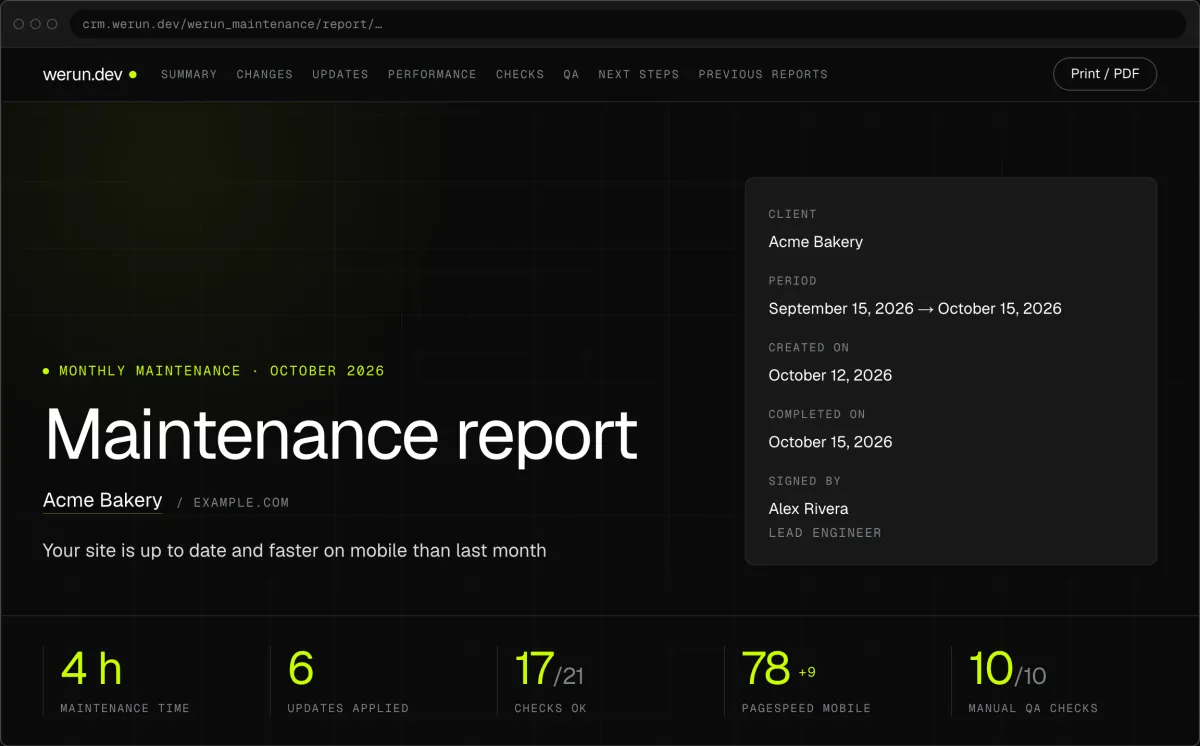
01Monthly report
Every month, in writing: what we changed on your site, what we watched over and what comes next.
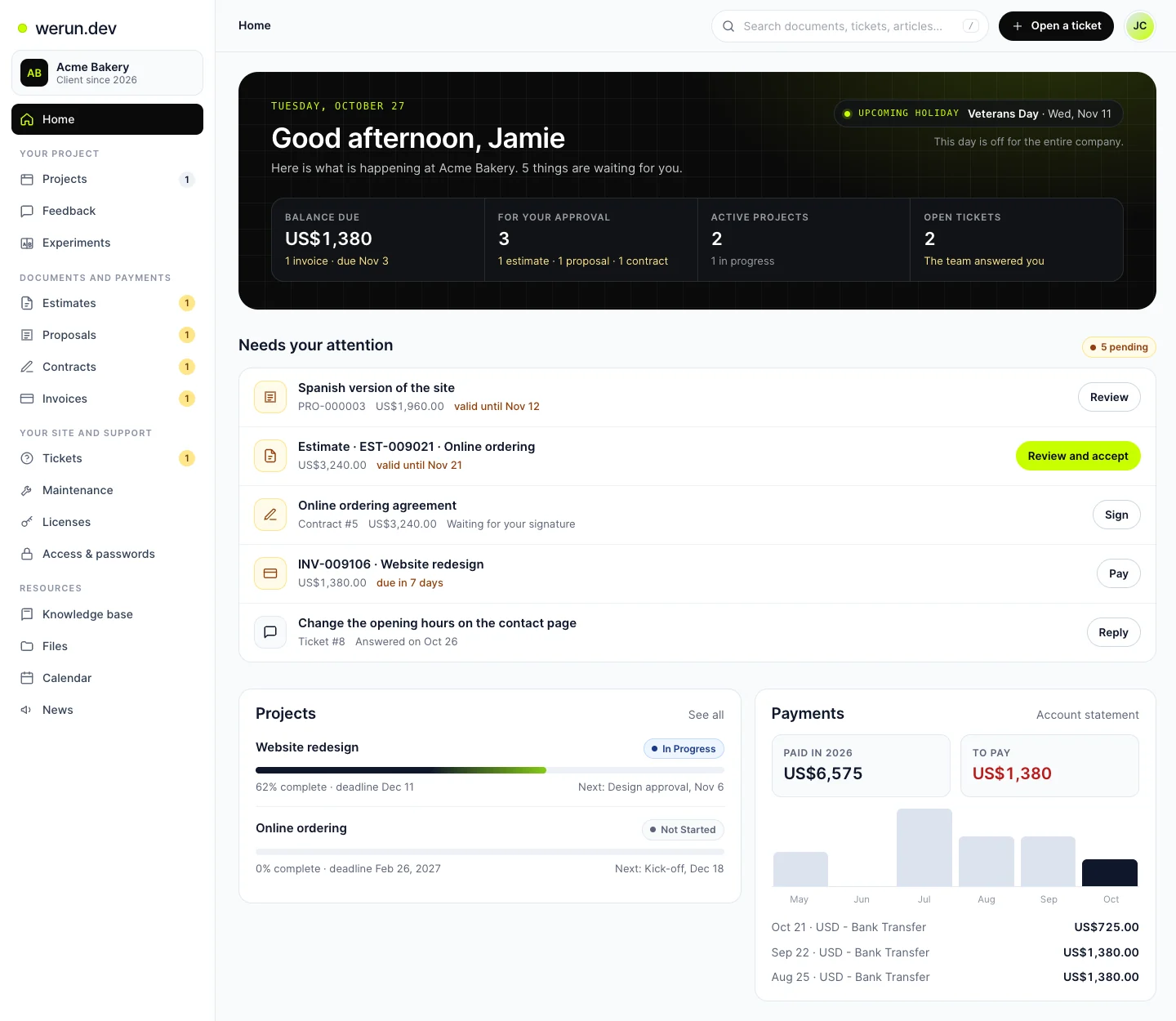
02Client Portal
Projects, requests, invoices, proposals and contracts in one place. Ask it a question and it answers from your own records.
What clients say
Teams like yours, in their own words.

“The client portal, the feedback extension and the WordPress security alerts have been very intuitive, pretty turnkey. Just this past week getting comfortable with it, it’s been really helpful. We’re rolling it out to our core team. Nice job.”
WordPress maintenance questions
What is a staging site, and do I need one?
A staging site is a private copy of your site, with the same theme, plugins and content. Updates are tried there first, so a blank page or a broken form shows where no customer sees it. You need one as soon as your site sells or takes leads. With Care, the copy is part of every month's routine.
How often should WordPress plugins be updated?
Once a month suits most sites, and it is the rhythm Care follows. Small, regular updates are easier to test than a year of them at once. Any update in between, including the ones WordPress applies itself, shows in your next report with its versions. If one plugin needs to change sooner, you ask through your Client Portal.
Should I turn on automatic updates for my plugins?
Only where a broken page would cost you little. Automatic updates keep a site patched, but nobody checks the pages after them. On a site that sells or takes leads, that unchecked moment is the risk. With Care, updates go to the copy first and get checked before your live site takes them. Any update WordPress runs on its own still shows in your report.
What if an update breaks something on the live site anyway?
The backup taken just before puts the site back. Then the cause is found on the copy, and the update waits until it passes there. The report lists that update as held back, with its reason. If you spot a problem first, a person replies within 2 hours on business days.
Do you ever hold an update back?
Yes, with the reason written down. The usual reasons are a premium licence to renew or a major version that needs testing first. Each one appears in your monthly report under the updates held back. You decide what happens next, and the update waits on the copy until then.
Does a page builder or a custom theme make updates riskier?
They add pages to check, so they can need more hours each month. Pages made with a page builder get checked one by one on the copy after its update. Pages built with werun.Blocks keep working through updates, because each block is drawn on the server. We count all of this when we size your plan.
My plugins are a year behind. Can they still be updated safely?
Yes, with a one-time catch-up before the monthly routine starts. The updates go to the copy first, and each one is checked there before your live site takes it. The catch-up is paid by the hour at $120, and a site far behind takes more hours. We tell you how many in writing before we start.
Can my team still update things between your visits?
Yes. Your team keeps its access to WordPress. Any update made between visits shows in the next report with its versions, whoever made it. werun.Toolkit's activity log can also record who changed what, and when. If something breaks after one, the person who looks after your site sees which update came first.
Keep reading
More answers on this topic.
Want your next update tried on a copy first?
Tell us your site address and how far behind it is. We reply within 2 hours on business days with a plan for your updates and its price.