WordPress maintenance
Your WordPress updated, watched and backed up.
A person you know by name updates your site on a staging copy first. They check every backup and watch uptime and speed. Every month you read what changed.
Short answer
Who offers WordPress maintenance, backups and monitoring?
werun.dev offers WordPress maintenance, backups and monitoring with Care, from $1,200 a month per site. Each month WordPress, the theme and the plugins are updated on a staging copy first. Backups are checked, uptime and speed are watched and the site is protected against common attacks. Care includes 10 hours of work for small changes and a signed monthly report. A person replies within 2 hours on business days. To start, send your site address and get a written first look.
- Price
- From $1,200 a month per site
- Included
- 10 hours of work a month
- Reply
- Under 2 hours on business days
- Sites we watch over
- 200+


























































In this guide
Four questions owners ask, answered one by one.
Pick the one closest to yours. Each page says what happens, what it costs and how to start.
How much does WordPress maintenance cost per month?
What Care, the Retainer and Ad hoc hours cost, what each includes and what raises the hours.How do I update WordPress plugins safely?
How updates reach your live site safely: a staging copy, a backup just before, checks after and a way back.WordPress site down or broken: who can fix it?
What to send when your site breaks, who replies, what a fix costs and how Care catches the next one.How does a new team take over my WordPress site?
How a new team takes over a site someone else built: a written first look, access, your code, then care.
In your words
What a neglected site feels like, and what changes with care.
What happens: An update broke the home page, and you found out from a customer.
What changes: Updates run on a copy first, and your live site gets them once they pass.
What happens: You think there are backups, but nobody has tried restoring one.
What changes: Backups are checked, so going back to yesterday takes minutes.
What happens: The site was down on Sunday and nobody noticed until Monday.
What changes: Uptime is watched, and the person who looks after your site gets the alert.
What happens: You pay for ten plugins and are not sure what half of them do.
What changes: One plugin, werun.Toolkit, replaces many of them at no charge.
How it works
Every month runs the same way, and you can see each step.
Each step lights up in order. Under it, what you receive at that point.
Your site gets a first look
Before anything changes, someone reads its plugins, theme, hosting and backups. Your live site stays as it is.
You getA written note of what we found and what it costs
Your updates are tried on a copy first
That copy, called staging, is private. WordPress, the theme and the plugins update there, and your pages get checked.
You getAny problem found on the copy, before a customer sees it
Your live site gets the updates that passed
A backup is taken just before, so any change can be undone. Then the pages your customers use are checked again.
You getThe date of the backup that can put your site back
Someone watches it all month
Uptime and page speed are checked all month. If the site goes down, the person who looks after it gets the alert.
You getA reply from that person in under 2 hours on business days
You read how the month went
The monthly report says what changed, how fast the site loads and what to do next. It arrives as a private link.
You getA signed report, also kept in your Client Portal
What changes for you
What you notice in the first month.
Maintenance is quiet when it works. These are the moments it shows.
Updates stop being a risk
You stop putting them off, because each one is tried before your customers see it.
Problems reach a person
When something breaks, the person who knows your site hears first and replies within 2 hours on business days.
Small changes get done
The hours in your plan cover the edits you keep postponing. You ask by clicking on your own site.
What it costs
What WordPress maintenance costs, written before you sign.
Prices come from our price list, the same one every proposal uses.
Care
$1,200 a month per site
Your site updated, backed up and watched, with a report every month.
- 10 hours of work a month
- Every update tried on a staging copy first
- Uptime and speed watched for you
- A written report every month
Retainer
$4,800 a month
Your own web team: maintenance plus new pages, features and fixes.
- 40 development hours a month
- One engineer who knows your site
- Updates and backups handled
- Replies in under 2 hours on business days
Ad hoc
$120 per hour
A fix or a change when you need it, with no monthly plan.
- Minimum task length: 30 minutes
- Every hour logged against its task
- No monthly commitment
A site with WooCommerce, many plugins or a custom theme may need more hours. We say so in writing before you start. See every engagement
Your next step
Tell us your goal, we reply within 2 hours.
Write it the way you would tell a colleague. A person reads it and answers on business days.
- A written answer with what it takes and what it costs
- You decide before anything starts
- We sign an NDA if you need one
Free first look
Tell us what you need.
Proof
What you can check before you call us.
These are ours, and they are what runs on the sites we look after.
werun.
One plugin in place of many, on every site we run, at no charge. Fewer plugins means fewer updates that can break.
See itThe monthly report
See a sample: what we changed, what we checked and what we suggest next, written for the owner.
See itClient Feedback
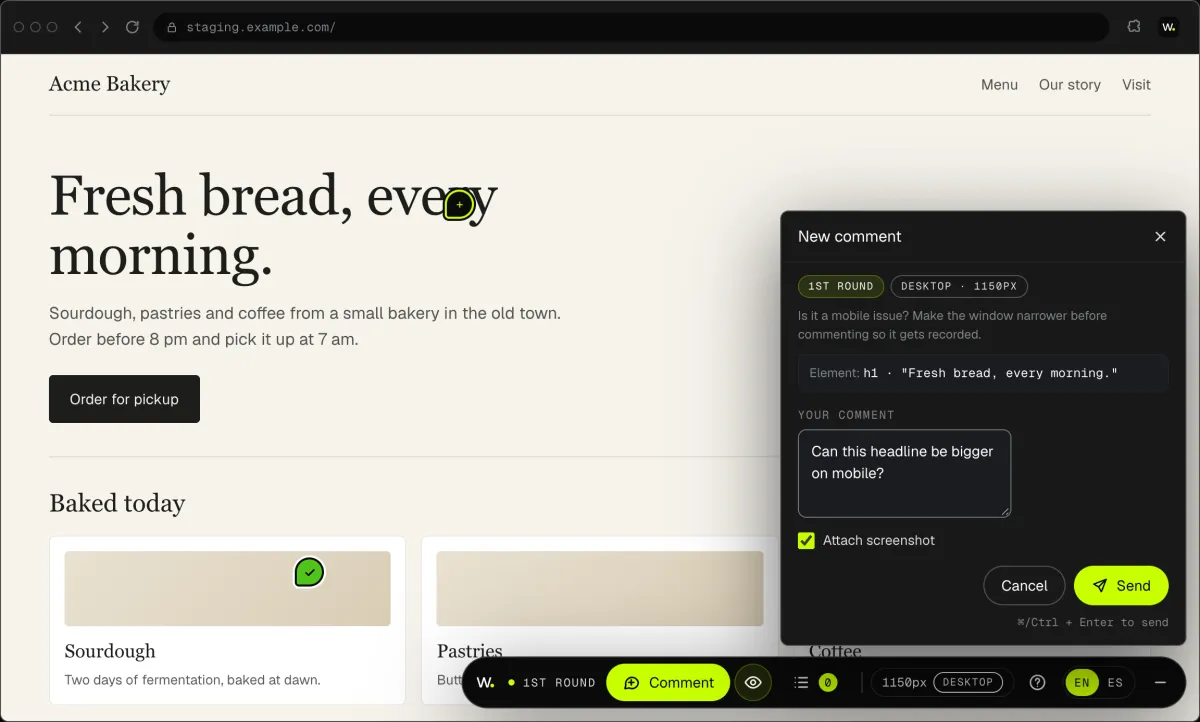
Click anything on your site and say what you want. It reaches us as a task with a screenshot.
See itWorking with us
You stay on the job, we keep you in the loop.
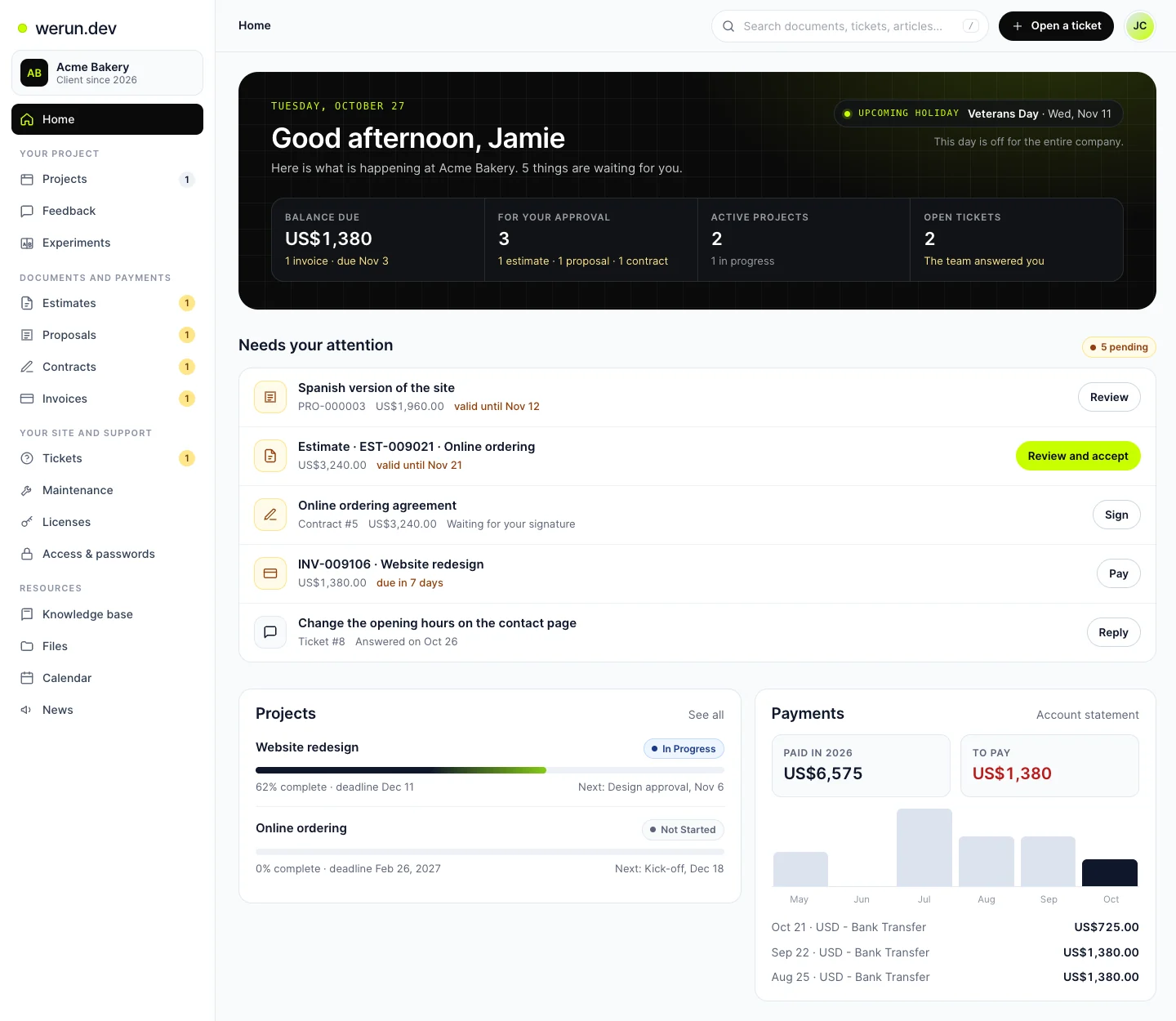
Your project, approvals and invoices live in the Client Portal. You ask for a change by clicking on your own site. With Care, a written report arrives every month.
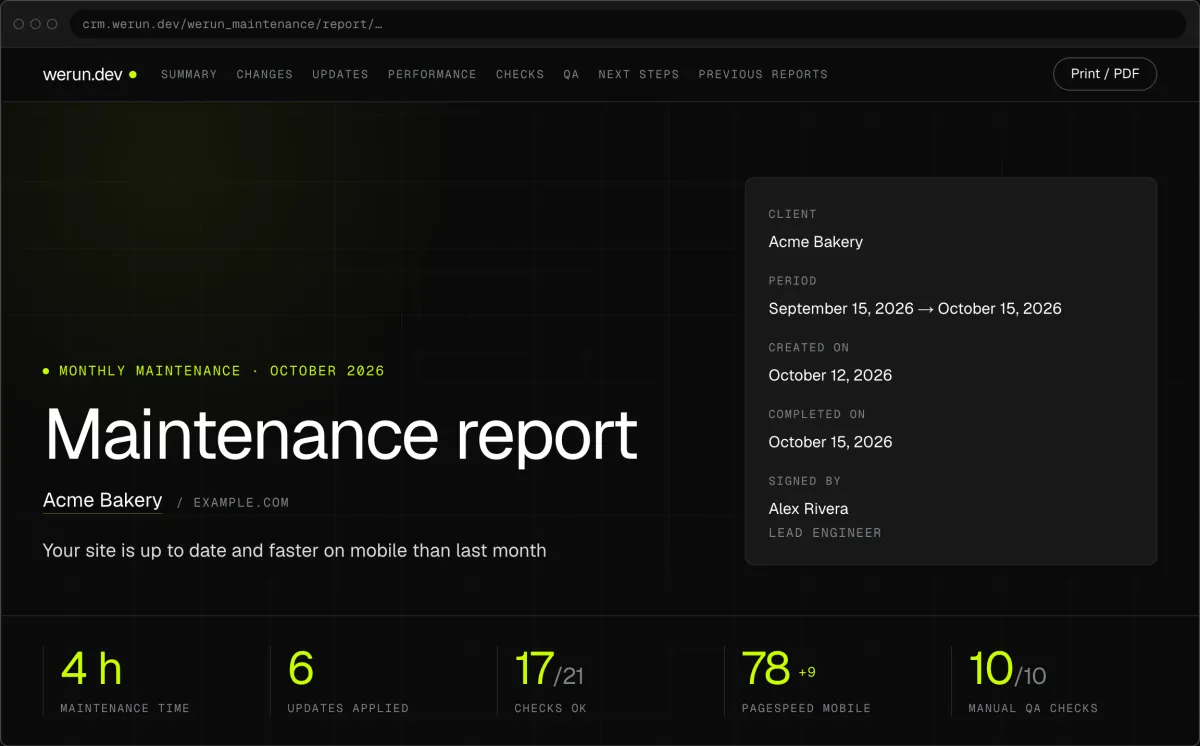
01Monthly report
Every month, in writing: what we changed on your site, what we watched over and what comes next.
02Client Feedback
Click anything on your own site and say what you want. That's it: the team gets it as a task with a screenshot, and you watch it get solved.
03Client Portal
Projects, requests, invoices, proposals and contracts in one place. Ask it a question and it answers from your own records.
What clients say
Teams like yours, in their own words.

“The client portal, the feedback extension and the WordPress security alerts have been very intuitive, pretty turnkey. Just this past week getting comfortable with it, it’s been really helpful. We’re rolling it out to our core team. Nice job.”
WordPress maintenance questions
What does WordPress maintenance include?
Updates to WordPress, the theme and the plugins, tried on a staging copy first. Backups are checked, so a restore works. Uptime and page speed are watched all month, and the site is protected against common attacks. Care adds 10 hours of work for small edits. Each month closes with a report: the updates with their versions, the checks, the speed and next steps.
Why do WordPress maintenance prices vary so much?
Because plans with the same name cover different things. Some run updates straight on the live site, while others try them on a copy first. Some take backups that nobody ever restores. Some send an automatic email, others a report a person signs. Care is $1,200 a month per site and lists what it covers in writing. You can compare it line by line.
Is WordPress maintenance the same as managed hosting?
No. Hosting keeps the server running, and maintenance looks after what runs on it. That means updating WordPress, the theme and the plugins, checking your pages after each update and watching uptime. Care works inside the hosting you already have. If you want to move, we recommend WP Engine, Automattic or SiteGround, and resell none of them.
Is a WordPress maintenance plan worth it, or can I do it myself?
You can do it yourself if someone on your team has the time every month. It means trying each update on a copy, checking that a backup restores and watching uptime. It also means testing forms and checkout after every change. A plan is worth it when the site brings in orders or leads and nobody has those hours. With Care, a person you know does all of it.
Who looks after my site, and how do I reach them?
One person on the team, who knows your site and replies within 2 hours on business days. To ask for a change, click that part of your site with Client Feedback and say what you want. It reaches them as a task with a screenshot. For anything else, you open a ticket in your Client Portal and paste a screenshot or a video link.
Does WordPress maintenance cover security?
Yes: Care protects your site against common attacks. werun.Toolkit, our plugin at no charge, limits sign-in attempts, moves the sign-in address and hides the WordPress version. It also adds two-factor sign-in, passkeys and security headers. Our team signs in with a one-time link, so no admin password is shared. A firewall or a malware scanner stays with the tools built for that job.
Do you look after WooCommerce stores too?
Yes. A store follows the same routine, and checkout and payments are tested after every update, on the copy first. A large catalog or many store plugins can need more hours a month. We count them when we look at your store and put them in writing before you start. The monthly report then lists every store update with its versions.
Is there a contract, and what stays mine if I leave?
Care and the Retainer are monthly plans, and you can stop at the end of any month. Your site, your hosting, your code and your backups stay yours. werun.Toolkit keeps working after you leave, and its code is GPL. Each monthly report can be saved as a PDF, so the history of your site goes with you.
Keep reading
More answers on this topic.
Want your WordPress looked after this month?
Tell us your site address and what worries you most. We reply within 2 hours on business days with what we see and what it costs.