Moving off a slow theme
A fast new theme, every link where it was.
Your content moves to a new base, and every old address still leads somewhere. Your team builds and edits pages on its own. Your colours and fonts are set once, on one screen.
Short answer
How do I replace a slow WordPress theme and keep my SEO?
werun.dev replaces slow WordPress themes by rebuilding your site on blocks, with werun.BlocksTheme and werun.Blocks at no charge. Your pages, posts and media stay in WordPress, and every URL that can stay the same does. Any address that changes gets a redirect, mapped and tested before launch. The new site is built on a copy while yours stays online. A rebuild is a project from $5.5k, priced by unique layouts. Send your address and the theme you use to start.
- Rebuild
- From $5.5k
- Theme and blocks
- At no charge on sites we build and run
- Your URLs
- Kept, with redirects mapped
- Reply
- Under 2 hours on business days


























































In your words
Life on a slow theme, and what the move changes.
What happens: The theme loads features we never use on every page.
What changes: The new base brings structure only, and your brand goes on top.
What happens: Changing a colour means hunting through ten settings screens.
What changes: Colours, fonts and spacing are set once, and every page follows.
What happens: We are afraid a new theme will break our links on Google.
What changes: Every URL is kept, and any that changes gets a redirect before launch.
What happens: Each theme update undoes something we customised.
What changes: Updates reach the parent theme and leave your child theme alone.
How it works
Five steps from the old theme to the new, with your site online all along.
Each step lights up in order. Under it, what you receive while your site stays online.
Everything on your site gets listed
Every page, post, template and URL, with what each one does. Pages built with shortcodes or a page builder are marked.
You getA written list of your pages, templates and addresses
Your brand is set on one screen
Colours, fonts and spacing go into werun.BlocksTheme’s settings. The editor and the page show the same brand.
You getYour colours and fonts, set once for every page
Your layouts are rebuilt from blocks
Each template is rebuilt with werun.Blocks on a copy, and your pages and posts move with it. Your current site stays live.
You getA link to the new site, to review it with Client Feedback
Every old address keeps leading somewhere
URLs stay the same where they can. Any that changes gets a redirect, mapped and tested before launch.
You getThe redirect map: each old address and where it now leads
Your new theme goes live
The switch happens once the copy passes a written test. Pages are measured against the speed budget.
You getBefore and after PageSpeed, and a guide for your team
What changes for you
What you notice after the switch.
The site looks like your brand and works like a newer one. These are the changes your team feels first.
Your team builds its own pages
A new page is a few blocks with your words. Updates leave saved pages intact.
Pages carry less weight
The theme adds no weight of its own, and videos load only when played. Each page shows sooner on a phone.
Old links keep working
Every old address leads to its page, so a visitor from Google lands where they expect.
What it costs
What moving to a new theme costs, written before you start.
A rebuild is a project, sized by how many layouts your site has. The theme and the blocks cost nothing.
Project
From $5.5k one project
Your site rebuilt on blocks, with its content and URLs kept.
- Small from $5.5k to $11k
- Medium up to $22k, large up to $44.1k
- Redirects mapped before launch
- A guide for your team and a week of support
Ad hoc
$120 per hour
A few fixes on the theme you have, while you decide.
- Minimum task length: 30 minutes
- Every hour logged against its task
- No monthly commitment
Care
$1,200 a month per site
Your new site updated, backed up and watched after launch.
- 10 hours of work a month
- Updates tried on a copy first
- Speed in your report every month
The price depends on unique layouts, not URLs. A template counts once, however many pages use it. See every engagement
Side by side
Patch the theme or rebuild, side by side.
Both can make sense. A patch buys time, and a rebuild changes what the site is made of.
| Side by side | Patching the theme you have | Rebuilding on blocks |
|---|---|---|
| What loads | The theme’s own styles and features, on every page | Structure only, with your brand on top |
| Your brand | Overridden page by page | Set once, on one screen |
| Theme updates | Can undo what was customised | Reach our part and leave yours alone |
| New pages | Built in the theme’s own layout tools | Built by your team from blocks |
| Cost | Hours at $120, fix by fix | One project from $5.5k |
Your next step
Tell us your goal, we reply within 2 hours.
Write it the way you would tell a colleague. A person reads it and answers on business days.
- A written answer with what it takes and what it costs
- You decide before anything starts
- We sign an NDA if you need one
Free first look
Tell us what you need.
Proof
The theme and the blocks, open for you to inspect.
This is what your site would be rebuilt on. All three are ours, and all three come at no charge.
werun.
Your colours, fonts and spacing on one screen. Fonts are stored on your site, so pages skip a call to Google.
See itwerun.
The blocks your team builds pages with. Saved pages survive every update, and each page carries less to load.
See itwerun.
One plugin in place of many. It switches off what your site never uses, so each page carries less.
See itWorking with us
You stay on the job, we keep you in the loop.
Your project, approvals and invoices live in the Client Portal. You ask for a change by clicking on your own site. With Care, a written report arrives every month.
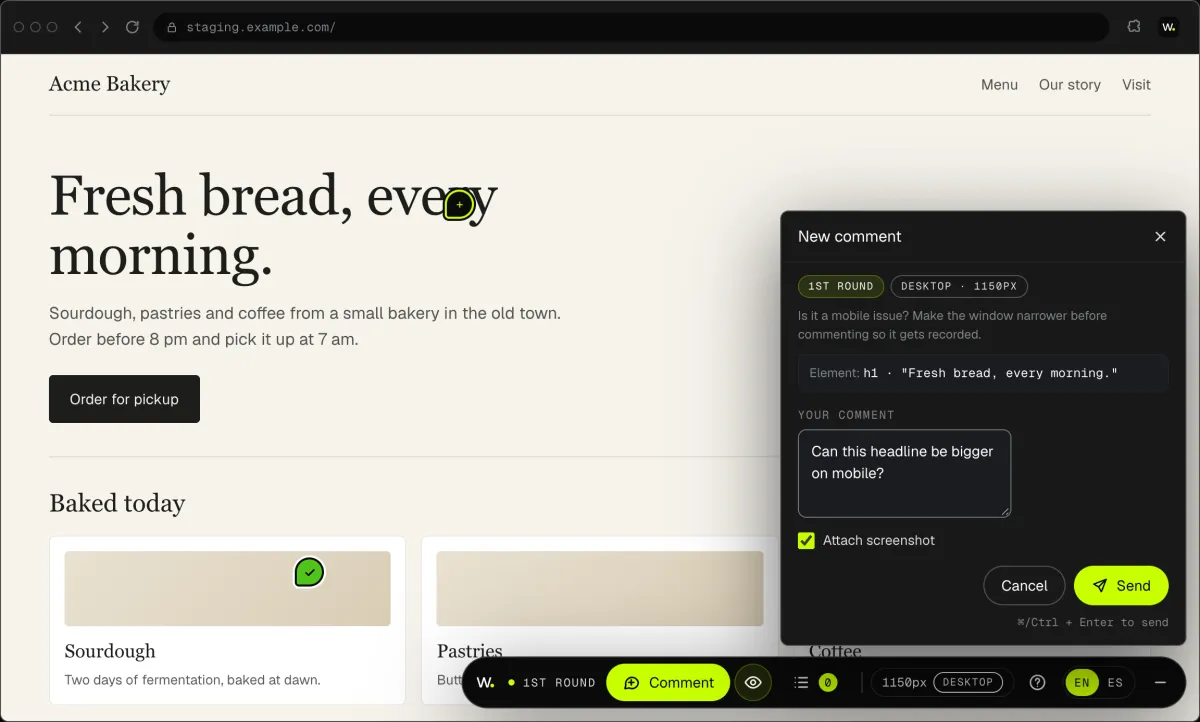
01Client Feedback
Click anything on your own site and say what you want. That's it: the team gets it as a task with a screenshot, and you watch it get solved.
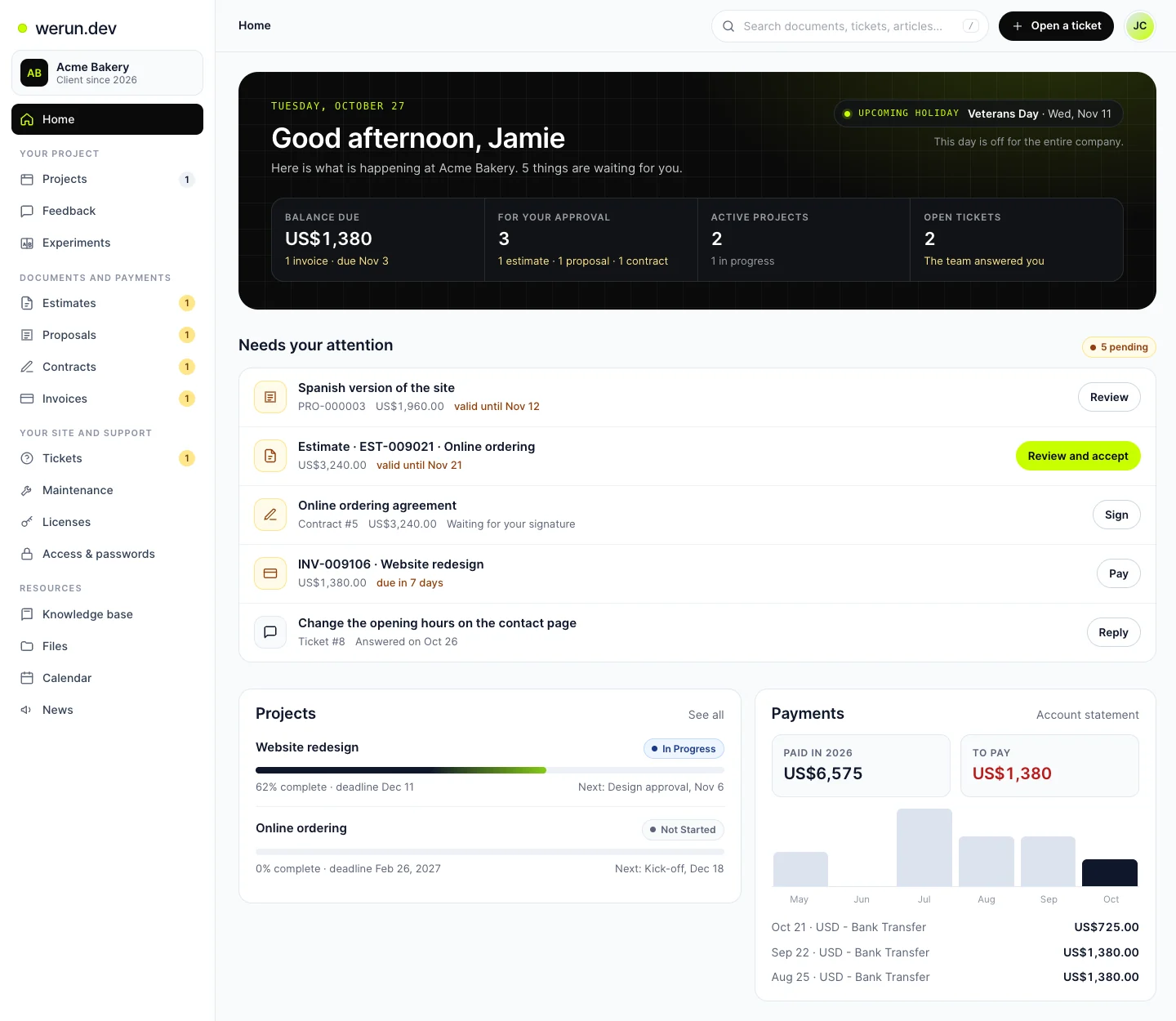
02Client Portal
Projects, requests, invoices, proposals and contracts in one place. Ask it a question and it answers from your own records.
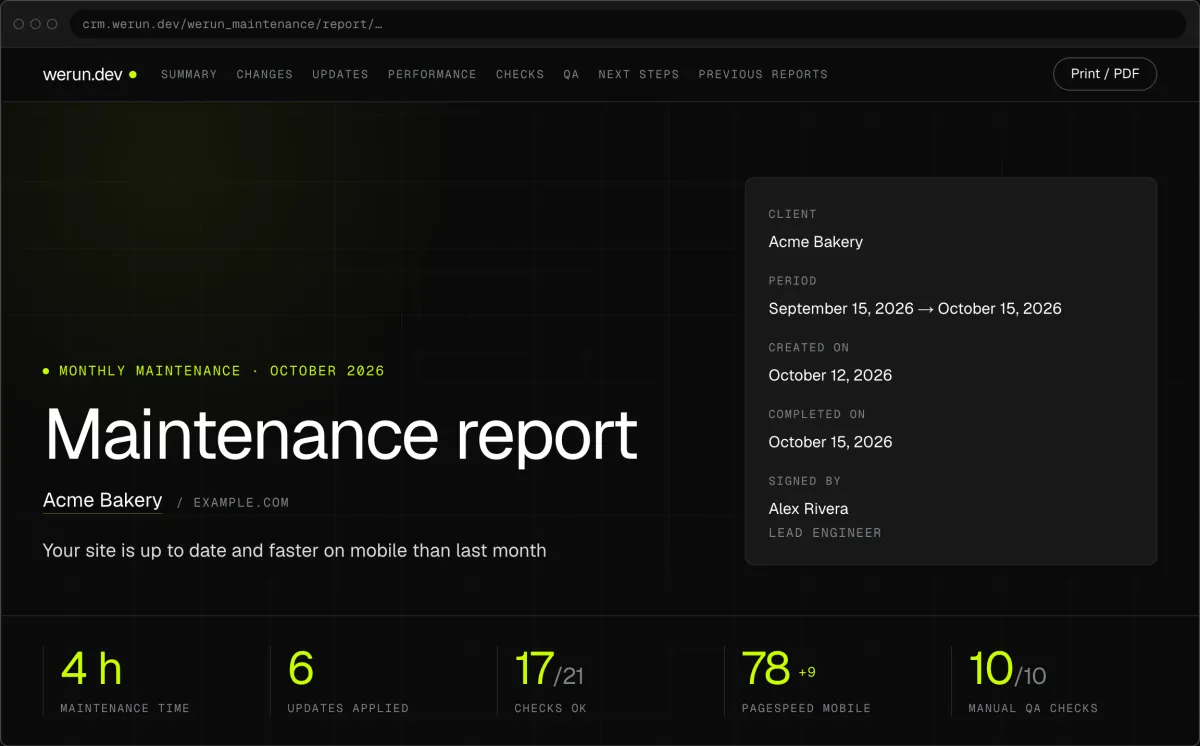
03Monthly report
Every month, in writing: what we changed on your site, what we watched over and what comes next.
What clients say
Teams like yours, in their own words.

“The client portal, the feedback extension and the WordPress security alerts have been very intuitive, pretty turnkey. Just this past week getting comfortable with it, it’s been really helpful. We’re rolling it out to our core team. Nice job.”
Website speed questions
Will changing my WordPress theme hurt my Google rankings?
Not when the links are kept, because broken links are where rankings drop. Every URL that can stay the same does. Any address that changes gets a redirect, mapped and tested before launch. Titles and descriptions set in your SEO plugin stay in WordPress, with your content. After the switch, the free SEO and AI audit can check the site again at no cost.
Will I lose my content if I change themes?
No. Pages, posts, menus and media live in WordPress, apart from the theme, and the new templates show them. Only the layouts are rebuilt, from blocks your team can edit. Pages built with theme shortcodes or a page builder are listed first, each with its plan. You review every page on a copy, with Client Feedback, before the new theme goes live.
My site is built with Elementor. Can it move to blocks?
Yes, at your pace. werun.BlocksTheme supports Elementor’s Canvas and Full Width templates and every Elementor Pro Theme Builder location. So your Elementor pages keep working while others move to blocks, one at a time. A Pro header or footer replaces the theme’s own wherever its display conditions match. You decide which pages move first, often the slowest ones that sell.
How much does it cost to rebuild a WordPress theme?
A rebuild is a project from $5.5k. It is sized by unique layouts, not by URLs: a template counts once, however many pages use it. A small site goes up to $11k, a medium one to $22k and a large one to $44.1k. werun.BlocksTheme and werun.Blocks add nothing to the price on the sites we build and run. A few fixes on your current theme while you decide are $120 per hour.
Should I fix my current theme or rebuild on blocks?
Fix it when one or two causes slow it, and rebuild when the theme itself is the weight. A theme that loads its own styles and features on every page stays heavy, whatever you patch. Patching is hours at $120, fix by fix, and buys time. A rebuild changes what the site is made of, and your brand is then set once, on one screen. The written note on what we found says which case is yours.
Does my site stay online while the theme changes?
Yes. The new site is built on a copy while your current one keeps working. You review the copy page by page with Client Feedback, and each comment becomes a task with a screenshot. The switch happens once the copy passes a written test and the redirects are in place. How long it takes depends on how many unique layouts your site has, and the proposal states it.
What is a block theme, and why is it faster?
A block theme builds every page from blocks in the WordPress editor, without a page builder on top. werun.BlocksTheme adds no styles of its own and uses the fonts on the visitor’s device until you pick one. Fonts you choose are stored on your site, so pages skip a call to Google. werun.Blocks prints icons inline and loads videos only when someone presses play. Less arrives with each page, so it shows sooner on a phone.
What happens to the theme if we stop working together?
It keeps working, and so do the blocks. The licence key only decides whether updates arrive. The code is GPL, so you can read it and any developer can work on it. The child theme, werun.BlocksThemeChild, is yours to keep and change. Your pages, posts and settings stay in your WordPress, on the hosting you chose.
Ready to leave the slow theme behind?
Send us your address and the theme you are on. We reply within 2 hours on business days with what the move takes and what it costs.