Internal tools
One tool for your team, shaped like your day.
A back office, a CRM or a portal built around how your team already works. You set permissions once, and every screen and file follows them. Your records move in after a test run you read first.
Short answer
Who can build a custom internal tool or CRM for my team?
werun.dev builds internal tools for teams: back offices, CRMs and portals shaped around how you already work. Roles are set once, and every screen, list and file checks them. Your records move in from spreadsheets after a test run you read first. Our own team works this way, in the CRM behind the Client Portal our clients sign in to. Projects start from $5.5k, the code lives in your repository, and a Retainer keeps the tool improving. To start, tell us which spreadsheets your team juggles today.
- Price
- Projects from $5.5k
- Shaped by
- How your team already works
- Permissions
- Set once, applied everywhere
- Code
- In your repository


























































In your words
What running a team on spreadsheets feels like, and what one tool changes.
What happens: The same customer lives in three spreadsheets, each a little different.
What changes: Each record has one home, and every screen reads it from there.
What happens: Everyone with the file sees every tab, margins included.
What changes: Permissions are set once, and each person sees what their role allows.
What happens: Someone left the company and still has the shared links.
What changes: Turning off an account ends their access at once, on every device.
What happens: Hours are tracked in one app and billed from another.
What changes: Time tracking sits beside the work, so the hours and the tasks agree.
How it works
The tool follows how you work, one step at a time.
Each step lights up in turn, with what you receive at that point. It starts with how your team works today, and the screens come after.
You walk us through your team’s week
Who does what, which spreadsheets and inboxes hold the work, and who may see each part.
You getA written map of your work and who may see each part
You hear first if a ready-made tool fits
If your platform or a tool you already pay for can do it, you hear it first.
You getA straight answer: a tool you have, or one built for you
Your roles are set once
Roles and access are written in one place. Every screen, list and file checks them.
You getA table of roles and what each one can open
Your spreadsheets move in after a test run
Records come over from your spreadsheets and tools. You read a test run before anything is written.
You getA test import of your records, to read first
Your team starts working in one place
Your team gets a guide and a week of support. Then a Retainer keeps the tool running and improving.
You getA guide for your team, then one engineer who knows the tool
What changes for you
What your team notices in the first weeks.
You see it in the questions your team stops asking each other.
One place to look
Tasks, clients, files and hours sit together, so nobody asks where the latest version is.
Access you can trust
A change to someone’s role applies on their next click. Turning off an account ends their access everywhere, at once.
Clients see their part
A client signs in and sees only the work you shared, as ours do in the Client Portal.
What it costs
What an internal tool costs, agreed before any code.
Every figure is from our price list, the same one behind each proposal.
Project
From $5.5k one project
Your tool designed around your team, built, tested and handed over.
- Roles and permissions set once
- Your records moved in, after a test run
- Every screen tested before launch
- A guide for your team and a week of support
Retainer
$4,800 a month
Your tool kept running and improved every month, by people who know it.
- 40 development hours a month
- One engineer who knows your tool
- Updates and backups handled
- Replies in under 2 hours on business days
Ad hoc
$120 per hour
A change to a tool you already have, paid by the hour.
- Minimum task length: 30 minutes
- Every hour logged against its task
- No monthly commitment
The price depends on how many roles, records and connected tools your team needs. See every engagement
Side by side
Spreadsheets and shared inboxes, or one tool built for your team.
Spreadsheets are a fine start. They strain once several people, clients and permissions share them.
| Side by side | Spreadsheets and shared inboxes | A tool built around your work |
|---|---|---|
| Who sees what | Whoever has the file sees all of it | Each role sees what you allow |
| When someone leaves | Shared links keep working | Their access ends with their account |
| Time and billing | Copied between apps by hand | Tracked beside the task it belongs to |
| Your clients | Sent a copy by email | Signed in to see only their own work |
| Files | Attached to whichever email | Private, behind the same permission check |
Your next step
Tell us your goal, we reply within 2 hours.
Write it the way you would tell a colleague. A person reads it and answers on business days.
- A written answer with what it takes and what it costs
- You decide before anything starts
- We sign an NDA if you need one
Free first look
Tell us what you need.
Proof
Tools of ours you can see at work.
We build our own tools the way we would build yours.
This website
A custom app we wrote and run. Every request it receives is saved here and copied to our CRM as a lead, so nothing is retyped.
See itClient Portal
Our clients’ side of the work: projects, approvals, invoices and tickets. The primary contact decides what each colleague sees.
See itClient Feedback
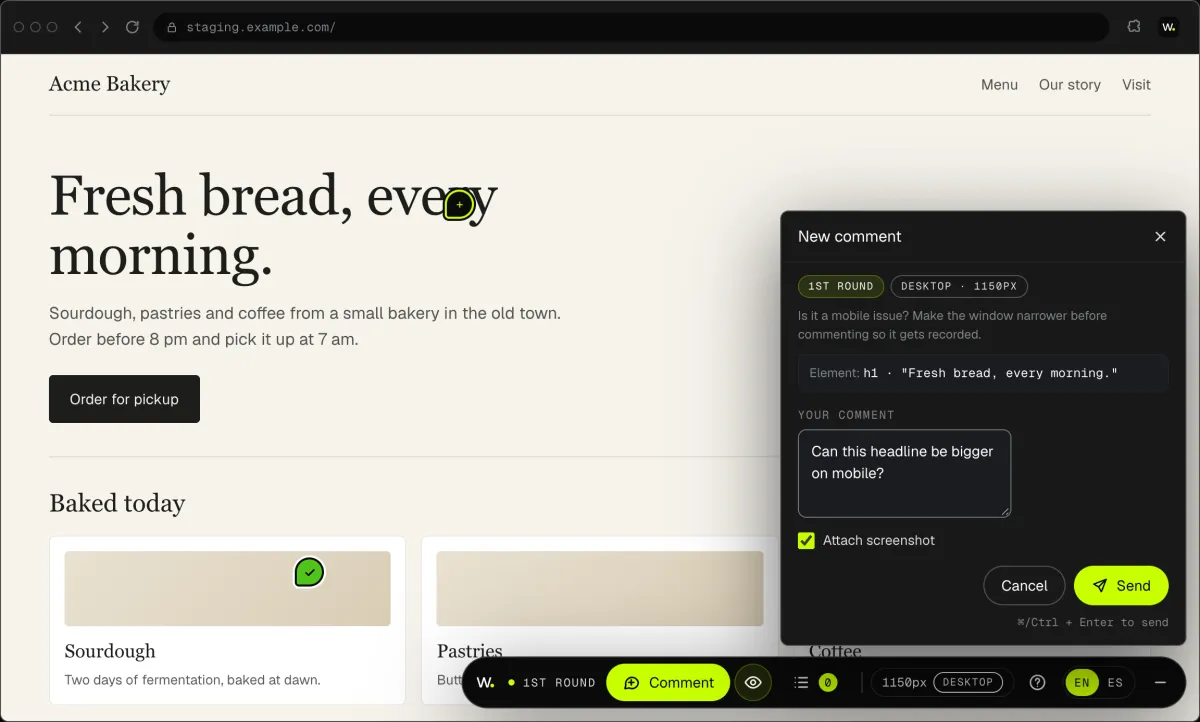
Our own Chrome extension. Click anything on a site, say what you want, and the team gets a task with a screenshot.
See itWorking with us
You stay on the job, we keep you in the loop.
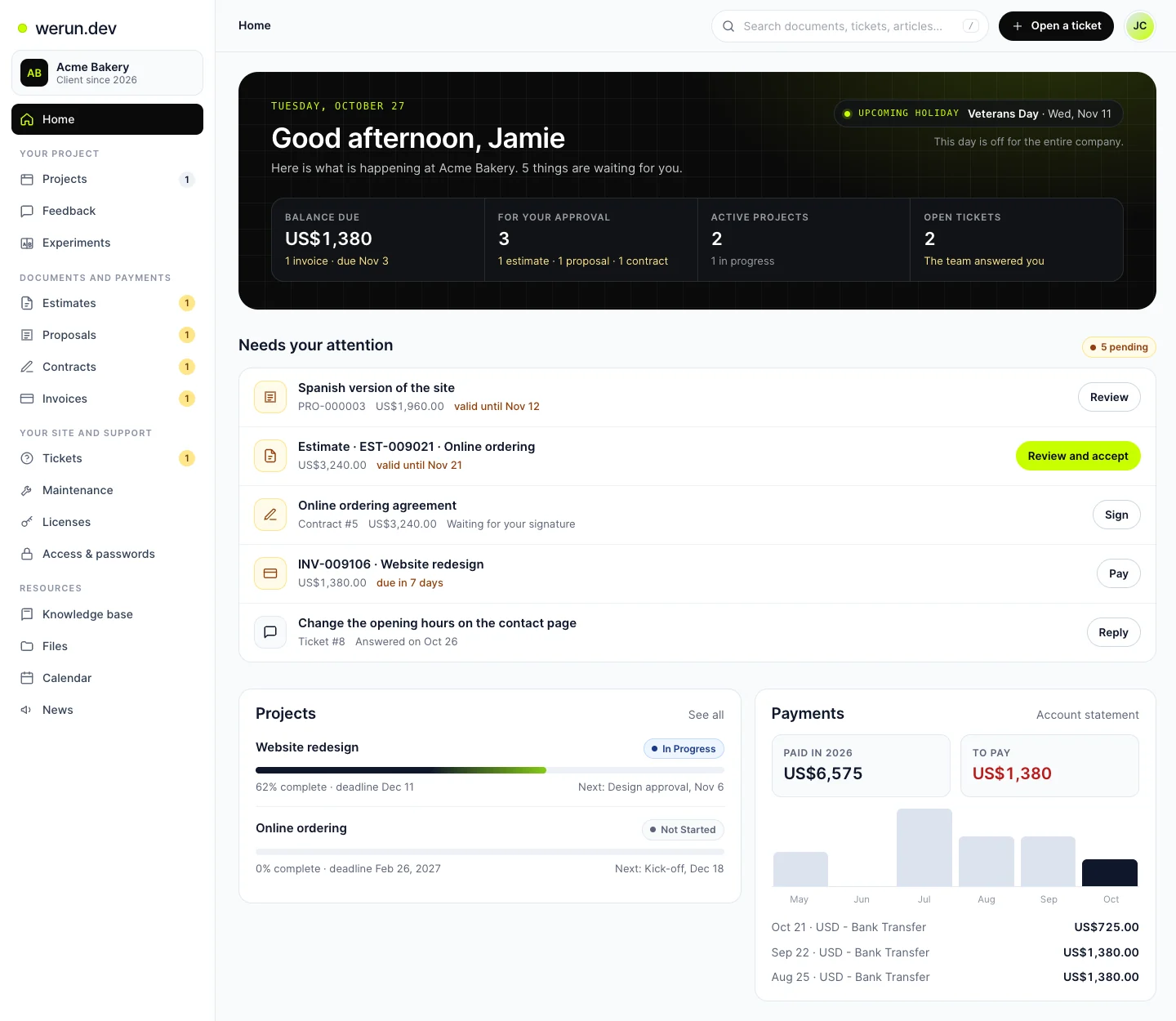
Your project, approvals and invoices live in the Client Portal. You ask for a change by clicking on your own site. With Care, a written report arrives every month.
01Client Portal
Projects, requests, invoices, proposals and contracts in one place. Ask it a question and it answers from your own records.
02Client Feedback
Click anything on your own site and say what you want. That's it: the team gets it as a task with a screenshot, and you watch it get solved.
What clients say
Teams like yours, in their own words.

“The client portal, the feedback extension and the WordPress security alerts have been very intuitive, pretty turnkey. Just this past week getting comfortable with it, it’s been really helpful. We’re rolling it out to our core team. Nice job.”
Internal tool questions
How much does a custom internal tool cost?
Projects start from $5.5k. A small tool runs to $11k, a medium one to $22k and a large one to $44.1k. The price follows how many roles, kinds of records and connected tools your team needs. Improving it every month is a Retainer at $4,800 for 40 development hours. A single change later is Ad hoc, at $120 an hour.
How long does it take to build an internal tool?
It follows the size of the tool. One team with one kind of record, like clients and their tasks, is the short end. Each extra role, record type or connected tool adds hours, and your proposal lists them before work starts. Records move in last, after you read a test run. Your team then gets a guide and a week of support.
Should I build a custom CRM or use HubSpot?
Use HubSpot or another ready-made CRM when your sales steps fit it, and we will tell you so. Build one when your process fits none, when clients must sign in, or when margins must stay private. Often the answer is both: a tool for your operations that talks to the CRM you keep. Your proposal says which, and why.
Can a custom tool replace the spreadsheets my team uses?
Usually, yes. Each record moves into the tool once, and every screen reads it from there. You read a test run before anything is written, and keep the originals until it looks right. After that, the same customer lives in one place instead of three slightly different files. Nobody asks which tab is the latest.
How do permissions work in a custom internal tool?
They are set once and applied everywhere. Roles and access live in one place, and every screen, list and file checks them on each request. So a change to someone’s role applies on their next click. Margins, salaries or client files stay with the roles you choose. Private files sit behind the same check as the screens.
What happens to access when someone leaves the team?
It ends with their account. Turning off an account ends their access at once, on every device. If your team signs in with Google Workspace, leaving the company’s Workspace ends their access within the hour. This website works this way for our own team. Their tasks and comments stay in the tool for whoever takes over the work.
Can our clients sign in and see their part of the work?
Yes, if you want them to. A client gets a sign-in that reads and comments on their own work, and nothing else. Your internal comments and hours stay on your side. In our Client Portal, the primary contact adds colleagues and chooses what each one sees.
Do we keep the tool if we change developers?
Yes. The code lives in your repository under your licence, and the database is yours. The tool runs on Next.js and PostgreSQL, which any team that knows them can maintain. While you stay with us, you can change plans from one month to the next.
Which part of your week should one tool hold?
Tell us which spreadsheets and inboxes your team juggles today. We reply within 2 hours on business days with what a tool would look like.