Shopify and ERP integration
Shopify and your ERP, one set of numbers.
Orders leave your store for your ERP as they happen. Stock and prices come back on their own, wholesale buyers included. Your team works in one place and trusts the numbers.
Short answer
How do I integrate Shopify with my ERP?
werun.dev integrates Shopify and Shopify Plus with your ERP through a private app that stays yours. Orders go up as buyers pay, and stock and prices come down from the ERP. On Plus, that includes a B2B price list for each wholesale account. If the ERP is down, orders wait in a queue and arrive later. The build is priced in hours at $120, and a first version usually takes three to four weeks. To start, tell us your plan, your ERP and what your team copies today.
- Plans
- Shopify and Shopify Plus
- Price
- $120 an hour, estimated first
- Your app
- In your repository, under your licence
- Sites we watch over
- 200+


























































In your words
Where Shopify and the ERP drift apart, and how they meet again.
What happens: A wholesale buyer sees the retail price and calls to ask for theirs.
What changes: Each B2B account sees its own price list, brought down from your ERP.
What happens: An item sold out in the ERP, and Shopify kept taking orders for it.
What changes: Stock comes down from the ERP, so Shopify sells what you hold.
What happens: Every morning someone exports orders from Shopify and imports them into the ERP.
What changes: Each order reaches the ERP as it is placed, with its customer attached.
What happens: A customer exists twice in the ERP because their email changed.
What changes: Customers are matched on their ERP number, never on their email.
How it works
From your Shopify admin to your ERP, one step at a time.
Each step lights up in turn. Under it, what you hold once that step is done.
- 12 left after a sale
- Wholesale prices updated
- Order #1042 shipped
- Order #1042 paid
- New customer added
Orders leave Shopify for your ERP as buyers pay. Stock, wholesale prices and shipping updates come back to Shopify. Your team drops the morning export, and B2B buyers see their own prices.
You approve a map of what travels
Which system owns each order, stock count, customer and price, and which way each one travels.
You getA written map and the estimate, before any build
A private app joins your store
It is tried on test orders first. You read what it would write to the ERP before it goes live.
You getA list of what each test order would write to your ERP
Orders go up, stock comes down
Each new order reaches the ERP as it is placed. Stock and prices travel the other way.
You getOrders already in your ERP when the day starts
Wholesale buyers see their prices
On Shopify Plus, each B2B account sees its own price list, kept in your ERP.
You getEach B2B account signed in to its own price list
Shopify and the ERP are compared nightly
Anything missed goes again, and anything that disagrees reaches a person.
You getA person checking any order the two sides disagree on
What changes for you
What your week looks like once Shopify and the ERP agree.
The difference shows in the jobs that leave your team’s list.
The morning export goes away
Orders reach the ERP as they come in, so the day starts with them already there.
Wholesale buyers serve themselves
They sign in, see their own prices and place the order. Your sales team takes fewer calls about prices.
Stock you can promise
What Shopify shows is what the ERP holds, so a sold-out item stops selling.
What it costs
What connecting Shopify costs, agreed before the build.
You pay for the hours to build it, and the app is yours. Looking after it afterwards is your choice.
Connection
$120 per hour, estimated first
The private app that links Shopify and your ERP, estimated once the map is written.
- Orders, stock, customers and prices mapped
- Tried on test orders before going live
- Usually three to four weeks for a first version
- The app in your repository
Changes later
From $240 per request
A new field, rule or system added to the app you have, sized before we start.
- XS: 2 hours, $240
- S: 5 hours, $600
- M: 10 hours, $1,200
- L: 20 hours, $2,400
Retainer
$4,800 a month
Your store and its connection looked after by one engineer, with hours for what comes next.
- 40 development hours a month
- Theme and apps kept current
- Replies in under 2 hours on business days
Shopify Plus, B2B price lists or a fulfilment partner add hours. We write how many before you start. See every engagement
Side by side
A ready-made app or one built for you, side by side.
Sometimes a ready-made connector is the right call, and we say so. This is how the two compare.
| Side by side | A ready-made connector app | A connection built for your rules |
|---|---|---|
| Made for | One product line, one kind of buyer | Account prices, B2B rules, several systems |
| Your fields | Mapped to the app’s model | Mapped to yours, on a written map |
| When the ERP is down | Depends on the app | Orders wait in a queue and arrive later |
| Checked against the ERP | Depends on the app | Every night, with a ticket on a mismatch |
| The code | The vendor’s | Yours, in your repository |
Your next step
Tell us your goal, we reply within 2 hours.
Write it the way you would tell a colleague. A person reads it and answers on business days.
- A written answer with what it takes and what it costs
- You decide before anything starts
- We sign an NDA if you need one
Free first look
Tell us what you need.
Proof
Things of ours you can try today.
They run on the same habits your Shopify connection would.
WelcomeAI
Our product reads Shopify stores and keeps their content in sync on a schedule, item by item.
See itClient Feedback
Click anything on your store and say what should change. It reaches us as a task with a screenshot.
See itThe Client Portal
Where our clients open tickets, accept estimates and follow each project, signed in to our own CRM.
See itWorking with us
You stay on the job, we keep you in the loop.
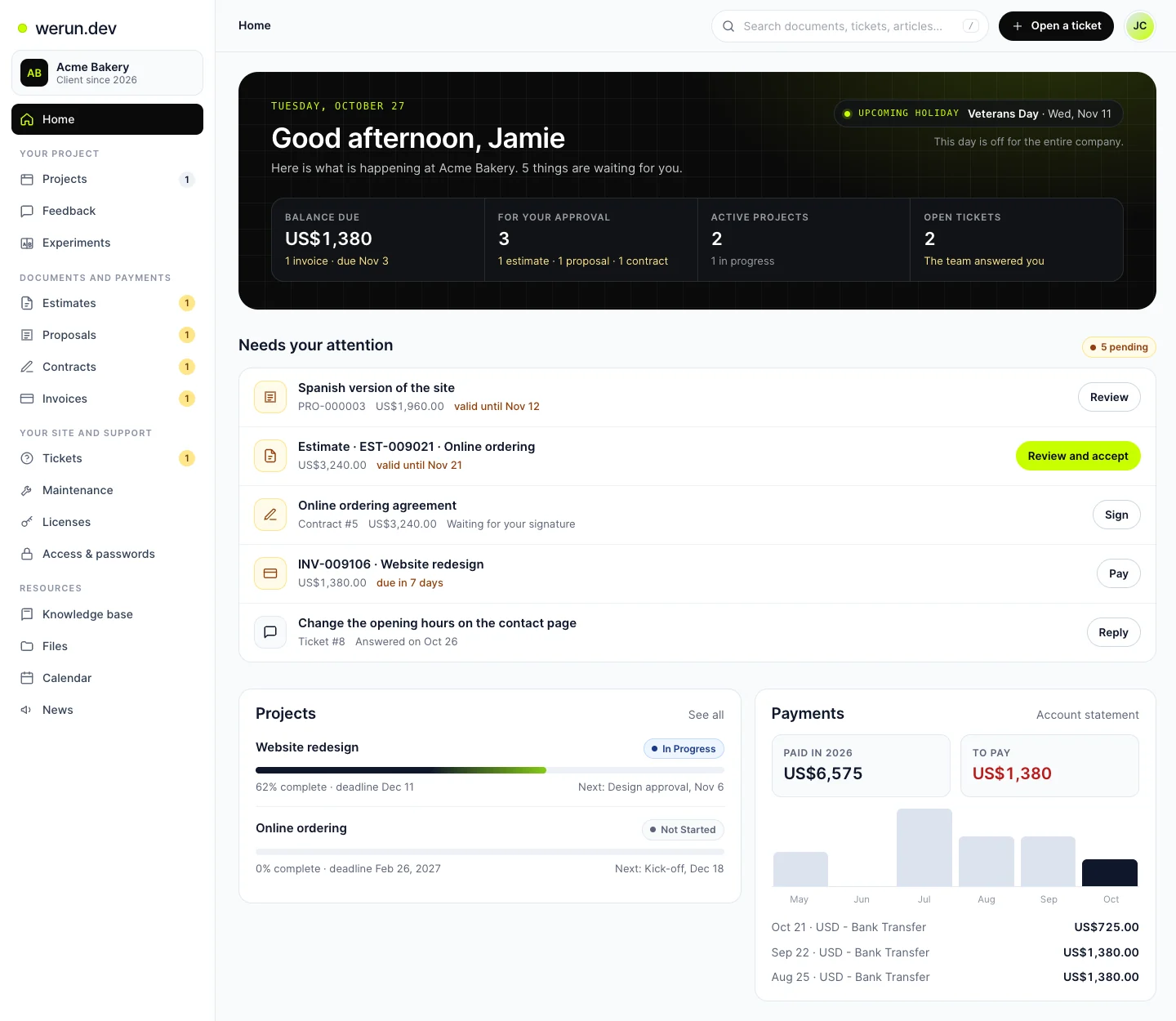
Your project, approvals and invoices live in the Client Portal. You ask for a change by clicking on your own site. With Care, a written report arrives every month.
01Client Portal
Projects, requests, invoices, proposals and contracts in one place. Ask it a question and it answers from your own records.
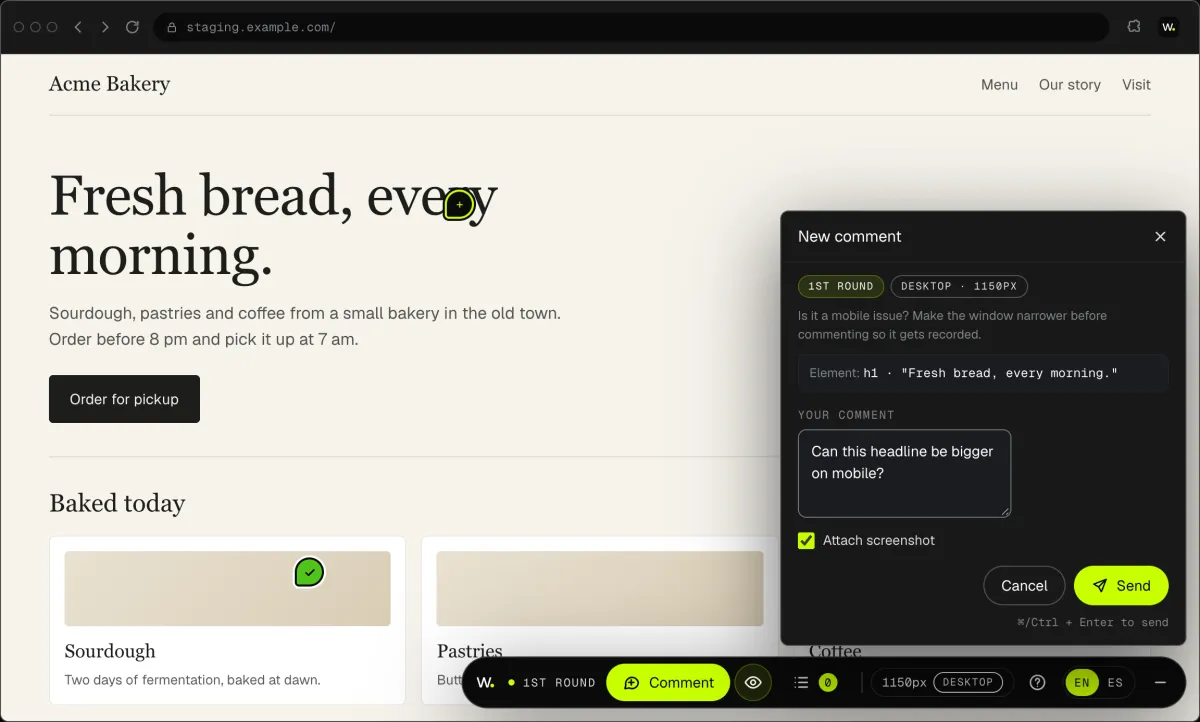
02Client Feedback
Click anything on your own site and say what you want. That's it: the team gets it as a task with a screenshot, and you watch it get solved.
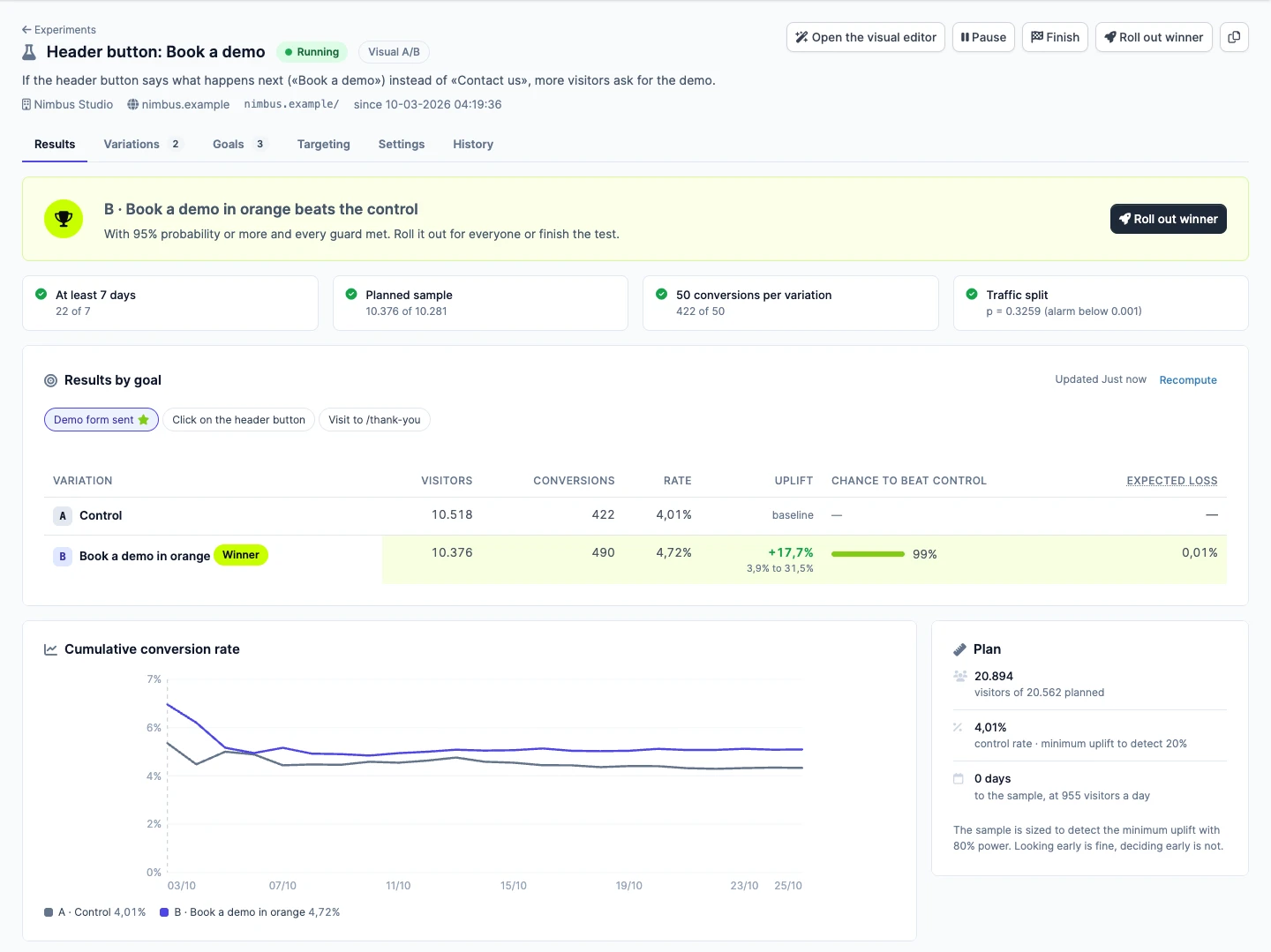
03werun.Experiments
Not sure which version sells more? Try both with real visitors. Tell us the idea in plain words and we set up the test. You watch the winner from your Client Portal.
What clients say
Teams like yours, in their own words.

“The client portal, the feedback extension and the WordPress security alerts have been very intuitive, pretty turnkey. Just this past week getting comfortable with it, it’s been really helpful. We’re rolling it out to our core team. Nice job.”
Shopify and ERP questions
How much does it cost to integrate Shopify with an ERP?
It is priced in hours at $120, estimated once the field map is written. You have the figure in writing before the build starts. Shopify Plus, B2B price lists or a fulfilment partner add hours, and the estimate says how many. Later changes are sized from XS ($240) to L ($2,400). The app is yours, so it carries no monthly fee to us.
Should we use a Shopify ERP connector app instead?
Sometimes, and we will tell you. A connector app works when your catalogue and your buyers fit its model: one product line, one kind of buyer. Account prices, B2B rules or a second system usually need an integration built for your rules. With an app, the code stays with its vendor. With yours, the code and the roadmap stay with you.
Do we need Shopify Plus to sync B2B price lists from our ERP?
For wholesale price lists inside Shopify, usually yes. B2B price lists and a checkout with your own rules are Shopify Plus work. We weigh your volume against what Plus brings. If it will not pay for itself, we tell you before you sign. On standard plans the checkout cannot be extended, and we say so up front.
What does an ERP integration install in our Shopify store?
A private app that belongs to you. It talks to Shopify through Shopify’s own admin connection and hears about each order the moment it is placed. Its code lives in your repository, under your licence, with a written note on how it works. If you ever change teams, the app and its notes stay with you.
Can the same integration update our 3PL or warehouse?
Yes. Stock, orders and customers can match across Shopify, your ERP, your CRM and your fulfilment partner. Each system gets its own line on the same written map, with one owner per field. When the warehouse ships, Shopify can show the order as shipped. A fulfilment partner adds hours, and the estimate says how many.
How are Shopify customers matched to accounts in our ERP?
By their ERP account number, never by email. An email changes, and matching on it creates the same customer twice. Once matched, each Shopify customer carries that number, so every later order lands on the right account. B2B companies follow the same rule, so each one keeps its own price list.
Can one ERP feed several Shopify stores?
Yes, on Shopify Plus, which lets one business run more than one store. Each store gets its own line on the map: which stock it sells and which prices it shows. Orders from every store reach the same ERP. Each extra store adds hours, and the written estimate says how many before you start.
Will an ERP integration slow down our Shopify store?
No. The private app works behind the store, through Shopify’s Admin API and webhooks. Buyers browse and pay in Shopify as before, and each order reaches the ERP after it is placed. If the ERP is slow or down, orders wait in a queue while buyers keep shopping. The app works on orders once they are placed, never on the pages buyers load.
Ready for Shopify and your ERP to agree?
Tell us your Shopify plan, your ERP and the records your team copies today. We reply within 2 hours on business days with where we would start.