WooCommerce and ERP integration
WooCommerce and your ERP, on a plugin you own.
A plugin written for your store sends each order to your ERP and brings stock and prices back. Wholesale buyers see their own prices. The plugin stays in your repository.
Short answer
How do I connect WooCommerce to my ERP?
werun.dev connects WooCommerce to your ERP with a plugin of your own, written around your fields and rules. Orders reach the ERP in the background, while stock and wholesale prices come back to the store. Every change is tried first on a copy of your store, called staging. The plugin stays in your repository, under your licence. It is priced in hours at $120, estimated after a written map of your fields. To start, tell us your ERP and what your team copies by hand.
- Price
- $120 an hour, estimated first
- Plugins written
- 80+
- Tried first
- On a staging copy of your store
- Reply
- Under 2 hours on business days


























































In your words
When WooCommerce and the ERP disagree, and what a plugin of your own fixes.
What happens: Your wholesale customers phone in orders because the store shows only retail prices.
What changes: Each wholesale account signs in and sees its own prices, brought from the ERP.
What happens: The sync plugin you bought maps half your fields and ignores the rest.
What changes: A plugin of your own maps the fields you have, written down first.
What happens: Checkout slows down whenever the ERP is busy.
What changes: Checkout saves the order and moves on. The ERP gets it in the background.
What happens: Nobody knows what the old sync does, and the person who wrote it left.
What changes: Your plugin comes with a written note on how it works, in your repository.
How it works
From the first map to live orders, tried on a copy first.
Your plugin is built the way we build all 80+ of ours. Each step lights up, with what you receive under it.
- 8 left after a sale
- Wholesale price changed
- Order #2087 shipped
- Order #2087 paid
- New customer added
Your plugin passes each paid order to your ERP while the buyer moves on. Stock, wholesale prices and shipping come back to WooCommerce. Your team stops retyping orders and quoting prices by phone.
Your fields go on a written map
Which system owns each order, stock count, customer and price, and which way it travels.
You getA written map of your fields, with the estimate
The plugin is written for your store
It comes with settings screens your team understands, and with automated tests.
You getSettings screens in words your team already uses
It runs on a copy of your store first
That copy is called staging. A test run lists each change it would send to the ERP, and you read it.
You getA test run with every change it would send
Your live store starts sending orders
Orders reach the ERP in the background. Each night both sides are compared, and a mismatch reaches a person.
You getOrders in your ERP while checkout keeps its pace
The plugin is handed to your team
It goes to your repository with a written note on how it works. A call walks your team through it.
You getThe plugin in your repository, under your licence
What changes for you
What your store does once the plugin is live.
The changes show at checkout, in the warehouse and on the phone.
Wholesale buyers order online
They sign in, see their prices and order at any hour, instead of calling.
Checkout keeps its pace
Buyers finish their order at once, whatever the ERP is doing.
The code is yours to keep
The plugin sits in your repository with its notes, so any good team can pick it up.
What it costs
What a plugin of your own costs, in writing before we start.
You pay for the hours to write it. The plugin is yours under your licence, with nothing more to pay us for it.
Plugin
$120 per hour, estimated first
The plugin that links WooCommerce and your ERP, estimated once the map is written.
- Orders, stock, customers and prices mapped
- Tried on a staging copy first
- Settings screens your team understands
- In your repository, under your licence
Care
$1,200 a month per site
Your store and its plugin updated, backed up and watched, with a report every month.
- 10 hours of work a month
- Checkout and payments checked after updates
- A written report every month
Ad hoc
$120 per hour
A new field or rule added to your plugin when you need it, with no monthly plan.
- Minimum task length: 30 minutes
- Every hour logged against its task
- No monthly commitment
Wholesale rules, many product types or a second system add hours. We say how many before you start. See every engagement
Side by side
A ready-made sync plugin or your own, compared.
For a simple catalogue, a ready-made plugin can be enough, and we will say so. Here is where the two part ways.
| Side by side | A ready-made sync plugin | A plugin of your own |
|---|---|---|
| Wholesale prices | If its model has them | Per account, from your ERP |
| Fields it maps | The ones it was built for | The ones your store has |
| Who you ask | The vendor’s support | The engineer who wrote it |
| Licence | Often a yearly fee per site | Yours, with nothing to renew |
Your next step
Tell us your goal, we reply within 2 hours.
Write it the way you would tell a colleague. A person reads it and answers on business days.
- A written answer with what it takes and what it costs
- You decide before anything starts
- We sign an NDA if you need one
Free first look
Tell us what you need.
Proof
Our WordPress work, open for you to check.
These run on the WordPress sites we look after, the same way your plugin would.
werun.
Our own plugin, one in place of many on the sites we run. It shows how we write and ship WordPress code.
See itThe monthly report
With Care, each month you read what changed on your store, what we checked and what comes next.
See itWelcomeAI
Our product keeps WordPress content in sync on a schedule, item by item, and reports on each one.
See itWorking with us
You stay on the job, we keep you in the loop.
Your project, approvals and invoices live in the Client Portal. You ask for a change by clicking on your own site. With Care, a written report arrives every month.
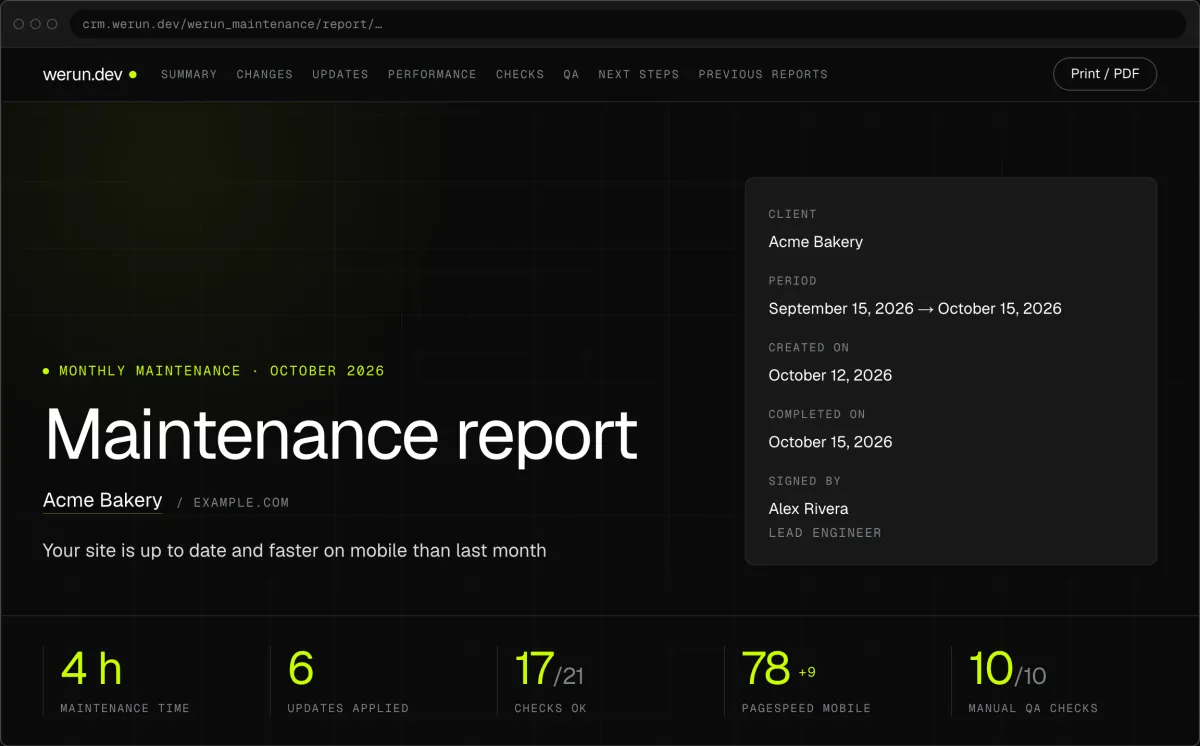
01Monthly report
Every month, in writing: what we changed on your site, what we watched over and what comes next.
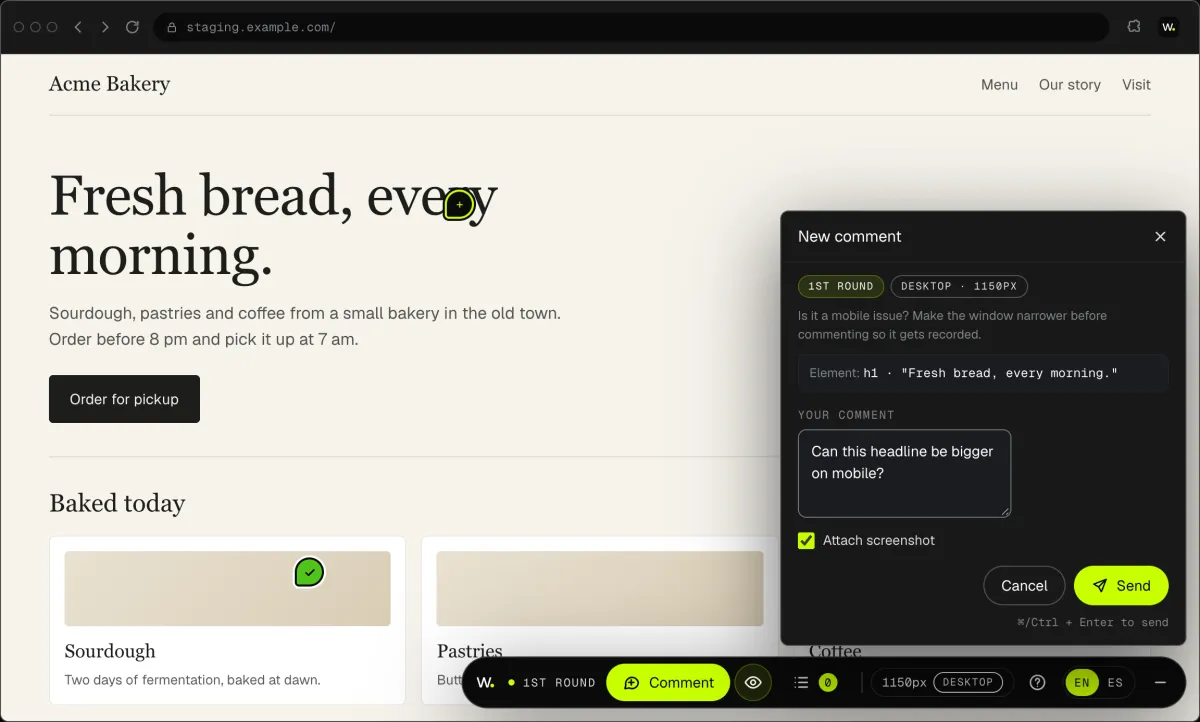
02Client Feedback
Click anything on your own site and say what you want. That's it: the team gets it as a task with a screenshot, and you watch it get solved.
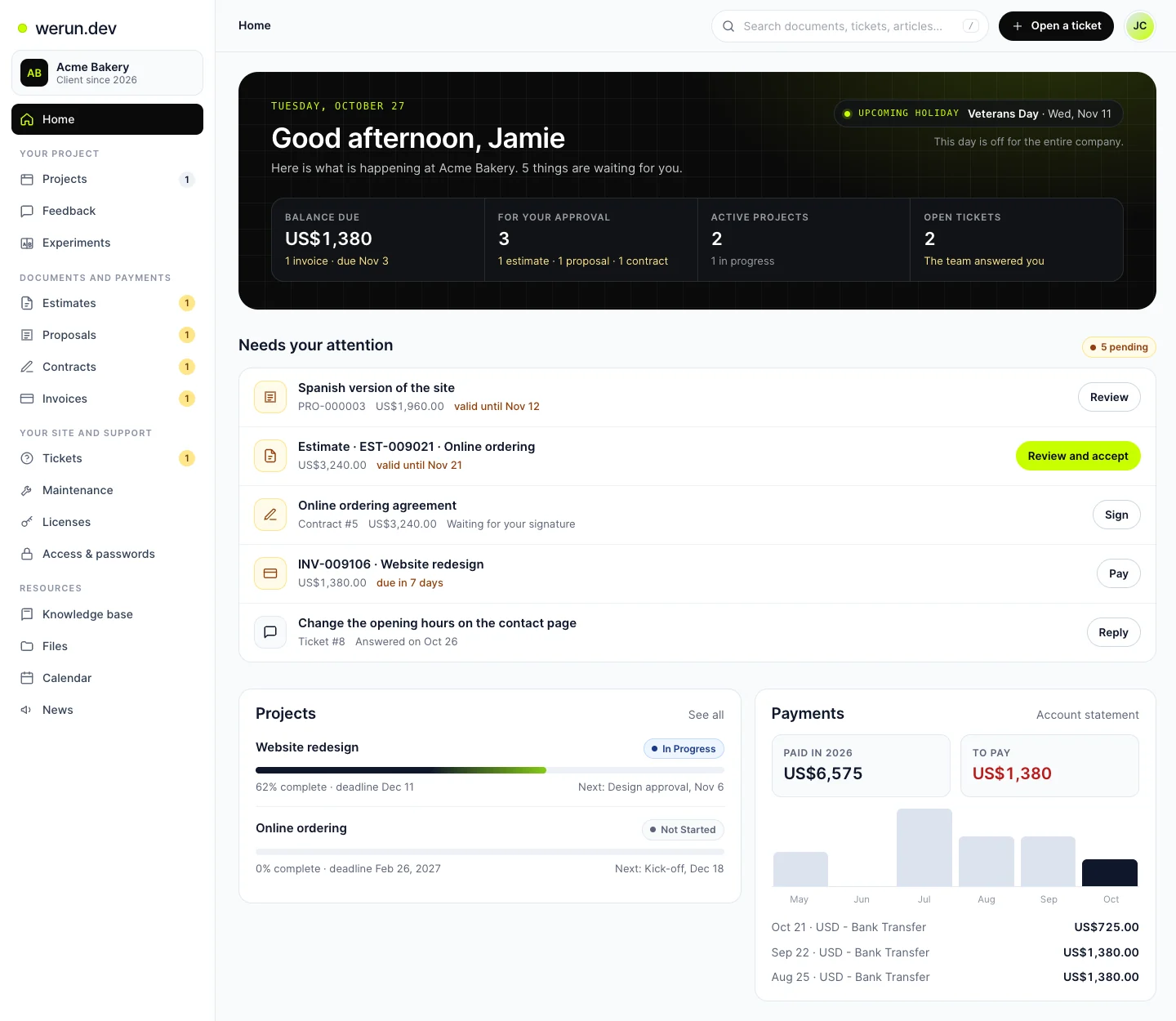
03Client Portal
Projects, requests, invoices, proposals and contracts in one place. Ask it a question and it answers from your own records.
What clients say
Teams like yours, in their own words.

“The client portal, the feedback extension and the WordPress security alerts have been very intuitive, pretty turnkey. Just this past week getting comfortable with it, it’s been really helpful. We’re rolling it out to our core team. Nice job.”
WooCommerce and ERP questions
How much does a WooCommerce ERP integration cost?
Hours at $120, estimated once the field map is written. You have the figure in writing before we start. Wholesale rules, many product types or a second system add hours, and the estimate says how many. After launch, each new field or rule is its own task at the same rate, with a 30-minute minimum. The plugin carries no licence fee.
Is a ready-made WooCommerce ERP sync plugin enough?
For a simple catalogue, often yes, and we will say so. A ready-made plugin maps the fields it was built for, and many charge a yearly fee per site. Prices per account, or fields it never planned for, call for a plugin of your own. It maps the fields your store has, and you ask the engineer who wrote it.
Can wholesale customers see their own prices in WooCommerce?
Yes. Prices for wholesale and B2B accounts come down from your ERP, account by account. Each customer sees theirs once signed in, and other visitors see the public price. When a price changes in the ERP, the store follows it. Your wholesale buyers can order online at any hour, without calling for a price.
Will the ERP sync slow down our WooCommerce checkout?
No. Checkout saves the order in WooCommerce and moves on at once. The plugin passes it to the ERP in the background, so the ERP’s pace stays away from your buyer. If the ERP is busy or down, orders wait their turn and arrive later. A nightly check sends again anything missed.
How is the plugin tested before it touches real orders?
On a copy of your store first, called staging, with automated tests. Then a test run lists each change the plugin would send to the ERP. You read that list before anything is written. Once you approve it, the plugin reaches your live store, and the nightly check starts comparing both sides.
Can you take over a WooCommerce ERP sync someone else wrote?
Yes. We read the code first and tell you in writing what we found. That covers what it moves, what it misses and what could break. Sometimes the answer is to keep it, and we say so. Otherwise we propose a plugin of your own, estimated in hours at $120 before anything changes.
Who owns the WooCommerce plugin you write?
You do. It lives on your WordPress and in your repository, under your licence, with a written note on how it works. We have written more than 80 plugins, and each one belongs to the client who asked for it. If you ever change teams, the plugin and its notes stay with you.
What happens to the plugin when WordPress or WooCommerce updates?
On the Care plan, each update is tried on a copy of your store before it goes live. Checkout and payments, where your plugin does its work, are checked after updates. Care is $1,200 a month per site, with 10 hours of work. When the month closes, the monthly report tells you what changed and what was checked.
Want your ERP prices in WooCommerce, account by account?
Tell us your ERP, your plugins and what your team copies by hand. We reply within 2 hours on business days with what your plugin would do.